




HarmonyOS鸿蒙Next中IDE报错:Decryption failed. Verify the encryption password, or delete the material folder wher…
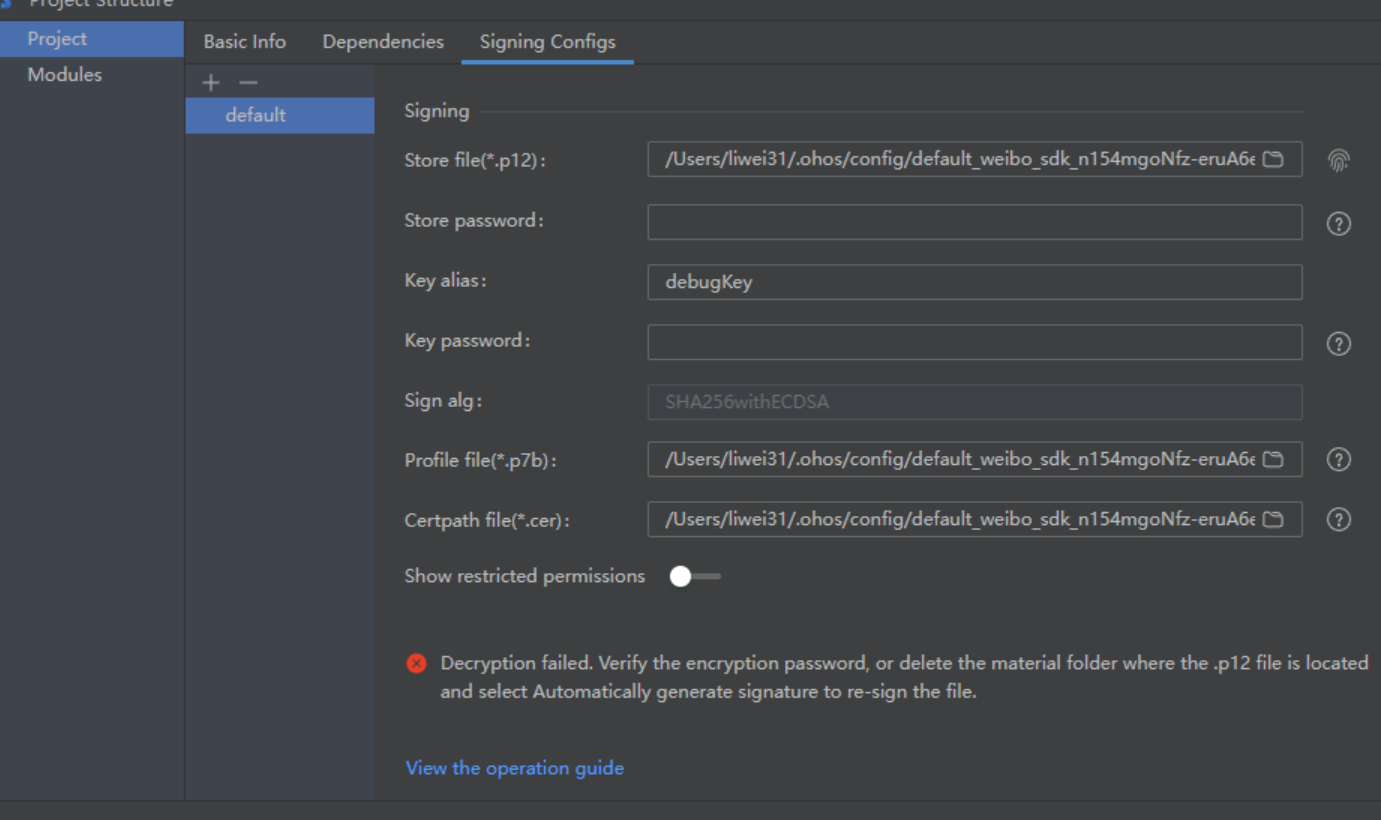
HarmonyOS鸿蒙Next中IDE报错:Decryption failed. Verify the encryption password, or delete the material folder wher… 在HarmonyOS开发过程中,当尝试解密某些文件时,可能会遇到“Decryption failed”的错误提示。
该错误提示表明解密操作未能成功完成,可能是由于加密密码错误或文件损坏等原因导致的。
IDE报错:Decryption failed. Verify the encryption password, or delete the material folder wher…
该问题如何解决?
更多关于HarmonyOS鸿蒙Next中IDE报错:Decryption failed. Verify the encryption password, or delete the material folder wher…的实战教程也可以访问 https://www.itying.com/category-93-b0.html

一、结论
Decryption failed. Verify the encryption password, or delete the material folder where the .p12 file is locatedand select Automatically generate signature to re-sign the file.
解密失败。验证加密密码,或删除.p12文件所在的材料文件夹,然后选择自动生成签名以重新签名文件。
二、解决方案:
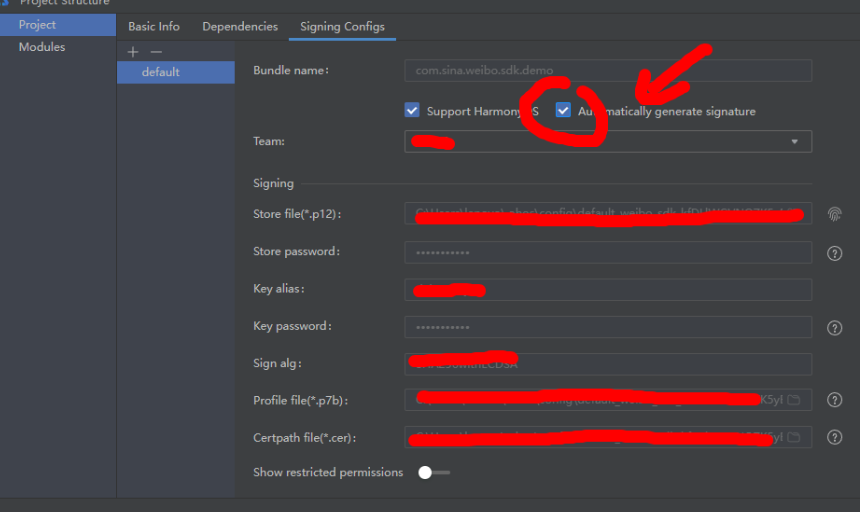
如果是自动签名,只需要重新自动签名: 勾选Automatically generate signature,稍等片刻即可。
如果加密密码正确但仍然无法解密,可能是文件已损坏或存在其他问题。
此时可以尝试删除包含.p12文件的材料文件夹,然后选择“Automatically generate signature”选项以重新生成签名文件。
重新生成签名后,再次尝试解密操作,看是否能够成功。
在选择“Automatically generate signature”选项后,IDE会自动生成新的签名文件。
这个过程通常只需要稍等片刻即可完成,无需手动进行复杂的操作。
注意: 在进行IDE签名配置时,需要确保设备已正确连接到电脑,并已被IDE识别。如果设备未连接或未被识别,将无法成功创建配置文件并可能出现类似“Unable to create the profile due to a lack of a device”的错误提示。
更多关于HarmonyOS鸿蒙Next中IDE报错:Decryption failed. Verify the encryption password, or delete the material folder wher…的实战系列教程也可以访问 https://www.itying.com/category-93-b0.html


这个错误通常与IDE的本地资源加密存储有关。根据错误信息,可以尝试以下两种方法解决:
-
核对加密密码:如果项目或本地缓存使用了密码保护,请确认输入的密码完全正确,注意大小写和特殊字符。
-
清理材料文件夹:这是更直接的解决方法。错误信息提示可以删除
material folder。这个文件夹通常位于用户目录下的IDE缓存路径中,例如:用户目录/.ohos/ide/或用户目录/Huawei/DevEco-Studio/下的相关缓存目录。 关闭IDE后,删除对应的缓存文件夹(如material或caches),重启IDE即可。IDE会重建必要的缓存文件。
通常第二种方法能快速解决问题,因为这消除了可能损坏的本地加密缓存。操作前请确保当前项目已保存,重要设置已备份。
