




Golang中package main报错的原因是什么
Golang中package main报错的原因是什么 大家好,
在Go中创建mod文件的步骤是什么?
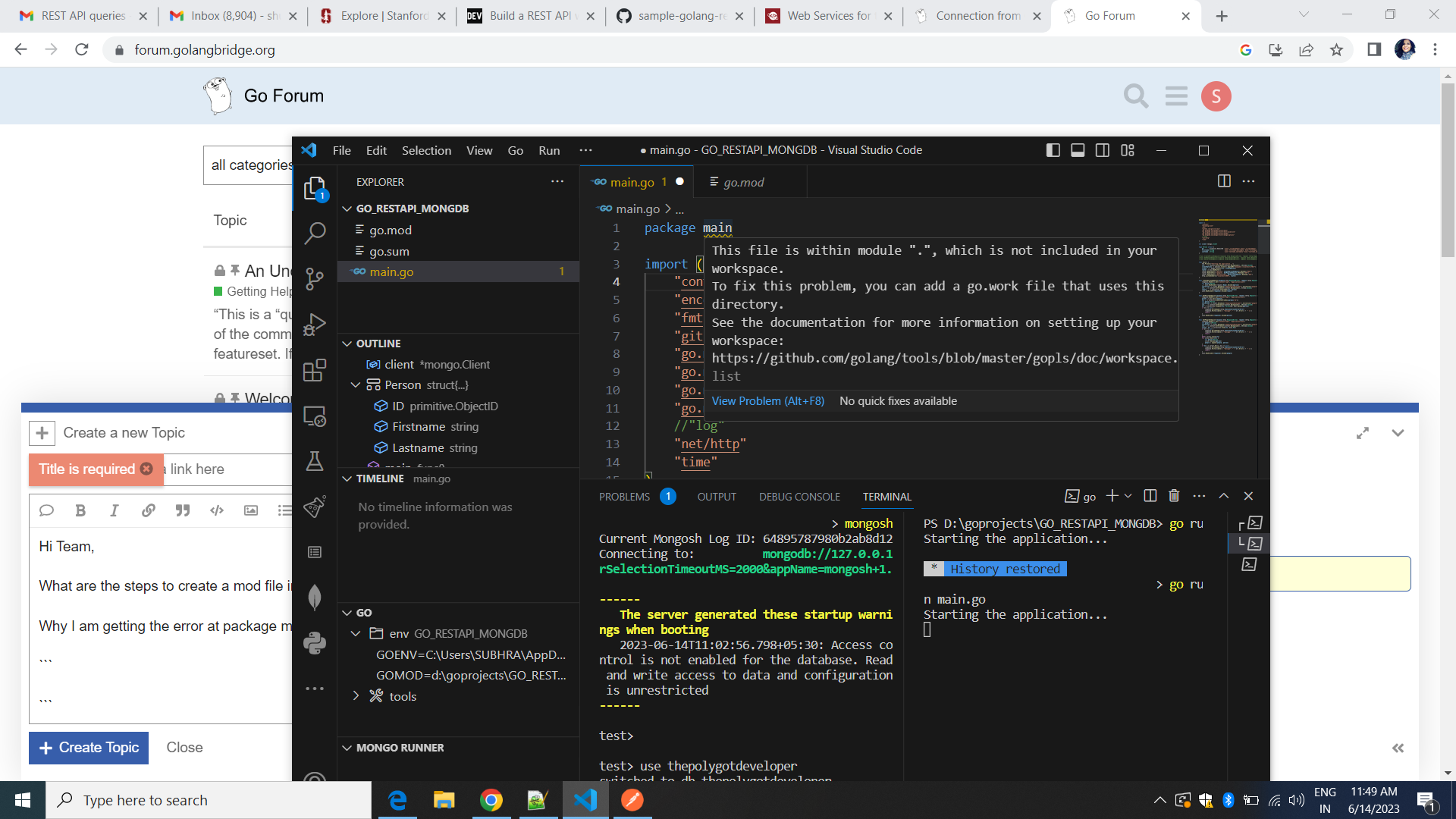
为什么我在package main处遇到错误。
package main

import (
	"context"
	"encoding/json"
	"fmt"
	"github.com/gorilla/mux"
	"go.mongodb.org/mongo-driver/bson"
	"go.mongodb.org/mongo-driver/bson/primitive"
	"go.mongodb.org/mongo-driver/mongo"
	"go.mongodb.org/mongo-driver/mongo/options"
	//"log"
	"net/http"
	"time"
)

var client *mongo.Client

type Person struct {
	ID        primitive.ObjectID `json:"_id,omitempty" bson:"_id,omitempty"`
	Firstname string             `json:"firstname,omitempty" bson:"firstname,omitempty"`
	Lastname  string             `json:"lastname,omitempty" bson:"lastname,omitempty"`
}

//func CreatePersonEndpoint(response http.ResponseWriter, request *http.Request) {}
//func GetPeopleEndpoint(response http.ResponseWriter, request *http.Request) {}
//func GetPersonEndpoint(response http.ResponseWriter, request *http.Request) {}

func main() {
	fmt.Println("Starting the application...")
	ctx, _ := context.WithTimeout(context.Background(), 10*time.Second)
	clientOptions := options.Client().ApplyURI("mongodb://localhost:27017")
	client, _ = mongo.Connect(ctx, clientOptions)
	router := mux.NewRouter()
	router.HandleFunc("/person", CreatePersonEndpoint).Methods("POST")
	router.HandleFunc("/people", GetPeopleEndpoint).Methods("GET")
	router.HandleFunc("/person/{id}", GetPersonEndpoint).Methods("GET")
	http.ListenAndServe("localhost:8000", router)
}

func CreatePersonEndpoint(response http.ResponseWriter, request *http.Request) {
	response.Header().Set("content-type", "application/json")
	var person Person
	_ = json.NewDecoder(request.Body).Decode(&person)
	collection := client.Database("thepolyglotdeveloper").Collection("people")
	ctx, _ := context.WithTimeout(context.Background(), 5*time.Second)
	result, _ := collection.InsertOne(ctx, person)
	json.NewEncoder(response).Encode(result)
}

func GetPersonEndpoint(response http.ResponseWriter, request *http.Request) {
	response.Header().Set("content-type", "application/json")
	params := mux.Vars(request)
	id, _ := primitive.ObjectIDFromHex(params["id"])
	var person Person
	collection := client.Database("thepolyglotdeveloper").Collection("people")
	ctx, _ := context.WithTimeout(context.Background(), 30*time.Second)
	err := collection.FindOne(ctx, Person{ID: id}).Decode(&person)
	if err != nil {
		response.WriteHeader(http.StatusInternalServerError)
		response.Write([]byte(`{ "message": "` + err.Error() + `" }`))
		return
	}
	json.NewEncoder(response).Encode(person)
}

func GetPeopleEndpoint(response http.ResponseWriter, request *http.Request) {
	response.Header().Set("content-type", "application/json")
	var people []Person
	collection := client.Database("thepolyglotdeveloper").Collection("people")
	ctx, _ := context.WithTimeout(context.Background(), 30*time.Second)
	cursor, err := collection.Find(ctx, bson.M{})
	if err != nil {
		response.WriteHeader(http.StatusInternalServerError)
		response.Write([]byte(`{ "message": "` + err.Error() + `" }`))
		return
	}
	defer cursor.Close(ctx)
	for cursor.Next(ctx) {
		var person Person
		cursor.Decode(&person)
		people = append(people, person)
	}
	if err := cursor.Err(); err != nil {
		response.WriteHeader(http.StatusInternalServerError)
		response.Write([]byte(`{ "message": "` + err.Error() + `" }`))
		return
	}
	json.NewEncoder(response).Encode(people)
}
更多关于Golang中package main报错的原因是什么的实战教程也可以访问 https://www.itying.com/category-94-b0.html



@christophberger 我还没有尝试运行这个应用。今晚会试试。但至少通过一个 udemy.com 课程,我学会了两种工作区相关的东西。 能够创建 go.work 和 VSCode 代码工作区,两者都行。

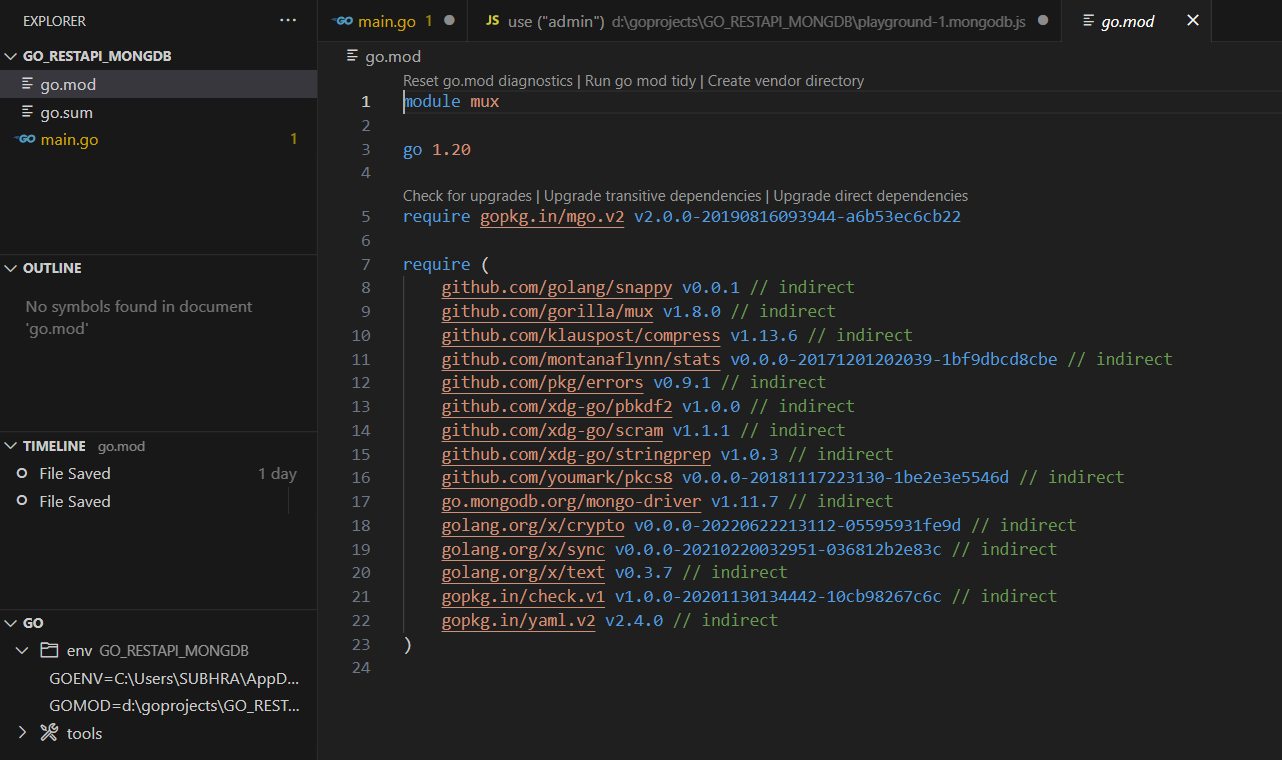
你好,@shubhra,请分享你当前的 go.mod 文件。
你在 VSCode 中收到的信息有点奇怪,因为它提到了工作区,尽管你并没有 go.work 文件。我猜这更多是 VSCode 的问题,而不是 Go 本身的问题。无论如何,VSCode 似乎被模块名称搞糊涂了。

存在两个错误:
- 我的 VSCODE 不接受原始代码,它需要一个 go.work 文件。由于我是 Go 语言新手,我参加了一个课程来学习如何创建 go.work 文件。
- 问题是我无法编写一个 CURL API,通过 RESTAPI 调用将数据插入到 MongoDB 中。 我使用的 RESTAPI 没有创建新的数据库(thepolyglotdeveloper),没有创建集合(people),也没有将数据插入到 MongoDB。
我使用了以下 CURL 命令:
- curl http://localhost:8000/person {“Firstname” : “Shubhra” “Lastname” : “Garg”}
- curl -X POST http://localhost:8000/v1/person -H ‘cache-control: no-cache’ -H ‘content-type: application/json’ -d ‘{ “Firstname” : “Shubhra”, “Lastname” : “Garg”}’
但是,由于没有 go.work 文件,VSCODE 不允许我通过 GOLANG RESTAPI 将数据插入数据库。您认为我创建的用于向 MongoDB 插入数据的 CURL API 是对还是错?
请注意,这里的“工作区”一词有两种含义:
- VSCode 工作区,VSCode 在其中保存工作区设置。文件扩展名是
.code-workspace。VSCode 工作区文件的存在对 Go 项目没有影响。你始终可以完全在 VSCode 之外,在命令行上使用 Go 命令来管理 Go 项目。 - Go 工作区,
你在这里可能完全不需要它。Go 工作区文件名是go.work。你仅需要它来在本地覆盖依赖项。
我建议暂时将 VSCode 工作区文件的问题放在一边。
更正:经过更仔细的查看,我猜你确实需要一个 go.work 文件,因为你在本地使用了两个独立的模块。
请尝试以下步骤,并告诉我是否有帮助:
- 进入 app 文件夹
- 运行
go work init .为你的应用创建一个新的 Go 工作区。 - 运行
go work use ../toolkit-project将另一个 Go 模块包含到 Go 工作区中。
通过此设置,Go 命令就知道在本地哪里可以找到导入的模块。
// 示例代码块,展示如何初始化一个Go模块
// 注意:实际命令在命令行中运行,此处仅为格式示例

package main 报错通常是因为缺少 go.mod 文件或依赖问题。从你的代码看,错误信息显示 go.mongodb.org/mongo-driver/bson 导入失败。
解决方案:
1. 初始化 Go 模块
# 在项目根目录执行
go mod init your-module-name
2. 下载依赖
go mod tidy
3. 如果仍然报错,手动添加缺失的依赖
go get go.mongodb.org/mongo-driver/mongo
go get go.mongodb.org/mongo-driver/bson
go get github.com/gorilla/mux
4. 完整示例 go.mod 文件:
module your-app

go 1.21

require (
    github.com/gorilla/mux v1.8.0
    go.mongodb.org/mongo-driver v1.11.0
)
代码修正建议:
你的代码有几个潜在问题需要修复:
func main() {
    fmt.Println("Starting the application...")
    ctx, cancel := context.WithTimeout(context.Background(), 10*time.Second)
    defer cancel() // 添加 defer 确保 context 被取消

    clientOptions := options.Client().ApplyURI("mongodb://localhost:27017")
    client, err := mongo.Connect(ctx, clientOptions) // 处理错误
    if err != nil {
        log.Fatal(err)
    }

    // 测试连接
    err = client.Ping(ctx, nil)
    if err != nil {
        log.Fatal(err)
    }

    router := mux.NewRouter()
    router.HandleFunc("/person", CreatePersonEndpoint).Methods("POST")
    router.HandleFunc("/people", GetPeopleEndpoint).Methods("GET")
    router.HandleFunc("/person/{id}", GetPersonEndpoint).Methods("GET")

    fmt.Println("Server starting on localhost:8000")
    if err := http.ListenAndServe("localhost:8000", router); err != nil {
        log.Fatal(err)
    }
}
项目结构示例:
your-project/
├── go.mod
├── go.sum
├── main.go
└── .gitignore
执行这些步骤后,package main 的导入错误应该会解决。如果仍有问题,请检查网络连接和 Go 版本(建议使用 Go 1.16+)。
