





Python中如何爬取天气网站的JSON数据
比如这个页面: http://m.weather.com.cn/maqi/101020100.shtml
json 格式数据类似: http://d1.weather.com.cn/aqi_7d/XiangJiAqiFc5d/101020100.html
整个 Request Headers(Referer, cookie 之类)完全设了还是返回 403,请教一下问题出在哪里
Python中如何爬取天气网站的JSON数据


要爬取天气网站的JSON数据,用requests库最直接。很多天气API直接返回JSON格式的数据,比解析HTML简单多了。
首先安装requests库:
pip install requests
这里以和风天气的API为例(需要先注册获取API Key):
import requests
import json

def get_weather_data(city, api_key):
    # 构造API请求URL
    url = f"https://devapi.qweather.com/v7/weather/now"

    # 设置请求参数
    params = {
        'location': city,  # 城市ID或名称
        'key': api_key,    # 你的API Key
        'lang': 'zh',      # 语言
        'unit': 'm'        # 单位(公制)
    }

    try:
        # 发送GET请求
        response = requests.get(url, params=params)
        response.raise_for_status()  # 检查请求是否成功

        # 解析JSON数据
        weather_data = response.json()

        # 打印原始JSON数据
        print("原始JSON数据:")
        print(json.dumps(weather_data, indent=2, ensure_ascii=False))

        # 提取关键信息
        if weather_data.get('code') == '200':
            now = weather_data['now']
            print(f"\n当前天气:")
            print(f"温度: {now['temp']}°C")
            print(f"体感温度: {now['feelsLike']}°C")
            print(f"天气: {now['text']}")
            print(f"风向: {now['windDir']}")
            print(f"风力: {now['windScale']}级")

        return weather_data

    except requests.exceptions.RequestException as e:
        print(f"请求出错: {e}")
        return None
    except json.JSONDecodeError as e:
        print(f"JSON解析出错: {e}")
        return None

# 使用示例
if __name__ == "__main__":
    # 替换成你的API Key和城市
    API_KEY = "你的API_Key"
    CITY = "101010100"  # 北京的城市ID

    weather_data = get_weather_data(CITY, API_KEY)
如果是爬取普通天气网站的JSON数据,可以先检查网页源码或开发者工具中的Network标签,找到真正的JSON数据接口。有些网站会把数据放在<script>标签里,可以用正则表达式提取:
import re
import json

def extract_json_from_script(html_content):
    # 查找JSON数据(通常以var data = {...}的形式存在)
    pattern = r'var\s+weatherData\s*=\s*({.*?});'
    match = re.search(pattern, html_content, re.DOTALL)

    if match:
        json_str = match.group(1)
        try:
            return json.loads(json_str)
        except json.JSONDecodeError:
            # 如果JSON不标准,可能需要先清理
            json_str = json_str.replace("'", '"')  # 单引号转双引号
            return json.loads(json_str)
    return None
总结:直接用requests请求API接口是最干净的方法。


也设了,chrome 里正常访问的 request header 我都给弄了进去,还是不行
{‘Host’: ‘d1.weather.com.cn’,
‘Connection’: ‘keep-alive’,
‘User-Agent’: ‘Mozilla/5.0 (Windows NT 6.1; Win64; x64) AppleWebKit/537.36 (KHTML, like Gecko) Chrome/56.0.2924.87 Safari/537.36’,
‘Accept’: ‘/’’,
‘Referer’: ‘http://m.weather.com.cn/mweather/101020100.shtml’,
‘Accept-Encoding’: ‘gzip, deflate, sdch’,
‘Accept-Language’: ‘zh-CN,zh;q=0.8’,
‘Cookie’: ‘BIGipServerd1src_pool=1874396221.20480.0000’}
<br>import requests<br><br>cookies = {<br> # 自己填写<br>}<br><br>headers = {<br> 'Accept-Encoding': 'gzip, deflate',<br> 'Accept-Language': 'zh-CN,zh;q=0.8',<br> 'User-Agent': 'Mozilla/5.0 (X11; Linux x86_64) AppleWebKit/537.36 (KHTML, like Gecko) Chrome/60.0.3112.90 Safari/537.36',<br> 'Accept': '*/*',<br> 'Referer': '<a target="_blank" href="http://m.weather.com.cn/maqi/101020100.shtml'" rel="nofollow noopener">http://m.weather.com.cn/maqi/101020100.shtml'</a>,<br> 'Connection': 'keep-alive',<br>}<br><br>params = (<br> ('_', '14483821791309'),<br>)<br><br>a = requests.get('<a target="_blank" href="http://d1.weather.com.cn/aqi_all/101020100.html'" rel="nofollow noopener">http://d1.weather.com.cn/aqi_all/101020100.html'</a>, headers=headers, params=params, cookies=cookies)<br>a.encoding = 'utf-8'<br>print(a.text)<br>
刚刚用 curl 生成了一份代码,实测是可以的,你可能是没带 cookie ?

感谢老兄!
看来应该是 cookie 的问题,我这写法里 urllib.request.Request 应该是没把 cookie 传递出去。非常感谢!知道大方向自己就好去 google 了
url = r"http://d1.weather.com.cn/aqi_7d/XiangJiAqiFc5d/101020100.html"
headers = {
‘Host’: ‘d1.weather.com.cn’,
‘Connection’: ‘keep-alive’,
‘User-Agent’: ‘Mozilla/5.0 (Windows NT 6.1; Win64; x64) AppleWebKit/537.36 (KHTML, like Gecko) Chrome/56.0.2924.87 Safari/537.36’,
‘Accept’: ‘/’,
‘Referer’: ‘http://m.weather.com.cn/maqi/101020100.shtml’,
‘Accept-Encoding’: ‘gzip, deflate, sdch’,
‘Accept-Language’: ‘zh-CN,zh;q=0.8’,
‘Cookie’: ‘f_city=%E9%95%87%E6%B1%9F%7C101190301%7C; BIGipServerd1src_pool=1874396221.20480.0000’
}
req = urllib.request.Request(url= url, headers=headers)
resp = urllib.request.urlopen(url)
respBytes = resp.read()
html = respBytes.decode(‘utf-8’)


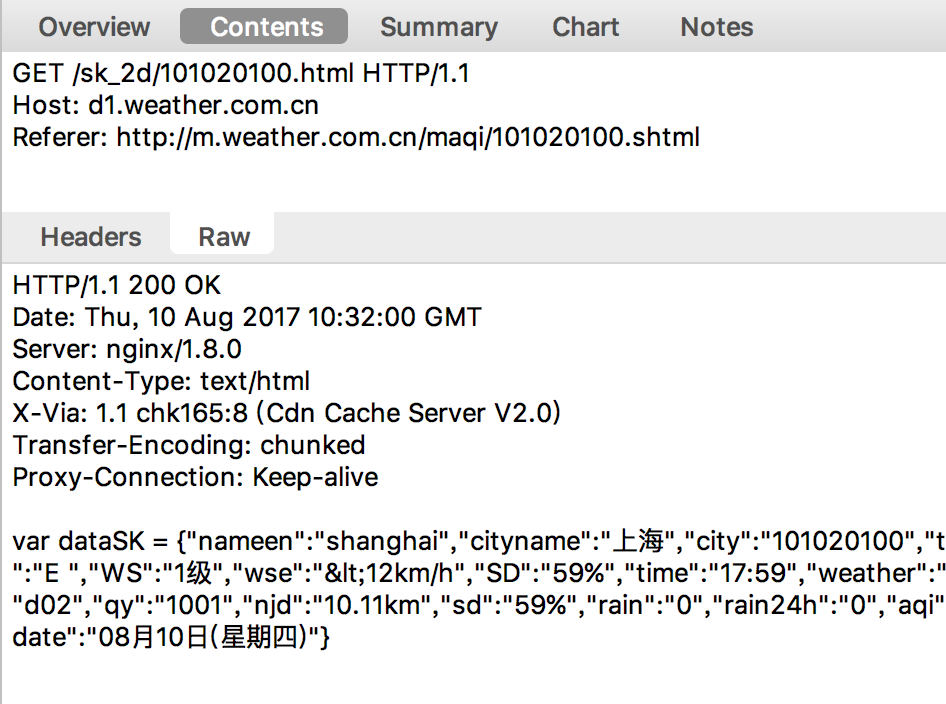
如图
[img]https://i.loli.net/2017/08/10/598c3642cffd6.png[/img]
<img src=“https://i.loli.net/2017/08/10/598c3642cffd6.png”/>
(PS:试一下哪种方式可以插图)

正无地自容中……其实问题很无厘头 resp = urllib.request.urlopen(url)里 url 忘记改成 req 了
感觉天气网的数据比较正规点,其实原先也有 api 的,估计后来用的人多就关了


以前我用的中国天气网开放平台的接口 openweather.weather.com.cn 已经不可访问了
现在中国天气网整了个智慧气象服务 不知道是不是升级版 http://smart.weather.com.cn/
