




Golang在Windows 10中使用CGO和PKCS11.h遇到的问题
Golang在Windows 10中使用CGO和PKCS11.h遇到的问题 在编写我的Go代码时,我最终遇到了两个不知道如何修复的错误。请问,有人知道吗?
第一个错误发生在我添加 import "C" 时,但我正在创建的Go代码需要CGO才能工作,所以我不明白为什么会出现这个错误,也不知道如何修复它。
第二个错误发生在我运行程序时。我测试过,这个错误与第一个错误没有关联。我不明白为什么会出现这个错误,也不知道如何修复它,但我已经检查了描述的路径,所描述的文件确实存在。
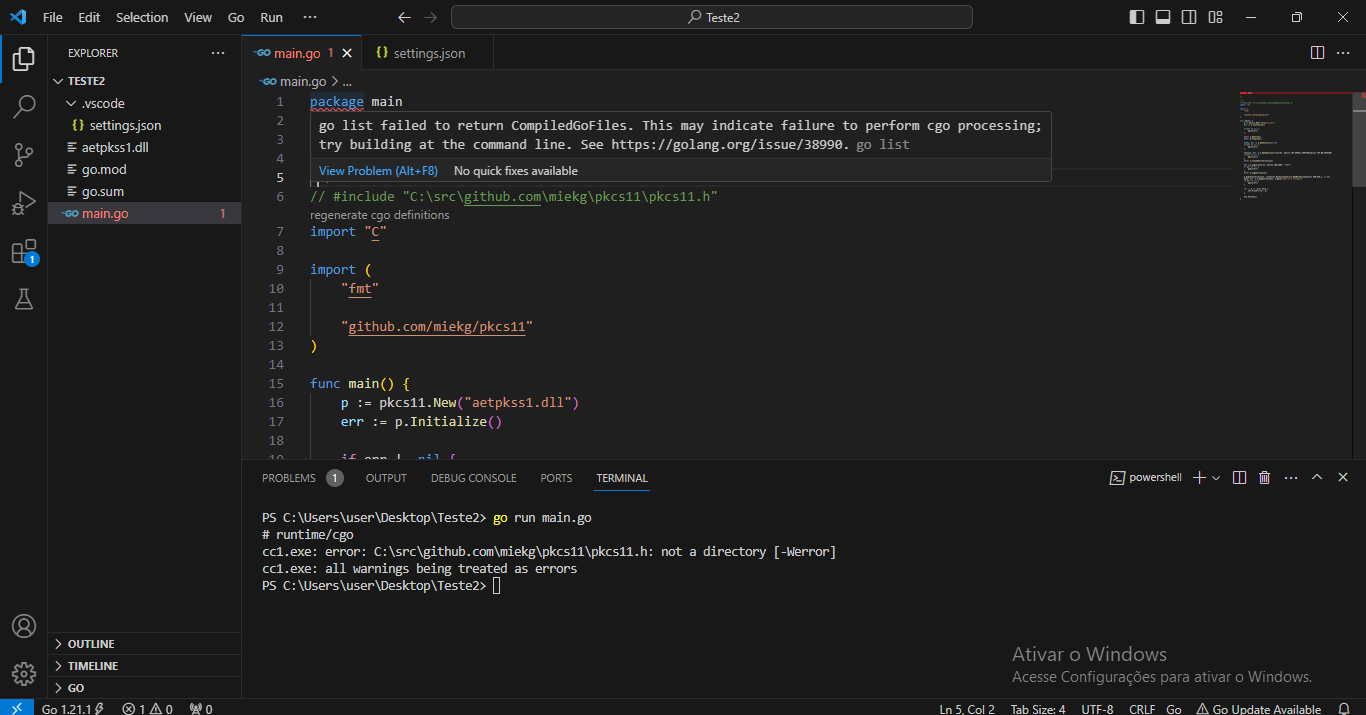
这是我的 main.go
package main

// #include "C:\src\github.com\miekg\pkcs11\pkcs11.h"
import "C"

import (
	"fmt"

	"github.com/miekg/pkcs11"
)

func main() {
	p := pkcs11.New("aetpkss1.dll")
	err := p.Initialize()

	if err != nil {
		panic(err)
	}

	defer p.Destroy()
	defer p.Finalize()

	slots, err := p.GetSlotList(true)
	if err != nil {
		panic(err)
	}

	session, err := p.OpenSession(slots[0], pkcs11.CKF_SERIAL_SESSION|pkcs11.CKF_RW_SESSION)
	if err != nil {
		panic(err)
	}
	defer p.CloseSession(session)

	err = p.Login(session, pkcs11.CKU_USER, "1234")
	if err != nil {
		panic(err)
	}
	defer p.Logout(session)

	p.DigestInit(session, []*pkcs11.Mechanism{pkcs11.NewMechanism(pkcs11.CKM_SHA_1, nil)})
	hash, err := p.Digest(session, []byte("this is a string"))
	if err != nil {
		panic(err)
	}

	for _, d := range hash {
		fmt.Printf("%x", d)
	}

	fmt.Println()
}
这是我的 settings.json
{
    "go.buildTags": "cgo",
    "go.toolsEnvVars": {
        "CGO_ENABLED": "1"
    } /* , "go.toolsGopath": "C:\\msys64\\ucrt64\\bin;${workspaceFolder}\\bin;${env:GOPATH}\\bin" */
}
更多关于Golang在Windows 10中使用CGO和PKCS11.h遇到的问题的实战教程也可以访问 https://www.itying.com/category-94-b0.html
2 回复

感谢您的帮助,但问题仍然存在。
更多关于Golang在Windows 10中使用CGO和PKCS11.h遇到的问题的实战系列教程也可以访问 https://www.itying.com/category-94-b0.html

第一个错误是因为在Windows上使用CGO时需要安装GCC编译器。你需要安装MinGW-w64或TDM-GCC,并将gcc.exe添加到系统PATH中。安装后设置环境变量:
// 在代码中添加构建约束
//go:build windows
// +build windows

package main

/*
#cgo windows LDFLAGS: -L${SRCDIR} -laetpkss1
#include <stdlib.h>
#include "C:\\src\\github.com\\miekg\\pkcs11\\pkcs11.h"
*/
import "C"
第二个错误是PKCS11库路径问题。使用相对路径或环境变量:
package main

/*
#cgo windows LDFLAGS: -L${SRCDIR} -laetpkss1
#define CK_PTR *
#define CK_DECLARE_FUNCTION(returnType, name) returnType name
#define CK_DECLARE_FUNCTION_POINTER(returnType, name) returnType (* name)
#define CK_CALLBACK_FUNCTION(returnType, name) returnType (* name)
#include <stdlib.h>
#include "pkcs11.h"
*/
import "C"

import (
	"fmt"
	"path/filepath"
	"runtime"

	"github.com/miekg/pkcs11"
)

func main() {
	// 动态构建DLL路径
	var dllPath string
	if runtime.GOOS == "windows" {
		dllPath = filepath.Join(".", "aetpkss1.dll")
	}

	p := pkcs11.New(dllPath)
	// 其余代码保持不变...
}
同时确保正确设置CGO环境变量:
# 在命令行中设置
set CGO_ENABLED=1
set CC=gcc
set CXX=g++
对于settings.json,需要正确配置:
{
    "go.buildTags": "cgo",
    "go.toolsEnvVars": {
        "CGO_ENABLED": "1",
        "CC": "gcc",
        "CXX": "g++"
    }
}
