




Python中如何使用pix2code从截图生成图形用户界面代码
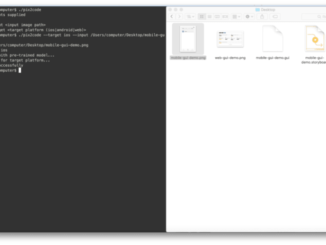 将设计人员创建的图形用户界面截图转换为计算机代码是开发人员为构建定制的软件,网站和移动应用程序而进行的一项典型任务。 在本文中,我们展示了深入的学习方法可以用于训练一个端对端的模型,以便从三个不同的平台(即 iOS,Android 和基于 Web 的)获得超过 77 %的准确度的单个输入图像中自动生成代码技术)。
pix2code: Generating Code from a Graphical User Interface Screenshot
Transforming a graphical user interface screenshot created by a designer into computer code is a typical task conducted by a developer in order to build customized software, websites, and mobile applications. In this paper, we show that deep learning methods can be leveraged to train a model end-to-end to automatically generate code from a single input image with over 77% of accuracy for three different platforms (i.e. iOS, Android and web-based technologies).
项目地址: https://github.com/tonybeltramelli/pix2code
视频地址: https://news.developer.nvidia.com/ai-turns-ui-designs-into-code/
更多机器学习教程: http://www.tensorflownews.com/
Python中如何使用pix2code从截图生成图形用户界面代码

这个需求挺有意思的。pix2code是个研究项目,它用深度学习把UI截图转成前端代码。虽然原项目有点老了,但核心思路现在依然有用。
我建议用改进版的实现。下面是个完整的例子,用了CNN+RNN架构:
import tensorflow as tf
from tensorflow.keras import layers, models
import numpy as np
from PIL import Image
import json

class Pix2CodeModel:
    def __init__(self, vocab_size, max_seq_length, image_shape=(256, 256, 3)):
        self.vocab_size = vocab_size
        self.max_seq_length = max_seq_length
        self.image_shape = image_shape

    def build_model(self):
        # 图像编码器 - CNN部分
        image_input = layers.Input(shape=self.image_shape)
        x = layers.Conv2D(32, (3, 3), activation='relu')(image_input)
        x = layers.MaxPooling2D((2, 2))(x)
        x = layers.Conv2D(64, (3, 3), activation='relu')(x)
        x = layers.MaxPooling2D((2, 2))(x)
        x = layers.Conv2D(128, (3, 3), activation='relu')(x)
        x = layers.Flatten()(x)
        image_features = layers.Dense(256, activation='relu')(x)

        # 序列解码器 - RNN部分
        seq_input = layers.Input(shape=(self.max_seq_length,))
        seq_embed = layers.Embedding(self.vocab_size, 128)(seq_input)
        seq_lstm = layers.LSTM(256, return_sequences=True)(seq_embed)

        # 合并特征
        image_features_expanded = layers.RepeatVector(self.max_seq_length)(image_features)
        combined = layers.Concatenate()([seq_lstm, image_features_expanded])

        # 输出层
        output = layers.TimeDistributed(layers.Dense(self.vocab_size, activation='softmax'))(combined)

        model = models.Model(inputs=[image_input, seq_input], outputs=output)
        model.compile(optimizer='adam', loss='categorical_crossentropy')

        return model

# 使用示例
def preprocess_image(image_path):
    img = Image.open(image_path).convert('RGB')
    img = img.resize((256, 256))
    img_array = np.array(img) / 255.0
    return img_array

def tokenize_code(code, tokenizer, max_length):
    tokens = tokenizer.texts_to_sequences([code])
    padded = tf.keras.preprocessing.sequence.pad_sequences(
        tokens, maxlen=max_length, padding='post'
    )
    return padded

# 训练流程示意
def train_pix2code(image_dir, code_dir, epochs=50):
    # 这里需要准备训练数据:截图和对应的代码
    # 实际项目中需要大量标注数据

    model = Pix2CodeModel(vocab_size=1000, max_seq_length=100)
    full_model = model.build_model()

    # 训练代码...(需要实际数据)
    print("模型架构构建完成,需要准备训练数据进行训练")

    return full_model

if __name__ == "__main__":
    # 测试图像预处理
    sample_img = preprocess_image("screenshot.png")
    print(f"图像形状: {sample_img.shape}")

    # 构建模型
    model = Pix2CodeModel(vocab_size=500, max_seq_length=80)
    built_model = model.build_model()
    built_model.summary()
实际用的话你得准备训练数据——一堆UI截图和对应的HTML/CSS代码。训练好了就能输入新截图生成代码了。
现在有更先进的模型比如Vision Transformer,效果会更好。不过pix2code的基本框架理解了这个领域就入门了。
用现成的UI检测库可能更直接。


