




HarmonyOS 鸿蒙Next开发路由跳转Router提示:Code is 100002, message is Uri error. The uri of router is not exist
HarmonyOS 鸿蒙Next开发路由跳转Router提示:Code is 100002, message is Uri error. The uri of router is not exist 鸿蒙开发路由跳转Router提示:Code is 100002, message is Uri error. The uri of router is not exist
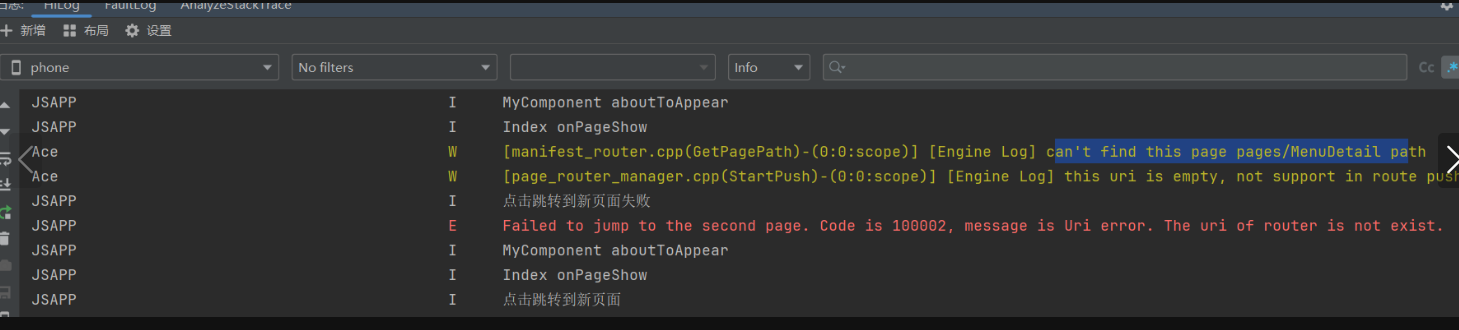
更多关于HarmonyOS 鸿蒙Next开发路由跳转Router提示:Code is 100002, message is Uri error. The uri of router is not exist的实战教程也可以访问 https://www.itying.com/category-93-b0.html

解决思路:main_pages.js新增的页面路径是否忘记配置
1、查看resource/base/profile/main_pages.js 文件的路由是否配置,page目录下新增页面后,需要在这个文件配置下同步一下,不然就会提示这个报错
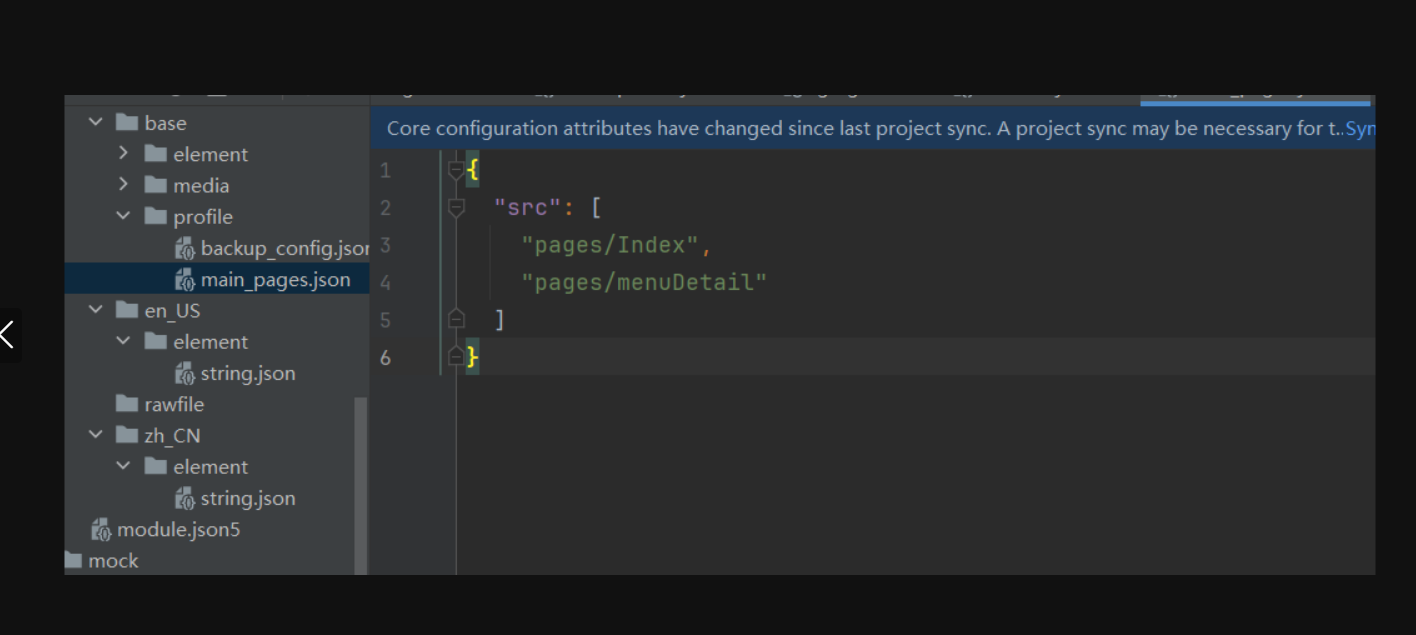
2、检查路径"pages/menuDetail" 大小写是否一致,不一致也有可能会提示报错
上述问题代码示例如下
function onJumpClick(): void {

  router.pushUrl({ url: 'pages/menuDetail' }).then(() => {
    console.log('点击跳转到新页面')
    console.info('Succeeded in jumping to the second page.')

  }).catch((err: BusinessError) => {
    console.log('点击跳转到新页面失败')
    console.error(`Failed to jump to the second page. Code is ${err.code}, message is ${err.message}`)
  })
}
更多关于HarmonyOS 鸿蒙Next开发路由跳转Router提示:Code is 100002, message is Uri error. The uri of router is not exist的实战系列教程也可以访问 https://www.itying.com/category-93-b0.html

这个错误码100002表示Router尝试跳转的URI在当前路由表中不存在。通常由以下几个原因导致:
1. 页面未在module.json5中正确注册
- 确保目标页面已在配置文件的
pages或extensionAbilities节点下声明 - 检查URI路径是否与配置中的
"name"字段完全一致
2. URI路径格式错误
- 标准格式应为:
"pages/目标页面名" - 常见错误:缺少
pages/前缀、大小写不一致、拼写错误
3. 动态路由参数问题
- 如果使用带参数的路由(如
pages/detail?id=123),需确保基础路径pages/detail已注册 - 参数部分(
?id=123)不需要在配置中声明
4. 跨模块跳转未配置依赖
- 跨模块跳转时,需在
module.json5的dependencies中声明对目标模块的依赖 - 同时需要在
abilities中配置"visible": true
5. 页面栈管理问题
- 检查是否在页面生命周期正确时机调用路由跳转
- 避免在页面未加载完成时进行跳转操作
建议检查步骤:
- 核对
module.json5中目标页面的注册路径 - 确认Router.pushUrl()中使用的URI字符串完全匹配
- 检查是否存在多模块间的依赖关系
- 验证页面是否已正常编译到应用中
可通过在跳转前打印URI字符串、对比配置文件进行排查。
