





使用Golang创建共享DLL的方法与技巧
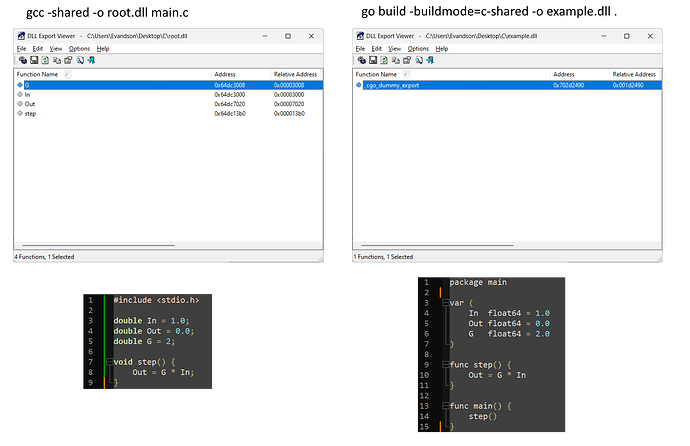
使用Golang创建共享DLL的方法与技巧 我需要创建一个暴露变量和函数的DLL。 实现此功能的C代码如下:
#include <stdio.h>

double In = 1.0;
double Out = 0.0;
double G = 2;

void step() {
    Out = G * In;
}
编译命令为:gcc -shared -o root.dll example.c
其他系统将基于内存地址获取值。
我想使用Golang实现相同的功能,但 //export 指令没有生成可读的DLL方法。有人能给我一些建议吗?
4 回复

尝试使用 go build -buildmode=c-shared -o example.dll . 命令。
func main() {
    fmt.Println("hello world")
}
更多关于使用Golang创建共享DLL的方法与技巧的实战系列教程也可以访问 https://www.itying.com/category-94-b0.html

Golang 只能导出函数。为此,需要使用 CGO、首字母大写的函数以及导出注释,例如:
//export <函数名>
func <函数名>(...){...}
示例代码:
package main

import "C"

// 全局变量
var (
	In  float64 = 1.0
	Out float64 = 0.0
	G   float64 = 2.0
)

//export Step
func Step() {
	Out = G * In
}

//export GetIn
func GetIn() float64 {
	return In
}

//export SetIn
func SetIn(value float64) {
	In = value
}

//export GetOut
func GetOut() float64 {
	return Out
}

//export GetG
func GetG() float64 {
	return G
}

//export SetG
func SetG(value float64) {
	G = value
}

func main() {
	// 这对于共享库中的 main 函数是必需的,但从 C 调用时不会执行
}
这将生成:
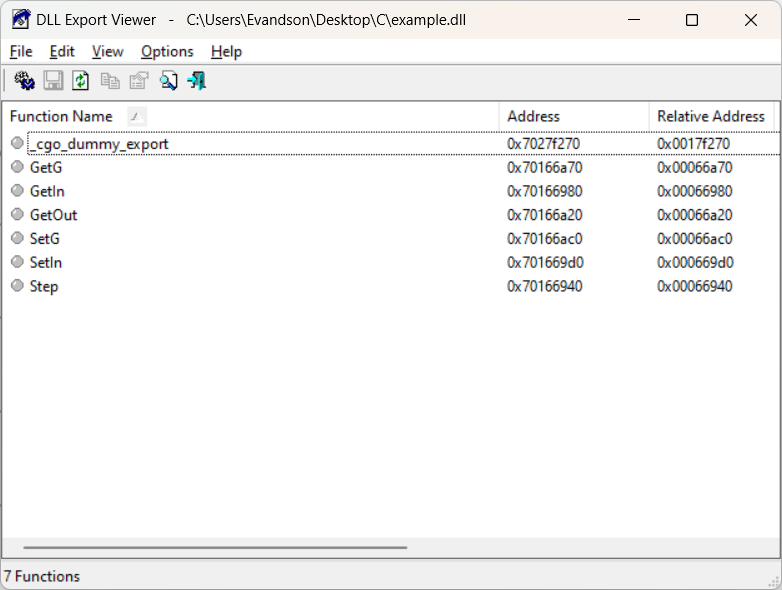
它应该由示例命令生成:
go build -buildmode=c-shared -o example.dll .

在Go中创建共享DLL需要特殊的编译方式和导出标记。以下是实现相同功能的Go代码示例:
package main

import "C"

//export In
var In float64 = 1.0

//export Out
var Out float64 = 0.0

//export G
var G float64 = 2.0

//export step
func step() {
    Out = G * In
}

func main() {
    // 空main函数,仅用于编译
}
编译命令:
go build -buildmode=c-shared -o root.dll example.go
生成的DLL将包含导出的变量和函数。其他系统可以通过以下方式访问:
C语言调用示例:
#include <stdio.h>
#include <windows.h>

typedef double (*get_double_func)();
typedef void (*step_func)();

int main() {
    HINSTANCE hDLL = LoadLibrary("root.dll");
    if (hDLL != NULL) {
        get_double_func getIn = (get_double_func)GetProcAddress(hDLL, "In");
        get_double_func getOut = (get_double_func)GetProcAddress(hDLL, "Out");
        get_double_func getG = (get_double_func)GetProcAddress(hDLL, "G");
        step_func step = (step_func)GetProcAddress(hDLL, "step");

        if (getIn && getOut && getG && step) {
            printf("In: %f, Out: %f, G: %f\n", getIn(), getOut(), getG());
            step();
            printf("After step - Out: %f\n", getOut());
        }

        FreeLibrary(hDLL);
    }
    return 0;
}
关键注意事项:
- 必须使用
//export注释标记要导出的变量和函数 - 编译时必须使用
-buildmode=c-shared参数 - 导出的变量实际上是函数指针,需要通过GetProcAddress获取
- 导出的变量在DLL中是只读的,如果需要修改,需要通过导出的setter函数
如果需要修改导出的变量值,可以添加setter函数:
//export setIn
func setIn(value float64) {
    In = value
}

//export setG
func setG(value float64) {
    G = value
}
