




HarmonyOS鸿蒙Next中后端返回的富文本如何根据alias-label匹配渲染对应组件
HarmonyOS鸿蒙Next中后端返回的富文本如何根据alias-label匹配渲染对应组件
后端返回的一个富文本,然后在页面渲染的时候回根据alias-label 去匹配是什么组件 假如说这个值等于video的时候 那么在对应的位置渲染一个video组件这样的一个功能该如何实现
更多关于HarmonyOS鸿蒙Next中后端返回的富文本如何根据alias-label匹配渲染对应组件的实战教程也可以访问 https://www.itying.com/category-93-b0.html

后端返回了富文本内容这个内容都是有规则的< img style="" draggable=“false” src="/storage/A4AE61E66CD26E888F4592833D56497F" duration= “291000” width=“233” audio-src="/storage/D12C09216463D988592B30CBAC5C986F" source-url="/storage/D12C09216463D988592B30CBAC 5C986F" alias-label=“audio” name=“大青蛙夫为妻纲.mp3” height=“auto”> 好比这个标签,虽然返回的是img但是实际上根据alias-label=“audio” 这个来判断他是一个audio那么就将返回的富文本用下面的办法进行处理一下
export interface TextItem {
  type: 'text';
  value: string;
}

export interface ImageItem {
  type: 'image';
  src: string;
}

export interface VideoItem {
  type: 'video';
  src: string;
  poster?: string;
  duration?: number;
}

export interface PdfItem {
  type: 'pdf';
  src: string;
}

export interface AudioItem {
  type: 'audio';
  src: string;
  duration?: number;
}

export type ContentItem = TextItem | ImageItem | VideoItem | PdfItem | AudioItem;

export function parseRichTextAsync(html: string): Promise<ContentItem[]> {
  return new Promise((resolve) => {
    const result: ContentItem[] = [];

    // 匹配 iframe、img、p 标签
    const regex = /(<iframe[^>]*pdfiframe="true"[^>]*>[\s\S]*?<\/iframe>|<img[^>]*>|<p[^>]*>[\s\S]*?<\/p>)/gi;
    let lastIndex = 0;
    let match: RegExpExecArray | null;

    while ((match = regex.exec(html)) !== null) {
      const tag = match[0];
      const index = match.index;

      // 标签前的纯文本
      if (index > lastIndex) {
        const text = html.substring(lastIndex, index).trim();
        if (text) result.push({ type: 'text', value: text });
      }

      // 处理 iframe → pdf
      if (tag.startsWith('<iframe')) {
        const srcMatch = tag.match(/_src="([^"]+)"/i);
        if (srcMatch) result.push({ type: 'pdf', src: srcMatch[1] });

        // iframe 内部文字或者后面紧跟文字
        // 去掉 iframe 标签,再生成 text
        const textAfterIframe = tag.replace(/<iframe[^>]*>[\s\S]*?<\/iframe>/i, '').trim();
        if (textAfterIframe) result.push({ type: 'text', value: textAfterIframe });
      }
      // 处理 img
      else if (tag.startsWith('<img')) {
        const aliasMatch = tag.match(/alias-label="([^"]+)"/i);
        const alias = aliasMatch ? aliasMatch[1] : '';

        const srcMatch = tag.match(/src="([^"]+)"/i);
        const src = srcMatch ? srcMatch[1] : '';

        const durationMatch = tag.match(/duration="([^"]+)"/i);
        const duration = durationMatch ? Number(durationMatch[1]) : undefined;

        const posterMatch = tag.match(/video-pic="([^"]+)"/i);
        const poster = posterMatch ? posterMatch[1] : undefined;

        if (alias === 'video') result.push({ type: 'video', src, poster, duration });
        else if (alias === 'audio') result.push({ type: 'audio', src, duration });
        else result.push({ type: 'image', src });
      }
      // 处理 p 标签 → text(保留 span 样式)
      else if (tag.startsWith('<p')) {
        let inner = tag.replace(/^<p[^>]*>/i, '').replace(/<\/p>$/i, '').trim();

        // 如果 p 内有 img / iframe,再用同样正则递归解析
        const innerMatches = inner.match(/<iframe[^>]*pdfiframe="true"[^>]*>[\s\S]*?<\/iframe>|<img[^>]*>/gi);
        if (innerMatches) {
          let startIdx = 0;
          innerMatches.forEach((m) => {
            const idx = inner.indexOf(m, startIdx);
            if (idx > startIdx) {
              const textPart = inner.substring(startIdx, idx).trim();
              if (textPart) result.push({ type: 'text', value: textPart });
            }

            // 解析 img / iframe
            if (m.startsWith('<iframe')) {
              const srcMatch = m.match(/_src="([^"]+)"/i);
              if (srcMatch) result.push({ type: 'pdf', src: srcMatch[1] });
            } else if (m.startsWith('<img')) {
              const aliasMatch = m.match(/alias-label="([^"]+)"/i);
              const alias = aliasMatch ? aliasMatch[1] : '';

              const srcMatch = m.match(/src="([^"]+)"/i);
              const src = srcMatch ? srcMatch[1] : '';

              const durationMatch = m.match(/duration="([^"]+)"/i);
              const duration = durationMatch ? Number(durationMatch[1]) : undefined;

              const posterMatch = m.match(/video-pic="([^"]+)"/i);
              const poster = posterMatch ? posterMatch[1] : undefined;

              if (alias === 'video') result.push({ type: 'video', src, poster, duration });
              else if (alias === 'audio') result.push({ type: 'audio', src, duration });
              else result.push({ type: 'image', src });
            }

            startIdx = idx + m.length;
          });

          // 剩余文字
          const remainingText = inner.substring(startIdx).trim();
          if (remainingText) result.push({ type: 'text', value: remainingText });
        } else if (inner) {
          result.push({ type: 'text', value: inner });
        }
      }

      lastIndex = regex.lastIndex;
    }

    // 标签之后剩余文本
    if (lastIndex < html.length) {
      const text = html.substring(lastIndex).trim();
      if (text) result.push({ type: 'text', value: text });
    }

    resolve(result);

  });
}
处理之后就会返回:
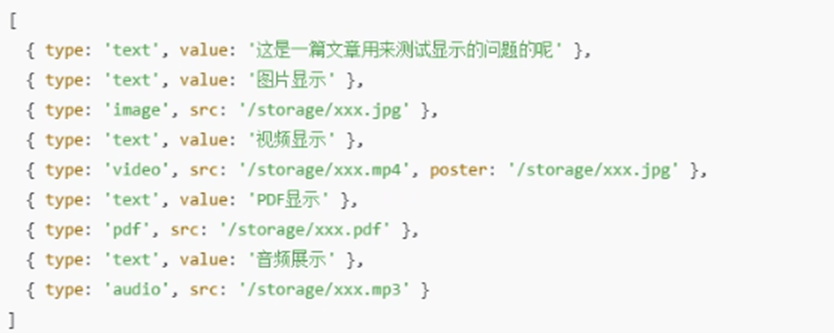 这样的数据
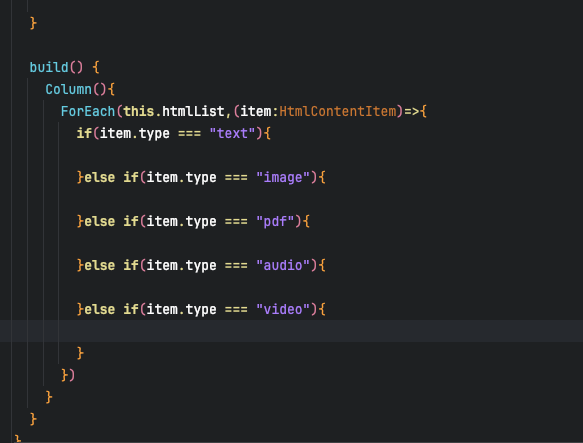
然后进行判断处理
然后在页面中逐一进行渲染
这样的数据
然后进行判断处理
然后在页面中逐一进行渲染
更多关于HarmonyOS鸿蒙Next中后端返回的富文本如何根据alias-label匹配渲染对应组件的实战系列教程也可以访问 https://www.itying.com/category-93-b0.html


在HarmonyOS Next中,后端返回的富文本可通过自定义组件结合@Component和@Builder实现alias-label匹配渲染。使用ForEach遍历富文本数据,根据alias值动态创建对应组件。通过@State管理数据,@Builder定义组件映射逻辑,实现条件渲染。
在HarmonyOS Next中实现根据alias-label匹配渲染对应组件的功能,可以通过以下步骤完成:
-
解析富文本:使用
XmlPullParser或第三方HTML解析库解析后端返回的富文本字符串,提取其中的自定义属性(如alias-label)和组件所需参数(如src、duration等)。 -
定义组件映射:创建一个映射关系,将
alias-label的值与对应的ArkUI组件关联。例如:const componentMap = { 'audio': AudioComponent, // 自定义音频组件 'video': VideoComponent, // 自定义视频组件 // 其他alias-label对应的组件 }; -
动态渲染组件:在ArkUI的声明式UI中,使用条件渲染或动态组件加载。例如,通过
if语句或ForEach遍历解析后的数据,根据alias-label选择组件:[@Component](/user/Component) struct RichTextView { // 解析后的数据数组,包含alias-label和组件属性 @State elements: Array<RichTextElement> = []; build() { Column() { ForEach(this.elements, (item: RichTextElement) => { // 根据alias-label动态渲染组件 if (item.aliasLabel === 'audio') { AudioComponent({ src: item.src, duration: item.duration }) } else if (item.aliasLabel === 'video') { VideoComponent({ src: item.src }) } else { // 默认文本渲染 Text(item.content) } }) } } } -
封装自定义组件:为
audio、video等类型创建可复用的ArkUI自定义组件,接收解析后的属性参数(如src),并调用HarmonyOS的多媒体API(如<Video>或<Audio>组件)实现功能。 -
处理嵌套结构:如果富文本包含复杂嵌套(如多个标签混合),需递归解析并维护UI层级,确保组件渲染顺序正确。
注意事项:
- 富文本解析需注意安全性,避免XSS攻击,建议对内容进行过滤或转义。
- 多媒体组件需处理资源加载状态(如加载中、错误回调)。
- 性能优化:对于长富文本,考虑分片渲染或懒加载。
此方法通过动态解析和条件渲染,实现了基于alias-label的组件匹配,可灵活扩展其他组件类型。
