




HarmonyOS鸿蒙Next中为什么函数加上export const localadd:local=new local
HarmonyOS鸿蒙Next中为什么函数加上export const localadd:local=new local layout代码为
import { find } from "./find";
import { local } from "./local";
import { mine } from "./mine";
import { recommend } from "./recommend";
import { HdsNavigation, HdsNavigationAttribute, HdsNavigationTitleMode, ScrollEffectType } from '[@kit](/user/kit).UIDesignKit';
import { AppStorageV2, LengthMetrics } from '[@kit](/user/kit).ArkUI';
import { PersistenceV2} from '[@kit](/user/kit).ArkUI';
import { GlobalMusic } from "../models/GlobalMusic"
import { playermanager } from "../untils/AVPlayerManager"
import { Background } from "../models/Background"
import {manager}from "./setting/custom"
// 跳转页面入口函数
interface zhuyemingzi {
image: Resource,
text: string
}
@Builder
export function layoutBuilder() {
Layout();
}
export interface songsItem {
img: string; // 图像资源标识
name: string; // 资源名称
author: string;// 作者信息
}
//AppStorageV2是临时的,PersistenceV2是永久的,两者语法一样
@ComponentV2
struct Layout {
@Local Background: Background = PersistenceV2.connect(Background, 'BACKGROUND_KEY', () => new Background())!
@Local playState:GlobalMusic=AppStorageV2.connect(GlobalMusic,'SONG_KEY',()=>new GlobalMusic())!
@Local pathStack : NavPathStack = AppStorageV2.connect(NavPathStack,'navstack',()=>new NavPathStack())!
@Local currentindex: number = 0
picture: zhuyemingzi[] = [
{ image: $r('app.media.home'), text: '推荐' },
{ image: $r('app.media.phone'), text: '本地' },
{ image: $r('app.media.communication'), text: '发现' },
{ image: $r('app.media.my'), text: '我的' }
]
// 关键修改:CustomOverlay 清除底部偏移和结束对齐,改为顶部对齐
@Builder CustomOverlay() {
Column() {
Column() {
if (this.playState.playList&&this.playState.playList.length>0) {
Row() {
//图标
Image(this.playState.albumCover)
.shadow({
color: Color.Gray,
// 阴影颜色
radius: 20,
// 阴影模糊半径
offsetY: 0,
// 阴影Y轴偏移量(负值表示向上)
})
.width(40)
.height(40)
.margin({ left: 5 })
.border({ radius: 10 })
.onClick(() => {
this.pathStack.pushPathByName('Play', null, true)
})
Column() {
//歌名
Text(this.playState.songName)
.width('100%')
.fontSize(17)
//作者
Text(this.playState.singerName)
.width('100%')
.fontSize(12)
.margin({top:2})
}
.align(Alignment.Start)
.padding({ left: 5 })
.layoutWeight(1)
//播放控制
Image($r("app.media.ic_prev"))
.fillColor(Color.Red)
.width(30)
.onClick(()=>{
playermanager.prevPlay()
})
Image(this.playState.isPlay?$r('app.media.ic_paused'):$r('app.media.ic_play'))
.margin({left:2})
.fillColor(Color.Red)
.width(35)
.height(35)
.onClick(()=>{
this.playState.isPlay?playermanager.pasue():playermanager.singplay(this.playState.playList[this.playState.playIndex])
})
Image($r('app.media.ic_next'))
.fillColor(Color.Red)
.width(30)
.margin({left:2})
}
.onClick(()=>{
playermanager.nextPlay()
})
.width('100%')
.justifyContent(FlexAlign.Start)
}
// 自定义组件放置区域(如按钮/图标)
else {
Row() {
//图标
Text('未在播放')
.fontWeight(15)
.fontSize(17)
.textAlign(TextAlign.Center)
.width('100%')
}
.width('100%')
.justifyContent(FlexAlign.Start)
}
}
.border({ radius: 10 })
.height('100%')
.justifyContent(FlexAlign.Center)
.shadow({
color: Color.Gray,
// 阴影颜色
radius: 20,
// 阴影模糊半径
offsetY: 0,
// 阴影Y轴偏移量(负值表示向上)
})
.backgroundBlurStyle(BlurStyle.COMPONENT_THICK)
.width('95%')
}
.position({bottom:0})
.margin({bottom:'11.5%'})
.width('100%')
.height(50) // 固定高度,避免占满屏幕
}
@Builder tabCustom(item: zhuyemingzi, index: number) {
Column() {
Image(item.image)
.width(28)
.height(28)
.fillColor(this.currentindex === index ? '#85A880' : '#63AAAA')
.margin({ top: 4 })
.padding({ bottom: 4 })
Text(item.text)
.fontSize(15)
.fontColor(this.currentindex === index ? '#85A880' : '#63AAAA')
}
}
build() {
NavDestination() {
// ============ 核心修改:外层包裹 Stack 堆叠容器 ============
Stack() {
// ① 第一层:背景图片【优先级1】,无选择图片时显示默认背景色【优先级2】
if (this.Background.currentbackground){
Image(this.Background.currentbackground)
.width('100%')
.height('100%')
.objectFit(ImageFit.Cover) // 铺满不变形,推荐使用
// .objectFit(ImageFit.Contain) // 可选:完整显示图片,不裁剪,可能留边
} else if(this.Background.currentbackground==='null'){
// 无背景图时,使用默认背景色(和你原来的一致)
Column()
.width('100%')
.height('100%')
.backgroundColor($r('sys.color.ohos_id_color_background'))
}
// ② 第二层:你的原有页面内容(所有内容写在这里,会覆盖在背景图上)
Column() {
Tabs({ barPosition: BarPosition.End }) {
ForEach(this.picture, (item: zhuyemingzi, index: number) => {
TabContent() {
if (index === 0) {
HdsNavigation() {
recommend()
}
.hideBackButton(true)
.titleMode(HdsNavigationTitleMode.MINI)
.titleBar({
avoidLayoutSafeArea: true,
style: {
scrollEffectOpts: {
enableScrollEffect: true,
scrollEffectType: ScrollEffectType.GRADIENT_BLUR,
blurEffectiveStartOffset: LengthMetrics.vp(0),
blurEffectiveEndOffset: LengthMetrics.vp(20)
},
originalStyle: {
backgroundStyle: {
backgroundColor: $r('sys.color.ohos_id_color_background_transparent'),
},
contentStyle: {
titleStyle: {
mainTitleColor: $r('sys.color.font_primary'),
subTitleColor: $r('sys.color.font_secondary')
},
menuStyle: {
backgroundColor: $r('sys.color.comp_background_tertiary'),
iconColor: $r('sys.color.icon_primary')
},
backIconStyle: {
backgroundColor: $r('sys.color.comp_background_tertiary'),
iconColor: $r('sys.color.icon_primary')
}
}
},
scrollEffectStyle: {
backgroundStyle: {
backgroundColor:$r('sys.color.ohos_id_color_background_transparent'),
},
contentStyle: {
titleStyle: {
mainTitleColor: $r('sys.color.font_primary'),
subTitleColor: $r('sys.color.font_secondary')
},
menuStyle: {
backgroundColor: $r('sys.color.comp_background_tertiary'),
iconColor: $r('sys.color.icon_primary')
},
backIconStyle: {
backgroundColor: $r('sys.color.comp_background_tertiary'),
iconColor: $r('sys.color.icon_primary')
}
}
}
},
content: {
title: {
mainTitle: '祝你天天开心'
},
}
})
}
else if (index === 1) {
HdsNavigation() {
local()
}
.hideBackButton(true)
.titleMode(HdsNavigationTitleMode.MINI)
.titleBar({
avoidLayoutSafeArea: true,
style: {
scrollEffectOpts: {
enableScrollEffect: true,
scrollEffectType: ScrollEffectType.GRADIENT_BLUR,
blurEffectiveStartOffset: LengthMetrics.vp(0),
blurEffectiveEndOffset: LengthMetrics.vp(20)
},
originalStyle: {
backgroundStyle: {
backgroundColor: $r('sys.color.ohos_id_color_background_transparent'),
},
contentStyle: {
titleStyle: {
mainTitleColor: $r('sys.color.font_primary'),
subTitleColor: $r('sys.color.font_secondary')
},
menuStyle: {
backgroundColor: $r('sys.color.comp_background_tertiary'),
iconColor: $r('sys.color.icon_primary')
},
backIconStyle: {
backgroundColor: $r('sys.color.comp_background_tertiary'),
iconColor: $r('sys.color.icon_primary')
}
}
},
scrollEffectStyle: {
backgroundStyle: {
backgroundColor: $r('sys.color.ohos_id_color_background_transparent'),
},
contentStyle: {
titleStyle: {
mainTitleColor: $r('sys.color.font_primary'),
subTitleColor: $r('sys.color.font_secondary')
},
menuStyle: {
backgroundColor: $r('sys.color.comp_background_tertiary'),
iconColor: $r('sys.color.icon_primary')
},
backIconStyle: {
backgroundColor: $r('sys.color.comp_background_tertiary'),
iconColor: $r('sys.color.icon_primary')
}
}
}
},
content: {
title: {
mainTitle: '本地'
},menu:{
value: [
{
content: {
label: '搜索',
icon: $r('app.media.ic_search'), // ← 本地 svg/png
isEnabled: true,
action: () => console.info('点击了 搜索')
}
},{
content: {
label: '切换',
icon: $r('app.media.Switch'), // ← 本地 svg/png
isEnabled: true,
action: () => console.info('点击了 切换')
}
},{
content: {
label: '导入',
icon: $r('app.media.add'),
isEnabled: true,
action: () => {
}
}
}]
}
}
})
}
else if (index === 2) {
HdsNavigation() {
find()
}
.hideBackButton(true)
.titleMode(HdsNavigationTitleMode.MINI)
.titleBar({
avoidLayoutSafeArea: true,
style: {
scrollEffectOpts: {
enableScrollEffect: true,
scrollEffectType: ScrollEffectType.GRADIENT_BLUR,
blurEffectiveStartOffset: LengthMetrics.vp(0),
blurEffectiveEndOffset: LengthMetrics.vp(20)
},
originalStyle: {
backgroundStyle: {
backgroundColor: $r('sys.color.ohos_id_color_background_transparent'),
},
contentStyle: {
titleStyle: {
mainTitleColor: $r('sys.color.font_primary'),
subTitleColor: $r('sys.color.font_secondary')
},
menuStyle: {
backgroundColor: $r('sys.color.comp_background_tertiary'),
iconColor: $r('sys.color.icon_primary')
},
backIconStyle: {
backgroundColor: $r('sys.color.comp_background_tertiary'),
iconColor: $r('sys.color.icon_primary')
}
}
},
scrollEffectStyle: {
backgroundStyle: {
backgroundColor: $r('sys.color.ohos_id_color_background_transparent'),
},
contentStyle: {
titleStyle: {
mainTitleColor: $r('sys.color.font_primary'),
subTitleColor: $r('sys.color.font_secondary')
},
menuStyle: {
backgroundColor: $r('sys.color.comp_background_tertiary'),
iconColor: $r('sys.color.icon_primary')
},
backIconStyle: {
backgroundColor: $r('sys.color.comp_background_tertiary'),
iconColor: $r('sys.color.icon_primary')
}
}
}
},
content: {
title: {
mainTitle: '互动大厅'
},menu:{
value: [
{
content: {
label: '添加',
icon: $r('app.media.add'),
isEnabled: true,
action: () =>{
manager.pickPhotoFromGallery()
}
}
}]
}
}
})
}
else if (index === 3) {
HdsNavigation() {
mine()
}
.hideBackButton(true)
.titleMode(HdsNavigationTitleMode.MINI)
.titleBar({
avoidLayoutSafeArea: true,
style: {
scrollEffectOpts: {
enableScrollEffect: true,
scrollEffectType: ScrollEffectType.GRADIENT_BLUR,
blurEffectiveStartOffset: LengthMetrics.vp(0),
blurEffectiveEndOffset: LengthMetrics.vp(20)
},
originalStyle: {
backgroundStyle: {
backgroundColor: $r('sys.color.ohos_id_color_background_transparent'),
},
contentStyle: {
titleStyle: {
mainTitleColor: $r('sys.color.font_primary'),
subTitleColor: $r('sys.color.font_secondary')
},
menuStyle: {
backgroundColor: $r('sys.color.comp_background_tertiary'),
iconColor: $r('sys.color.icon_primary')
},
backIconStyle: {
backgroundColor: $r('sys.color.comp_background_tertiary'),
iconColor: $r('sys.color.icon_primary')
}
}
},
scrollEffectStyle: {
backgroundStyle: {
backgroundColor: $r('sys.color.ohos_id_color_background_transparent'),
},
contentStyle: {
titleStyle: {
mainTitleColor: $r('sys.color.font_primary'),
subTitleColor: $r('sys.color.font_secondary')
},
menuStyle: {
backgroundColor: $r('sys.color.comp_background_tertiary'),
iconColor: $r('sys.color.icon_primary')
},
backIconStyle: {
backgroundColor: $r('sys.color.comp_background_tertiary'),
iconColor: $r('sys.color.icon_primary')
}
}
}
},
content: {
title: {
mainTitle: '我的'
}
}
})
}
}
.tabBar(this.tabCustom(item, index))
})
}
.overlay(this.CustomOverlay()) // Overlay 直接覆盖在 Tabs 上方,底部对齐 Tab 栏顶部
.barHeight('14%') // Tab 栏高度固定为屏幕15%
.scrollable(false)
.barOverlap(true)
.barBackgroundBlurStyle(BlurStyle.COMPONENT_THICK)
.onChange((index: number) => {
this.currentindex = index
})
}
.width('100%')
.height('100%')
.justifyContent(FlexAlign.End)
}
.width('100%')
.height('100%')
}
.onReady((context: NavDestinationContext) => {
this.pathStack = context.pathStack;
})
}
}
local代码为
import { AppStorageV2 } from "[@kit](/user/kit).ArkUI"
import { playermanager } from "../untils/AVPlayerManager";
import { GlobalMusic } from "../models/GlobalMusic";
import { getPersistPermissionUtils } from "../untils/PersistPermissionUtils";
import { addSongsBeforeLaunch, importSongs } from "../untils/ImportSongs";
import { manager} from "./setting/custom";
export interface SongInfo {
  uri: string;
  songName: string | Resource;
  duration: number;
  singerName?: string | Resource;
  albumCover?: PixelMap;
}

[@Component](/user/Component)
 export struct  local {
  [@StorageProp](/user/StorageProp)('topRectHeight') topRectHeight: number = 0;
  [@StorageProp](/user/StorageProp)('bottomRectHeight') bottomRectHeight: number = 0;
  [@State](/user/State) playList: Map<string, SongInfo> = new Map(); // 播放列表,使用 Map 去重
  [@State](/user/State) currentSong: SongInfo = {
    uri: '',
    duration: 0,
    songName: $r('app.string.unknown_song'),
    singerName: $r('app.string.unknown_singer')
  };

  async handleImportSongs() {
    importSongs(this.playList, this.context).then((songMap: Map<string, SongInfo>) => {
      this.playList = songMap;
    })
  }

  aboutToAppear(): void {
    getPersistPermissionUtils().init(this.context)
    this.initPlayListFromPf();
  }

  async initPlayListFromPf() {
    let existPath: Array<string> = await getPersistPermissionUtils().getFilePathExist(this.context)
    await getPersistPermissionUtils().activatePermissionExample(existPath)
    addSongsBeforeLaunch(existPath).then((songMap: Map<string, SongInfo>) => {
      this.playList = songMap
更多关于HarmonyOS鸿蒙Next中为什么函数加上export const localadd:local=new local的实战教程也可以访问 https://www.itying.com/category-93-b0.html

开发者您好,由于您提供的代码缺失的内容过多,我这边简化了一下您的写了一个demo:
@Component
export struct local{
  handleImportSongs(){
    console.log('play');
  }
  static handleImportSongs(){
    const instance = new local();
    instance.handleImportSongs()
    console.log('======================');
  }
  build() {
    Column(){
      Button('local').onClick(() => {
        this.handleImportSongs()
      })
    }
  }
}
import { local } from './local';
@Entry
@Component
struct layout{
  build() {
    Column({space: 10}){
      Button('layout')
        .onClick(() => {
          const instance = new local();
          local.handleImportSongs()
          instance.handleImportSongs()
        })
      local()
    }
  }
}
我在本地使用这个代码没有复现出来闪退的问题,开发者可以尝试一下这个代码是否有问题,如果有问题,还请开发者提供一下详细的日志信息以及版本信息(DevEco Studio版本信息和测试手机的版本信息)。
更多关于HarmonyOS鸿蒙Next中为什么函数加上export const localadd:local=new local的实战系列教程也可以访问 https://www.itying.com/category-93-b0.html

上面有@Component和@ComponentV2混用了。 以及在local里面用了这个 pathStack: NavPathStack = AppStorageV2.connect(NavPathStack, ‘navstack’, () => new NavPathStack())! 所以会闪退。

闪退原因是这个吧:
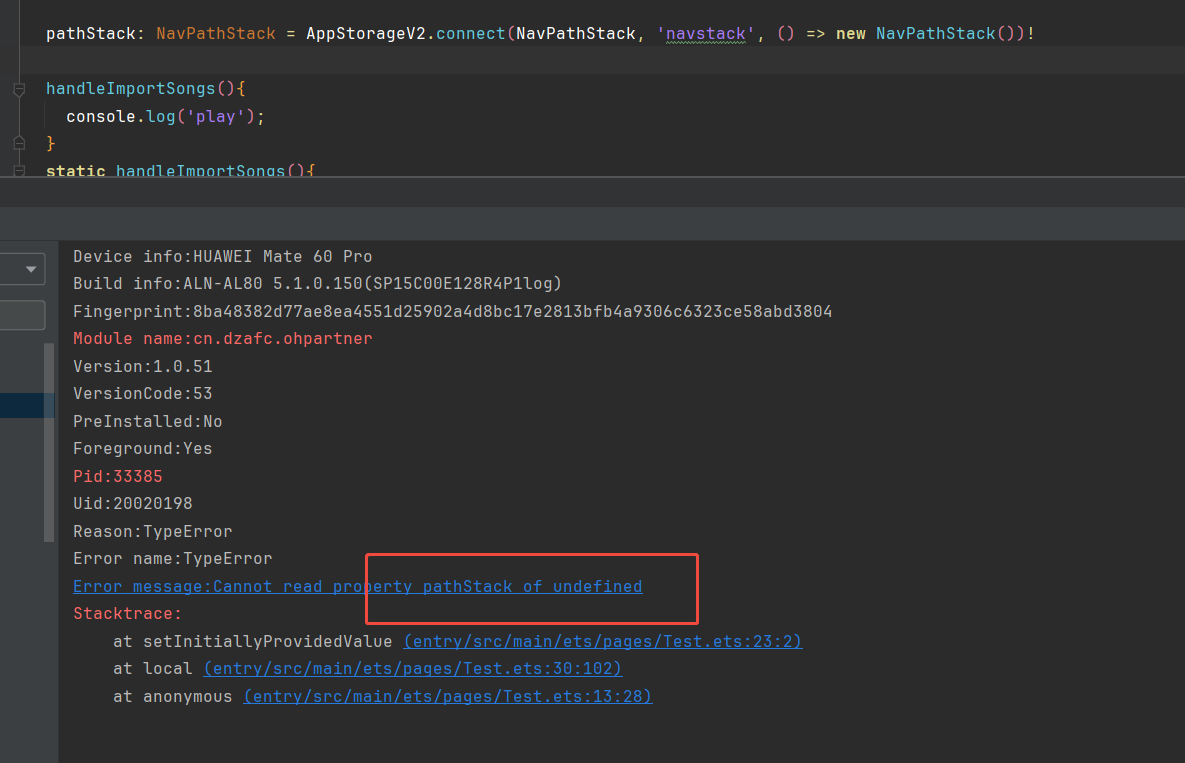
原因是:你在local里面写了这个:
pathStack: NavPathStack = AppStorageV2.connect(NavPathStack, 'navstack', () => new NavPathStack())!
解决办法:可以把上面那个报错行调整下位置,不要在页面初始化的时候就调用。

local 是一个组件,组件基于struct声明而非class,因此不要使用new关键字进行实例化。
如果你需要复用local里面的逻辑,建议抽离出一个viewModel类, 专门用来处理逻辑。
下面简单示例,在viewModel中处理业务逻辑,管理状态变量:
export class LocalViewModel {
  context?: Context
  @Track message: string = '抽离viewModel'

  init(context?: Context) {
    this.context = context
  }
}

@Component
export struct local {
  @State viewModel: LocalViewModel = new LocalViewModel()

  aboutToAppear(): void {
    this.viewModel.init(this.getUIContext().getHostContext())
  }

  build() {
    Column() {
      Text(this.viewModel.message)
    }
  }
}
在HarmonyOS Next中,export const localadd:local=new local 是用于声明并导出一个常量 localadd,其类型为 local,并初始化为 new local() 实例。这通常用于定义本地服务或对象,以便在应用的不同模块中共享使用。export 关键字确保该常量可被其他文件导入,const 表示常量不可变。这种语法支持模块化开发,有助于代码组织和复用。

在HarmonyOS Next中,直接实例化一个自定义组件(如 new local())并导出为常量,然后在其他页面调用其方法,会导致页面闪退。这是因为自定义组件实例与UI渲染上下文紧密绑定,直接实例化会破坏组件的生命周期管理。
从你的代码看,local 组件已经有一个静态方法 handleImportSongs(context: Context),这是正确的设计。你应该直接调用这个静态方法,而不是创建组件实例。
解决方案:
在你的 layout.ets 文件中,修改 action 部分:
action: () => {
  // 获取当前页面的上下文
  const context = getContext(this) as Context;
  // 调用 local 组件的静态方法
  local.handleImportSongs(context);
}
原因分析:
-
组件生命周期问题:
@Component装饰的组件需要由ArkUI框架管理其生命周期。直接使用new local()创建的实例没有正确的上下文绑定,会导致状态管理和资源释放异常。 -
上下文依赖:
handleImportSongs方法需要Context对象来执行文件操作等系统功能。通过静态方法传递上下文是标准做法。 -
状态隔离:每个组件实例应有独立的状态。直接导出单例实例会导致状态污染和渲染冲突。
代码调整说明:
- 移除
export const localadd: local = new local()这行代码 - 直接使用
local.handleImportSongs(context)调用静态方法 - 确保传入正确的
Context对象
这样修改后,点击"导入"按钮就能正确调用 local 组件中的导入功能,而不会导致页面闪退。静态方法的设计正是为了支持这种跨组件的功能调用场景。
