




Python中如何抓取知乎某个问题下的所有图片?
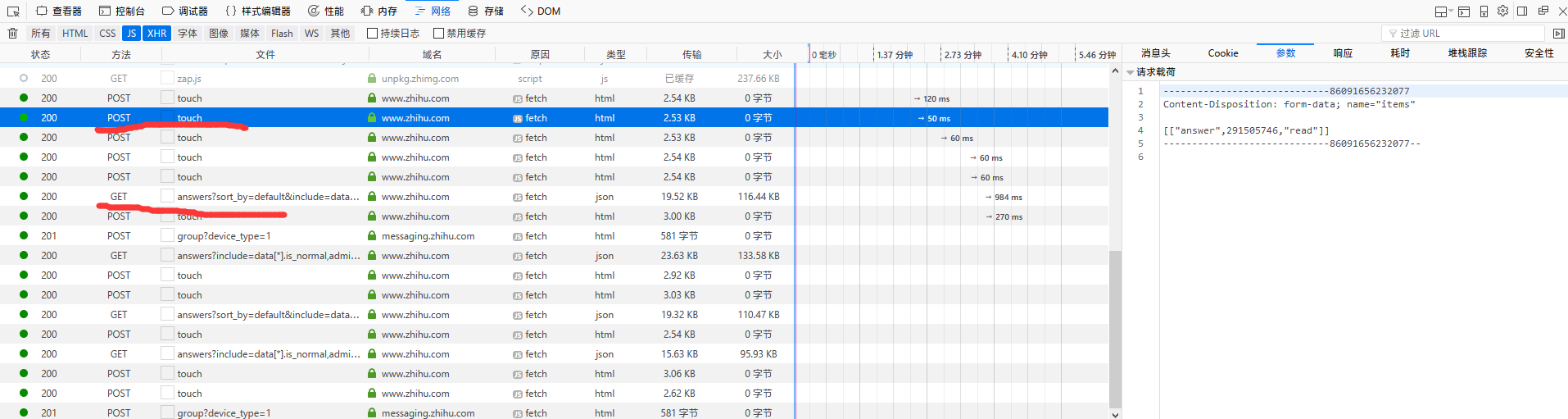
初学 python,想到用这个练手,但是知乎的答案是动态加载的,每次网页滚动一定距离就会发送一个 POST 请求,当滚动到末尾的时候就会发送 GET 请求,加载新的内容,求思路,谢谢
Python中如何抓取知乎某个问题下的所有图片?


import requests
import json
import os
from urllib.parse import urljoin
import re

def fetch_zhihu_images(question_id, save_dir='zhihu_images'):
    """
    抓取知乎问题下的所有图片

    Args:
        question_id: 知乎问题ID(URL中的数字部分)
        save_dir: 图片保存目录
    """

    # 创建保存目录
    if not os.path.exists(save_dir):
        os.makedirs(save_dir)

    headers = {
        'User-Agent': 'Mozilla/5.0 (Windows NT 10.0; Win64; x64) AppleWebKit/537.36',
        'Referer': f'https://www.zhihu.com/question/{question_id}'
    }

    # 知乎API端点
    base_url = f'https://www.zhihu.com/api/v4/questions/{question_id}/answers'

    offset = 0
    limit = 20
    total_images = 0

    while True:
        params = {
            'include': 'data[*].is_normal,content',
            'limit': limit,
            'offset': offset,
            'sort_by': 'default'
        }

        try:
            response = requests.get(base_url, headers=headers, params=params, timeout=10)
            response.raise_for_status()
            data = response.json()

            # 提取所有回答
            answers = data.get('data', [])
            if not answers:
                break

            for answer in answers:
                content = answer.get('content', '')

                # 使用正则表达式匹配图片URL
                # 匹配知乎的图片格式,包括原始图片和缩略图
                img_patterns = [
                    r'data-original="(https://pic\d\.zhimg\.com/[^"]+)"',  # 原始图片
                    r'data-actualsrc="(https://pic\d\.zhimg\.com/[^"]+)"',  # 实际图片
                    r'src="(https://pic\d\.zhimg\.com/[^"]+)"',  # 普通图片
                    r'https://www\.zhihu\.com/equation\?tex=([^"]+)'  # 公式图片(可选)
                ]

                for pattern in img_patterns:
                    img_urls = re.findall(pattern, content)

                    for img_url in img_urls:
                        # 清理URL,去除查询参数获取原始图片
                        clean_url = img_url.split('?')[0]

                        # 下载图片
                        try:
                            img_response = requests.get(clean_url, headers=headers, timeout=10)
                            img_response.raise_for_status()

                            # 生成文件名
                            filename = os.path.join(save_dir, f'img_{total_images:04d}.jpg')

                            # 保存图片
                            with open(filename, 'wb') as f:
                                f.write(img_response.content)

                            print(f'已保存: {filename}')
                            total_images += 1

                        except Exception as e:
                            print(f'下载失败 {clean_url}: {e}')
                            continue

            # 检查是否还有更多数据
            if data.get('paging', {}).get('is_end', True):
                break

            offset += limit

        except requests.exceptions.RequestException as e:
            print(f'请求失败: {e}')
            break
        except json.JSONDecodeError as e:
            print(f'JSON解析失败: {e}')
            break

    print(f'\n总共下载了 {total_images} 张图片')
    return total_images


# 使用示例
if __name__ == '__main__':
    # 从知乎问题URL中提取ID
    # 例如:https://www.zhihu.com/question/123456789
    question_id = '123456789'  # 替换为实际的问题ID

    # 调用函数下载图片
    fetch_zhihu_images(question_id)
这个脚本的工作原理:
- 获取问题ID:从知乎问题URL中提取数字ID
- 调用API:使用知乎的官方API获取问题下的所有回答
- 解析内容:从回答内容中提取图片URL
- 下载图片:下载并保存所有找到的图片
使用步骤:
- 安装依赖:
pip install requests - 替换
question_id为你要抓取的问题ID - 运行脚本,图片会保存在
zhihu_images文件夹
注意事项:
- 需要遵守知乎的robots.txt和使用条款
- 建议添加适当的延迟避免请求过快
- 知乎可能有反爬机制,可能需要处理验证码
核心要点: 通过官方API获取数据,用正则匹配图片链接。

python<br><a target="_blank" href="https://www.zhihu.com/api/v4/questions/265062021/answers?sort_by=default&include=data" rel="nofollow noopener">https://www.zhihu.com/api/v4/questions/265062021/answers?sort_by=default&include=data</a>[*].is_normal,admin_closed_comment,reward_info,is_collapsed,annotation_action,annotation_detail,collapse_reason,is_sticky,collapsed_by,suggest_edit,comment_count,can_comment,content,editable_content,voteup_count,reshipment_settings,comment_permission,created_time,updated_time,review_info,relevant_info,question,excerpt,relationship.is_authorized,is_author,voting,is_thanked,is_nothelp,upvoted_followees;data[*].mark_infos[*].url;data[*].author.follower_count,badge[?(type=best_answerer)].topics&limit=20&offset=23<br><br><a target="_blank" href="https://www.zhihu.com/api/v4/questions/265062021/answers?sort_by=default&include=data" rel="nofollow noopener">https://www.zhihu.com/api/v4/questions/265062021/answers?sort_by=default&include=data</a>[*].is_normal,admin_closed_comment,reward_info,is_collapsed,annotation_action,annotation_detail,collapse_reason,is_sticky,collapsed_by,suggest_edit,comment_count,can_comment,content,editable_content,voteup_count,reshipment_settings,comment_permission,created_time,updated_time,review_info,relevant_info,question,excerpt,relationship.is_authorized,is_author,voting,is_thanked,is_nothelp,upvoted_followees;data[*].mark_infos[*].url;data[*].author.follower_count,badge[?(type=best_answerer)].topics&limit=20&offset=63<br><br><br><a target="_blank" href="https://www.zhihu.com/api/v4/questions/265062021/answers?include=data" rel="nofollow noopener">https://www.zhihu.com/api/v4/questions/265062021/answers?include=data</a>[*].is_normal,admin_closed_comment,reward_info,is_collapsed,annotation_action,annotation_detail,collapse_reason,is_sticky,collapsed_by,suggest_edit,comment_count,can_comment,content,editable_content,voteup_count,reshipment_settings,comment_permission,created_time,updated_time,review_info,relevant_info,question,excerpt,relationship.is_authorized,is_author,voting,is_thanked,is_nothelp,upvoted_followees;data[*].mark_infos[*].url;data[*].author.follower_count,badge[?(type=best_answerer)].topics&limit=20&offset=83&sort_by=default<br>
加载更多和 GET 请求末尾的 offset 有关,但是请求 URL 似乎不是固定的

最近刚好做了一个应用,不过我用的是 nodejs,爬取范围比楼主的稍微大点,一个话题下所有图片。
基于爬虫的应用,关键点其实不在于能爬到内容并解析,而是建立一个爬取体系,能够分步骤可靠并可控的爬取所需内容。具体到楼主这个需求,可以分几步:
1、找一款合适的知乎爬虫 sdk,研究下 api 参数,我用的是: https://github.com/shanelau/zhihu。
2、对于一个问题,第一次先爬取所有回答,后续用定时任务爬取更新的回答。
3、另起一个定时任务,解析每个回答中的文本信息,提取图片并保存。
4、另起一个定时任务,对图片进行后续处理。比如识别下是不是妹子什么的。


我发现有的图片加载不出来 这个是什么问题?比如这个 https://pic3.zhimg.com/0bea957c8c4c92cfd1713a62e55bbb28_r.jpg 直接访问也是只能加载部分,我看了下我扒下来的所有图片,不好图片都是这样的
