




HarmonyOS鸿蒙Next开发者技术支持-高德地图
HarmonyOS鸿蒙Next开发者技术支持-高德地图
一、 关键技术难点总结
1.1 问题说明
本项目核心要解决的是在HarmonyOS平台上,将高德地图SDK的原生能力无缝集成到Flutter跨平台框架中所面临的一系列技术挑战。这些挑战主要体现在架构差异、通信机制和平台特性适配三个方面 。
-
架构差异与融合难题:HarmonyOS采用其特有的ArkUI框架和组件化开发生态,而Flutter拥有自成一体的渲染引擎和Widget系统。两者架构迥异,需要一种有效机制将鸿蒙原生的高德地图视图(
MapView)嵌入到Flutter的Widget树中,并保持视觉统一和手势协调。 -
跨平台通信障碍:Flutter应用需要与鸿蒙原生侧的高德地图实例进行双向数据交换。例如,Flutter端需要控制地图的初始位置、添加标记点,而原生侧则需要将实时定位信息、地图事件(如点击、拖拽)回传给Flutter。这要求建立一条稳定、高效的双向通信信道 。
-
平台特定配置与权限管理:高德地图SDK在鸿蒙端的正常运行依赖于一系列严格的配置和权限,包括但不限于:
- 网络权限(
ohos.permission.INTERNET):用于地图图块和API数据下载。 - 精确定位权限(
ohos.permission.LOCATION,ohos.permission.APPROXIMATELY_LOCATION等):用于实现定位功能。 - 后台定位权限(
ohos.permission.LOCATION_IN_BACKGROUND):保障应用在后台时仍能持续定位。 - 正确的API Key配置:确保服务鉴权通过。任何一环的缺失或配置错误都会导致地图显示失败或功能异常。
- 网络权限(
-
依赖管理与构建问题:在鸿蒙项目中引入高德地图的HAR包后,可能会遇到包管理工具(如hvigor)的兼容性问题,例如在特定配置下无法正确加载字节码HAR包,导致项目构建失败。
1.2 原因分析
上述问题的根源在于Flutter与原生平台之间固有的技术边界以及HarmonyOS生态的独特性。
-
技术栈隔离:Flutter旨在通过自绘引擎提供一致的跨平台体验,但其代价是无法直接使用原生UI组件。因此,必须通过Flutter提供的**平台视图(Platform View)** 机制作为“桥梁”,将原生视图嵌入到Flutter界面中。这套机制的实现方式因原生平台(Android, iOS, HarmonyOS)而异,在HarmonyOS上需要遵循其特定的
FlutterPlugin和PlatformView规范。 -
通信协议不匹配:Flutter(Dart语言)与鸿蒙原生(ArkTS/JS语言)运行在不同的运行时环境中,内存空间隔离。它们之间的通信需要依赖**消息通道(MethodChannel)** 进行序列化与反序列化,通信数据格式的定义和同步成为关键。
-
安全模型与隐私合规:HarmonyOS对应用权限和用户隐私保护有严格的要求。高德地图SDK在使用定位等敏感能力时,不仅需要在配置文件中声明权限,还需在运行时动态申请,并按照规范处理隐私协议,否则功能会被系统限制 。
-
构建工具链差异:鸿蒙的构建工具hvigor对于依赖管理有特定规则。遇到的问题(如
useNormalizedOHMUrl相关错误)正是由于项目配置与hvigor期望的默认行为不一致所致,这属于工具链适配层面的问题。
1.3 解决思路
针对以上问题,我们的核心解决思路是**“桥接与封装”**,即在Flutter与鸿蒙原生层之间建立清晰、高效的交互协议,并对复杂细节进行封装,为Flutter层提供简洁易用的API。
-
采用平台视图(Platform View)方案:利用Flutter的
OhosView组件作为容器,将鸿蒙原生的高德地图MapView组件直接嵌入到Flutter的Widget层级中。这是实现原生地图能力与Flutter界面融合的架构基础。 -
建立双向方法通道(MethodChannel):在Flutter(Dart侧)和鸿蒙(ArkTS侧)之间建立一对一的
MethodChannel。- Flutter to Native:Flutter侧通过
MethodChannel.invokeMethod调用原生侧的地图控制方法(如moveCamera,addMarker)。 - Native to Flutter:原生侧通过
MethodChannel.sendMethod将地图事件(如onMapClick,onLocationChanged)主动发送到Flutter侧。
- Flutter to Native:Flutter侧通过
-
分层设计与职责分离:
- 鸿蒙原生层:负责高德地图SDK的初始化和实例管理、地图渲染、定位功能实现、生命周期管理以及权限申请。
- Flutter桥接层:实现
FlutterPlugin和PlatformViewFactory,负责创建原生视图和通信通道。 - Flutter应用层:提供傻瓜式的
CustomOhosViewWidget,开发者只需像使用普通Widget一样将其加入界面,并通过回调函数处理业务逻辑。
-
标准化配置与错误处理:明确权限列表和
module.json5的配置模板,提供构建错误的标准化解决方案,降低环境配置的复杂度。
1.4 解决方案
1.开发准备
1.1 获取应用AppID
通过代码获取应用的AppID。
let flag = bundleManager.BundleFlag.GET_BUNDLE_INFO_WITH_SIGNATURE_INFO;
let bundleInfo = bundleManager.getBundleInfoForSelfSync(flag)
let appId = bundleInfo.signatureInfo.appId;
1.2 申请高德API Key
进入高德开发平台控制台创建一个新应用。
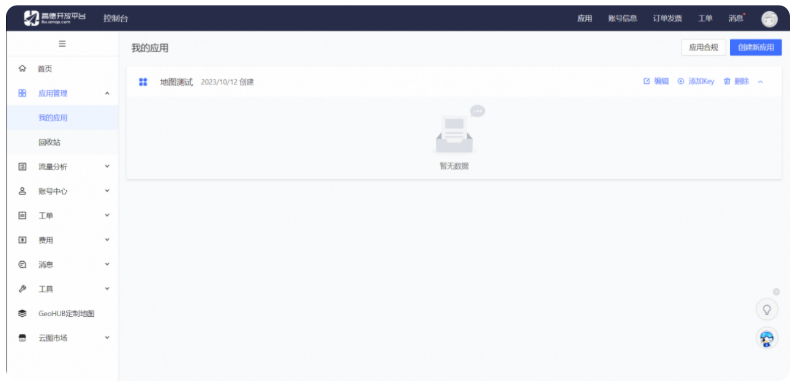
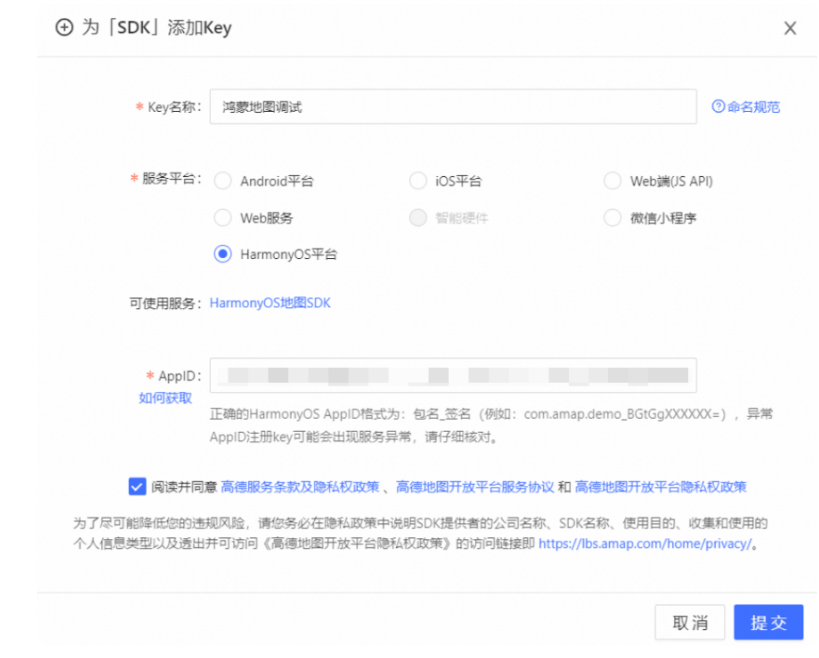
点击"添加新Key"按钮,在弹出的对话框中,依次:输入应用名名称,选择绑定的服务为“HarmonyOS平台”,输入AppID。
2. 配置项目
**配置权限:**在module.json5文件中声明权限。
"requestPermissions": [
        {
            "name": "ohos.permission.LOCATION",
            "reason": "$string:dependency_reason",
            "usedScene": {
                "abilities": [
                    "EntryAbility"
                ],
                "when": "always"
            }
        },
        {
            "name": "ohos.permission.APPROXIMATELY_LOCATION",
            "reason": "$string:dependency_reason",
            "usedScene": {
                "abilities": [
                    "EntryAbility"
                ],
                "when": "always"
            }
        },
        {
            "name": "ohos.permission.LOCATION_IN_BACKGROUND",
            "reason": "$string:dependency_reason",
            "usedScene": {
                "abilities": [
                    "EntryAbility"
                ],
                "when": "always"
            }
        },
        {
            "name": "ohos.permission.INTERNET",
            "reason": "$string:dependency_reason",
            "usedScene": {
                "when": "always"
            }
        },
        {
            "name": "ohos.permission.GET_NETWORK_INFO",
            "reason": "$string:dependency_reason",
            "usedScene": {
                "when": "always"
            }
        },
        {
            "name": "ohos.permission.CAMERA",
            "reason": "$string:dependency_reason",
            "usedScene": {
                "abilities": [
                    "EntryAbility"
                ],
                "when": "always"
            }
        }
    ]
**添加依赖:**在ohos/entry/oh-package.json5中添加。
{
"dependencies": {
    "@amap/amap_lbs_location": ">=1.2.1",   // 定位SDK
    "@amap/amap_lbs_common": ">=1.2.0",   // 公共基础SDK
    "@amap/amap_lbs_map3d": ">=2.2.1",   // 3D地图SDK
  }
}
3.开发实现
3.1 鸿蒙端
创建 AMapFlutterMapPlugin类,实现FlutterPlugin 接口,用于将高德地图集成到Flutter应用中。
export default class AMapFlutterMapPlugin implements FlutterPlugin {
  private channel?:MethodChannel;
  getUniqueClassName(): string {
    return "AMapFlutterMapPlugin"
  }
  onAttachedToEngine(binding: FlutterPluginBinding): void {
    binding.getPlatformViewRegistry().registerViewFactory('com.amap.app/AMapView', new AMapPlatformViewFactory(binding.getBinaryMessenger(),StandardMessageCodec.INSTANCE))
  }
  onDetachedFromEngine(binding: FlutterPluginBinding): void {
    this.channel?.setMethodCallHandler(null)
  }
}
创建 AMapPlatformViewFactory类,这个类继承自PlatformViewFactory,用于创建高德地图的原生视图。
class AMapPlatformViewFactory extends PlatformViewFactory {
  message: BinaryMessenger;
  constructor(message: BinaryMessenger, createArgsCodes: MessageCodec<Object>) {
    super(createArgsCodes)
    this.message = message;
  }
  public create(context: common.Context, viewId: number, args: Any): PlatformView {
    return new AMapView(context, viewId, args, this.message);
  }
}
创建 AMapView, 这个主要是在Flutter端来对接原生端的 View的,通过 PlatformView 就可以把鸿蒙原生的View显示到Flutter端。
class AMapView extends PlatformView implements MethodCallHandler {
  methodChannel: MethodChannel;
  constructor(context: common.Context, viewId: number , args: ESObject, message: BinaryMessenger) {
    super();
    this.methodChannel = new MethodChannel(message, `com.amap.app/AMapView${viewId}`, StandardMethodCodec.INSTANCE);
    this.methodChannel.setMethodCallHandler(this);
  }
  onMethodCall(call: MethodCall, result: MethodResult): void {
    let method: string = call.method;
    switch (method) {
      case 'getMessageFromFlutterView':
        let value: ESObject = call.args;
        let link1: SubscribedAbstractProperty<number> = AppStorage.link('numValue');
        link1.set(value)
        console.log("nodeController receive message from dart: ");
        result.success(true);
        break;
    }
  }
  public sendMessage = () => {
    this.methodChannel.invokeMethod('getMessageFromOhosView', 'natvie - ');
  }
  getView(): WrappedBuilder<[Params]> {
    return new WrappedBuilder(AMapBuilder);
  }
  dispose(): void {
  }
}
实现地图的 Component,用于在鸿蒙端显示高德地图,并处理地图的初始化、定位和事件监听。
@Component
struct AMapComponent {
  @Prop params: Params
  customView: AMapView = this.params.platformView as AMapView
  aMap: AMap | null = null;
  private context = getContext(this);
  locationManger?: AMapLocationManagerImpl;
  @State @Watch('longitudeChange') longitude: number = 116.397451
  @State latitude: number = 39.909187
  @State mAddresses?: string;
  @State mCountryName?: string;
  @State mAdministrativeArea?: string;
  @State mLocality?: string;
  @State mSubLocality?: string;
  aboutToAppear() {
    // 地图初始化配置
    MapsInitializer.setApiKey('ApiKey值');
    MapsInitializer.setDebugMode(true);

    // 地图实例创建与相机定位
    MapViewManager.getInstance().registerMapViewCreatedCallback((mapview?: MapView) => {
      if (mapview) {
        mapview.onCreate();
        mapview.getMapAsync((map) => {
          this.aMap = map;
          this.aMap.moveCamera(CameraUpdateFactory.newLatLngZoom(
            new LatLng(this.latitude, this.longitude), 18
          ));
        });
      }
    });
    // 隐私政策设置
    AMapLocationManagerImpl.updatePrivacyShow(
      AMapPrivacyShowStatus.DidShow,
      AMapPrivacyInfoStatus.DidContain,
      this.context
    );
    AMapLocationManagerImpl.updatePrivacyAgree(
      AMapPrivacyAgreeStatus.DidAgree,
      this.context
    );
    // 定位初始化流程
    this.locationManger = new AMapLocationManagerImpl(this.context);
    this.reqPermissionsFromUser(['ohos.permission.APPROXIMATELY_LOCATION', 'ohos.permission.LOCATION']);
    this.startLocationUpdates();
  }
  // 监听经度变化,更新地图相机位置
  longitudeChange() {
    this.aMap?.moveCamera(CameraUpdateFactory.newLatLngZoom(
      new LatLng(this.latitude, this.longitude), 18
    ));
  }
  // 定位权限请求(核心权限处理)
  reqPermissionsFromUser(permissions: Array<Permissions>) {
    const atManager = abilityAccessCtrl.createAtManager();
    atManager.requestPermissionsFromUser(getContext(this) as common.UIAbilityContext, permissions)
      .then((data) => {
        // 权限处理逻辑(省略细节)
      })
      .catch((err) => console.error(`权限请求失败: ${err.message}`));
  }
  // 启动连续定位(核心定位配置)
  startLocationUpdates() {
    const options: AMapLocationOption = {
      priority: geoLocationManager.LocationRequestPriority.FIRST_FIX,
      timeInterval: 2,
      locatingWithReGeocode: true,
      reGeocodeLanguage: AMapLocationReGeocodeLanguage.Chinese,
      isOffset: true
    };
    this.locationManger?.setLocationListener(AMapLocationType.Updating, this.listener);
    this.locationManger?.setLocationOption(AMapLocationType.Updating, options);
    this.locationManger?.startUpdatingLocation();
  }
  // 定位事件监听(核心数据处理)
  listener: IAMapLocationListener = {
    onLocationChanged: (location) => {
      // 更新经纬度并触发地图刷新
      this.latitude = location.latitude;
      this.longitude = location.longitude;
      // 解析地址信息
      this.getAddresses(location.latitude, location.longitude);
    },
    onLocationError: (error) => console.error(`定位错误: ${JSON.stringify(error)}`)
  };
  // 逆地理编码获取地址详情
  async getAddresses(latitude: number, longitude: number) {
    if (geoLocationManager.isGeocoderAvailable()) {
      try {
        const result = await geoLocationManager.getAddressesFromLocation({
          locale: "zh", latitude, longitude, maxItems: 1
        });
        // 更新地址相关状态
        this.mAddresses = result[0].placeName;
        this.mCountryName = result[0].countryName;
        this.mAdministrativeArea = result[0].administrativeArea;
        this.mLocality = result[0].locality;
        this.mSubLocality = result[0].subLocality;
      } catch (error) {
        console.error(`地址解析失败: ${error}`);
      }
    }
  }
  build() {
    Stack() {
      MapViewComponent().zIndex(0) // 高德地图组件
    }
    .width('100%')
    .height('100%')
  }
}
3.2 Flutter端
新建CustomOhosView,用于在Flutter端显示鸿蒙侧的原生视图。
typedef OnViewCreated = Function(CustomViewController);

class CustomOhosView extends StatefulWidget {
  final OnViewCreated onViewCreated; // 视图创建完成后的回调
  final String viewTypeId; // 原生视图类型标识符
  const CustomOhosView(this.onViewCreated, this.viewTypeId, {Key? key})
      : super(key: key);
  [@override](/user/override)
  State<CustomOhosView> createState() => _CustomOhosViewState();
}

class _CustomOhosViewState extends State<CustomOhosView> {
  late MethodChannel _channel;
  [@override](/user/override)
  Widget build(BuildContext context) {
    // 创建鸿蒙原生视图
    return OhosView(
      viewType: widget.viewTypeId, // 指定视图类型标识符
      onPlatformViewCreated: (int id) {
        _channel = MethodChannel('${widget.viewTypeId}$id');
        final controller = CustomViewController._(
          _channel,
        );
        widget.onViewCreated(controller);
      },
      creationParams: const <String, dynamic>{}, // 传递给原生视图的参数
      creationParamsCodec: const StandardMessageCodec(),
    );
  }
}

class CustomViewController {
  final MethodChannel _channel;
  final StreamController<String> _controller = StreamController<String>();
  CustomViewController._(
    this._channel,
  ) {
    // 设置方法调用处理器,接收来自原生视图的消息
    _channel.setMethodCallHandler(
      (call) async {
        final result = call.arguments as String;
        final data = {
          'method': call.method,
          'data': result,
        };
        _controller.sink.add(jsonEncode(data));
      },
    );
  }
  // 暴露消息流供监听
  Stream<String> get customDataStream => _controller.stream;
  // 向鸿蒙视图发送消息
  Future<void> sendMessageToOhosView(String method, message) async {
    await _channel.invokeMethod(
      method,
更多关于HarmonyOS鸿蒙Next开发者技术支持-高德地图的实战教程也可以访问 https://www.itying.com/category-93-b0.html

HarmonyOS Next的高德地图技术支持主要涉及鸿蒙原生SDK集成。开发者需使用ArkTS语言调用高德地图的鸿蒙版本API,实现地图显示、定位、路径规划等功能。相关开发文档和示例代码可在华为开发者联盟官网的高德地图鸿蒙专区获取。集成时需注意鸿蒙Next的API与安卓/iOS版本存在差异,需按鸿蒙规范进行适配。
更多关于HarmonyOS鸿蒙Next开发者技术支持-高德地图的实战系列教程也可以访问 https://www.itying.com/category-93-b0.html
这篇帖子详细阐述了在HarmonyOS Next平台上,将高德地图SDK集成到Flutter应用中的完整技术方案,分析透彻,步骤清晰。这是一个典型的跨平台原生能力桥接案例,其核心思路和架构设计具有很高的参考价值。
帖子准确地指出了Flutter与HarmonyOS原生开发在架构、通信和权限管理上的核心差异。解决方案采用了标准的Flutter平台插件开发范式,通过 PlatformView 和 MethodChannel 进行桥接,这是当前最成熟和官方的集成方式。
技术方案评价:
- 架构合理性:采用
FlutterPlugin+PlatformViewFactory+PlatformView的分层设计,职责清晰。鸿蒙端负责地图实例的生命周期、渲染和原生事件,Flutter端提供Widget封装和业务逻辑处理,符合Flutter混合开发的最佳实践。 - 通信机制:使用
MethodChannel实现双向通信,是Dart与原生代码交互的标准方案。帖子中展示了Flutter调用原生方法以及原生向Flutter发送事件的两个方向,覆盖了主要交互场景。 - 权限与配置:对HarmonyOS上必需的权限(网络、定位、后台定位等)和
module.json5的配置说明非常完整,特别是提到了隐私合规接口(updatePrivacyShow/updatePrivacyAgree)的调用,这是集成高德等第三方SDK时容易忽略但至关重要的步骤。 - 问题排查:针对构建工具hvigor的
useNormalizedOHMUrl配置问题给出了解决方案,这类工具链适配问题是实际开发中常见的障碍,分享出来很有帮助。
代码实现要点:
- 鸿蒙端:
AMapFlutterMapPlugin作为插件入口,AMapPlatformViewFactory负责创建视图,AMapView作为PlatformView实现并处理通信,AMapComponent承载实际的地图UI和业务逻辑(初始化、定位、事件监听)。这个链路完整实现了Flutter插件在HarmonyOS侧的规范。 - Flutter端:通过自定义的
CustomOhosViewWidget封装OhosView,并提供了CustomViewController来管理通信通道,将复杂的原生交互简化为简单的Widget和Stream接口,提升了易用性。
总结: 该方案成功地解决了在HarmonyOS Next的Flutter应用中嵌入高德地图的核心技术难题。它不仅提供了可工作的代码,更重要的是展示了一套解决此类“Flutter调用HarmonyOS原生SDK”问题的通用方法论:即通过 平台视图嵌入 解决UI融合,通过 方法通道 解决逻辑通信,并严格遵守目标平台的 权限与配置规范。这对于其他需要在Flutter中集成HarmonyOS专属能力(如支付、推送、传感器等)的开发者而言,是一个很好的范例。
