




HarmonyOS鸿蒙Next中NavDestination嵌套Tabs底部留白(已经设置hideTitleBar(true))
HarmonyOS鸿蒙Next中NavDestination嵌套Tabs底部留白(已经设置hideTitleBar(true))
@Entry
@Component
struct Main {

  @StorageLink('fontSizeOffset') fontSizeOffset: number = 5;
  @State currentIndex: number = 0;
  @State pathStack: NavPathStack = new NavPathStack();
  private tabsController: TabsController = new TabsController();

  build() {
    NavDestination() {
      Tabs({
        barPosition: BarPosition.End,
        controller: this.tabsController
      }) {
        TabContent() {
          // Home({ pathStack: this.pathStack })
        }
        .padding({
          left: '12vp',
          right: '12vp'
        })
        .backgroundColor($r('[baseCore].color.white'))
        .tabBar(this.TabBuilder('首页', 0, $r('sys.symbol.house_fill')))

        TabContent() {
          // Setting()
        }
        .padding({
          left: '12vp',
          right: '12vp'
        })
        .backgroundColor($r('[baseCore].color.white'))
        .tabBar(this.TabBuilder('我的', 1, $r('sys.symbol.person_crop_circle_fill_1')))
      }
      .width('100%')
      .height('100%')
      .barHeight('56vp')
      .barMode(BarMode.Fixed)
      .onChange((index: number) => {
        this.currentIndex = index;
      })
    }
    .height('100%')
    .hideTitleBar(true)
    .onReady((context: NavDestinationContext) => {
      this.pathStack = context.pathStack;
    })
  }

  @Builder
  TabBuilder(title: Resource|string, index: number, selectedImg: Resource) {
    Column() {
      SymbolGlyph(selectedImg)
        .fontSize('24fp')
        .renderingStrategy(SymbolRenderingStrategy.MULTIPLE_OPACITY)
        .symbolEffect(new BounceSymbolEffect(EffectScope.WHOLE, EffectDirection.UP),
          this.currentIndex === index ? true : false)
        .fontColor(this.currentIndex === index ? [$r('[baseCore].color.sys_color')] : [$r('[baseCore].color.gray_light')])
      Text(title)
        .margin({ top: '4vp' })
        .fontSize(10 + this.fontSizeOffset)
        .fontWeight(500)
        .fontColor(this.currentIndex === index ? $r('[baseCore].color.sys_color') : $r('[baseCore].color.gray_light'))
    }
    .backgroundColor($r('[baseCore].color.sys_color'))
    .justifyContent(FlexAlign.Center)
    .height('56vp')
    .width('100%')
    .onClick(() => {
      this.currentIndex = index;
      this.tabsController.changeIndex(this.currentIndex);
    })
  }
}

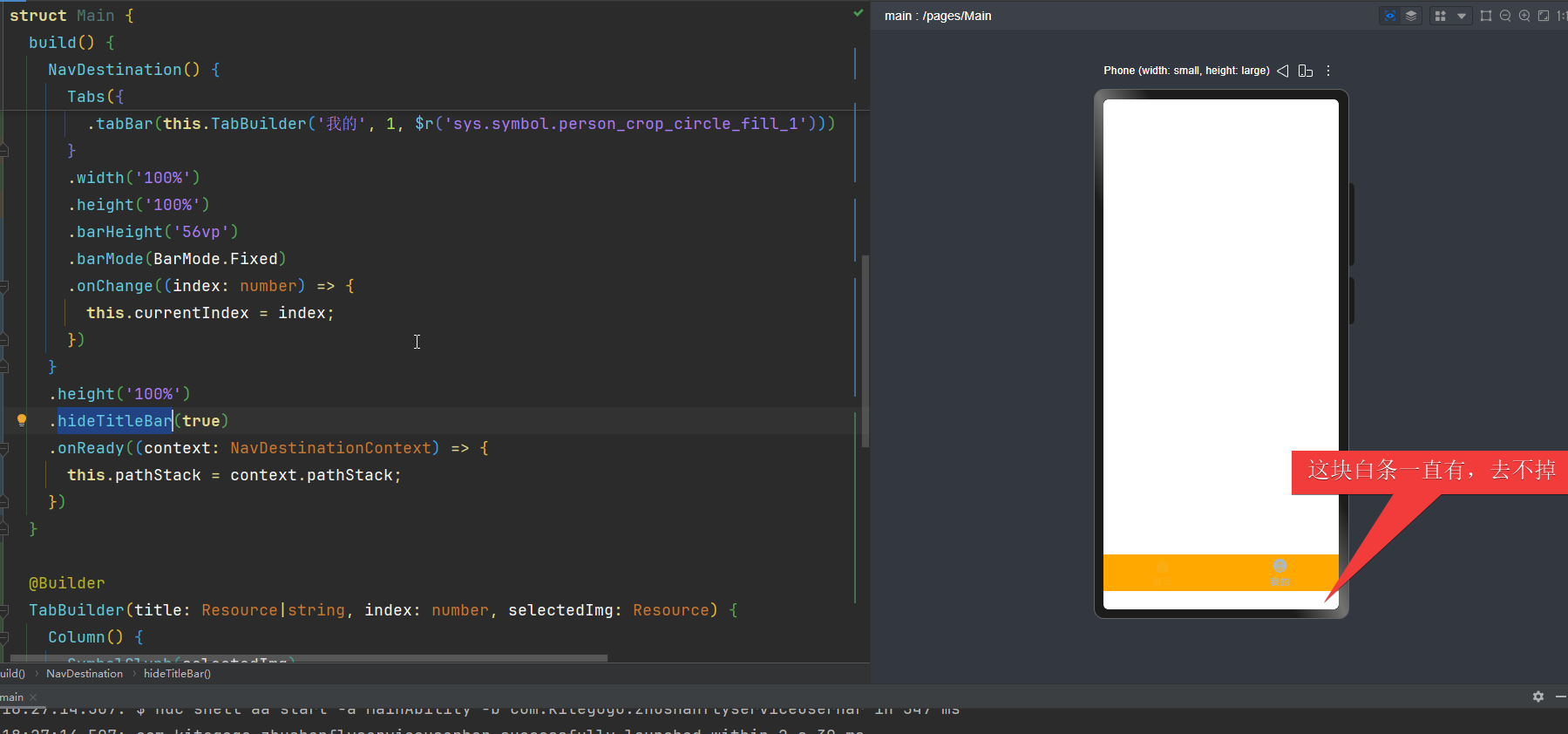
大佬们 我这是什么情况 我把demo几乎原封不动的复制过来 结果底部一直有一块白,跑的那个官方demo就没问题,同一部手机
更多关于HarmonyOS鸿蒙Next中NavDestination嵌套Tabs底部留白(已经设置hideTitleBar(true))的实战教程也可以访问 https://www.itying.com/category-93-b0.html

页面会默认避让状态栏、导航栏,您可以运行在模拟器或者真机上看下效果。
页面避让了底部导航栏,正好底部导航栏颜色为白色,所以看起来会有底部留白,您可以统一下底部导航栏和底部TabBar的背景色,这样看起来就不会太突兀了,也可以避让下底部导航栏。
如果您还是想要不避让底部导航栏,可以设置页面沉浸式。
示例代码如下:
import { window } from '@kit.ArkUI';
import { common } from '@kit.AbilityKit';

//
@Entry
@Component
struct Main {

  @StorageLink('fontSizeOffset') fontSizeOffset: number = 5;
  @State currentIndex: number = 0;
  @State pathStack: NavPathStack = new NavPathStack();
  private tabsController: TabsController = new TabsController();
  aboutToAppear(): void {
    let context: common.UIAbilityContext = this.getUIContext().getHostContext() as common.UIAbilityContext;
    window.getLastWindow(context).then((lastWindow) => {
      lastWindow.setWindowLayoutFullScreen(true); // 设置页面全屏
      lastWindow.setWindowSystemBarEnable(['status']); // 设置导航条和状态栏隐藏
    })
  }
  build() {
    NavDestination() {
      Tabs({
        barPosition: BarPosition.End,
        controller: this.tabsController
      })
      {
        TabContent() {
          Text('111111')
          // Home({ pathStack: this.pathStack })
        }
        .padding({
          left: '12vp',
          right: '12vp'
        })
        .height('120%')
        .backgroundColor('white')
        .tabBar(this.TabBuilder('首页', 0, $r('sys.symbol.house_fill')))

        TabContent() {
          // Setting()
        }
        .padding({
          left: '12vp',
          right: '12vp'
        })
        .expandSafeArea([SafeAreaType.SYSTEM],[])
        .height('100%')
        .backgroundColor('white')
        .tabBar(this.TabBuilder('我的', 1, $r('sys.symbol.person_crop_circle_fill_1')))
      }
      .width('100%')
      .height('100%')
      .barHeight('56vp')
      .barMode(BarMode.Fixed)
      .onChange((index: number) => {
        this.currentIndex = index;
      })
    }
    .height('100%')
    .hideTitleBar(true)
    .backgroundColor('blue')
  }

  @Builder
  TabBuilder(title: Resource|string, index: number, selectedImg: Resource) {
    Column() {
      SymbolGlyph(selectedImg)
        .fontSize('24fp')
        .renderingStrategy(SymbolRenderingStrategy.MULTIPLE_OPACITY)
        .symbolEffect(new BounceSymbolEffect(EffectScope.WHOLE, EffectDirection.UP),
          this.currentIndex === index ? true : false)
        // .fontColor(this.currentIndex === index ? [$r('[baseCore].color.sys_color')] : [$r('[baseCore].color.gray_light')])
      Text(title)
        .margin({ top: '4vp' })
        .fontSize(10 + this.fontSizeOffset)
        .fontWeight(500)
        // .fontColor(this.currentIndex === index ? $r('[baseCore].color.sys_color') : $r('[baseCore].color.gray_light'))
    }
    // .backgroundColor($r('[baseCore].color.sys_color'))
    .justifyContent(FlexAlign.Center)
    .height('56vp')
    .width('100%')
    .onClick(() => {
      this.currentIndex = index;
      this.tabsController.changeIndex(this.currentIndex);
    })
  }
}
更多关于HarmonyOS鸿蒙Next中NavDestination嵌套Tabs底部留白(已经设置hideTitleBar(true))的实战系列教程也可以访问 https://www.itying.com/category-93-b0.html




在HarmonyOS Next中,NavDestination嵌套Tabs底部留白问题,即使设置hideTitleBar(true)也可能存在。这通常与页面布局结构或Tabs组件自身的默认样式有关。建议检查NavDestination的父容器布局约束,并确认Tabs组件的height属性是否设置为’100%’。同时,检查是否在页面层级存在额外的默认边距(padding或margin)未被覆盖。
这个问题通常是由于布局高度计算或样式继承导致的。从你的代码看,主要问题可能出在以下几个地方:
-
NavDestination的高度设置:你设置了
.height('100%'),但在某些情况下,这可能会继承父容器的额外padding或margin。 -
Tabs组件的背景色:Tabs组件默认可能有背景色,且未完全覆盖底部区域。
建议检查/修改以下几点:
// 1. 确保Tabs完全填充NavDestination
Tabs({
  barPosition: BarPosition.End,
  controller: this.tabsController
}) {
  // TabContent内容...
}
.width('100%')
.height('100%')
.backgroundColor($r('[baseCore].color.white')) // 显式设置Tabs背景色

// 2. 检查NavDestination的父容器
// 如果NavDestination外层还有容器,确保它们也是100%高度且无padding

// 3. 尝试为TabContent设置flex布局
TabContent() {
  Column() {
    // 你的页面内容
  }
  .width('100%')
  .height('100%')
}
特别注意:
- 检查是否在全局样式或父组件中设置了默认的padding/margin
- 确保所有嵌套容器的高度都是
'100%' - 可以尝试在Tabs上添加
.margin({bottom: 0})显式清除底部边距
如果问题依旧,建议检查设备的安全区域(SafeArea)设置,某些设备底部可能有系统预留区域。
