




uni-app新版的uni-starter错误已经解决最好将代码集成到框架里不然会有后来者同样摸不清头脑
uni-app新版的uni-starter错误已经解决最好将代码集成到框架里不然会有后来者同样摸不清头脑
操作步骤:
- 再次运行注册,
预期结果:
- 应该能够注册成功
实际结果:
- 解决了,https://doc.dcloud.net.cn/uniCloud/uni-id/summary.html#config ,uni-id的云端配置文件在uniCloud/cloudfunctions/common/uni-config-center/uni-id/config.json
{
  "passwordSecret": [
    {
      "type": "hmac-sha256",
      "version": 1
    }
  ],
  "passwordStrength": "medium",
  "tokenSecret": "",
  "requestAuthSecret": "",
  "tokenExpiresIn": 7200,
  "tokenExpiresThreshold": 3600,
  "maxTokenLength": 10,
  "passwordErrorLimit": 6,
  "passwordErrorRetryTime": 3600,
  "autoSetInviteCode": false,
  "forceInviteCode": false,
  "idCardCertifyLimit": 1,
  "realNameCertifyLimit": 5,
  "sensitiveInfoEncryptSecret": "",
  "frvNeedAlivePhoto": false,
  "userRegisterDefaultRole": [],
  "app": {
    "tokenExpiresIn": 2592000,
    "tokenExpiresThreshold": 864000,
    "oauth": {
      "weixin": {
        "appid": "",
        "appsecret": ""
      },
      "qq": {
        "appid": "",
        "appsecret": ""
      },
      "apple": {
        "bundleId": ""
      },
      "huawei": {
        "clientId": "",
        "clientSecret": ""
      }
    }
  },
  "web": {
    "tokenExpiresIn": 7200,
    "tokenExpiresThreshold": 3600,
    "oauth": {
      "weixin-h5": {
        "appid": "",
        "appsecret": ""
      },
      "weixin-web": {
        "appid": "",
        "appsecret": ""
      }
    }
  },
  "mp-weixin": {
    "tokenExpiresIn": 259200,
    "tokenExpiresThreshold": 86400,
    "oauth": {
      "weixin": {
        "appid": "",
        "appsecret": ""
      }
    }
  },
  "mp-qq": {
    "tokenExpiresIn": 259200,
    "tokenExpiresThreshold": 86400,
    "oauth": {
      "qq": {
        "appid": "",
        "appsecret": ""
      }
    }
  },
  "mp-alipay": {
    "tokenExpiresIn": 259200,
    "tokenExpiresThreshold": 86400,
    "oauth": {
      "alipay": {
        "appid": "",
        "privateKey": "",
        "keyType": "PKCS8"
      }
    }
  },
  "mp-harmony": {
    "oauth": {
      "huawei": {
        "clientId": "",
        "clientSecret": ""
      }
    }
  },
  "service": {
    "sms": {
      "name": "",
      "codeExpiresIn": 180,
      "scene": {
        "bind-mobile-by-sms": {
          "templateId": "",
          "codeExpiresIn": 240
        }
      }
    },
    "univerify": {
      "appid": ""
    }
  }
}
bug描述:
- 新版的uni-starter 错误,
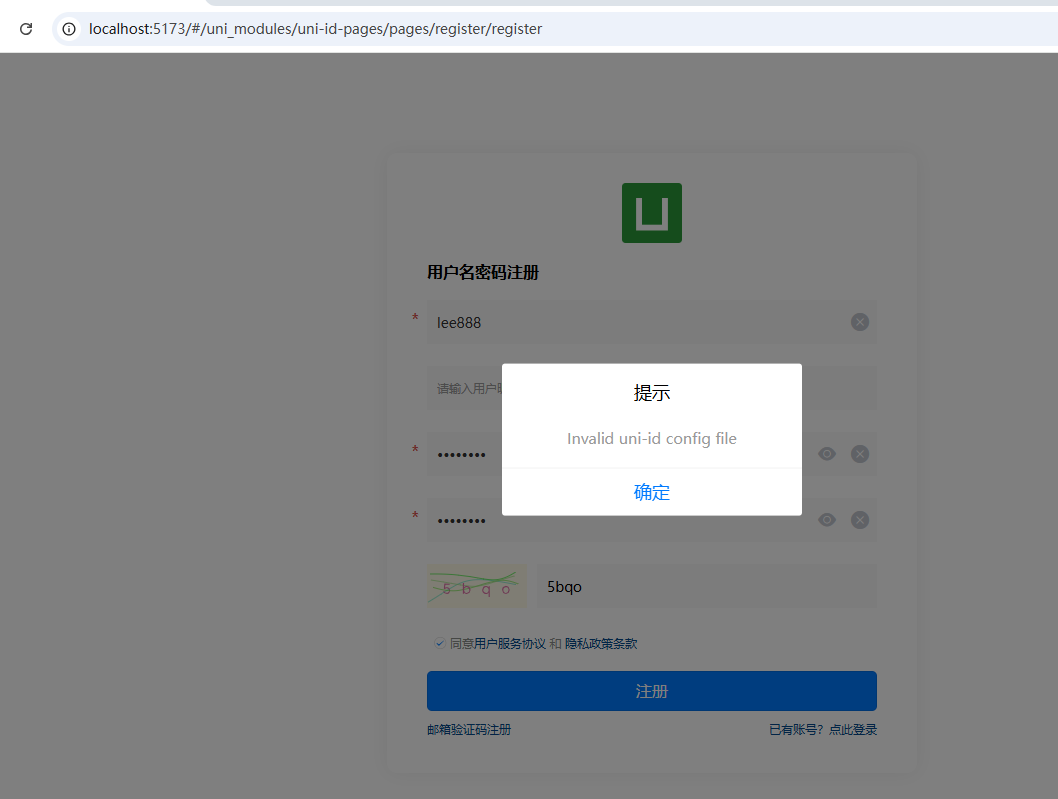
- 我在运行uni-starter注册时,页面/uni_modules/uni-id-pages/pages/register/register 点击注册,弹出对话框:Invalid uni-id config file,具体如下截图,Hx显示错误如下:
15:12:00.755 [本地调试][云对象:uni-id-co]调用方法:[registerUser],请求参数: {"username":"lee888","nickname":"lee888","password":"lee888**",...}
15:12:00.783 [本地调试]Error: Invalid uni-id config file
15:12:00.783 [本地调试]    at x._getOriginConfig (E:\unicloud\uni-starter-master\suijihao\uni_modules\uni-id-common\uniCloud\cloudfunctions\common\uni-id-common\index.js:1:9360)
15:12:00.783 [本地调试]    at new x (E:\unicloud\uni-starter-master\suijihao\uni_modules\uni-id-common\uniCloud\cloudfunctions\common\uni-id-common\index.js:1:8584)
15:12:00.783 [本地调试]    at Object.y [as createInstance] (E:\unicloud\uni-starter-master\suijihao\uni_modules\uni-id-common\uniCloud\cloudfunctions\common\uni-id-common\index.js:1:10439)
15:12:00.783 [本地调试]    at le._before (E:\unicloud\uni-starter-master\suijihao\uni_modules\uni-id-pages\uniCloud\cloudfunctions\uni-id-co\index.obj.js:134:36)
15:12:12.218 [本地调试][云对象:uni-captcha-co]调用方法:[getImageCaptcha],请求参数: {"scene":"register"}
15:12:12.757 [本地调试][云对象:uni-captcha-co]返回结果: {"code":0,"msg":"验证码获取成功","captchaBase64":"data:image/svg+xml;utf8,%3Csvg xmlns='http://www.w…2 2' stroke='%23e6bc92' fill='none'/%3E%3C/svg%3E",...}
15:14:41.528 [本地调试][云对象:uni-id-co]调用方法:[registerUser],请求参数: {"username":"lee888","nickname":"lee888","password":"lee888**",...}
15:14:41.546 [本地调试]Error: Invalid uni-id config file
15:14:41.546 [本地调试]    at x._getOriginConfig (E:\unicloud\uni-starter-master\suijihao\uni_modules\uni-id-common\uniCloud\cloudfunctions\common\uni-id-common\index.js:1:9360)
15:14:41.546 [本地调试]    at new x (E:\unicloud\uni-starter-master\suijihao\uni_modules\uni-id-common\uniCloud\cloudfunctions\common\uni-id-common\index.js:1:8584)
15:14:41.546 [本地调试]    at Object.y [as createInstance] (E:\unicloud\uni-starter-master\suijihao\uni_modules\uni-id-common\uniCloud\cloudfunctions\common\uni-id-common\index.js:1:10439)
15:14:41.546 [本地调试]    at le._before (E:\unicloud\uni-starter-master\suijihao\uni_modules\uni-id-pages\uniCloud\cloudfunctions\uni-id-co\index.obj.js:134:36)
15:19:30.339 [本地调试][云对象:uni-captcha-co]调用方法:[getImageCaptcha],请求参数: {"scene":"register"}
15:19:31.028 [本地调试][云对象:uni-captcha-co]返回结果: {"code":0,"msg":"验证码获取成功","captchaBase64":"data:image/svg+xml;utf8,%3Csvg xmlns='http://www.w…64 36.80L118.41 36.73L119.33 36.80'/%3E%3C/svg%3E",...}

更多关于uni-app新版的uni-starter错误已经解决最好将代码集成到框架里不然会有后来者同样摸不清头脑的实战教程也可以访问 https://www.itying.com/category-93-b0.html
