




uni-app uni.downloadFile 在 h5 端中 下载进度 progress 一直是 Infinity 在微信小程序端一直是 null
uni-app uni.downloadFile 在 h5 端中 下载进度 progress 一直是 Infinity 在微信小程序端一直是 null
示例代码:
const test = uni.downloadFile({
  url: 'http://192.168.20.101:8081/gateway/file-server/fileOss/outsidePreview/xzyc19928853767319429121992885376731942913',
  success: (ret) => {
    console.log(ret)
  },
  fail: (ret) => {
    console.log(ret)
  },
})
test.onProgressUpdate((ret) => {
  console.log(ret)
})
操作步骤:
新建 vue 文件,复制代码示例运行
预期结果:
progress 返回正确的下载进度
实际结果:
progress 返回错误
bug描述:
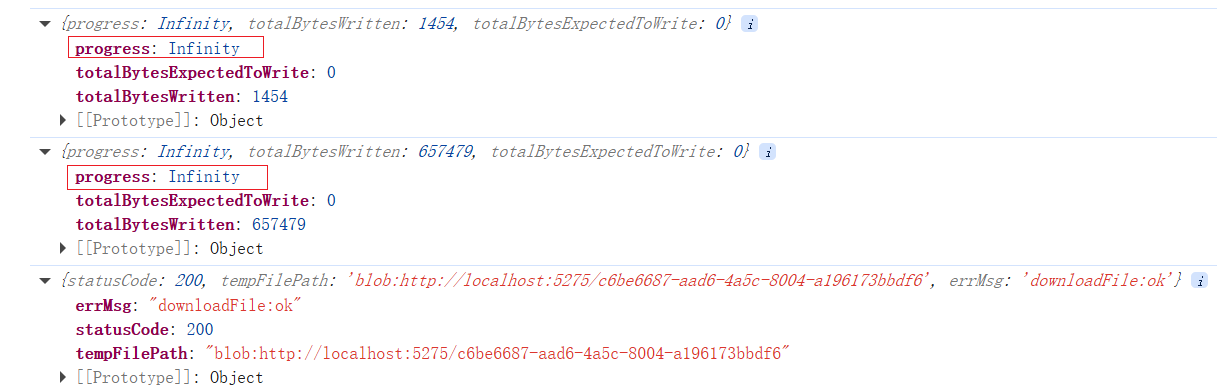
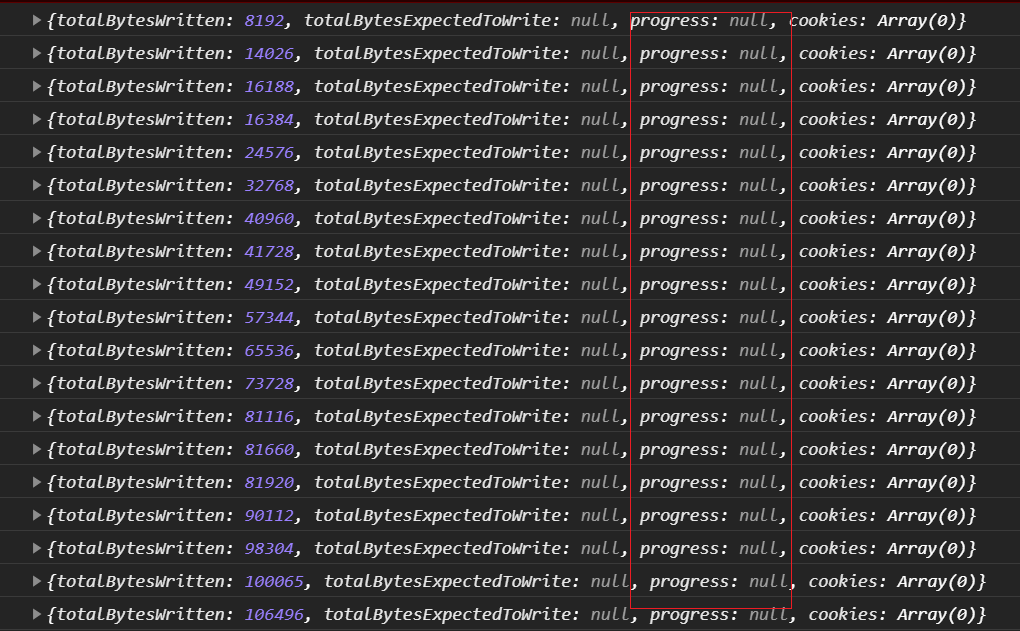
uni.downloadFile 在 h5 端中,下载进度 progress 一直是 Infinity,在微信小程序端一直是 null
文件能正常下载
vue3 项目,微信基础库3.11.2
| 开发环境 | 版本号 | 项目创建方式 |
|---|---|---|
| Windows | win10 | HBuilderX |
更多关于uni-app uni.downloadFile 在 h5 端中 下载进度 progress 一直是 Infinity 在微信小程序端一直是 null的实战教程也可以访问 https://www.itying.com/category-93-b0.html
6 回复


这是一个跨平台兼容性问题,不同端对下载进度计算的支持程度不同。
H5端 Infinity 问题:
H5端使用浏览器的XMLHttpRequest实现下载,当服务器未返回Content-Length响应头时,无法计算总下载量,导致totalBytesExpectedToWrite为0。此时进度计算公式progress = (totalBytesWritten / totalBytesExpectedToWrite) * 100会得到Infinity。
微信小程序 null 问题:
微信小程序基础库3.11.2版本中,onProgressUpdate回调在某些情况下可能返回null,这可能是微信小程序API的实现问题或特定版本bug。
解决方案:
- H5端处理:
test.onProgressUpdate((ret) => {
  if (ret.totalBytesExpectedToWrite === 0) {
    console.log('服务器未返回Content-Length,无法计算进度')
    // 可以显示无限进度条或只显示已下载大小
    console.log('已下载:', ret.totalBytesWritten)
  } else {
    const progress = (ret.totalBytesWritten / ret.totalBytesExpectedToWrite) * 100
    console.log('下载进度:', progress + '%')
  }
})
- 微信小程序端:
- 升级微信开发者工具和基础库版本
- 添加空值检查:
test.onProgressUpdate((ret) => {
  if (!ret) {
    console.log('进度信息为空')
    return
  }
  console.log('下载进度:', ret.progress)
})