





uni-app 一键登录云函数验证报获取不到手机号
uni-app 一键登录云函数验证报获取不到手机号 产品分类:uniCloud/App
| 开发环境 | 版本号 | 项目创建方式 |
|---|---|---|
示例代码:
fastLoginFn() {
    if (!this.checked) {
        this.showPrivacyPopup = true;
        return;
    }
    console.log("手机号一键登录")
    var this_ = this
    // 预登陆
    uni.preLogin({
        provider: "univerify",
        success: () => {
            uni.login({
                provider: "univerify",
                univerifyStyle: {
                    fullScreen: true,
                    backgroundColor: "rgba(255,255,255,1)",
                    phoneNum: {
                        color: "#000000",
                        fontSize: "22"
                    },
                    slogan: {
                        color: "#707070",
                        fontSize: "12"
                    },
                    icon: {
                        path: "static/login/login_icon.png",
                        width: "98px",
                        height: "56px",
                    },
                    authButton: {
                        normalColor: "#FE006B",
                        highlightColor: "#FF5F69",
                        disabledColor: "#BDBDBD",
                        textColor: "#ffffff",
                        title: "本机号码一键登录"
                    },
                    otherLoginButton: {
                        visible: "true",
                        textColor: "#FE006B",
                        title: "其他手机号",
                        borderWidth: "1px",
                        borderColor: "#FE006B",
                        borderWidth: "2px"
                    },
                    privacyTerms: {
                        defaultCheckBoxState: "false",
                        textColor: "#707070",
                        termsColor: "#037BFF",
                        prefix: "我已阅读并同意",
                        suffix: "并使用本机号码登录",
                        fontSize: "14",
                        uncheckedImage: "static/login/icon_check_login_bf.png",
                        checkedImage: "static/login/checked_icon.png",
                        checkBoxSize: "14",
                        privacyItems: [
                            // { url: "https://app.chongzhigu.com/serviceAgreement.html", title: "用户协议" },
                            // { url: "https://app.chongzhigu.com/privacy.html", title: "隐私政策" }
                        ]
                    }
                },
                success: async (res) => {
                    console.log("一键登录调用返回的数据", res)
                    let data = {
                        isNewApp: 'chongzhigu1',
                        accessToken: res.authResult.access_token,
                        openId: res.authResult.openid
                    }
                    console.log('一键登录', data)
                    const login = await this.$api.fastLogin(data)
                    console.log('login', login)
                    if (login.code === 20000) {
                        let userInfo = login.data;
                        // #ifdef APP-PLUS
                        this.pushConnect(); //推送绑定id
                        // #endif
                        this.onLoginSuccess(userInfo);
                        setTimeout(() => {
                            uni.closeAuthView()
                        }, 300)
                    } else {
                        uni.showToast({
                            title: "一键登录失败请选择其他登录方式",
                            icon: "none",
                            duration: 5000
                        })
                        uni.navigateTo({
                            url: '/pages/login/newLogin'
                        })
                        setTimeout(() => {
                            uni.closeAuthView()
                        }, 500)
                    }
                },
                fail(err) {
                    if (err.errCode == 30002) {
                        console.log('其他登录方式');
                        uni.navigateTo({
                            url: '/pages/login/newLogin'
                        })
                    }
                    setTimeout(() => {
                        uni.closeAuthView()
                    }, 500)
                }
            })
        },
        fail(res) {
            console.log("一键登录uni.preLogin失败", res)
            if (res.errMsg != "login:ok") {
                uni.showToast({
                    title: "请检查是否插入有效sim卡及开启蜂窝数据网络",
                    icon: "none"
                })
            }
            setTimeout(() => {
                uni.navigateTo({
                    url: '/pages/login/newLogin'
                })
            }, 200)
        }
    })
},
fail(res) {
    console.log("一键登录uni.preLogin失败", res)
    if (res.errMsg != "login:ok") {
        uni.showToast({
            title: "请检查是否插入有效sim卡及开启蜂窝数据网络",
            icon: "none"
        })
    }
    setTimeout(() => {
        uni.navigateTo({
            url: '/pages/login/newLogin'
        })
    }, 200)
}
操作步骤:
一键登录,后端云函数获取手机号异常
预期结果:
一键登录,后端云函数调用正常获取手机号
实际结果:
一键登录,后端云函数调用获取不到手机号
bug描述:
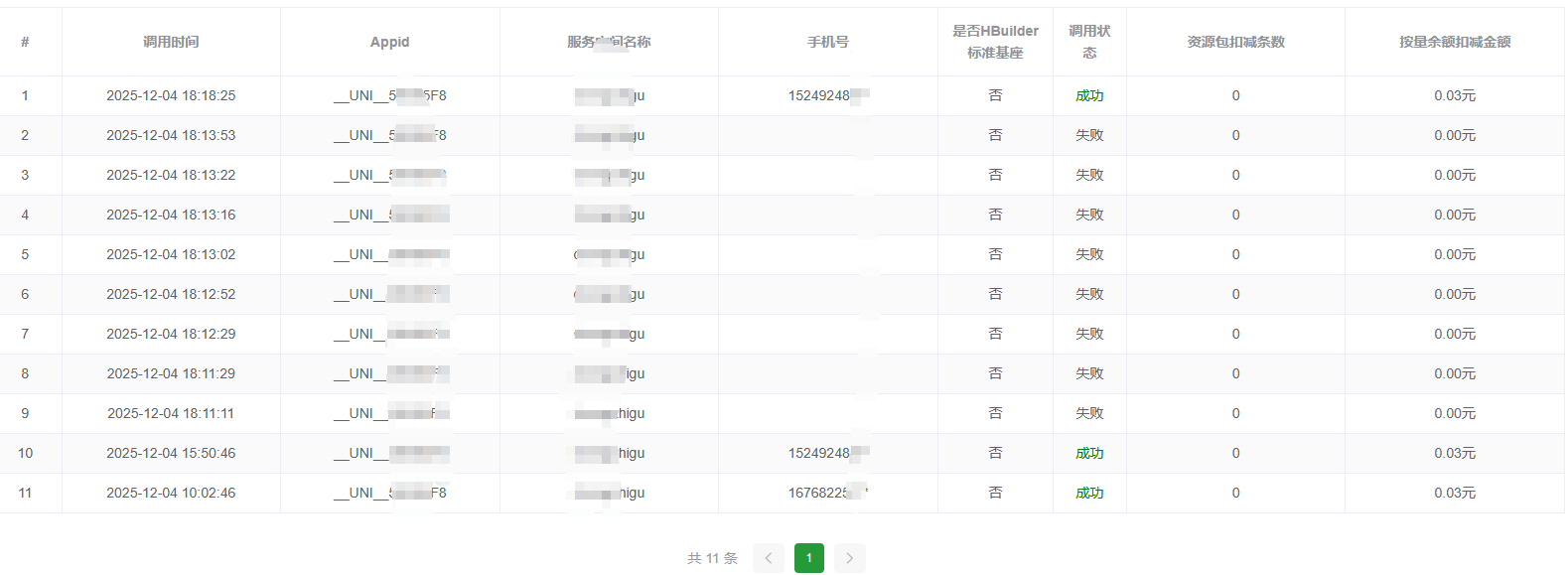
手机上正常获取到了运营商回调,后端服务调用云函数报{"success":false,"error":{"code":"FunctionBizError","message":"5000:获取手机号失败,请稍后重试。"}},开发测试前几天正常的,上线运行了2天之后突然部分手机号无法正常登录,目前已知(移动)
更多关于uni-app 一键登录云函数验证报获取不到手机号的实战教程也可以访问 https://www.itying.com/category-93-b0.html


