




uni-app中onNavigationBarButtonTap事件不执行
uni-app中onNavigationBarButtonTap事件不执行
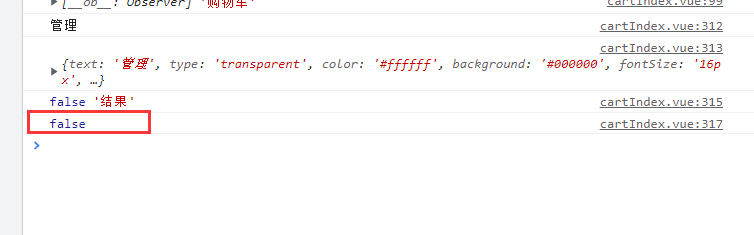
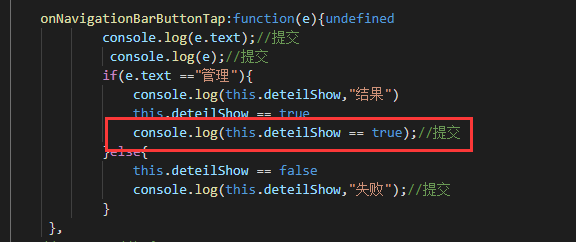
onNavigationBarButtonTap 能打印出来 赋值就不执行了
3 回复

【正确报bug的姿势】https://ask.dcloud.net.cn/article/38139
更多关于uni-app中onNavigationBarButtonTap事件不执行的实战教程也可以访问 https://www.itying.com/category-93-b0.html


根据您提供的截图信息,问题在于onNavigationBarButtonTap事件处理函数中的this指向问题。
在uni-app中,onNavigationBarButtonTap是页面生命周期函数,但在该函数内部直接使用this可能无法正确指向页面实例,导致无法访问data中的数据或调用页面方法。
解决方案:
-
使用箭头函数(推荐): 在
methods中定义事件处理函数时使用箭头函数,可以自动绑定正确的this。methods: { handleButtonTap: () => { // 现在this指向正确 this.show = !this.show; } } -
在onLoad中绑定this: 在页面加载时手动绑定this上下文。
onLoad() { this.onNavigationBarButtonTap = this.onNavigationBarButtonTap.bind(this); } -
使用变量保存this引用: 在函数外部保存页面实例的引用。
let that;
export default {
  data() {
    return { show: false }
  },
  onLoad() {
    that = this;
  },
  onNavigationBarButtonTap() {
    that.show = !that.show;
  }
}
