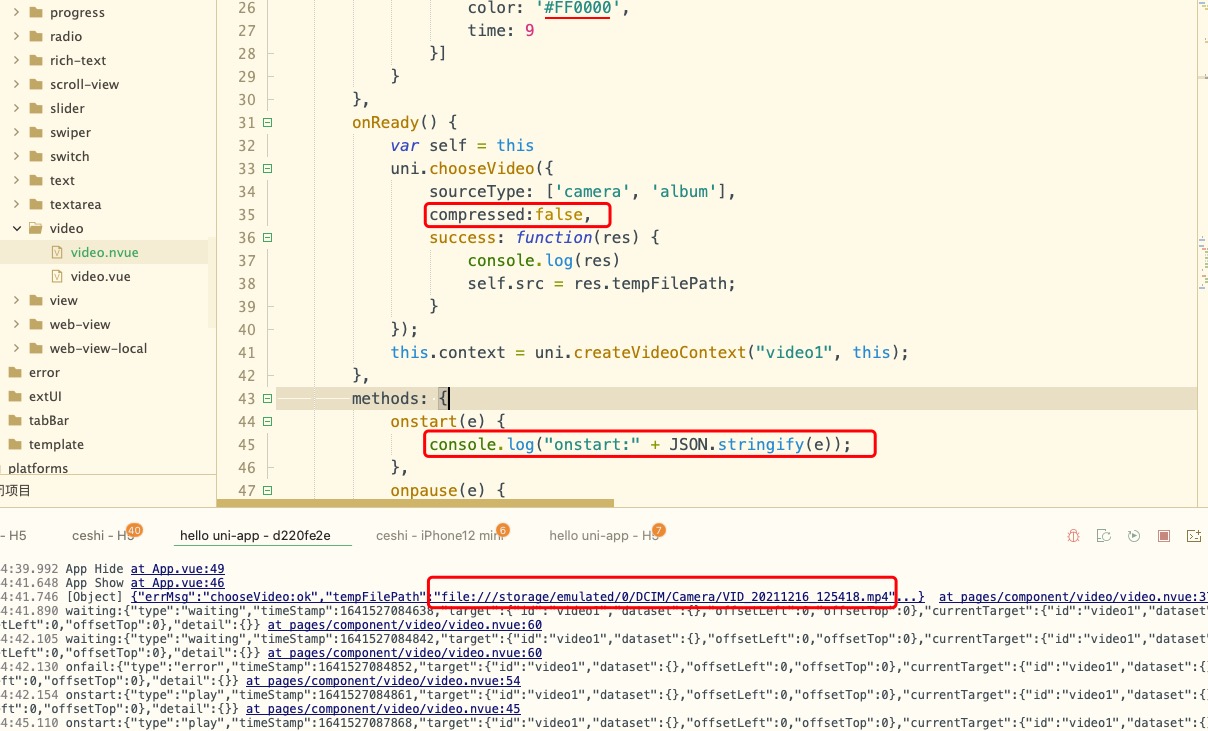
uni-app中uni.chooseVideo()接口获取本地视频播放问题

uni-app中uni.chooseVideo()接口获取本地视频播放问题

华为鸿蒙机
nvue文件

uni.chooseVideo()的参数compressed设置true,已压缩视频,在video组件可以播放

uni.chooseVideo()的参数compressed设置false,不压缩视频,在video组件无法播放

manifest.json "app-plus" : { "runmode" : "liberate" }加上这个也不行

请问这个是什么原因?

11 回复

确实存在

更多关于uni-app中uni.chooseVideo()接口获取本地视频播放问题的实战教程也可以访问 https://www.itying.com/category-93-b0.html


原来你比我早发现了问题,为啥不早点提帖子呀,这个BUG害的我一行一行代码排查,浪费我1天时间

有人解决吗?

提供一下可以复现问题的示例吧。 我这边在hello uni里面 这样配置。可以正常播放呀
uni.chooseVideo({
camera: this.cameraList[this.cameraIndex].value,
sourceType: sourceType[this.sourceTypeIndex],
compressed:false,
success: (res) => {
this.src = res.tempFilePath
},

nvue 试试

回复 FullStack: nvue也试了。我这边OK hx 3.3.5 。 你发个示例出来吧

附件就是例子

我试试

回复 DCloud_Android_DQQ: 用你的代码 我复现了问题。 但是 hello uni 确实没问题。 我先看看

你试试下面的代码 有没有问题
<template>
<view>
<page-head :title="title"></page-head>
<view class="uni-common-mt">
<view class="uni-list">
<view class="uni-list-cell">
<view class="uni-list-cell-left">
<view class="uni-label">视频来源</view>
</view>
<view class="uni-list-cell-right">
<picker :range=“sourceType” @change=“sourceTypeChange” :value=“sourceTypeIndex”>
<view class="uni-input">{{sourceType[sourceTypeIndex]}}</view>
</picker>
</view>
</view>
</view>
</view>

<view class="uni-title uni-common-mt uni-common-pl">摄像头位置</view>
<view class="uni-hello-text camera-tips">注意:部分 Android 手机下由于系统 ROM 不支持无法生效,打开拍摄界面后可操作切换</view>
<view class="uni-list">
<radio-group @change=“radioChange”>
<label class="uni-list-cell uni-list-cell-pd" v-for="(item, index) in cameraList" :key="item.value">
<radio :value="item.value" :checked="index === cameraIndex">{{item.name}}</radio>
</label>
</radio-group>
</view>

<template v-if="!src">
<view class=“uni-hello-addfile” @tap=“chooseVideo”>+ 添加视频</view>
</template>
<template v-else>

</template>
</view>
</template>

<script> var sourceType = [ ['camera'], ['album'], ['camera', 'album'] ] export default { data() { return { title: 'chooseVideo', sourceTypeIndex: 2, sourceType: ['拍摄', '相册', '拍摄或相册'], src: '', cameraList: [{ value: 'back', name: '后置摄像头', checked: 'true' }, { value: 'front', name: '前置摄像头' }, ], cameraIndex: 0 } }, onUnload() { this.src = '', this.sourceTypeIndex = 2, this.sourceType = ['拍摄', '相册', '拍摄或相册']; }, methods: { radioChange(evt) { for (let i = 0; i < this.cameraList.length; i++) { if (this.cameraList[i].value === evt.detail.value) { this.cameraIndex = i; break; } } }, sourceTypeChange: function(e) { this.sourceTypeIndex = parseInt(e.detail.value) }, chooseVideo: function() { uni.chooseVideo({ camera: this.cameraList[this.cameraIndex].value, sourceType: sourceType[this.sourceTypeIndex], compressed:false, success: (res) => { console.log(JSON.stringify(res)) this.src = res.tempFilePath }, fail: (err) => { // #ifdef MP uni.getSetting({ success: (res) => { let authStatus = false; switch (this.sourceTypeIndex) { case 0: authStatus = res.authSetting['scope.camera']; break; case 1: authStatus = res.authSetting['scope.album']; break; case 2: authStatus = res.authSetting['scope.album'] && res.authSetting['scope.camera']; break; default: break; } if (!authStatus) { uni.showModal({ title: '授权失败', content: 'Hello uni-app需要从您的相机或相册获取视频,请在设置界面打开相关权限', success: (res) => { if (res.confirm) { uni.openSetting() } } }) } } }) // #endif } }) } } } </script> <style> .video { width: 100%; } .camera-tips { padding: 10rpx 30rpx; } </style>

bug 已确认。 nvue 下,播放过的视频组件调用 chooseVideo方法存在此问题。

回到顶部