




HarmonyOS鸿蒙Next中build app包的时候报错:Ohos BundleTool [Error]: Module: (entry) and Module: (entry) have the same moduleName, please check devi
HarmonyOS鸿蒙Next中build app包的时候报错:Ohos BundleTool [Error]: Module: (entry) and Module: (entry) have the same moduleName, please check devi
{
  "apiType": "stageMode",
  "buildOption": {
  },
  "buildOptionSet": [
    {
      "name": "release",
      "arkOptions": {
        "obfuscation": {
          "ruleOptions": {
            "enable": true,
            "files": [
              "./obfuscation-rules.txt"
            ]
          }
        }
      }
    },
  ],
  "targets": [
    {
      "name": "default",
      "source": {
        "sourceRoots": [
          "./src/plugOnline"
        ],

      }
    },
    {
      "name": "ohosTest",
    },
    {
      "name": "appTest",
      "source": {
        "sourceRoots": [
          './src/pluginDebug'
        ]
      }
    }
  ]
}
这个是entry目录下的配置,本意是想通过target来隔离测试代码,但是打包后报错:
2025/09/12 14:29:56.506 -Ohos BundleTool [Error]: Module: (entry) and Module: (entry) have the same moduleName, please check deviceType or distroFilter of the module. 2025/09/12 14:29:56.506 - Ohos BundleTool [Error]: Module: entry has deviceType [phone, tablet].
2025/09/12 14:29:56.506 - Ohos BundleTool [Error]: Another Module: entry has deviceType [phone, tablet].
2025/09/12 14:29:56.506 - Ohos BundleTool [Error]: Solution: Make sure the module name is valid and unique.
2025/09/12 14:29:56.506 - Ohos BundleTool [Error]: Reference: FAQ.
2025/09/12 14:29:56.506 - Ohos BundleTool [Error]: Compressor::compressFile verify failed, check version, apiVersion,moduleName,packageName.
2025/09/12 14:29:56.506 - Ohos BundleTool [Error]: Compressor::compressAppMode compress failed. msg: Compressor::compressFile verify failed, check version, apiVersion,moduleName,packageName.
2025/09/12 14:29:56.509 - Ohos BundleTool [Error]: Compressor::compressProcess Bundle exception: Compressor::compressAppMode compress failed.
2025/09/12 14:29:56.511 - Ohos BundleTool [Error]: Compressor::compressProcess compress failed.
2025/09/12 14:29:56.511 - Ohos BundleTool [Error]: CompressEntrance::main exit, compress failed
本来问答中搜到了相关问题,但是楼主设置了不可见,只好发起求助了。
更多关于HarmonyOS鸿蒙Next中build app包的时候报错:Ohos BundleTool [Error]: Module: (entry) and Module: (entry) have the same moduleName, please check devi的实战教程也可以访问 https://www.itying.com/category-93-b0.html

已经修改好了:
在build-proflie.json5中,里面的products新增一个:
"products": [
  {
    "name": "default",
    "signingConfig": "default",
    "compatibleSdkVersion": "5.0.0(12)",
    "runtimeOS": "HarmonyOS",
    "buildOption": {
      "strictMode": {
        "caseSensitiveCheck": true,
        "useNormalizedOHMUrl": true
      }
    }
  },
  {
    "name":  "otherProduct",
    "signingConfig": "default",
    "compatibleSdkVersion": "5.0.0(12)",
    "runtimeOS": "HarmonyOS",
    "buildOption": {
      "strictMode": {
        "caseSensitiveCheck": true,
        "useNormalizedOHMUrl": true
      }
    }
  }
],
然后modules中的targets设置不同的products就可以了:
"modules": [
  {
    "name": "entry",
    "srcPath": "./entry",
    "targets": [
      {
        "name": "default",
        "applyToProducts": [
          "default"
        ]
      },
      {
        "name": "appTest",
        "applyToProducts": [
          "otherProduct"
        ]
      }
    ]
  }
]
更多关于HarmonyOS鸿蒙Next中build app包的时候报错:Ohos BundleTool [Error]: Module: (entry) and Module: (entry) have the same moduleName, please check devi的实战系列教程也可以访问 https://www.itying.com/category-93-b0.html

该问题是由于模块配置中 moduleName 重复导致的冲突。以下是具体分析和解决方案:
在 entry 模块的配置中,多个 target 默认继承相同的 moduleName(默认为模块目录名 entry),导致打包工具判定模块名称重复。即使通过 targets 隔离代码,模块的唯一性仍需通过唯一 moduleName 或 distroFilter 区分。
在 build-profile.json5 中为每个 target 明确指定唯一 moduleName,例如:
{
  "apiType": "stageMode",
  "buildOption": {},
  "buildOptionSet": [ ... ],
  "targets": [
    {
      "name": "default",
      "moduleName": "entry_main",  // 增加唯一名称
      "source": { ... }
    },
    {
      "name": "ohosTest",
      "moduleName": "entry_test"   // 测试模块独立命名
    },
    {
      "name": "appTest",
      "moduleName": "entry_debug", // 调试模块独立命名
      "source": { ... }
    }
  ]
}
通过 distroFilter 区分模块适用的设备类型,避免同一设备类型下模块冲突:
{
  "targets": [
    {
      "name": "default",
      "distroFilter": "deviceType = phone || deviceType = tablet",
      "source": { ... }
    },
    {
      "name": "appTest",
      "distroFilter": "deviceType = car",  // 仅车载设备生效
      "source": { ... }
    }
  ]
}

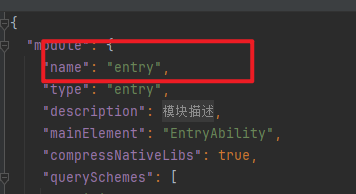
1.楼主检查一下./src/pluginDebug这个路径下和这个路径下./src/plugOnline是不是存在两个相同的module.json5,且名字都是一样的
2.如果楼主想要配置不同的资源路径可以配置不同的resources


这个错误是因为你在同一个模块(entry)中定义了多个target,但打包工具将它们识别为多个同名的模块。
问题出在你的targets配置上。虽然你定义了三个target(default、ohosTest、appTest),但打包时它们都被视为同一个模块"entry"。当这些target的deviceType(默认为[phone, tablet])相同时,系统会认为存在模块名冲突。
解决方案是确保每个target有唯一的模块标识。在HarmonyOS Next中,可以通过以下方式解决:
-
为每个target设置不同的distroFilter: 在module.json5文件中,为每个target配置不同的distroFilter,使它们针对不同的设备类型或场景。
-
检查module.json5配置: 确保你的module.json5中moduleName是唯一的,并且每个target对应的配置有明确的区分。
-
重新考虑项目结构: 如果测试代码需要完全隔离,考虑创建独立的HAP模块而不是在同一个entry模块中使用多个target。
从你的配置看,你试图通过target隔离测试代码,但当前配置会导致模块名冲突。需要调整distroFilter或重新设计模块结构来避免这个问题。
