




HarmonyOS鸿蒙Next中使用NDK(C++)开发时报错,提示Ensure that the .so name is the same as that in oh-package.json5 under module directory.
HarmonyOS鸿蒙Next中使用NDK(C++)开发时报错,提示Ensure that the .so name is the same as that in oh-package.json5 under module directory.
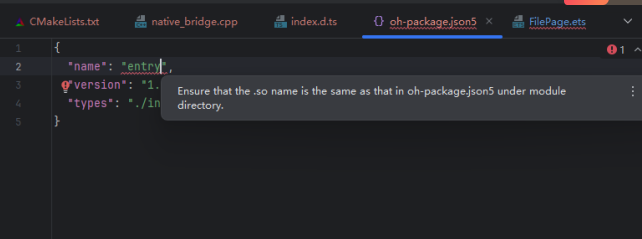
我要在module级别的module.json5加什么代码,怎么添加?
更多关于HarmonyOS鸿蒙Next中使用NDK(C++)开发时报错,提示Ensure that the .so name is the same as that in oh-package.json5 under module directory.的实战教程也可以访问 https://www.itying.com/category-93-b0.html

需要在dependencies中加入.so包的名字和位置,然后将名字对应过去。
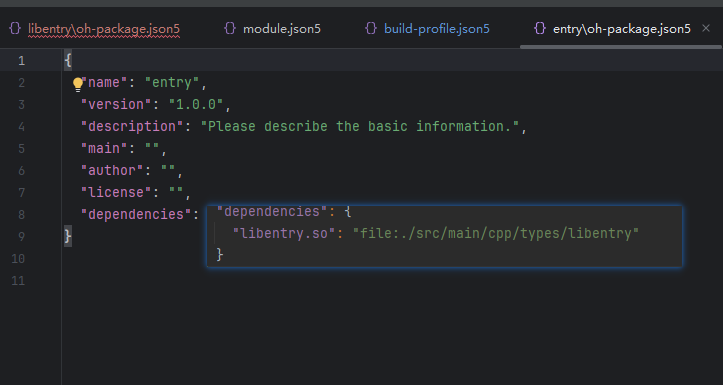
更多关于HarmonyOS鸿蒙Next中使用NDK(C++)开发时报错,提示Ensure that the .so name is the same as that in oh-package.json5 under module directory.的实战系列教程也可以访问 https://www.itying.com/category-93-b0.html


这个错误提示.so文件名与oh-package.json5中声明的名称不一致。你需要确保两个地方的文件名完全匹配。
解决方法如下:
-
检查
oh-package.json5文件: 在模块目录下的oh-package.json5中,找到"nativeLibrary"字段。确认其值(即.so库的名称)是否与你实际生成的.so文件名一致。示例:
{ "name": "your_module", "nativeLibrary": "your_library_name" // 这里必须与.so文件名一致 } -
检查生成的
.so文件: 确认你的C++代码编译后生成的.so文件名称(如libyour_library_name.so)是否与oh-package.json5中的"nativeLibrary"值匹配。注意通常不需要包含lib前缀和.so后缀。 -
在
module.json5中添加NDK配置: 在模块的module.json5文件中,确保"abilities"或"extensionAbilities"(根据你的使用场景)下正确配置了"nativeLibraryPath"。这通常指向.so文件所在的目录(如libs/arm64-v8a)。示例:
{ "module": { "name": "your_module", "abilities": [ { "name": "EntryAbility", "srcEntry": "./ets/entryability/EntryAbility.ets", "nativeLibraryPath": "libs/arm64-v8a", // 指定.so文件目录 "metadata": [ { "name": "ohos.ability.nativeLibrary", "value": "your_library_name" // 与oh-package.json5中的名称一致 } ] } ] } } -
同步文件结构: 确保
.so文件放在正确的目录下(如src/main/cpp/libs/arm64-v8a/),并且编译输出路径配置正确。
完成以上步骤后,重新编译项目即可解决该错误。关键点是保持oh-package.json5中的"nativeLibrary"、module.json5中的"value"和实际.so文件名三者一致。
