




HarmonyOS鸿蒙Next中使用AVRecorder录制音频的时长不正确
HarmonyOS鸿蒙Next中使用AVRecorder录制音频的时长不正确 当前API17。
在使用recorder录音时,我使用了一个计时器去记录时间,但在录制结束后,获取音频时,使用了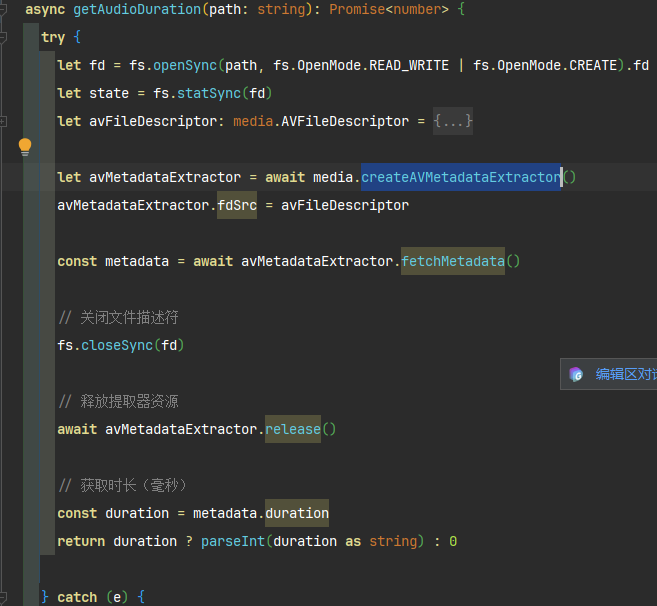 来获取音频时长(社区找到的示例),显示的时长比我计时器的时长短,录制越长,缩短的比例越大。以下是我recorder的主要代码:
RecorderManager.ets:
export class AudioRecorder {
  private avRecorder: media.AVRecorder | undefined = undefined

  private avProfile: media.AVRecorderProfile = {
    audioBitrate: 128000, // 音频比特率
    audioChannels: 1, // 音频声道数
    audioCodec: media.CodecMimeType.AUDIO_AAC, // 音频编码格式,当前支持ACC,MP3,G711MU
    audioSampleRate: 32000, // 音频采样率
    fileFormat: media.ContainerFormatType.CFT_MPEG_4A, // 封装格式,当前支持MP4,M4A,MP3,WAV
  }

  private avConfig: media.AVRecorderConfig = {
    audioSourceType: media.AudioSourceType.AUDIO_SOURCE_TYPE_MIC, // 音频输入源,这里设置为麦克风
    profile: this.avProfile,
    url: 'fd://35', // 参考应用文件访问与管理开发示例新建并读写一个文件
  }

  private uriPath: string = ''

  private filePath: string = ''

  /**
   * 创建文件以及设置avConfig.url
   */
  async createAndSetFd(): Promise<void> {
    try {
      const context: Context = getContext(this)
      const path: string = context.filesDir + `/${DateUtils.getTimestamp()}.mp3` // 文件沙箱路径,文件后缀名应与封装格式对应
      const audioFile: fs.File = fs.openSync(path, fs.OpenMode.READ_WRITE | fs.OpenMode.CREATE)
      this.avConfig.url = 'fd://' + audioFile.fd // 更新url
      this.filePath = path

      console.log('创建文件成功, 文件路径为:', this.filePath)
    } catch (e) {
      console.log('创建文件失败:', e)
    }
  }

  /**
   * 获取录音文件列表
   */
  async getRecordingFiles(): Promise<RecordingFileInfo[]> {
    try {
      // const context: Context = getContext(this)
      const context: common.UIAbilityContext = getContext(this) as common.UIAbilityContext
      const recordingDir = context.filesDir

      // 读取目录下的所有文件
      const files = fs.listFileSync(recordingDir)
      const recordingFiles: RecordingFileInfo[] = []

      for (const fileName of files) {
        // 过滤音频文件(.mp3, .m4a)
        if (fileName.endsWith('.mp3') || fileName.endsWith('.m4a') || fileName.endsWith('.wav')) {
          const filePath = recordingDir + '/' + fileName
          const durationMs = await this.getAudioDuration(filePath)
          try {
            // 获取文件状态信息
            const stat = fs.statSync(filePath)

            // 解析时间戳文件名获取创建时间
            const createTime = this.parseFileNameToTime(fileName)

            const fileInfo: RecordingFileInfo = {
              fileName: fileName,
              filePath: filePath,
              fileSize: stat.size,
              createTime: createTime,
              duration: DateUtils.duration2Time(durationMs),
            }

            recordingFiles.push(fileInfo)
          } catch (statError) {
            console.error('获取文件状态失败:', fileName, statError)
          }
        }
      }

      // 按创建时间倒序排列(最新的在前面)
      recordingFiles.sort((a, b) => {
        return b.fileName.localeCompare(a.fileName)
      })

      console.log('扫描到录音文件:', recordingFiles.length, '个')
      return recordingFiles

    } catch (error) {
      console.error('扫描录音文件失败:', error)
      return []
    }
  }

  /**
   * 获取音频时长
   * @param path 音频文件路径
   * @returns duration 音频时长(毫秒)
   */
  async getAudioDuration(path: string): Promise<number> {
    try {
      let fd = fs.openSync(path, fs.OpenMode.READ_WRITE | fs.OpenMode.CREATE).fd
      let state = fs.statSync(fd)
      let avFileDescriptor: media.AVFileDescriptor = {
        fd: fd,
        offset: 0,
        length: state.size,
      }

      let avMetadataExtractor = await media.createAVMetadataExtractor()
      avMetadataExtractor.fdSrc = avFileDescriptor

      const metadata = await avMetadataExtractor.fetchMetadata()

      // 关闭文件描述符
      fs.closeSync(fd)

      // 释放提取器资源
      await avMetadataExtractor.release()

      // 获取时长(毫秒)
      const duration = metadata.duration
      return duration ? parseInt(duration as string) : 0

    } catch (e) {
      console.log('获取元数据失败:', e)
      return 0
    }
  }

  /**
   * 删除音频
   * @param path 文件路径
   */
  deleteFile(path: string) {

  }

  /**
   * 格式化文件大小
   * @param bytes 字节数
   * @returns 文件大小
   */
  formatFileSize(bytes: number): string {
    if (bytes === 0) return '0 B'

    const k = 1024
    const sizes = ['B', 'KB', 'MB', 'GB']
    const i = Math.floor(Math.log(bytes) / Math.log(k))

    return parseFloat((bytes / Math.pow(k, i)).toFixed(2)) + ' ' + sizes[i]
  }

  // 注册audioRecorder回调函数
  setAudioRecorderCallback() {
    if (this.avRecorder !== undefined) {
      // 状态机变化回调函数
      this.avRecorder.on('stateChange', (state: media.AVRecorderState, reason: media.StateChangeReason) => {
        console.log(`音频管理器当前状态为 ${state}`)
      })
      // 错误上报回调函数
      this.avRecorder.on('error', (err: BusinessError) => {
        console.error(`音频管理器出现错误, 错误码为 ${err.code}, 错误消息为 ${err.message}`)
      })
    }
  }

  // 开始录制对应的流程
  async startRecordingProcess() {
    try {
      if (this.avRecorder != undefined) {
        await this.avRecorder.release()
        this.avRecorder = undefined
      }
      // 1.创建录制实例
      console.log('创建AVRecorder实例')
      this.avRecorder = await media.createAVRecorder()
      console.log('AVRecorder创建成功,当前状态:', this.avRecorder.state)

      this.setAudioRecorderCallback()
      // 2.获取录制文件fd赋予avConfig里的url;参考FilePicker文档

      // 4.配置录制参数完成准备工作
      console.log('开始准备录制参数,当前状态:', this.avRecorder.state)
      console.log('配置参数:', JSON.stringify(this.avConfig, null, 2))
      // 3.配置录制参数完成准备工作
      await this.avRecorder.prepare(this.avConfig)
      // 4.开始录制
      await this.avRecorder.start()
    } catch (e) {
      console.error('开始录制失败:', e)
      // 清理资源
      if (this.avRecorder != undefined) {
        try {
          await this.avRecorder.release()
          this.avRecorder = undefined
        } catch (releaseError) {
          console.error('释放录制实例失败:', releaseError)
        }
      }
    }
  }

  // 暂停录制对应的流程
  async pauseRecordingProcess() {
    if (this.avRecorder != undefined && this.avRecorder.state === 'started') { // 仅在started状态下调用pause为合理状态切换
      await this.avRecorder.pause()
    }
  }

  // 恢复录制对应的流程
  async resumeRecordingProcess() {
    if (this.avRecorder != undefined && this.avRecorder.state === 'paused') { // 仅在paused状态下调用resume为合理状态切换
      await this.avRecorder.resume()
    }
  }

  // 停止录制对应的流程
  async stopRecordingProcess() {
    if (this.avRecorder != undefined) {
      // 1. 停止录制
      if (this.avRecorder.state === 'started'
        || this.avRecorder.state === 'paused') { // 仅在started或者paused状态下调用stop为合理状态切换
        await this.avRecorder.stop()
      }
      // 2.重置
      await this.avRecorder.reset()
      // 3.释放录制实例
      await this.avRecorder.release()
      this.avRecorder = undefined
      // 4.关闭录制文件fd
    }
  }

  // 一个完整的【开始录制-暂停录制-恢复录制-停止录制】示例
  async audioRecorderDemo() {
    await this.startRecordingProcess() // 开始录制
    // 用户此处可以自行设置录制时长,例如通过设置休眠阻止代码执行
    // await this.pauseRecordingProcess() //暂停录制
    // await this.resumeRecordingProcess() // 恢复录制
    // await this.stopRecordingProcess() // 停止录制
  }

  /**
   * 解析文件名中的时间戳为可读时间
   * @param fileName 文件名
   * @returns 时间字符串
   */
  private parseFileNameToTime(fileName: string): string {
    try {
      // 提取文件名中的时间戳部分(去掉扩展名)
      const timestamp = fileName.replace(/\.(mp3|m4a|wav)$/, '')

      // 解析时间戳格式:yyyymmddHHMMSS
      if (timestamp.length === 14) {
        const year = timestamp.substring(0, 4)
        const month = timestamp.substring(4, 6)
        const day = timestamp.substring(6, 8)
        const hour = timestamp.substring(8, 10)
        const minute = timestamp.substring(10, 12)
        const second = timestamp.substring(12, 14)

        return `${year}-${month}-${day} ${hour}:${minute}:${second}`
      }
    } catch (error) {
      console.error('解析文件名时间失败:', fileName, error)
    }

    return '未知时间'
  }
}
然后是页面:
[@Component](/user/Component)
export struct MainPage {
  [@State](/user/State) message: string = '录音Demo'

  [@State](/user/State) isRecording: boolean = false

  [@State](/user/State) isPaused: boolean = false

  [@State](/user/State) recordTime: string = '00:00'

  [@State](/user/State) recordStatus: string = '准备录音'

  [@State](/user/State) recordingFiles: RecordingFileInfo[] = [] // 录音文件列表

  [@State](/user/State) ButtonHovered: boolean = false

  // 计时器相关(示例实现)
  private timer: number = - 1

  private seconds: number = 0

  // 录音管理器实例
  private audioRecorder: AudioRecorder = new AudioRecorder()

  // 页面显示时加载文件列表
  async aboutToAppear() {
    await this.refreshFileList()
  }

  // 刷新文件列表
  async refreshFileList() {
    try {
      this.recordingFiles = await this.audioRecorder.getRecordingFiles()
      console.log('文件列表刷新成功,共', this.recordingFiles.length, '个文件')
    } catch (error) {
      console.error('刷新文件列表失败:', error)
    }
  }

  // 权限申请
  async requestMicrophonePermission(): Promise<boolean> {
    try {
      const atManager = abilityAccessCtrl.createAtManager()
      const context = getContext(this)

      // 检查权限状态
      const grantStatus = await atManager.checkAccessToken(
        context.applicationInfo.accessTokenId,
        'ohos.permission.MICROPHONE',
      )

      if (grantStatus === abilityAccessCtrl.GrantStatus.PERMISSION_GRANTED) {
        console.log('麦克风权限已授予')
        return true
      }

      // 申请权限
      const requestResult: PermissionRequestResult = await atManager.requestPermissionsFromUser(
        context,
        ['ohos.permission.MICROPHONE'],
      )

      if (requestResult.authResults[0] === abilityAccessCtrl.GrantStatus.PERMISSION_GRANTED) {
        console.log('麦克风权限申请成功')
        return true
      } else {
        console.log('麦克风权限申请失败')
        return false
      }
    } catch (error) {
      console.error('权限申请过程中出错:', error)
      return false
    }
  }

  build() {
    Column({ space: 20 }) {
      // 标题
      Text(this.message)
        .fontSize(24)
        .fontWeight(FontWeight.Bold)
        .fontColor('#333333')
        .margin({ top: 40 })

      // 录音状态显示
      Column({ space: 10 }) {
        Text(this.recordStatus)
          .fontSize(16)
          .fontColor('#666666')

        Text(this.recordTime)
          .fontSize(32)
          .fontWeight(FontWeight.Bold)
          .fontColor(this.isRecording ? '#FF4444' : '#333333')
      }
      .margin({ top: 40 })

      // 录音控制区域
      Column({ space: 20 }) {
        // 主录音按钮
        Button() {
          Column() {
            Image(this.isRecording ? $r('app.media.ic_stop') : $r('app.media.ic_record'))
              .width(40)
              .height(40)
              .fillColor(Color.White)
            Text(this.isRecording ? '停止录音' : '开始录音')
              .fontSize(14)
              .fontColor(Color.White)
              .margin({ top: 8 })
          }
        }
        .width(120)
        .height(120)
        .backgroundColor(this.isRecording ? '#FF4444' : '#007DFF')
        .borderRadius(60)
        .onClick(async () => {
          if (! this.isRecording) {
            // 开始录音
            await this.startRecording()
          } else {
            // 停止录音
            await this.stopRecording()
          }
        })

        // 控制按钮组
        Row({ space: 20 }) {
          Button('暂停')
            .width(80)
            .height(40)
            .fontSize(14)
            .backgroundColor('#FFA500')
            .enabled(this.isRecording && ! this.isPaused)
            .opacity(this.isRecording && ! this.isPaused ? 1 : 0.5)
            .onClick(async () => {
              await this.pauseRecording()
            })

          Button('继续')
            .width(80)
            .height(40)
            .fontSize(14)
            .backgroundColor('#32CD32')
            .enabled(this.isPaused)
            .opacity(this.isPaused ? 1 : 0.5)
            .onClick(async () => {
              await this.resumeRecording()
            })
        }
      }
      .margin({ top: 60 })

      // 录音文件列表区域
      Column({ space: 10 }) {
        Row() {
          Text(`录音文件  共${this.recordingFiles.length}条`)
            .fontSize(18)
            .fontWeight(FontWeight.Medium)
            .layoutWeight(1)

          Button('刷新')
            .width(60)
            .height(32)
            .fontSize(12)
            .backgroundColor('#32CD32')
            .onClick(async () => {
              await this.refreshFileList()
            })
        }
        .width('100%')
        .padding({ left: 20, right: 20 })
        .alignItems(VerticalAlign.Center)

        if (this.recordingFiles.length > 0) {
          List({ space: 10 }) {
            ForEach(this.recordingFiles, (fileInfo: RecordingFileInfo, index: number) => {
              ListItem() {
                Row() {
                  Column({ space: 4 }) {
                    Text(`${index + 1}. ${fileInfo.fileName}`)
                      .fontSize(16)
                      .fontColor('#333333')
                      .maxLines(1)
                      .textOverflow({ overflow: TextOverflow.Ellipsis })

                    Row({ space: 10 }) {
                      Text(fileInfo.createTime)
                        .fontSize(12)
                        .fontColor('#999999')

                      Text(this.audioRecorder.formatFileSize(fileInfo.fileSize))
                        .fontSize(12)
                        .fontColor('#999999')

                      Text(fileInfo.duration)
                        .fontSize(12)
                        .fontColor('#999999')
                    }
                  }
                  .alignItems(HorizontalAlign.Start)
                  .layoutWeight(1)

                  Column({ space: 5 }) {
                    Button('上传', { buttonStyle: ButtonStyleMode.TEXTUAL }).listButtonExtend('#4CAF50').onClick(() => {
                      console.log('上传文件:', JSON.stringify(fileInfo, null, 2))
                      uploadFile(fileInfo.filePath)
                    })

                    Divider().width(30).strokeWidth(1)

                    Button('删除', { buttonStyle: ButtonStyleMode.TEXTUAL }).listButtonExtend('#F44336').onClick(() => {
                      console.log('删除文件:', JSON.stringify(fileInfo, null, 2))
                      this.audioRecorder.deleteFile(fileInfo.filePath)
                    })
                  }
                }
                .width('100%')
                .padding({
                  left: 16,
                  right: 16,
                  top: 12,
                  bottom: 12,
                })
                .backgroundColor(Color.White)
                .borderRadius(8)
              }
            }, (fileInfo: RecordingFileInfo) => fileInfo
更多关于HarmonyOS鸿蒙Next中使用AVRecorder录制音频的时长不正确的实战教程也可以访问 https://www.itying.com/category-93-b0.html

【解决方案】
编译方式和环境配置对比:
- 模拟器和真机:它们的编译方式更为严格,能够更准确地反映应用在实际设备上的运行情况。例如,它们可能会更严格地检查API使用是否符合设备的硬件和软件环境。
- DevEco Studio预览器:预览器的主要目的是提供快速的代码修改和界面预览,它可能不会进行完整的编译和安装过程,因此在某些情况下,预览器中运行的代码可能与在模拟器或真机上运行的结果不完全一致。
显示效果对比:
- 模拟器:通常旨在模仿特定设备的屏幕尺寸和分辨率,有时可能不会完全准确,特别是在处理特定设备的独有特性时。
- 真机:能够提供最真实的显示效果,因为它是实际的物理设备。
- DevEco Studio预览器:可能为了快速显示而简化了一些图形渲染过程,导致与模拟器或真机的显示效果有所不同。例如,预览器可能不会考虑所有的屏幕适配问题,或者不会完全模拟所有的硬件特性。
调试能力对比:
- 模拟器和真机:支持全面的调试功能,包括断点设置、代码步进、变量监控等。
- DevEco Studio预览器:虽然也支持一定的调试功能,如设置断点和调试执行,但不支持所有类型的调试,例如不支持Attach、跨Ability调试和C++调试。具体约束条件可查看官方文档:使用预览器调试的特别说明。
官方文档模拟器与真机的差异清楚的描述了模拟器对各种Kit的支持情况,同时对于不同系统中模拟器预置应用也有明确说明:模拟器预置应用。开发者在无真机或者模拟器不具备支持能力的情况时可以使用云调试。
更多关于HarmonyOS鸿蒙Next中使用AVRecorder录制音频的时长不正确的实战系列教程也可以访问 https://www.itying.com/category-93-b0.html

感谢您的提问,为了更快解决您的问题,麻烦请补充以下信息:
使用提供的demo并没有复现问题,这边显示的时长比计时器的时长短现象是什么样的,这边测试比如正在录音的时候是16s的时候duration返回的是16512ms,以下是测试使用的demo,api17的版本
import { AudioRecorder } from "./RecorderManager"
import { abilityAccessCtrl, PermissionRequestResult } from "[@kit](/user/kit).AbilityKit"


export class RecordingFileInfo {
  fileName: string = ''
  filePath: string = ''
  fileSize: number = 0
  createTime: string = ''
  duration: string = ''
}

@Component
@Entry
export struct MainPage {
  @State message: string = '录音Demo'
  @State isRecording: boolean = false
  @State isPaused: boolean = false
  @State recordTime: string = '00:00'
  @State recordStatus: string = '准备录音'
  @State recordingFiles: RecordingFileInfo[] = [] // 录音文件列表
  @State ButtonHovered: boolean = false
  // 计时器相关(示例实现)
  private timer: number = -1
  private seconds: number = 0
  // 录音管理器实例
  private audioRecorder: AudioRecorder = new AudioRecorder()

  // 页面显示时加载文件列表
  async aboutToAppear() {
    await this.refreshFileList()
  }

  // 刷新文件列表
  async refreshFileList() {
    try {
      this.recordingFiles = await this.audioRecorder.getRecordingFiles()
      console.log('文件列表刷新成功,共', this.recordingFiles.length, '个文件')
    } catch (error) {
      console.error('刷新文件列表失败:', error)
    }
  }

  // 权限申请
  async requestMicrophonePermission(): Promise<boolean> {
    try {
      const atManager = abilityAccessCtrl.createAtManager()
      const context = getContext(this)

      // 检查权限状态
      const grantStatus = await atManager.checkAccessToken(
        context.applicationInfo.accessTokenId,
        'ohos.permission.MICROPHONE',
      )

      if (grantStatus === abilityAccessCtrl.GrantStatus.PERMISSION_GRANTED) {
        console.log('麦克风权限已授予')
        return true
      }

      // 申请权限
      const requestResult: PermissionRequestResult = await atManager.requestPermissionsFromUser(
        context,
        ['ohos.permission.MICROPHONE'],
      )

      if (requestResult.authResults[0] === abilityAccessCtrl.GrantStatus.PERMISSION_GRANTED) {
        console.log('麦克风权限申请成功')
        return true
      } else {
        console.log('麦克风权限申请失败')
        return false
      }
    } catch (error) {
      console.error('权限申请过程中出错:', error)
      return false
    }
  }

  build() {
    Column({ space: 20 }) {
      // 标题
      Text(this.message)
        .fontSize(24)
        .fontWeight(FontWeight.Bold)
        .fontColor('#333333')
        .margin({ top: 40 })

      // 录音状态显示
      Column({ space: 10 }) {
        Text(this.recordStatus)
          .fontSize(16)
          .fontColor('#666666')

        Text(this.recordTime)
          .fontSize(32)
          .fontWeight(FontWeight.Bold)
          .fontColor(this.isRecording ? '#FF4444' : '#333333')
      }
      .margin({ top: 40 })

      // 录音控制区域
      Column({ space: 20 }) {
        // 主录音按钮
        Button() {
          Column() {
            Image(this.isRecording ? $r('app.media.startIcon') : $r('app.media.ic_widget_study'))
              .width(40)
              .height(40)
              .fillColor(Color.White)
            Text(this.isRecording ? '停止录音' : '开始录音')
              .fontSize(14)
              .fontColor(Color.White)
              .margin({ top: 8 })
          }
        }
        .width(120)
        .height(120)
        .backgroundColor(this.isRecording ? '#FF4444' : '#007DFF')
        .borderRadius(60)
        .onClick(async () => {
          if (!this.isRecording) {
            // 开始录音
            await this.startRecording()
          } else {
            // 停止录音
            await this.stopRecording()
          }
        })

        // 控制按钮组
        Row({ space: 20 }) {
          Button('暂停')
            .width(80)
            .height(40)
            .fontSize(14)
            .backgroundColor('#FFA500')
            .enabled(this.isRecording && !this.isPaused)
            .opacity(this.isRecording && !this.isPaused ? 1 : 0.5)
            .onClick(async () => {
              await this.pauseRecording()
            })

          Button('继续')
            .width(80)
            .height(40)
            .fontSize(14)
            .backgroundColor('#32CD32')
            .enabled(this.isPaused)
            .opacity(this.isPaused ? 1 : 0.5)
            .onClick(async () => {
              await this.resumeRecording()
            })
        }
      }
      .margin({ top: 60 })

      // 录音文件列表区域
      Column({ space: 10 }) {
        Row() {
          Text(`录音文件  共${this.recordingFiles.length}条`)
            .fontSize(18)
            .fontWeight(FontWeight.Medium)
            .layoutWeight(1)

          Button('刷新')
            .width(60)
            .height(32)
            .fontSize(12)
            .backgroundColor('#32CD32')
            .onClick(async () => {
              await this.refreshFileList()
            })
        }
        .width('100%')
        .padding({ left: 20, right: 20 })
        .alignItems(VerticalAlign.Center)

        if (this.recordingFiles.length > 0) {
          List({ space: 10 }) {
            ForEach(this.recordingFiles, (fileInfo: RecordingFileInfo, index: number) => {
              ListItem() {
                Row() {
                  Column({ space: 4 }) {
                    Text(`${index + 1}. ${fileInfo.fileName}`)
                      .fontSize(16)
                      .fontColor('#333333')
                      .maxLines(1)
                      .textOverflow({ overflow: TextOverflow.Ellipsis })

                    Row({ space: 10 }) {
                      Text(fileInfo.createTime)
                        .fontSize(12)
                        .fontColor('#999999')

                      Text(this.audioRecorder.formatFileSize(fileInfo.fileSize))
                        .fontSize(12)
                        .fontColor('#999999')

                      Text(fileInfo.duration)
                        .fontSize(12)
                        .fontColor('#999999')
                    }
                  }
                  .alignItems(HorizontalAlign.Start)
                  .layoutWeight(1)

                  Column({ space: 5 }) {
                    Button('上传', { buttonStyle: ButtonStyleMode.TEXTUAL }).onClick(() => {
                      console.log('上传文件:', JSON.stringify(fileInfo, null, 2))
                      // uploadFile(fileInfo.filePath)
                    })

                    Divider().width(30).strokeWidth(1)

                    Button('删除', { buttonStyle: ButtonStyleMode.TEXTUAL }).onClick(() => {
                      console.log('删除文件:', JSON.stringify(fileInfo, null, 2))
                      this.audioRecorder.deleteFile(fileInfo.filePath)
                    })
                  }
                }
                .width('100%')
                .padding({
                  left: 16,
                  right: 16,
                  top: 12,
                  bottom: 12,
                })
                .backgroundColor(Color.White)
                .borderRadius(8)
              }
            }, (fileInfo: RecordingFileInfo) => fileInfo.fileName)
          }
          .width('100%')
          .height(200)
          .padding({ left: 20, right: 20 })
        } else {
          Column() {
            Text('暂无录音文件')
              .fontSize(16)
              .fontColor('#999999')
              .margin({ top: 40 })
          }
          .width('100%')
          .height(200)
          .justifyContent(FlexAlign.Center)
        }
      }
      .margin({ top: 40 })
      .layoutWeight(1)
    }
    .width('100%')
    .height('100%')
    .backgroundColor('#F5F5F5')
    .justifyContent(FlexAlign.Start)
  }

  // 开始录音
  async startRecording() {
    try {
      // 1. 先申请权限
      const hasPermission = await this.requestMicrophonePermission()
      if (!hasPermission) {
        this.recordStatus = '麦克风权限未授予'
        return
      }

      // 2. 创建文件并设置文件描述符
      await this.audioRecorder.createAndSetFd()

      // 3. 开始录音流程
      await this.audioRecorder.startRecordingProcess()

      // 4. 更新UI状态
      this.isRecording = true
      this.isPaused = false
      this.recordStatus = '正在录音...'

      this.seconds = 0
      this.startTimer()

      console.log('录音开始成功')
    } catch (error) {
      console.error('开始录音失败:', error)
      this.recordStatus = '录音开始失败'
    }
  }

  // 停止录音
  async stopRecording() {
    try {
      // 停止录音流程
      await this.audioRecorder.stopRecordingProcess()

      // 更新UI状态
      this.isRecording = false
      this.isPaused = false
      this.recordStatus = '录音已停止'

      this.stopTimer()
      this.resetSeconds()

      // 刷新文件列表
      await this.refreshFileList()

      console.log('录音停止成功')
    } catch (error) {
      console.error('停止录音失败:', error)
      this.recordStatus = '录音停止失败'
    }
  }

  // 暂停录音
  async pauseRecording() {
    try {
      // 暂停录音流程
      await this.audioRecorder.pauseRecordingProcess()

      // 更新UI状态
      this.isPaused = true
      this.recordStatus = '录音已暂停'
      // 暂停计时器
      if (this.timer !== -1) {
        clearInterval(this.timer)
        this.timer = -1
      }

      console.log('录音暂停成功')
    } catch (error) {
      console.error('暂停录音失败:', error)
      this.recordStatus = '录音暂停失败'
    }
  }

  // 恢复录音
  async resumeRecording() {
    try {
      // 恢复录音流程
      await this.audioRecorder.resumeRecordingProcess()

      // 更新UI状态
      this.isPaused = false
      this.recordStatus = '正在录音...'
      // 恢复计时器
      this.startTimer()

      console.log('录音恢复成功')
    } catch (error) {
      console.error('恢复录音失败:', error)
      this.recordStatus = '录音恢复失败'
    }
  }

  startTimer() {
    this.timer = setInterval(() => {
      this.seconds++
      const minutes = Math.floor(this.seconds / 60)
      const secs = this.seconds % 60
      this.recordTime = `${minutes.toString().padStart(2, '0')}:${secs.toString().padStart(2, '0')}`
    }, 1000)
  }

  stopTimer() {
    if (this.timer !== -1) {
      clearInterval(this.timer)
      this.timer = -1
    }
  }

  resetSeconds() {
    this.seconds = 0
    this.recordTime = '00:00'
  }

  aboutToDisappear() {
    this.stopTimer()
    // 页面销毁时确保释放录音资源
    this.audioRecorder.stopRecordingProcess()
  }
}
import { media } from "[@kit](/user/kit).MediaKit"
import { common } from "[@kit](/user/kit).AbilityKit"
import { fileIo as fs } from '[@kit](/user/kit).CoreFileKit';
import { RecordingFileInfo } from "./Index";
import { BusinessError } from "[@kit](/user/kit).BasicServicesKit";


export class AudioRecorder {
  private avRecorder: media.AVRecorder | undefined = undefined
  private avProfile: media.AVRecorderProfile = {
    audioBitrate: 128000, // 音频比特率
    audioChannels: 1, // 音频声道数
    audioCodec: media.CodecMimeType.AUDIO_AAC, // 音频编码格式,当前支持ACC,MP3,G711MU
    audioSampleRate: 32000, // 音频采样率
    fileFormat: media.ContainerFormatType.CFT_MPEG_4A, // 封装格式,当前支持MP4,M4A,MP3,WAV
  }
  private avConfig: media.AVRecorderConfig = {
    audioSourceType: media.AudioSourceType.AUDIO_SOURCE_TYPE_MIC, // 音频输入源,这里设置为麦克风
    profile: this.avProfile,
    url: 'fd://35', // 参考应用文件访问与管理开发示例新建并读写一个文件
  }
  private uriPath: string = ''
  private filePath: string = ''

  /**
   * 创建文件以及设置avConfig.url
   */
  async createAndSetFd(): Promise<void> {
    try {
      const context: Context = getContext(this)
      const path: string = context.filesDir + `/${new Date()}.mp3` // 文件沙箱路径,文件后缀名应与封装格式对应
      const audioFile: fs.File = fs.openSync(path, fs.OpenMode.READ_WRITE | fs.OpenMode.CREATE)
      this.avConfig.url = 'fd://' + audioFile.fd // 更新url
      this.filePath = path

      console.log('创建文件成功, 文件路径为:', this.filePath)
    } catch (e) {
      console.log('创建文件失败:', e)
    }
  }

  /**
   * 获取录音文件列表
   */
  async getRecordingFiles(): Promise<RecordingFileInfo[]> {
    try {
      // const context: Context = getContext(this)
      const context: common.UIAbilityContext = getContext(this) as common.UIAbilityContext
      const recordingDir = context.filesDir

      // 读取目录下的所有文件
      const files = fs.listFileSync(recordingDir)
      const recordingFiles: RecordingFileInfo[] = []

      for (const fileName of files) {
        // 过滤音频文件(.mp3, .m4a)
        if (fileName.endsWith('.mp3') || fileName.endsWith('.m4a') || fileName.endsWith('.wav')) {
          const filePath = recordingDir + '/' + fileName
          const durationMs = await this.getAudioDuration(filePath)
          try {
            // 获取文件状态信息
            const stat = fs.statSync(filePath)

            // 解析时间戳文件名获取创建时间
            const createTime = this.parseFileNameToTime(fileName)

            const fileInfo: RecordingFileInfo = {
              fileName: fileName,
              filePath: filePath,
              fileSize: stat.size,
              createTime: createTime,
              duration:durationMs.toString(),
            }

            recordingFiles.push(fileInfo)
          } catch (statError) {
            console.error('获取文件状态失败:', fileName, statError)
          }
        }
      }

      // 按创建时间倒序排列(最新的在前面)
      recordingFiles.sort((a, b) => {
        return b.fileName.localeCompare(a.fileName)
      })

      console.log('扫描到录音文件:', recordingFiles.length, '个')
      return recordingFiles

    } catch (error) {
      console.error('扫描录音文件失败:', error)
      return []
    }
  }

  /**
   * 获取音频时长
   * [@param](/user/param) path 音频文件路径
   * [@returns](/user/returns) duration 音频时长(毫秒)
   */
  async getAudioDuration(path: string): Promise<number> {
    try {
      let fd = fs.openSync(path, fs.OpenMode.READ_WRITE | fs.OpenMode.CREATE).fd
      let state = fs.statSync(fd)
      let avFileDescriptor: media.AVFileDescriptor = {
        fd: fd,
        offset: 0,
        length: state.size,
      }

      let avMetadataExtractor = await media.createAVMetadataExtractor()
      avMetadataExtractor.fdSrc = avFileDescriptor

      const metadata = await avMetadataExtractor.fetchMetadata()

      // 关闭文件描述符
      fs.closeSync(fd)

      // 释放提取器资源
      await avMetadataExtractor.release()

      // 获取时长(毫秒)
      const duration = metadata.duration
      return duration ? parseInt(duration as string) : 0

    } catch (e) {
      console.log('获取元数据失败:', e)
      return 0
    }
  }

  /**
   * 删除音频
   * [@param](/user/param) path 文件路径
   */
  deleteFile(path: string) {

  }

  /**
   * 格式化文件大小
   * [@param](/user/param) bytes 字节数
   * [@returns](/user/returns) 文件大小
   */
  formatFileSize(bytes: number): string {
    if (bytes === 0) {
      return '0 B'
    }

    const k = 1024
    const sizes = ['B', 'KB', 'MB', 'GB']
    const i = Math.floor(Math.log(bytes) / Math.log(k))

    return parseFloat((bytes / Math.pow(k, i)).toFixed(2)) + ' ' + sizes[i]
  }

  // 注册audioRecorder回调函数
  setAudioRecorderCallback() {
    if (this.avRecorder !== undefined) {
      // 状态机变化回调函数
      this.avRecorder.on('stateChange', (state: media.AVRecorderState, reason: media.StateChangeReason) => {
        console.log(`音频管理器当前状态为 ${state}`)
      })
      // 错误上报回调函数
      this.avRecorder.on('error', (err: BusinessError) => {
        console.error(`音频管理器出现错误, 错误码为 ${err.code}, 错误消息为 ${err.message}`)
      })
    }
  }

  // 开始录制对应的流程
  async startRecordingProcess() {
    try {
      if (this.av
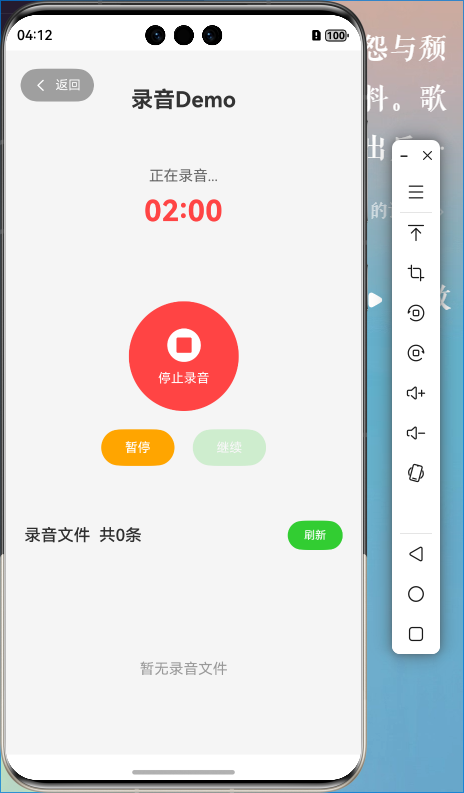
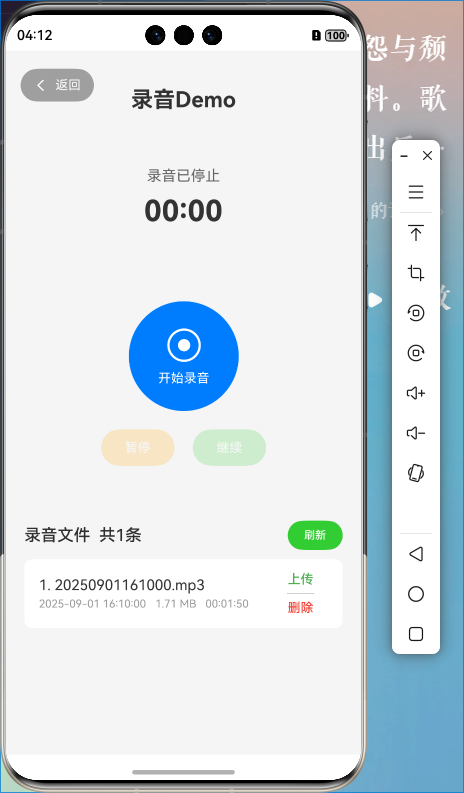
在开始录音后,页面中的计时器中时间已经到了2:00(对比过手机上的秒表,计时器基本无误差),但是在停止后,在录音列表中获取到的音频的时长并不足2:00,只有1:50左右。复现截图张贴在新楼中,感谢回复。
这边又试了下,直接看显示的毫秒是没有问题的,看了下DateUtils.duration2Time(durationMs)这个好像是您这边自己封装的转时间的方法,是不是这边的问题呢,这边我通过自己的时间转换方法没有复现
// 时间转换(毫秒转换成时分秒)
function setMillis (millis:number) {
  let hours = Math.floor(millis / 3600000);
  let minutes = Math.floor((millis % 3600000) / 60000);
  let seconds = Math.floor((millis % 60000) / 1000);
  let millisecondsLeft = Math.floor(millis % 1000);
  let setTime = '';

  if (hours > 0) {
    setTime += `${hours}时`;
  }
  if (minutes > 0) {
    setTime += `${minutes}分`;
  }
  if (seconds > 0) {
    setTime += `${seconds}秒`;
  }
  if (millisecondsLeft > 0) {
    setTime += `${millisecondsLeft}毫秒`;
  }
  return setTime;
};

感谢你的思路,但是我在日志中打印了metadate的数据,其中的duration与列表中的时长是一致的(108224ms->1:48,没有错误),所以应该不是时间转换的工具函数的问题。

在HarmonyOS Next中,AVRecorder录制音频时长不正确通常与设置的录制参数有关。请检查音频采样率、编码格式、码率等配置是否与预期录制时长匹配。确保时间戳处理正确,避免因参数不兼容导致时长计算错误。

根据你提供的代码,问题很可能出在音频封装格式与文件扩展名的匹配上。在你的 avProfile 配置中,fileFormat 设置为 CFT_MPEG_4A,这通常对应 .m4a 或 .mp4 文件。然而,在 createAndSetFd() 方法中,你创建的文件扩展名是 .mp3。
不匹配的封装格式和文件扩展名会导致元数据解析错误,进而获取到不准确的音频时长。
解决方案:
你需要确保 fileFormat 与创建的文件扩展名一致。根据你的配置,有以下两种修改方案:
方案一:使用 M4A 格式(推荐)
这是最直接的修复方法,与你的 avProfile 设置完全匹配。
-
在
RecorderManager.ets的createAndSetFd()方法中,将文件扩展名改为.m4a:const path: string = context.filesDir + `/${DateUtils.getTimestamp()}.m4a` // 将 .mp3 改为 .m4a -
在
getRecordingFiles()方法中,确保扫描.m4a文件:if (fileName.endsWith('.m4a') || fileName.endsWith('.wav')) { // 移除了 .mp3
方案二:更改为 MP3 封装格式
如果你需要生成 MP3 文件,则需要修改 avProfile。
-
在
RecorderManager.ets的avProfile中,将fileFormat改为CFT_MPEG_3:private avProfile: media.AVRecorderProfile = { // ... 其他参数保持不变 fileFormat: media.ContainerFormatType.CFT_MPEG_3, // 改为 MP3 封装格式 }同时,确认
audioCodec支持 MP3 编码(AUDIO_MPEG)。 -
保持
createAndSetFd()中的文件扩展名为.mp3。
根本原因分析: AVMetadataExtractor 依赖文件头部的元信息来解析时长。当封装格式(Header)与文件扩展名(实际内容)不匹配时,提取器可能无法正确解析文件,从而返回错误的时长信息。录制时间越长,这种不一致导致的累计误差就越大。
请选择上述一种方案进行修改,这应该能解决你遇到的音频时长不准确的问题。
