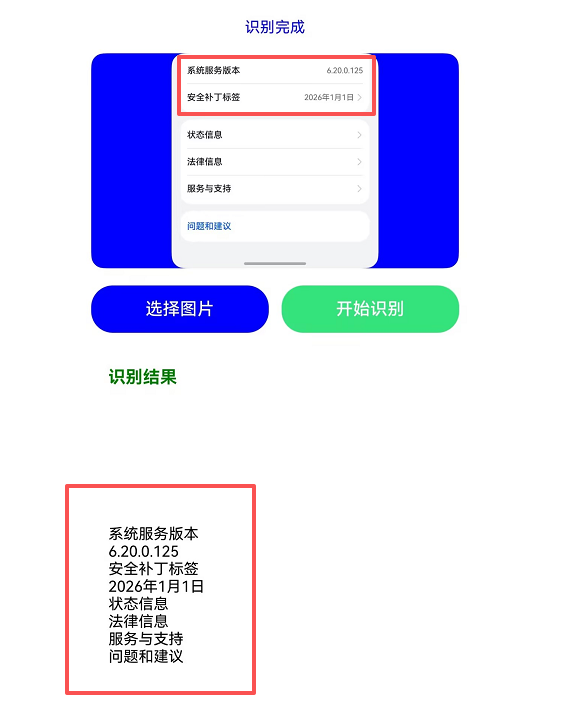
开发者您好:
【解决方案】
请问您的具体使用场景是什么呢?是否使用的是textRecognition.recognizeText,如果是的话,该接口返回了blocks: Array<TextBlock>,里面包含了识别块的坐标和具体内容,可以参考类似代码实现,如果不满足的烦请反馈。参考代码如下,遍历返回结果,定义字符,通过计算定位来动态拼接最终结果:
import { textRecognition } from '@kit.CoreVisionKit';
import { image } from '@kit.ImageKit';
import { hilog } from '@kit.PerformanceAnalysisKit';
import { BusinessError } from '@kit.BasicServicesKit';
import { fileIo } from '@kit.CoreFileKit';
import { photoAccessHelper } from '@kit.MediaLibraryKit';

@Entry
@Component
struct Index {
  private imageSource: image.ImageSource | undefined = undefined;
  @State chooseImage: PixelMap | undefined = undefined;
  @State dataValues: string = '';

  async aboutToAppear(): Promise<void> {
    const initResult = await textRecognition.init();
    hilog.info(0x0000, 'OCRDemo', `OCR service initialization result:${initResult}`);
  }

  async aboutToDisappear(): Promise<void> {
    await textRecognition.release();
    hilog.info(0x0000, 'OCRDemo', 'OCR service released successfully');
  }

  build() {
    Column() {
      Image(this.chooseImage)
        .objectFit(ImageFit.Fill)
        .height('60%');

      Scroll() {
        Text(this.dataValues)
          .copyOption(CopyOptions.LocalDevice)
          .margin(10);
      }
      .height(200);

      Button('选择图片')
        .type(ButtonType.Capsule)
        .fontColor(Color.White)
        .alignSelf(ItemAlign.Center)
        .width('80%')
        .margin(10)
        .onClick(() => {
          // 拉起图库,获取图片资源
          void this.selectImage();
        });

      Button('开始识别')
        .type(ButtonType.Capsule)
        .fontColor(Color.White)
        .alignSelf(ItemAlign.Center)
        .width('80%')
        .margin(10)
        .onClick(() => {
          this.textRecognitionTest();
        });
    }
    .width('100%')
    .height('100%')
    .justifyContent(FlexAlign.Center);
  }

  private textRecognitionTest() {
    if (!this.chooseImage) {
      return;
    }
    // 调用文本识别接口
    let visionInfo: textRecognition.VisionInfo = {
      pixelMap: this.chooseImage
    };
    let textConfiguration: textRecognition.TextRecognitionConfiguration = {
      isDirectionDetectionSupported: false
    };
    textRecognition.recognizeText(visionInfo, textConfiguration)
      .then((data: textRecognition.TextRecognitionResult) => {
        // 识别成功,获取对应的结果
        let recognitionString = JSON.stringify(data);
        hilog.info(0x0000, 'OCRDemo', `Succeeded in recognizing text: ${recognitionString}`);
        let finalString = '';

        data.blocks.forEach((block, index) => {
          const item = block.lines[0];
          const label = item.value;
          const points = item.cornerPoints;

          if (index == 0) {
            // 计算距离左边多少宽度
            const left = points[0].x;
            const spaceCount = Math.round(left / 30);
            finalString += ' '.repeat(spaceCount);
            finalString += label;
          } else {
            // 判断是否在一行
            const current = points;
            const prev = data.blocks[index-1].lines[0].cornerPoints;
            if ((current[0].y - prev[3].y) > 30) {
              // 不在一行加换行符
              const left = points[0].x;
              const spaceCount = Math.round(left / 30);
              finalString += '\n';
              finalString += ' '.repeat(spaceCount);
              finalString += label;
            } else {
              const left = Math.abs(current[0].x - prev[0].x);
              const spaceCount = Math.round(left / 30);
              finalString += ' '.repeat(spaceCount);
              finalString += label;
            }
          }
        });

        this.dataValues = finalString;
      })
      .catch((error: BusinessError) => {
        hilog.error(0x0000, 'OCRDemo', `Failed to recognize text. Code: ${error.code}, message: ${error.message}`);
        this.dataValues = `Error: ${error.message}`;
      });
  }

  private async selectImage() {
    let uri = await this.openPhoto();
    if (uri === undefined) {
      hilog.error(0x0000, 'OCRDemo', 'Failed to get uri.');
      return;
    }
    this.loadImage(uri);
  }

  private async openPhoto(): Promise<string> {
    return new Promise<string>((resolve) => {
      let photoPicker: photoAccessHelper.PhotoViewPicker = new photoAccessHelper.PhotoViewPicker();
      photoPicker.select({
        MIMEType: photoAccessHelper.PhotoViewMIMETypes.IMAGE_TYPE,
        maxSelectNumber: 1
      }).then((res: photoAccessHelper.PhotoSelectResult) => {
        resolve(res.photoUris[0]);
      }).catch((err: BusinessError) => {
        hilog.error(0x0000, 'OCRDemo', `Failed to get photo image uri. code: ${err.code}, message: ${err.message}`);
        resolve('');
      });
    });
  }

  private loadImage(name: string) {
    setTimeout(async () => {
      try {
        let fileSource = await fileIo.open(name, fileIo.OpenMode.READ_ONLY);
        this.imageSource = image.createImageSource(fileSource.fd);
        this.chooseImage = await this.imageSource.createPixelMap();
        await fileIo.close(fileSource);
      } catch (error) {
        hilog.error(0x0000, 'OCRDemo', `Failed to open file. Error: ${error}`);
      }
    }, 100);
  }
}
【背景知识】
TextRecognitionResult:textRecognition(文字识别)-ArkTS API-Core Vision Kit(基础视觉服务)-AI - 华为HarmonyOS开发者。