




HarmonyOS鸿蒙Next中createAsset申请的uri在下载多个媒体图片到相册后,无法在下载到相册
HarmonyOS鸿蒙Next中createAsset申请的uri在下载多个媒体图片到相册后,无法在下载到相册 问题:在使用createAsset申请到的uri,把网络图片下载到相册后,前几张是没问题的正常下载到相册,但是多次下载,大概三十来张后,图片正常保存到沙箱了,但相册就没有新下载的图了。
步骤1:权限检测:
private permissionList: Array<Permissions> = [
  "ohos.permission.WRITE_IMAGEVIDEO",
  "ohos.permission.READ_IMAGEVIDEO",
]

/**
 * 检查相册读写权限,没有权限则请求授权,返回授权结果
 * @return
 */
async checkMediaPermission(): Promise<boolean> {
  return await PermissionUtil.requestPermissionsList(this.permissionList)
}
步骤2:获取可用uri
if (fileBean.type === MediaType.PHOTO) {
  let uri = await helper.createAsset(photoAccessHelper.PhotoType.IMAGE, 'jpg', options);
  uris.push(uri)
} else if (fileBean.type === MediaType.VIDEO) {
  let uri = await helper.createAsset(photoAccessHelper.PhotoType.VIDEO, 'mp4', options);
  uris.push(uri)
}
步骤3:SFFT进行下载
// 自定义下载配置
let downloadConfig: DownloadConfig = {
  url: this.data.getData(this.currentDownloadIndex).remoteUrl as string, // 远端下载地址(必选)
  fileName: this.data.getData(this.currentDownloadIndex).fileName!, // 下载后的本地文件名(必选)
  fileDir: this.downloadFileDir, // 存储下载文件的沙箱目录(可选)
  concurrency: 2, // 启用的并发线程数(可选)
  retryInterval: 1000, // 下载失败时,下载失败后的重试间隔时间(可选)
};

downloadTask = downloadManager.createDownloadTask(downloadConfig, customDownloadListener);
await downloadTask?.start();
步骤4:使用copy保存到相册
onSuccess: () => {
  try {
    let destFile =
      fileIo.openSync(this.uris[this.currentDownloadIndex],
        fileIo.OpenMode.READ_WRITE | fileIo.OpenMode.CREATE);
    let srcfile =
      fileIo.openSync(this.downloadFileDir + "/" + this.data.getData(this.currentDownloadIndex).fileName,
        fileIo.OpenMode.READ_WRITE);
    fileIo.copyFileSync(srcfile.fd, destFile.fd);
    Logger.d("save files length:", fileIo.statSync(destFile.fd).size);
    this.data.notifyDataChange(this.currentDownloadIndex);
    Logger.d("download file" + this.data.getData(this.currentDownloadIndex).remoteUrl +
      "download success")
    fileIo.closeSync(destFile.fd);
    this.data.getData(this.currentDownloadIndex).downloadStatus = DownloadStatus.DownloadSuccess;
    this.data.getData(this.currentDownloadIndex).localUri =
      this.downloadFileDir + "/" + this.data.getData(this.currentDownloadIndex).fileName;
    fileIo.closeSync(srcfile.fd);
  } catch (e) {
    Logger.e(TAG, "download error:" + e.message)
  }
},
结果:沙箱存在保存的图片,但是相册没有,也并没有任何报错日志。sdk是5.0.1(13)。
打印的日志,相册文件也存在大小:Logger.d(“save files length:”, fileIo.statSync(destFile.fd).size);
→打印日志结果:save files length destFile: 81085
更多关于HarmonyOS鸿蒙Next中createAsset申请的uri在下载多个媒体图片到相册后,无法在下载到相册的实战教程也可以访问 https://www.itying.com/category-93-b0.html

开发者您好,我这边采用1楼使用弹窗授权保存到图库的方案,使用弹窗授权保存到图库的方法是可以下载到相册的,也能够下载 30+张图片,切后台也不影响。
我这边验证的完整Demo可以参考:调用showAssetsCreationDialog弹窗授权保存图片到相册。
您这边提到切后台再返回下载失败,也可能是因为切后台下载中断导致,可以参考官方示例:文件上传下载功能。
如果以上方案仍然不能成功保存到相册,是否方便发一个完整可复现的Demo方便我们这边定位复现问题。
更多关于HarmonyOS鸿蒙Next中createAsset申请的uri在下载多个媒体图片到相册后,无法在下载到相册的实战系列教程也可以访问 https://www.itying.com/category-93-b0.html

使用弹窗授权保存到图库的方法试试:
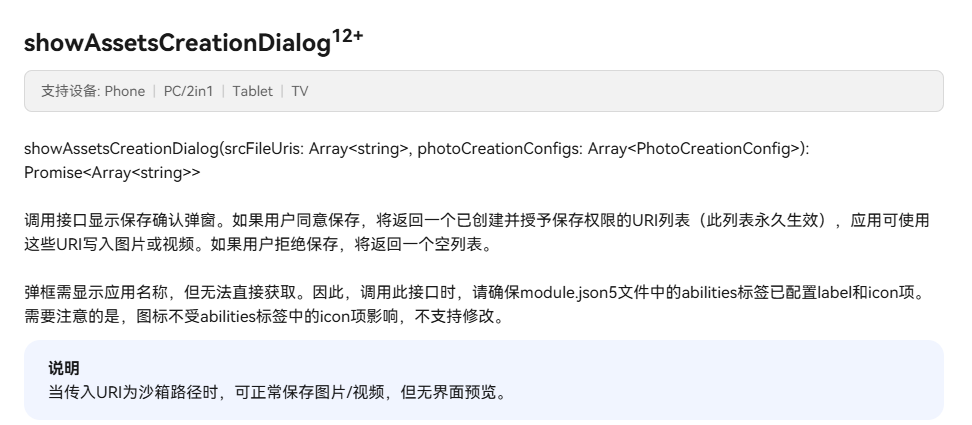
// 自定义下载配置
let downloadConfig: DownloadConfig = {
  url: this.data.getData(this.currentDownloadIndex).remoteUrl as string, // 远端下载地址(必选)
  fileName: this.data.getData(this.currentDownloadIndex).fileName!, // 下载后的本地文件名(必选)
  fileDir: this.downloadFileDir, // 存储下载文件的沙箱目录(可选)
  concurrency: 2, // 启用的并发线程数(可选)
  retryInterval: 1000, // 下载失败时,下载失败后的重试间隔时间(可选)
};

this.saveImageToAlbum(`${downloadConfig.fileDir}/${downloadConfig.fileName}`);

async saveImageToAlbum(path: string): Promise<boolean> {
    return new Promise(async (resolve: Function, reject: Function) => {
      try {
        const context = this.uiContext?.getHostContext();
        let phAccessHelper = photoAccessHelper.getPhotoAccessHelper(context);
        let srcFileUri: Array<string> = [fileUri.getUriFromPath(path)];

        let photoCreationConfigs: Array<photoAccessHelper.PhotoCreationConfig> = [
          {
            title: '保存图片',
            fileNameExtension: 'jpg',
            photoType: photoAccessHelper.PhotoType.IMAGE
          }
        ];
        let desFileUris: Array<string> = await phAccessHelper.showAssetsCreationDialog(srcFileUri, photoCreationConfigs);

        if (desFileUris.length > 0) {
          // 文件拷贝
          for (let index = 0; index < desFileUris.length; index++) {
            let srcFile = fs.openSync(srcFileUri[index], fs.OpenMode.READ_WRITE | fs.OpenMode.CREATE);
            let destFile = fs.openSync(desFileUris[index], fs.OpenMode.READ_WRITE | fs.OpenMode.CREATE);
            try {
              fs.copyFileSync(srcFile.fd, destFile.fd);
            } catch (error) {
              let err: BusinessError = error as BusinessError;
              console.error(`Invoke downloadFile failed, code is ${err.code}, message is ${err.message}`);
            } finally {
              fs.closeSync(srcFile);
              fs.closeSync(destFile);
            }
          }
          resolve(true);
        } else {
          resolve(false);
        }
      } catch (err) {
        reject(err);
      }
    });
  }


在HarmonyOS Next中,createAsset返回的URI是临时访问权限,下载完成后权限可能失效。下载多个媒体图片到相册时,每个文件需要独立的持久化URI或使用PhotoAccessHelper的createAsset接口直接创建相册资源。确保使用正确的API处理批量下载,避免临时URI过期导致无法访问。

这个问题通常与媒体库的索引更新机制有关。在批量保存图片时,系统可能不会立即刷新相册的媒体索引。
你可以尝试在每次成功调用 fileIo.copyFileSync 后,显式地通知媒体库刷新。使用 photoAccessHelper 的 commitModify 方法或 mediaLibrary 的 fileAssetChange 接口来触发索引更新。
具体操作是,在 copyFileSync 之后,获取到对应的 FileAsset 对象,然后调用其 commitModify 方法。或者,使用 MediaLibrary.getMediaLibrary 实例的 on('fileAssetChange') 来主动触发一次扫描。
另外,检查是否在连续调用 createAsset 时,传入的 options 参数(特别是 relativePath)始终保持一致。路径不一致可能导致文件被保存到相册的不同子目录下,不易被主相册视图立即发现。
虽然你提到没有错误日志,但建议在 catch 块中增加更详细的错误信息输出,例如 e.code,以排除潜在的、未抛出异常的资源限制问题(如短时间内文件句柄打开过多)。确保在每次文件操作后,无论成功与否,都正确关闭了文件描述符(fd),你的代码中已经做了这一点。
