




HarmonyOS鸿蒙Next中半模态里用了Navigation,如何实现以下的效果?键盘避让已设置。
HarmonyOS鸿蒙Next中半模态里用了Navigation,如何实现以下的效果?键盘避让已设置。 **【问题描述】:**半模态里用了Navigation,如何实现以下的效果?
**【版本信息】:**6.0.2
【复现代码】:
@Entry
@Component
struct Index {
  @State isShow: boolean = false;
  // @State sheetHeight: number = 500;
  @Provide('NavPathStack') pageStack: NavPathStack = new NavPathStack();

  @Builder
  PagesMap(name: string) {
    if (name == 'DialogPage') {
      DialogPage();
    }
  }

  @Builder
  myBuilder() {
    Navigation(this.pageStack) {
      Button('Push DialogPage')
        .margin(20)
        .width('100%')
        .onClick(() => {
          this.pageStack.pushPathByName('DialogPage', '');
        })
    }
    .mode(NavigationMode.Stack)
    .title('Main')
    .navDestination(this.PagesMap)
    .width('100%')
    .height('100%')
  }

  build() {
    Column() {
      Button("transition modal 1")
        .onClick(() => {
          this.isShow = true;
        })
        .fontSize(20)
        .margin(10)
        .bindSheet($$this.isShow, this.myBuilder(), {
          // height: this.sheetHeight,
          detents: [SheetSize.MEDIUM, SheetSize.LARGE, 200],
          backgroundColor: Color.Green,
          onWillAppear: () => {
            console.log("BindSheet onWillAppear.");
          },
          onAppear: () => {
            console.log("BindSheet onAppear.");
          },
          onWillDisappear: () => {
            console.log("BindSheet onWillDisappear.");
          },
          onDisappear: () => {
            console.log("BindSheet onDisappear.");
          }
        })
    }
    .justifyContent(FlexAlign.Center)
    .width('100%')
    .height('100%')
    .margin({
      top: 50
    })
  }
}

@Component
struct DialogPage {
  @Consume('NavPathStack') pageStack: NavPathStack;

  build() {
    NavDestination() {
      Scroll() {
        Column() {
          TextArea({ placeholder: "1111" })
            .padding(12)
            .width("100%")
            .layoutWeight(1)
            .borderRadius(0)
            .maxLength(1000)
            .showCounter(true)
            .defaultFocus(true)
            .enableAutoSpacing(true)
            .enableKeyboardOnFocus(true)
            .fontWeight(FontWeight.Regular)
            .fontSize($r("sys.float.Body_M"))
            .fontColor($r("sys.color.font_primary"))
            .borderRadius(20)
            .backgroundColor($r("sys.color.background_secondary"))
            .placeholderFont({
              size: $r("sys.float.Body_M"),
              weight: FontWeight.Regular
            })
          Search()
          Search()
          Search()
          Search()
          Search()
          Search()
          Search()
          Button("Close")
            .onClick(() => {
              this.pageStack.pop();
            })
            .width('30%')
        }
        .justifyContent(FlexAlign.Center)
        .backgroundColor(Color.White)
        .borderRadius(10)
        .width('100%')
      }
      .width('100%')
      .height('100%')
    }
    .backgroundColor('rgba(0,0,0,0.5)')
    .hideTitleBar(true)
  }
}
EntryAbility
// 设置虚拟键盘抬起时把页面上抬直到露出光标
windowStage.getMainWindowSync().getUIContext()
.setKeyboardAvoidMode(KeyboardAvoidMode.OFFSET);
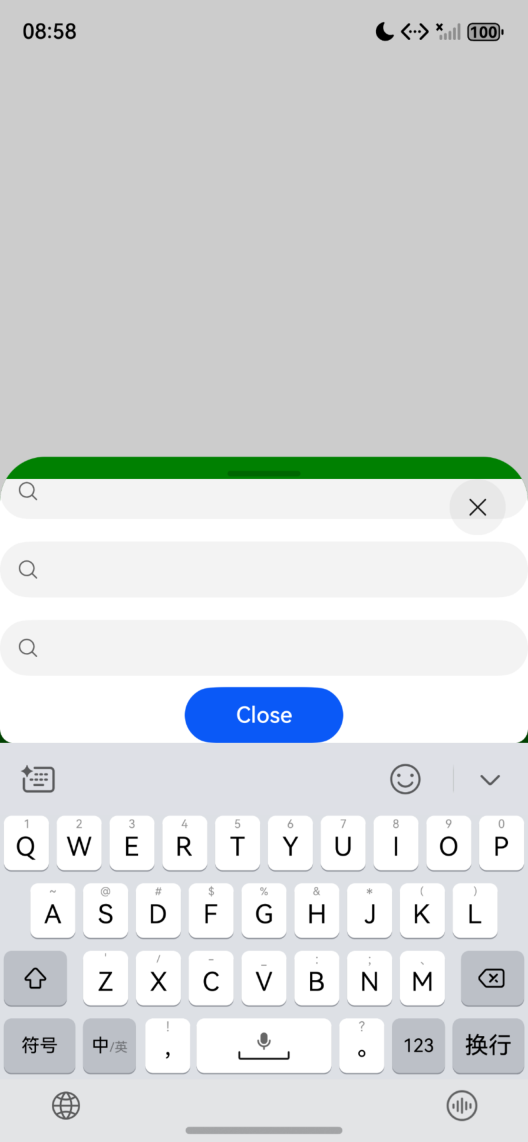
【代码效果图】:
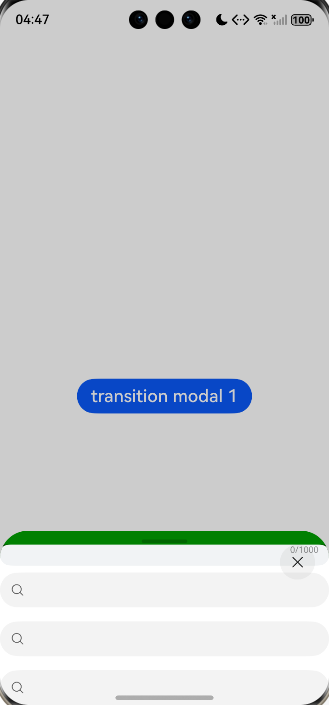
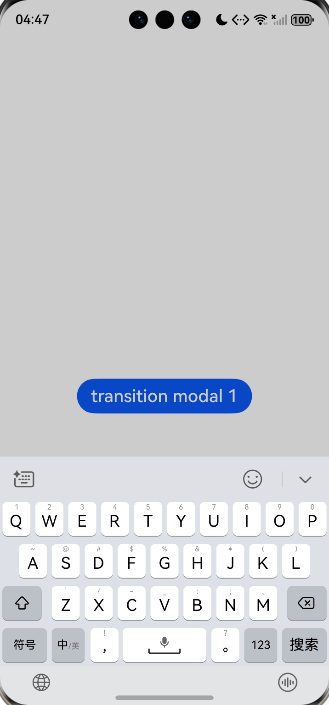
**【尝试解决方案】:**暂无
更多关于HarmonyOS鸿蒙Next中半模态里用了Navigation,如何实现以下的效果?键盘避让已设置。的实战教程也可以访问 https://www.itying.com/category-93-b0.html

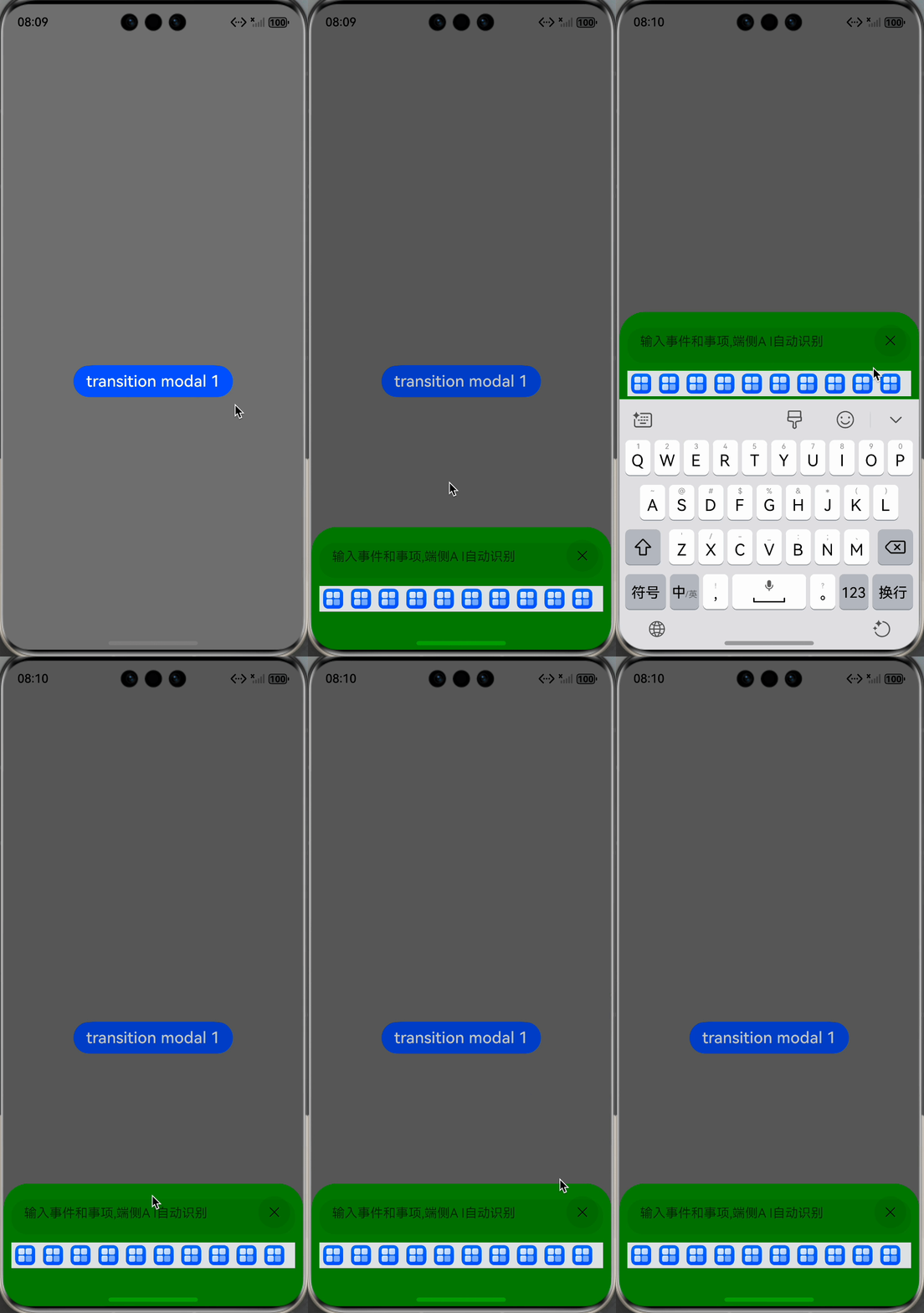
开发者您好,通过监听软键盘高度,同步到半模态弹窗的高度即可实现,问题现象中的效果图,可以直接使用bindSheet实现,没必要用Navigation,代码如下:
import { window } from '@kit.ArkUI';

/**
 * 输入Sheet组件
 */
@Component
export struct InputSheet {
  @State inputText: string = '';
  title: string = '输入';
  placeholder: string = '请输入内容';
  maxLength: number = 100;
  confirmText: string = '确定';
  cancelText: string = '取消';
  validator?: (value: string) => string | null;
  onConfirm?: (value: string) => void;
  onCancel?: () => void;

  /**
   * 验证输入内容
   */
  private validateInput(): boolean {
    if (!this.inputText || this.inputText.trim().length === 0) {
      this.getUIContext().getPromptAction().showToast({
        message: '请输入内容',
        duration: 2000
      });
      return false;
    }

    if (this.validator) {
      const errorMsg = this.validator(this.inputText);
      if (errorMsg) {
        this.getUIContext().getPromptAction().showToast({
          message: errorMsg,
          duration: 2000
        });
        return false;
      }
    }

    return true;
  }

  /**
   * 处理确认按钮点击
   */
  private handleConfirm(): void {
    if (this.validateInput()) {
      if (this.onConfirm) {
        this.onConfirm(this.inputText.trim());
      }
    }
  }

  /**
   * 处理取消按钮点击
   */
  private handleCancel(): void {
    if (this.onCancel) {
      this.onCancel();
    }
  }

  build() {
    Column({ space: 16 }) {
      // 标题
      Text(this.title)
        .fontSize(20)
        .fontWeight(FontWeight.Medium)
        .fontColor($r('sys.color.ohos_id_color_text_primary'))
        .width('100%')
        .textAlign(TextAlign.Start);

      // 输入框
      TextInput({
        placeholder: this.placeholder,
        text: $$this.inputText
      })
        .width('100%')
        .height(48)
        .fontSize(16)
        .borderRadius(8)
        .backgroundColor($r('sys.color.comp_background_tertiary'))
        .maxLength(this.maxLength)
        .onChange((value: string) => {
          this.inputText = value;
        });

      // 按钮区域
      Row({ space: 12 }) {
        Button(this.cancelText)
          .fontSize(16)
          .fontColor($r('sys.color.ohos_id_color_text_secondary'))
          .backgroundColor($r('sys.color.ohos_id_color_button_normal'))
          .layoutWeight(1)
          .height(40)
          .onClick(() => {
            this.handleCancel();
          });

        Button(this.confirmText)
          .fontSize(16)
          .fontColor(Color.White)
          .backgroundColor($r('sys.color.ohos_id_color_emphasize'))
          .layoutWeight(1)
          .height(40)
          .onClick(() => {
            this.handleConfirm();
          });
      }
      .width('100%')
      .margin({ top: 8 });
    }
    .padding(24)
    .width('100%');
  }
}

@Entry
@Component
struct SheetTransitionExample2 {
  @State isShow: boolean = false;
  @State keyboardHeight: number = 0; // Soft keyboard height
  @State sheetHeight: number = 0;

  aboutToAppear(): void {
    window.getLastWindow(this.getUIContext().getHostContext()).then(currentWindow => {
      currentWindow.on('keyboardHeightChange', (data: number) => {
        this.keyboardHeight = this.getUIContext().px2vp(data);
        console.info(`keyboardHeight is ${this.keyboardHeight}`);
      });
    });
  }

  @Builder
  myBuilder() {
    InputSheet()
      .id('sheetNode')
      // 通过FrameNode获取半模态弹窗为自适应高度时的实际高度
      .onAppear(() => {
        let ComponentFrameNode = this.getUIContext().getFrameNodeById('sheetNode');
        if (ComponentFrameNode != null) {
          this.sheetHeight = this.getUIContext().px2vp(ComponentFrameNode.getMeasuredSize().height);
          console.info(`sheetHeight is ${this.sheetHeight}`);
        }
      });
  }

  build() {
    Column() {
      Button('transition modal 1')
        .onClick(() => {
          this.isShow = true;
        })
        .fontSize(20)
        .margin(10)
        .bindSheet($$this.isShow, this.myBuilder(), {
          // 软键盘弹出后,将全部UI内容抬到软键盘上方
          height: (this.keyboardHeight === 0 ? SheetSize.FIT_CONTENT : this.sheetHeight + this.keyboardHeight),
          showClose: true,
        });
    }
    .justifyContent(FlexAlign.Start)
    .width('100%')
    .height('100%');
  }
}
使用Navigation实现修改如下:
import { window } from '@kit.ArkUI';

@Entry
@Component
struct Index {
  @State isShow: boolean = false;
  @State sheetHeight: number = 300;
  @Provide('NavPathStack') pageStack: NavPathStack = new NavPathStack();
  @State keyboardHeight: number = 0; // Soft keyboard height

  @Builder
  PagesMap(name: string) {
    if (name == 'DialogPage') {
      DialogPage();
    }
  }

  @Builder
  myBuilder() {
    Navigation(this.pageStack) {
      Button('Push DialogPage')
        .margin(20)
        .width('100%')
        .onClick(() => {
          this.pageStack.pushPathByName('DialogPage', '');
        })
    }
    .mode(NavigationMode.Stack)
    .title('Main')
    .navDestination(this.PagesMap)
    .width('100%')
    .height('100%')
  }

  aboutToAppear(): void {
    window.getLastWindow(this.getUIContext().getHostContext()).then(currentWindow => {
      currentWindow.on('keyboardHeightChange', (data: number) => {
        this.keyboardHeight = this.getUIContext().px2vp(data);
        console.info(`keyboardHeight is ${this.keyboardHeight}`);
      });
    });
  }

  build() {
    Column() {
      Button("transition modal 1")
        .onClick(() => {
          this.isShow = true;
        })
        .fontSize(20)
        .margin(10)
        .bindSheet($$this.isShow, this.myBuilder(), {
          height: this.sheetHeight + this.keyboardHeight,
          // detents: [SheetSize.MEDIUM, SheetSize.LARGE, 200],
          backgroundColor: Color.Green,
          onWillAppear: () => {
            console.log("BindSheet onWillAppear.");
          },
          onAppear: () => {
            console.log("BindSheet onAppear.");
          },
          onWillDisappear: () => {
            console.log("BindSheet onWillDisappear.");
          },
          onDisappear: () => {
            console.log("BindSheet onDisappear.");
          }
        })
    }
    .justifyContent(FlexAlign.Center)
    .width('100%')
    .height('100%')
    .margin({
      top: 50
    })
  }
}

@Component
struct DialogPage {
  @Consume('NavPathStack') pageStack: NavPathStack;

  build() {
    NavDestination() {
      Scroll() {
        Column() {
          TextArea({ placeholder: "1111" })
            .padding(12)
            .width("100%")
            // .layoutWeight(1)
            .borderRadius(0)
            .maxLength(1000)
            .showCounter(true)
            // .defaultFocus(true)
            .enableAutoSpacing(true)
            .enableKeyboardOnFocus(true)
            .fontWeight(FontWeight.Regular)
            .fontSize($r("sys.float.Body_M"))
            .fontColor($r("sys.color.font_primary"))
            .borderRadius(20)
            .backgroundColor($r("sys.color.background_secondary"))
            .placeholderFont({
              size: $r("sys.float.Body_M"),
              weight: FontWeight.Regular
            })
          Search()
          Search()
          Search()
          Search()
          Search()
          Search()
          Search()
          Button("Close")
            .onClick(() => {
              this.pageStack.pop();
            })
            .width('30%')
        }
        .justifyContent(FlexAlign.Center)
        .backgroundColor(Color.White)
        .borderRadius(10)
        .width('100%')
      }
      .width('100%')
      .height('100%')
    }
    .backgroundColor('rgba(0,0,0,0.5)')
    .hideTitleBar(true)
  }
}
更多关于HarmonyOS鸿蒙Next中半模态里用了Navigation,如何实现以下的效果?键盘避让已设置。的实战系列教程也可以访问 https://www.itying.com/category-93-b0.html

import { window } from '@kit.ArkUI';

@Entry
@Component
struct Page5 {
        @State isShow: boolean = false;
        @State isShow2: boolean = false;
        // @State sheetHeight: number = 500;
        @Provide('NavPathStack') pageStack: NavPathStack = new NavPathStack();

        @Builder
        PagesMap(name: string) {
                if (name == 'DialogPage') {
                        DialogPage();
                }
        }

        @Builder
        myBuilder() {
                Navigation(this.pageStack) {
                        Button('Push DialogPage')
                                .margin(20)
                                .width('100%')
                                .onClick(() => {
                                          this.pageStack.pushPathByName('DialogPage', '');
                                        // this.isShow2=true;
                                })
                                // .bindSheet($$this.isShow2, this.PagesMap("DialogPage"), {
                                //         detents: [SheetSize.MEDIUM, SheetSize.LARGE],
                                //         title:{title:"title"},
                                //         showClose:true
                                // })

                }
                .mode(NavigationMode.Stack)
                .title('Main')
                .navDestination(this.PagesMap)
                .width('100%')
                .height('100%')
        }

        build() {
                Column() {
                        Button("transition modal 1")
                                .onClick(() => {
                                        this.isShow = true;
                                })
                                .fontSize(20)
                                .margin(10)
                                .bindSheet($$this.isShow, this.myBuilder(), {
                                        // height: this.sheetHeight,
                                        detents: [SheetSize.MEDIUM, SheetSize.LARGE, 200],
                                        backgroundColor: Color.Green,
                                        onWillAppear: () => {
                                                console.log("BindSheet onWillAppear.");
                                        },
                                        onAppear: () => {
                                                console.log("BindSheet onAppear.");
                                        },
                                        onWillDisappear: () => {
                                                console.log("BindSheet onWillDisappear.");
                                        },
                                        onDisappear: () => {
                                                console.log("BindSheet onDisappear.");
                                        }
                                })
                }
                .justifyContent(FlexAlign.Center)
                .width('100%')
                .height('100%')
                .margin({
                        top: 50
                })
        }
}

@Component
struct DialogPage {
        @Consume('NavPathStack') pageStack: NavPathStack;
        windowClass: window.Window | null = null;
        @State keyboardHeight: number = 0;

        aboutToAppear(): void {
                let windowClass = window.getLastWindow(this.getUIContext().getHostContext());
                windowClass.then(win => {
                        this.windowClass = win;
                        this.windowClass?.on('keyboardHeightChange', (height) => {
                                this.keyboardHeight = this.getUIContext().px2vp(height);
                                console.log("keyboardHeight=" + this.keyboardHeight)
                        })
                });
        }

        aboutToDisappear() {
                this.windowClass?.off('keyboardHeightChange')
        }

        build() {
                NavDestination() {
                        Scroll() {
                                Column() {
                                        TextArea({ placeholder: "1111" })
                                                .padding(12)
                                                .width("100%")
                                                .layoutWeight(1)
                                                .borderRadius(0)
                                                .maxLength(1000)
                                                .showCounter(true)
                                                .defaultFocus(true)
                                                .enableAutoSpacing(true)
                                                .enableKeyboardOnFocus(true)
                                                .fontWeight(FontWeight.Regular)
                                                .fontSize($r("sys.float.Body_M"))
                                                .fontColor($r("sys.color.font_primary"))
                                                .borderRadius(20)
                                                .backgroundColor($r("sys.color.background_secondary"))
                                                .placeholderFont({
                                                        size: $r("sys.float.Body_M"),
                                                        weight: FontWeight.Regular
                                                })
                                                .constraintSize({ minHeight: 40 }) //需要个最小高度
                                        Search()
                                        Search()
                                        Search()
                                        Search()
                                        Search()
                                        Search()
                                        Search()
                                        Button("Close")
                                                .onClick(() => {
                                                        this.pageStack.pop();
                                                })
                                                .width('30%')
                                }
                                .justifyContent(FlexAlign.Center)
                                .backgroundColor(Color.White)
                                .borderRadius(10)
                                .width('100%')
                        }
                        .width('100%')
                        .height('100%')
                }
                .backgroundColor('rgba(0,0,0,0.5)')
                .hideTitleBar(true)
                .safeAreaPadding({ bottom: this.keyboardHeight })
        }
}
setKeyboardAvoidMode针对页面生效,对于弹窗类组件不生效,比如Dialog、Popup、Menu、BindSheet、BindContentCover、Toast、OverlayManager。弹窗类组件的避让模式可以参考CustomDialogControllerOptions对象说明。


在HarmonyOS Next中,半模态界面使用Navigation时,可通过调整Navigation的布局属性实现键盘避让。设置Navigation的height属性为自适应,结合键盘弹出事件监听,动态调整Navigation的底部边距。使用UIExtensionAbility的窗口管理能力,设置窗口的avoidKeyboard属性为true,确保内容区域自动上移。

在半模态(Sheet)内使用Navigation组件时,要实现键盘避让效果,需要确保Sheet的高度能够动态调整以容纳键盘。从你的代码看,虽然设置了detents,但键盘弹出时Sheet高度没有自动调整。
关键解决方案是:在Sheet的onWillAppear或onAppear生命周期中,监听键盘事件并动态调整Sheet的高度。以下是修改后的核心代码:
@State sheetHeight: number = 500; // 添加状态变量

// 在myBuilder的bindSheet配置中修改:
.bindSheet($$this.isShow, this.myBuilder(), {
  height: this.sheetHeight, // 绑定动态高度
  detents: [SheetSize.MEDIUM, SheetSize.LARGE, 200],
  backgroundColor: Color.Green,
  onWillAppear: () => {
    console.log("BindSheet onWillAppear.");
    // 监听键盘事件
    keyboard.onKeyboardShow(() => {
      // 获取键盘高度并调整sheetHeight
      // 需要根据实际布局计算合适的高度
      this.sheetHeight = 300; // 调整为合适值
    });
    keyboard.onKeyboardHide(() => {
      this.sheetHeight = 500; // 恢复原高度
    });
  },
  // ... 其他配置
})
另外,在DialogPage中,确保TextArea的父容器Scroll能够正确响应键盘事件。你已经设置了enableKeyboardOnFocus(true),这是正确的。
如果问题仍然存在,可以尝试:
- 检查Sheet的detents设置是否与动态高度冲突
- 确保键盘事件监听在正确的生命周期中注册
- 考虑使用
keyboard.avoidArea获取键盘避让区域高度来精确计算Sheet高度
这种方案通过动态调整Sheet高度来实现Navigation内容区的键盘避让,而不是依赖默认的页面偏移。
