




HarmonyOS鸿蒙Next中SoundPool加载音频失败问题
HarmonyOS鸿蒙Next中SoundPool加载音频失败问题 我在构建第一个app的时候发现soundpool加载音频有问题,所以单独构建了一个程序,测试soundpool。然后出现了很诡异的情况。
在以下两种加载写法都被我注释掉的情况下
const uri = `fd://${fileDescriptor.fd}`; // 构造符合规范的URI地址
await this.soundPool!.load(uri); // 使用单参数加载接口

const testId = await this.soundPool.load(fileDescriptor.fd, fileDescriptor.offset, fileDescriptor.length);
soundPool.on('loadComplete', (soundId: number) =>这个函数,依然能接收到loadComplete,而且是soundPool.create后就能接收到,但soundID始终为0.
后来我加了一条
if (soundId <= 0) {  // 过滤无效ID
  console.warn("收到无效加载完成事件,soundId:", soundId);
  return;
随后这个异常的loadComplete虽然被过滤掉了,但后面即使我soundPool.load()后,soundPool.on依然再也捕捉不到loadComplete信号了。
我想问的问题是:
1.为什么在还没调用soundPool.load()的时候会收到loadComplete
2.为什么我主动调用的soundPool.on无法触发loadComplete。
以下是完整源码,基本功能就是按按钮播音乐,按暂停停止,使用soundpool实现的。
// Index.ets
import { media } from '@kit.MediaKit';
import { audio } from '@kit.AudioKit';
import { BusinessError } from '@kit.BasicServicesKit';
import { common } from '@kit.AbilityKit';
@Entry
@Component
export struct Index {
  private soundPool: media.SoundPool | null = null;
  private soundId: number = 0;
  private streamId: number = 0;
  private isInitialized: boolean = false;
  private context = this.getUIContext().getHostContext() as common.UIAbilityContext;

  async aboutToAppear() {
    await this.initSoundPool();
  }

  private async initSoundPool() {
    try {
      const audioRendererInfo: audio.AudioRendererInfo = {
        usage: audio.StreamUsage.STREAM_USAGE_MUSIC,
        rendererFlags: 0
      };
   //   console.info(audioRendererInfo.usage.toString(),audioRendererInfo.rendererFlags,audioRendererInfo.volumeMode);
      this.soundPool = await media.createSoundPool(2, audioRendererInfo);
      console.info('SoundPool 创建成功');
      this.soundPool.on('loadComplete', (soundId: number) => {
        if (soundId <= 0) {  // 过滤无效ID
          console.warn("收到无效加载完成事件,soundId:", soundId);
          return;
        }
       // if (!this.isManualLoading) return; // 过滤非主动加载事件
        this.soundId = soundId;
        this.isInitialized = true;
        console.info(`音频加载完成,soundId: ${soundId}`);
      });

      this.soundPool.on('error', (error: BusinessError) => {
        console.error(`错误: ${error.code}, ${error.message}`);
      });

      await this.loadAudio();
    } catch (error) {
      console.error(`初始化失败: ${JSON.stringify(error)}`);
    }
  }

  private async loadAudio() {
    if (!this.context || !this.soundPool)
    {
      console.log('跳出了');
      return;
    }

    try {
      const fileDescriptor = await this.context.resourceManager.getRawFd('test.mp3');
      //console.info(`文件有效性验证: fd=${fileDescriptor?.fd}, length=${fileDescriptor?.length}`);
      if (!fileDescriptor) {
        console.error("文件描述符获取失败");
        return;
      }
      const uri = `fd://${fileDescriptor.fd}`; // 构造符合规范的URI地址
      await this.soundPool!.load(uri); // 使用单参数加载接口
     // const testId = await this.soundPool.load(fileDescriptor.fd, fileDescriptor.offset, fileDescriptor.length);//很可能是这条出的问题
    } catch (error) {
      console.error(`加载失败: ${JSON.stringify(error)}`);
    }

  }

  private async playSound() {
    if (!this.soundPool) return;
    if(!this.isInitialized) return;

    try {
      const playParameters: media.PlayParameters = {
        loop: 0,
        rate: 1.0,
        leftVolume: 1.0,
        rightVolume: 1.0,
        priority: 1
      };
      this.streamId = await this.soundPool.play(this.soundId, playParameters);
    } catch (error) {
      console.error(`播放失败: ${JSON.stringify(error)}`);
    }
  }

  async aboutToDisappear() {
    if (this.soundPool) {
      this.soundPool.off('loadComplete');
      this.soundPool.off('error');
      try {
        await this.soundPool.release();
      } catch (error) {
        // TODO: Implement error handling.
      }
    }
  }

  async stopSound() {
    if (!this.soundPool || this.streamId <= 0) return;

    try {
      await this.soundPool.stop(this.streamId);
      this.streamId = 0; // 重置流ID
      console.info('Sound stopped successfully');
    } catch (error) {
      console.error(`Stop failed: [${error.code}] ${error.message}`);
    }
  }

  build() {
    Column() {
      Text('SoundPool 示例')
        .fontSize(24)
        .margin({ top: 40, bottom: 20 });

      Text(this.isInitialized ? '✅ 就绪' : '⏳ 加载中')
        .fontColor(this.isInitialized ? Color.Green : Color.Gray)
        .margin({ bottom: 30 });

      Button('播放音频')
        .width(200)
        .height(50)
        .onClick(() => this.playSound())
        .margin({ bottom: 20 });

      Button('停止播放')
        .width(200)
        .height(50)
        .onClick(() => this.stopSound());
    }
    .width('100%')
    .height('100%')
  }
}
以下是module.json5的内容
{
  "module": {
    "name": "entry",
    "type": "entry",
    "description": "$string:module_desc",
    "mainElement": "EntryAbility",
    "deviceTypes": [
      "phone"
    ],
    "deliveryWithInstall": true,
    "installationFree": false,
    "pages": "$profile:main_pages",
    "requestPermissions": [
      {
        "name": "ohos.permission.READ_MEDIA",
        "reason": "$string:permission_reason",
        "usedScene": {
          "abilities": [
            "EntryAbility"
          ],
          "when": "inuse",
        }
      }
    ],
    "abilities": [
      {
        "name": "EntryAbility",
        "srcEntry": "./ets/entryability/EntryAbility.ets",
        "description": "$string:EntryAbility_desc",
        "icon": "$media:layered_image",
        "label": "$string:EntryAbility_label",
        "startWindowIcon": "$media:startIcon",
        "startWindowBackground": "$color:start_window_background",
        "exported": true,
        "skills": [
          {
            "entities": [
              "entity.system.home"
            ],
            "actions": [
              "ohos.want.action.home"
            ]
          }
        ]
      }
    ],
    "extensionAbilities": [
      {
        "name": "EntryBackupAbility",
        "srcEntry": "./ets/entrybackupability/EntryBackupAbility.ets",
        "type": "backup",
        "exported": false,
        "metadata": [
          {
            "name": "ohos.extension.backup",
            "resource": "$profile:backup_config"
          }
        ],
      }
    ]
  }
}
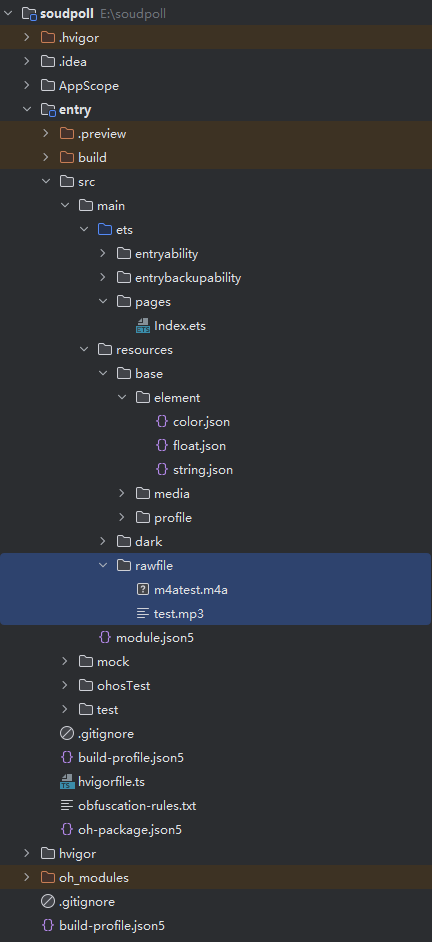
以下是资源路径图片
更多关于HarmonyOS鸿蒙Next中SoundPool加载音频失败问题的实战教程也可以访问 https://www.itying.com/category-93-b0.html

另外可以在这个示例上进行修改:https://developer.huawei.com/consumer/cn/doc/harmonyos-guides/using-soundpool-for-playback#运行示例工程
更多关于HarmonyOS鸿蒙Next中SoundPool加载音频失败问题的实战系列教程也可以访问 https://www.itying.com/category-93-b0.html


其实我高度怀疑是我音频文件有问题,因为其他步骤都debug了,流程中的赋值都没问题,只是在执行soundpool.load的时候,soundId一直是0,而且try catch还捕捉不到错误。
所以我严重怀疑是音频文件有问题,但我从网上下了各种格式的音频文件,问题依然在,头疼啊。

试下将loadComplete监听器的注册推迟到真正调用load()方法之前,并确保只监听一次。这样可以避免捕获到早期的初始化事件。参考代码:
// 1. 在 initSoundPool 中只创建 SoundPool 并注册错误监听
private async initSoundPool() {
  try {
    const audioRendererInfo: audio.AudioRendererInfo = {
      usage: audio.StreamUsage.STREAM_USAGE_MUSIC,
      rendererFlags: 0
    };
    this.soundPool = await media.createSoundPool(2, audioRendererInfo);
    console.info('SoundPool 创建成功');

    // 只注册错误监听,loadComplete 监听放到 load 前
    this.soundPool.on('error', (error: BusinessError) => {
      console.error(`错误: ${error.code}, ${error.message}`);
    });

    await this.loadAudio(); // 开始加载
  } catch (error) {
    console.error(`初始化失败: ${JSON.stringify(error)}`);
  }
}

// 2. 在 loadAudio 中,加载前注册监听,加载后取消监听(避免重复)
private async loadAudio() {
  if (!this.context || !this.soundPool) return;

  // 先移除可能存在的旧监听,再添加新监听,确保唯一性
  this.soundPool.off('loadComplete');
  this.soundPool.on('loadComplete', (soundId: number) => {
    if (soundId > 0) {
      this.soundId = soundId;
      this.isInitialized = true;
      console.info(`音频加载完成,有效 soundId: ${soundId}`);
      // 加载完成后立即移除监听,防止干扰后续可能的重新加载
      this.soundPool?.off('loadComplete');
    } else {
      console.warn("收到无效 soundId,忽略");
    }
  });

  try {
    const fileDescriptor = await this.context.resourceManager.getRawFd('test.mp3');
    const uri = `fd://${fileDescriptor.fd}`;
    await this.soundPool.load(uri); // 开始加载
  } catch (error) {
    console.error(`加载失败: ${JSON.stringify(error)}`);
    // 加载失败也要移除监听,避免内存泄漏或状态错误
    this.soundPool?.off('loadComplete');
  }
}

你好,建议使用使用AVPlayer播放音频(ArkTS):
https://developer.huawei.com/consumer/cn/doc/harmonyos-guides/using-avplayer-for-playback

你好,请严格按照文档中的步骤使用SoundPool播放短音频(ArkTS):
https://developer.huawei.com/consumer/cn/doc/harmonyos-guides/using-soundpool-for-playback

在HarmonyOS Next中,SoundPool加载音频失败通常与音频格式或资源路径有关。请确保音频文件为支持的格式(如MP3、WAV),并正确放置在项目的resources/rawfile目录下。加载时需使用正确的资源路径标识符(如$rawfile(‘audio.mp3’))。同时,检查音频文件是否损坏或编码参数是否兼容。
根据你的代码和描述,问题主要出在事件监听和加载逻辑的时序上。
1. 为什么在还没调用soundPool.load()的时候会收到loadComplete?
在HarmonyOS Next的SoundPool实现中,loadComplete事件监听器注册后,系统可能会立即触发一个初始的、无效的soundId(值为0)回调。这是一个已知的设计行为,用于初始化事件通道。你观察到的soundId为0的loadComplete事件正是这个初始回调。
2. 为什么主动调用的soundPool.load()无法触发loadComplete?
问题在于你的加载逻辑。在loadAudio()方法中,你使用了await等待load()方法完成:
await this.soundPool!.load(uri);
根据HarmonyOS Next的API设计,load()方法在调用时立即返回一个Promise,但音频的实际加载是异步进行的。loadComplete事件应该在加载真正完成时触发。然而,如果load()调用过程中出现错误,或者音频文件路径/格式有问题,加载会失败,导致loadComplete事件无法触发。
关键问题分析:
-
事件监听时机:你在
initSoundPool()中注册了loadComplete监听器,然后立即调用loadAudio()。如果音频加载失败,后续就不会再收到有效的loadComplete事件。 -
资源路径问题:你使用
getRawFd('test.mp3')获取资源文件描述符。请确认:test.mp3文件确实存在于resources/rawfile/目录下- 文件名和扩展名完全匹配(包括大小写)
- 音频文件格式是SoundPool支持的格式(如MP3、WAV等)
-
权限配置:虽然你配置了
READ_MEDIA权限,但还需要在应用首次运行时动态申请权限。
建议的修改:
-
移除无效事件过滤:不要过滤soundId为0的事件,或者至少不要在其中return,因为这可能影响事件监听器的正常工作。
-
检查资源文件:确保音频文件正确放置在
resources/rawfile/目录,并且文件名正确。 -
添加错误处理:在
load()调用后添加更详细的错误日志,检查是否有加载错误。 -
验证文件描述符:取消注释你代码中的验证行,确保fileDescriptor有效。
-
使用正确的加载方式:建议使用单参数URI方式加载,这是推荐的方式。
修改后的loadAudio()方法可以增加更多调试信息:
private async loadAudio() {
  if (!this.context || !this.soundPool) {
    console.error('Context或SoundPool未初始化');
    return;
  }

  try {
    const fileDescriptor = await this.context.resourceManager.getRawFd('test.mp3');
    console.info(`文件描述符: fd=${fileDescriptor?.fd}, length=${fileDescriptor?.length}`);

    if (!fileDescriptor) {
      console.error("文件描述符获取失败");
      return;
    }

    const uri = `fd://${fileDescriptor.fd}`;
    console.info(`加载URI: ${uri}`);

    // 不等待load()完成,让事件监听器处理加载完成通知
    this.soundPool.load(uri).then(() => {
      console.info('load()方法调用完成');
    }).catch(error => {
      console.error(`load()调用失败: ${JSON.stringify(error)}`);
    });

  } catch (error) {
    console.error(`加载失败: ${JSON.stringify(error)}`);
  }
}
同时,修改loadComplete事件监听器,不要过滤soundId为0的事件,而是记录它:
this.soundPool.on('loadComplete', (soundId: number) => {
  console.info(`收到loadComplete事件,soundId: ${soundId}`);

  if (soundId <= 0) {
    console.warn("收到初始或无效soundId");
    return; // 但不要阻止后续处理
  }

  this.soundId = soundId;
  this.isInitialized = true;
  console.info(`音频加载完成,有效soundId: ${soundId}`);
});
这样修改后,你应该能更清楚地看到事件触发的顺序和加载状态。
