




HarmonyOS鸿蒙Next中soundpool下的soundId一直为0,音乐文件加载不上来
HarmonyOS鸿蒙Next中soundpool下的soundId一直为0,音乐文件加载不上来 这是initSoundPool(){}下的一个方法,负责加载音乐文件test.
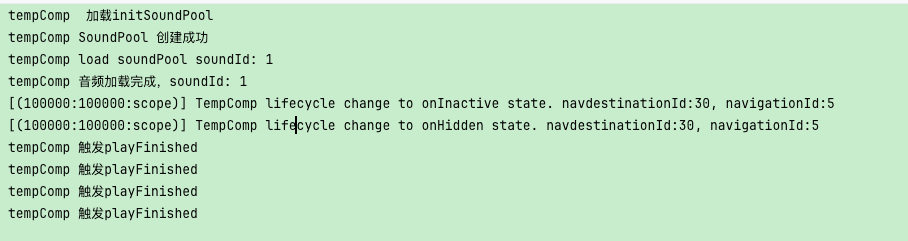
但是,无论如何this.soundId的值都是0,而且后来我加了try,catch,也不报错,但soundid就是0
private async loadAudio() {

  if (!this.context || !this.soundPool)
  {
    console.log('跳出了');
    return;
  }

  try {
    const fileDescriptor = this.context.resourceManager.getRawFdSync('test.mp3');
    if (!fileDescriptor) {
      console.error("文件描述符获取失败");
      return;
    }
    this.soundId = await this.soundPool.load(fileDescriptor.fd, fileDescriptor.offset, fileDescriptor.length);//很可能是这条出的问题
    console.info(`load soundPool soundId: ${this.soundId}`)
  }

  catch (error) {
    console.error(`加载失败: ${JSON.stringify(error)}`);
  }
}
this.soundPool.on('loadComplete', (soundId: number)这个方法监测下的soundId,也是0.
找了两天了,没找到原因,求助各位大佬。
下面是源码,懂了的大佬可以不看
// Index.ets
import { media } from '@kit.MediaKit';
import { audio } from '@kit.AudioKit';
import { BusinessError } from '@kit.BasicServicesKit';
import { common } from '@kit.AbilityKit';
import { fileIo } from '@kit.CoreFileKit';
@Entry
@Component
export struct Index {
  private soundPool: media.SoundPool | null = null;
  private soundId: number = 0;
  private streamId: number = 0;
  private isInitialized: boolean = false;
  private context = this.getUIContext().getHostContext() as common.UIAbilityContext;

  async aboutToAppear() {
    await this.initSoundPool();
  }

  private async initSoundPool() {
    try {
      const audioRendererInfo: audio.AudioRendererInfo = {
        usage: audio.StreamUsage.STREAM_USAGE_MUSIC,
        rendererFlags: 0
      };
   //   console.info(audioRendererInfo.usage.toString(),audioRendererInfo.rendererFlags,audioRendererInfo.volumeMode);
      this.soundPool = await media.createSoundPool(2, audioRendererInfo);
      console.info('SoundPool 创建成功');
      this.soundPool.on('loadComplete', (soundId: number) =>
      {
        console.log(soundId.toString());
        if (soundId <= 0)
        {  // 过滤无效ID
          console.warn("收到无效加载完成事件,soundId:", soundId);

        }
        else
        {
          this.soundId = soundId;
          this.isInitialized = true;
          console.info(`音频加载完成,soundId: ${soundId}`);
        }
       // if (!this.isManualLoading) return; // 过滤非主动加载事件
      });

      this.soundPool.on('playFinished', () => {
        console.info('触发playFinished');
      });
        this.soundPool.on('error', (error: BusinessError) => {
        console.error(`错误: ${error.code}, ${error.message}`);
      });

      await this.loadAudio();
    } catch (error) {
      console.error(`初始化失败: ${JSON.stringify(error)}`);
    }
  }

  private async loadAudio() {

    if (!this.context || !this.soundPool)
    {
      console.log('跳出了');
      return;
    }

    try {
      const fileDescriptor = this.context.resourceManager.getRawFdSync('testogg.ogg');
      if (!fileDescriptor) {
        console.error("文件描述符获取失败");
        return;
      }
      this.soundId = await this.soundPool.load(fileDescriptor.fd, fileDescriptor.offset, fileDescriptor.length);//很可能是这条出的问题
      console.info(`load soundPool soundId: ${this.soundId}`)
    }

    catch (error) {
      console.error(`加载失败: ${JSON.stringify(error)}`);
    }
  }

  private async playSound() {
    console.log(this.soundId.toString());
    if (!this.soundPool) return;
    if(!this.isInitialized) return;

    try {
      const playParameters: media.PlayParameters = {
        loop: 0,
        rate: 1.0,
        leftVolume: 1.0,
        rightVolume: 1.0,
        priority: 1
      };
      this.streamId = await this.soundPool.play(this.soundId, playParameters);
    } catch (error) {
      console.error(`播放失败: ${JSON.stringify(error)}`);
    }
  }

  async aboutToDisappear() {
    if (this.soundPool) {
      this.soundPool.off('loadComplete');
      this.soundPool.off('error');
      try {
        await this.soundPool.release();
      } catch (error) {
        // TODO: Implement error handling.
      }
    }
  }

  async stopSound() {
    if (!this.soundPool || this.streamId <= 0) return;

    try {
      await this.soundPool.stop(this.streamId);
      this.streamId = 0; // 重置流ID
      console.info('Sound stopped successfully');
    } catch (error) {
      console.error(`Stop failed: [${error.code}] ${error.message}`);
    }
  }

  build() {
    Column() {
      Text('SoundPool 示例')
        .fontSize(24)
        .margin({ top: 40, bottom: 20 });

      Text(this.isInitialized ? '✅ 就绪' : '⏳ 加载中')
        .fontColor(this.isInitialized ? Color.Green : Color.Gray)
        .margin({ bottom: 30 });

      Button('播放音频')
        .width(200)
        .height(50)
        .onClick(() => this.playSound())
        .margin({ bottom: 20 });

      Button('停止播放')
        .width(200)
        .height(50)
        .onClick(() => this.stopSound());
    }
    .width('100%')
    .height('100%')
  }
}
更多关于HarmonyOS鸿蒙Next中soundpool下的soundId一直为0,音乐文件加载不上来的实战教程也可以访问 https://www.itying.com/category-93-b0.html

getRawFdSync(‘test.mo3’);看看这里是不是文件名是.mp3格式。
更多关于HarmonyOS鸿蒙Next中soundpool下的soundId一直为0,音乐文件加载不上来的实战系列教程也可以访问 https://www.itying.com/category-93-b0.html



在HarmonyOS Next中,SoundPool的soundId为0通常表示音频资源加载失败。请检查音频文件格式是否支持(如.wav、.mp3等),文件路径是否正确,以及文件是否已成功放入应用的资源目录(如resources/rawfile/)。确保使用正确的API(如loadSync())加载音频,并确认应用已申请必要的音频权限(如ohos.permission.MICROPHONE)。

根据你的代码,问题很可能出在音频文件路径和加载方式上。在HarmonyOS Next中,getRawFdSync 方法对文件路径有严格要求。
核心问题分析:
- 文件路径错误:你代码中尝试加载
'test.mp3'和'testogg.ogg',但getRawFdSync要求文件必须放在resources/rawfile目录下,并且不能包含子目录。 - 文件格式支持:SoundPool 在 HarmonyOS Next 中主要支持
.wav和.ogg格式,对.mp3的支持可能不完整。
解决方案:
第一步:检查文件位置和格式
- 将你的音频文件(建议使用
.ogg或.wav格式)放入resources/rawfile目录。 - 确保文件名完全匹配,包括扩展名。
第二步:修改加载代码
private async loadAudio() {
  if (!this.context || !this.soundPool) {
    console.log('跳出了');
    return;
  }

  try {
    // 确保文件名与rawfile目录中的文件完全一致
    const fileDescriptor = this.context.resourceManager.getRawFdSync('test.ogg'); // 或 'test.wav'
    if (!fileDescriptor) {
      console.error("文件描述符获取失败");
      return;
    }

    // 添加调试信息
    console.info(`文件描述符: fd=${fileDescriptor.fd}, offset=${fileDescriptor.offset}, length=${fileDescriptor.length}`);

    this.soundId = await this.soundPool.load(fileDescriptor.fd, fileDescriptor.offset, fileDescriptor.length);
    console.info(`load soundPool soundId: ${this.soundId}`);
  } catch (error) {
    console.error(`加载失败: ${JSON.stringify(error)}`);
  }
}
第三步:验证文件是否存在
在 aboutToAppear 中添加文件检查:
async aboutToAppear() {
  // 先检查文件是否存在
  try {
    const fileList = this.context.resourceManager.getRawFileListSync();
    console.info('rawfile目录下的文件:', fileList);
  } catch (error) {
    console.error('获取文件列表失败:', error);
  }

  await this.initSoundPool();
}
其他注意事项:
- SoundPool 初始化:确保
createSoundPool成功后再进行加载。 - 事件监听顺序:
loadComplete事件监听需要在调用load方法之前注册,你的代码已经正确实现。 - 资源释放:在
aboutToDisappear中释放资源是好的实践。
如果按照上述步骤修改后问题仍然存在,请检查:
- 音频文件是否损坏
- 文件大小是否过大(SoundPool 适合短音频)
- 控制台是否有其他错误信息
从你的代码结构看,逻辑基本正确,问题很可能就是文件路径或格式导致的加载失败。
