




HarmonyOS鸿蒙Next中字符串转换base64, 但最后结果是空字符
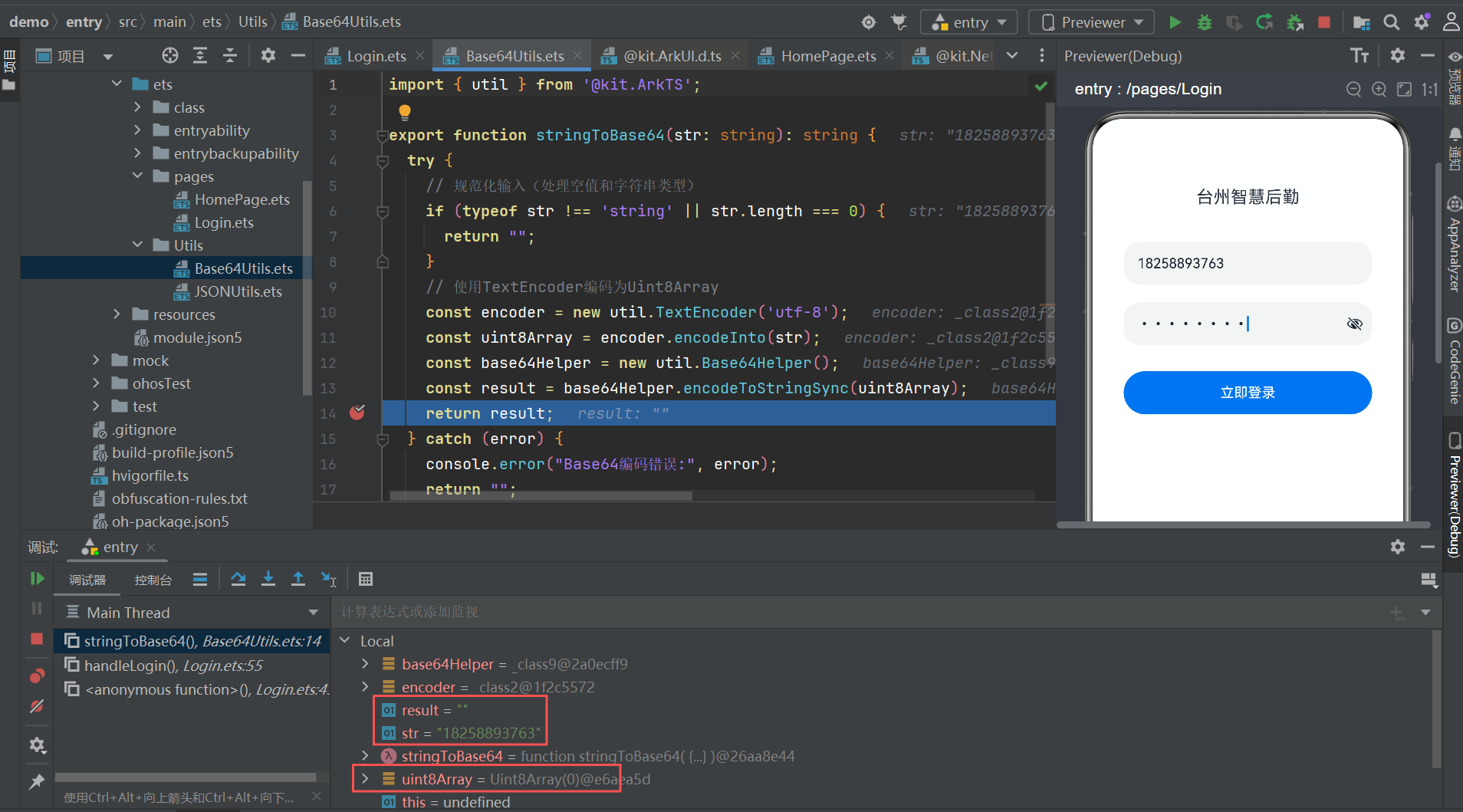
HarmonyOS鸿蒙Next中字符串转换base64, 但最后结果是空字符 我这边要将字符串转换base64, 但最后结果是空字符。看过文档也找过ai处理都没有解决,我这个代码应该是没有问题的。有没有大佬帮忙看看是什么原因导致的。
更多关于HarmonyOS鸿蒙Next中字符串转换base64, 但最后结果是空字符的实战教程也可以访问 https://www.itying.com/category-93-b0.html

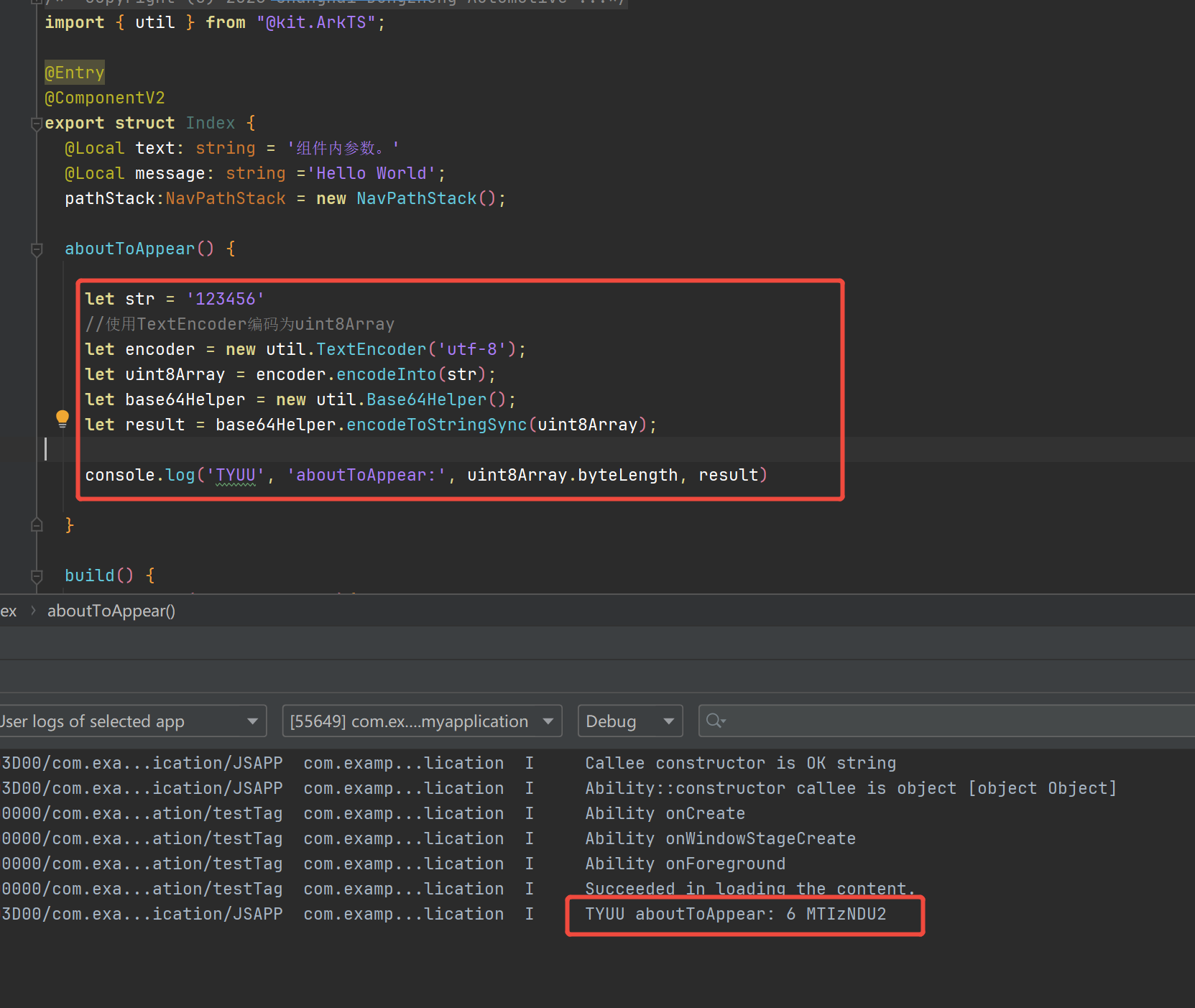
您好,这边测试也没有问题,DevEco Studio 6.0.1 Release,HarmonyOS 6.0.1 Release SDK API21
import { util } from "@kit.ArkTS";
@Entry
@Component
 struct Index {

  aboutToAppear() {
    let str = '字符串字符串'
    let encoder = new util.TextEncoder('utf-8');
    let uint8Array = encoder.encodeInto(str);
    let base64Helper = new util.Base64Helper();
    let result = base64Helper.encodeToStringSync(uint8Array);
    console.log('TYuu', 'aboutToAppear:', uint8Array,uint8Array.byteLength, result)
  }
  build() {
    Column(){

    }
  }
}
02-12 17:24:15.350   2275-2275     A00000/testTag                  apppool               I     Ability onCreate
02-12 17:24:15.816   2275-2275     A00000/testTag                  com.examp...lication  I     Ability onWindowStageCreate
02-12 17:24:15.915   2275-2275     A00000/testTag                  com.examp...lication  I     Ability onForeground
02-12 17:24:16.266   2275-2275     A00000/testTag                  com.examp...lication  I     Succeeded in loading the content.
02-12 17:24:16.278   2275-2275     A03d00/JSAPP                    com.examp...lication  I     TYuu aboutToAppear: 229,173,151,231,172,166,228,184,178,229,173,151,231,172,166,228,184,178 18 5a2X56ym5Liy5a2X56ym5Liy
更多关于HarmonyOS鸿蒙Next中字符串转换base64, 但最后结果是空字符的实战系列教程也可以访问 https://www.itying.com/category-93-b0.html

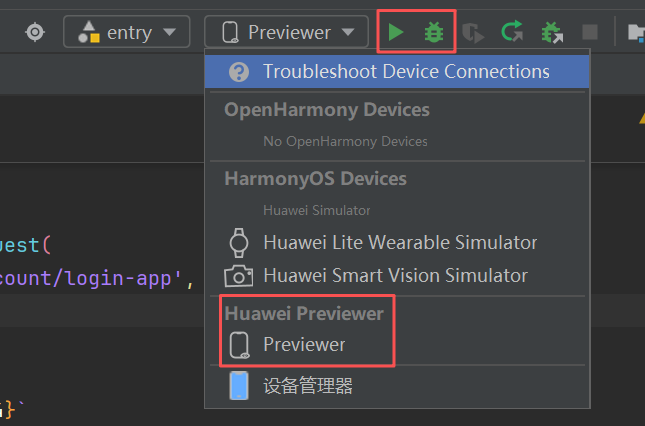
找到原因了,用DevEco Studio 6.0.2 Release 用自带的Previewer 运行/调试的时候uint8Array和base64的转换方法返回都为空。换成本模拟器就好了。

找HarmonyOS工作还需要会Flutter的哦,有需要Flutter教程的可以学学大地老师的教程,很不错,B站免费学的哦:https://www.bilibili.com/video/BV1S4411E7LY/?p=17,

根据支持使用预览器的API清单https://developer.huawei.com/consumer/cn/doc/harmonyos-guides/ide-previewer-api-list#section11437157112916可知,建议使用模拟器或者真机来测试,


找HarmonyOS工作还需要会Flutter的,有需要Flutter教程的可以学学大地老师的教程,很不错,B站免费学的:https://www.bilibili.com/video/BV1S4411E7LY/?p=17


在HarmonyOS Next中,字符串转Base64结果为空,通常是因为输入字符串为空或编码处理不当。使用util模块的base64相关API,确保正确导入@ohos.util.base64。检查字符串编码,确认输入非空且有效。
从代码截图来看,问题可能出在 TextEncoder 的使用上。在 HarmonyOS Next 中,TextEncoder 的 API 与 Web 标准一致,但需要确保编码参数正确。
你的代码是:
let encoder = new util.TextEncoder();
let data = encoder.encodeInto("HarmonyOS");
let base64 = base64.encodeToString(data);
console.log("base64结果: " + base64);
问题在于 encodeInto 方法返回的是一个包含 read 和 written 属性的对象,而不是 Uint8Array。base64.encodeToString 需要接收 Uint8Array 类型的数据。
请修改为:
let encoder = new util.TextEncoder();
// 使用 encode 方法而不是 encodeInto
let data = encoder.encode("HarmonyOS");
let base64 = base64.encodeToString(data);
console.log("base64结果: " + base64);
或者如果你确实想用 encodeInto,需要这样处理:
let encoder = new util.TextEncoder();
let buffer = new Uint8Array(100); // 分配足够大的缓冲区
let result = encoder.encodeInto("HarmonyOS", buffer);
// 使用实际写入的部分
let data = buffer.slice(0, result.written);
let base64 = base64.encodeToString(data);
console.log("base64结果: " + base64);
第一种使用 encode 方法的方式更简洁直接。encode 方法会直接返回包含编码结果的 Uint8Array,而 encodeInto 是将结果写入到已有的缓冲区中,适用于需要重用缓冲区的性能敏感场景。
