




HarmonyOS 鸿蒙Next中API20获取状态栏高度和导航栏高度方法
HarmonyOS 鸿蒙Next中API20获取状态栏高度和导航栏高度方法 context:https://developer.huawei.com/consumer/cn/doc/architecture-guides/tools-v1_2-ts_309-0000002443435465
步骤一:在EntryAbility缓存Context实例。
onCreate(want: Want, launchParam: AbilityConstant.LaunchParam): void {
  AppStorage.setOrCreate('context', this.context);
}
步骤二:在需要使用的地方,从缓存当中获取到对应的Context实例。
context: common.Context = AppStorage.get('context') as common.Context
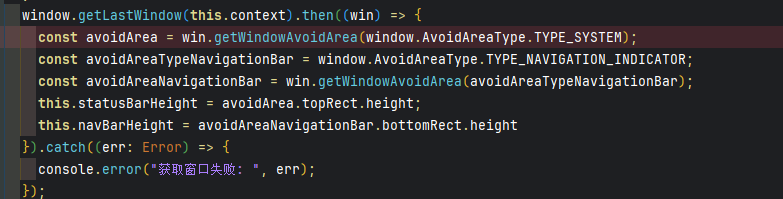
window.getLastWindow(this.context).then((win) => {
  const avoidArea = win.getWindowAvoidArea(window.AvoidAreaType.TYPE_SYSTEM);
  const avoidAreaTypeNavigationBar = window.AvoidAreaType.TYPE_NAVIGATION_INDICATOR;
  const avoidAreaNavigationBar = win.getWindowAvoidArea(avoidAreaTypeNavigationBar);
  this.statusBarHeight = avoidArea.topRect.height;
  this.navBarHeight = avoidAreaNavigationBar.bottomRect.height
}).catch((err: Error) => {
  console.error("获取窗口失败: ", err);
});
更多关于HarmonyOS 鸿蒙Next中API20获取状态栏高度和导航栏高度方法的实战教程也可以访问 https://www.itying.com/category-93-b0.html

谢谢分享
更多关于HarmonyOS 鸿蒙Next中API20获取状态栏高度和导航栏高度方法的实战系列教程也可以访问 https://www.itying.com/category-93-b0.html

在HarmonyOS Next API 20中,获取状态栏高度可使用window.getTopWindow().getWindowProperties().statusBarHeight。获取导航栏高度则通过window.getTopWindow().getWindowProperties().navigationBarHeight。这两个属性直接返回像素值。

在HarmonyOS Next API 20中,获取状态栏和导航栏高度的方法是正确的。你提供的代码流程清晰:
-
缓存Context:在
EntryAbility的onCreate方法中将this.context存入AppStorage,这是获取窗口实例的前提。 -
获取窗口并计算尺寸:关键步骤是使用
window.getLastWindow(context)获取当前窗口,然后通过getWindowAvoidArea方法查询系统避让区域。- 状态栏高度:通过
AvoidAreaType.TYPE_SYSTEM获取系统避让区,其topRect.height即为状态栏高度。 - 导航栏高度:通过
AvoidAreaType.TYPE_NAVIGATION_INDICATOR获取导航指示器避让区,其bottomRect.height即为导航栏高度。
- 状态栏高度:通过
你的代码示例和截图准确展示了这一过程。需要注意的是,getLastWindow返回的是Promise,因此需要使用.then进行异步处理,并在.catch中做好错误捕获,这符合HarmonyOS ArkTS的异步编程规范。此方法适用于需要精确布局以避免系统UI遮挡的场景。
