




HarmonyOS鸿蒙Next中请教下用ArkTS如何实现,每隔100毫秒播放一个音频
HarmonyOS鸿蒙Next中请教下用ArkTS如何实现,每隔100毫秒播放一个音频 请教下用ArkTS如何实现,每隔100毫秒播放一个音频。就是每隔100毫秒播放个音频。我现在用的是使用SoundPool播放短音频,然后用 setTimeout(resolve, this.nextDelay)的方式来
现在开始播放期间,感觉有点卡。不知道是不是SoundPool播放要在主线程导致的,还有就是停止播放有延迟,都停止了 也没有打印日志,但是还响一会。
如果想实现,每隔100毫秒播放一个音频 用什么来循环?用什么来播放音频?
如下是部分SoundPool代码
// 初始化 SoundPool
async initSoundPool() {
  this.soundPool = await media.createSoundPool(5, {
    usage: audio.StreamUsage.STREAM_USAGE_MUSIC,
    rendererFlags: 0,
  });
  if (this.soundPool) {
    this.soundPool.on('loadComplete', (soundId) => {
      MyLog.info('加载完成' + soundId);
    });
    for (let i = 0; i < this.list.length; i++) {
      this.loadAudio(this.list[i].filePath).then((res) => {
        this.soundMap.set(this.guitarStandard[i].filePath, res);
      });
    }
    this.loadAudio(this.successAudio).then((res) => {
      this.soundMap.set(this.successAudio, res);
    });
  }
}

// 加载新音频源
async loadAudio(filePath: string) {
  if (this.soundPool) {
    // 加载新资源
    const fileDescriptor = await this.context.resourceManager.getRawFd(filePath);
    const soundId = await this.soundPool.load(fileDescriptor.fd, fileDescriptor.offset, fileDescriptor.length);
    return soundId;
  }
  return -1;
}

// 播放控制
async playAudio(soundId: number = -1, isSingle: boolean = true) {
  if (this.currentStreamId !== -1 && isSingle) {
    return;
  }
  const playParams: media.PlayParameters = {
    loop: 0,
    rate: audio.AudioRendererRate.RENDER_RATE_NORMAL,
    leftVolume: 1.0,
    rightVolume: 1.0,
    priority: 1,
  };
  if (this.soundPool) {
    try {
      this.currentStreamId = await this.soundPool.play(soundId, playParams);
    } catch (e) {
      MyLog.error('播放失败', JSON.stringify(e));
    }
  }
}
更多关于HarmonyOS鸿蒙Next中请教下用ArkTS如何实现,每隔100毫秒播放一个音频的实战教程也可以访问 https://www.itying.com/category-93-b0.html

开发者您好,参考如下方案看是否能解决问题,如果未解决请提供以下信息:
1.请提供能复现问题的最小demo和需要播放的短音频文件。
【解决方案】
将所有时长小于100ms的短音频文件放到rawfile下soundpool目录中,然后点击“连续播放”未复现卡顿现象。点击“停止播放”后立即停止。如果场景允许建议将循环间隔时间设置成1s及以上。
完整示例代码:
import { media } from '@kit.MediaKit';
import { audio } from '@kit.AudioKit';
import { BusinessError } from '@kit.BasicServicesKit';

let soundPool: media.SoundPool;

@ObservedV2
class SoundFile {
  @Trace
  filename: string = '';
  @Trace
  soundId: number = -1;

  constructor(filename: string, soundId: number) {
    this.filename = filename;
    this.soundId = soundId;
  }
}

@Builder
export function PageBuilder() {
  TestPage0();
}

@Entry
@ComponentV2
struct TestPage0 {
  private context: Context = this.getUIContext().getHostContext() as Context;
  @Local soundFilesArr: Array<SoundFile> = new Array();
  @Local soundIdArr: number[] = [];
  changeText:number = 0;
  intervalId:number = 0;
  async aboutToAppear(): Promise<void> {
    await this.create();

    for(let i = 0; i < this.soundFilesArr.length; i++)
    {
      await this.load(this.soundFilesArr[i].filename);
    }
  }

  build() {
    NavDestination() {
      Column({ space: 2 }) {
        Button('连续播放')
          .onClick(()=>{
            console.log('===============bofang');

            this.intervalId = setInterval(async () => {
              await this.play(this.soundIdArr[this.changeText%this.soundIdArr.length]);
              this.changeText++;
              console.log('===============bofang========='+this.soundIdArr[this.changeText%this.soundIdArr.length]);

            }, 100);
          })
        Button('停止播放')
          .onClick(()=>{
            console.log('===============tizhibofang');

            clearInterval(this.intervalId)
          })

      }
      .width('100%')
      .height('100%')
    }
  }

  async create() {
    // 创建soundPool实例
    let audioRendererInfo: audio.AudioRendererInfo = {
      usage: audio.StreamUsage.STREAM_USAGE_MUSIC, // 音频流使用类型:音乐。根据业务场景配置,参考StreamUsage
      rendererFlags: 1 // 音频渲染器标志
    };
    try {
      soundPool = await media.createSoundPool(32, audioRendererInfo);
    } catch (error) {
      console.error('load raw file error ' + JSON.stringify(error));
    }

    this.loadCallback(soundPool); // 监听loadComplete
    await this.scanRawFile(); // 扫描rawfile音频资源
  }

  async scanRawFile() {
    try {
      let resourceManager = this.context.resourceManager;
      let files = await resourceManager.getRawFileList('soundpool/'); //确保目录存在,并包含音频文件
      for (let i = 0; i < files.length; i++) {
        let soundFile: SoundFile = new SoundFile(files[i], -1);
        this.soundFilesArr.push(soundFile);
      }
    } catch (error) {
      console.error('getRawFileList error' + JSON.stringify(error));
    }
  }

  async load(fileName: string) {
    try {
      let rowFd = await this.context.resourceManager.getRawFd('soundpool/' + fileName);
      console.info('file uri: ' + fileName + ',' + rowFd.fd);
      await soundPool.load(rowFd.fd, rowFd.offset, rowFd.length).then((soundId) => {
        this.updListArrSoundId(fileName, soundId);
        this.soundIdArr[this.changeText] = soundId;
        this.changeText++
      })
        .catch((e: BusinessError) => {
          console.error('load sound err: ', e.code, e.message);
        });
    } catch (error) {
      console.error('load raw file error' + JSON.stringify(error));
    }
  }

  async play(soundId: number) {
    // 开始播放,这边play也可带播放播放的参数PlayParameters,请在音频资源加载完毕,即收到loadComplete回调之后再执行play操作
    await soundPool.play(soundId).then(async (streamId: number) => {
      console.info('play sound success soundid:' + soundId, streamId);
    }, (err: BusinessError) => {
      console.info(`play sound Error: errCode is ${err.code}, errMessage is ${err.message}`);
    });
  }

  async unload(fileName: string, soundId: number) {
    soundPool.unload(soundId, (error: BusinessError) => {
      if (error) {
        console.error(`Failed to unload soundPool: errCode is ${error.code}, errMessage is ${error.message}`, soundId);
      } else {
        console.info('Succceeded in unload soundPool', soundId);
        this.updListArrSoundId(fileName, -1);
      }
    });
  }

  loadCallback(soundPool: media.SoundPool) {
    soundPool.on('loadComplete', (soundId: number) => {
      console.info('loadComplete, soundId: ' + soundId);
    });
  }


  updListArrSoundId(fileName: string, soundId: number) {
    // 更新list记录soundId
    this.soundFilesArr.forEach((soundFile) => {
      if (soundFile.filename == fileName) {
        soundFile.soundId = soundId;
      }
    });
  };
}
【背景知识】
- SoundPool(音频池)接口可以实现低时延短音播放,如相机快门音效、系统通知音效等,实现一次加载,多次低时延播放。
- SoundPool支持的音频播放格式如下:
| 音频容器规格 | 规格描述 |
|---|---|
| m4a | 音频格式:AAC |
| aac | 音频格式:AAC |
| mp3 | 音频格式:MP3 |
| ogg | 音频格式:VORBIS |
| wav | 音频格式:PCM |
- 使用接口createSoundPool创建音频池实例,当API 18以下版本,创建的SoundPool对象底层为单实例模式,一个应用进程只能够创建1个SoundPool实例。当API 18及API 18以上版本,创建的SoundPool对象底层为多实例模式,一个应用进程最多能够创建128个SoundPool实例。
【常见FAQ】
Q:SoundPool当前支持播放解码后1MB以下的音频资源,有个1MB以下的MP3音频播放时为什么被截取?
A:MP3是常见的压缩率优良的音频编码格式,可以使用FFmpeg工具将MP3文件解码为WAV格式(WAV是一种未压缩的音频格式),通过查看WAV文件大小获取MP3音频解码后的大小,从而判断MP3音频资源是否符合SoundPool的使用要求。
更多关于HarmonyOS鸿蒙Next中请教下用ArkTS如何实现,每隔100毫秒播放一个音频的实战系列教程也可以访问 https://www.itying.com/category-93-b0.html

使用on(‘playFinished’)方法监听播放完成:
- 每次播放完成的时候,进行资源的释放;
- 开启新一轮的音频播放。
await this.soundPool?.on('playFinished',async ()=>{
  await this.soundPool.release();
  setTimeout(()=>{
    //加载...播放新音频
  },100)
});
注意:
- 调用on(‘playFinished’)或者on(‘playFinishedWithStreamId’)方法,用于监听“播放完成”。 当仅单独注册’playFinished’事件回调或者’playFinishedWithStreamId’事件回调时,当音频播放完成的时候,都会触发注册的回调。 当同时注册’playFinished’事件回调和’playFinishedWithStreamId’事件回调时,当音频播放完成的时候,仅会触发’playFinishedWithStreamId’事件回调,不会触发’playFinished’事件回调。
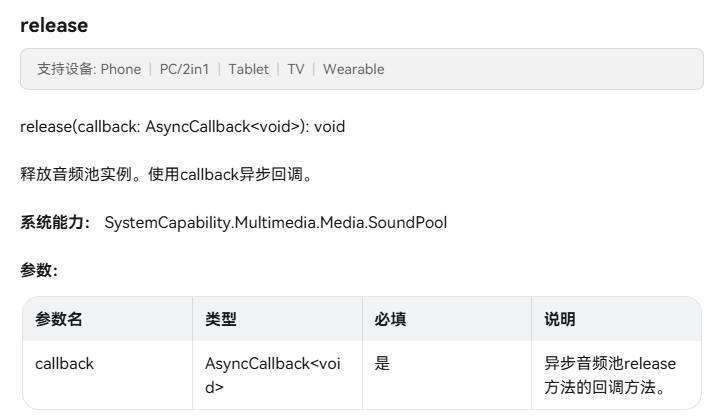
相关文档:【SoundPool_release】

建议换种方式试下这个。毕竟100毫秒太短了,api启动和关闭都是需要时间的。
建议方式: 比如把这个音频合成下,合成方式:(音频+100毫秒的空白)x10的长音频。然后在长音频播放结束后再延迟100毫秒,再继续播放长音频。


SoundPool适合短音频(<5秒)快速播放,虽然能低延迟播放,但频繁的同步操作(如每100ms触发)会导致UI线程阻塞
这个 100ms 是否是必须,而且这个 100 ms 确实太短
参考地址
https://developer.huawei.com/consumer/cn/doc/harmonyos-guides/using-soundpool-for-playback

在HarmonyOS Next中,使用ArkTS实现每隔100毫秒播放音频,可通过@ohos.multimedia.audio模块创建AudioRenderer实例。设置音频参数后,使用setInterval定时器控制播放间隔。核心步骤包括:初始化音频渲染器、准备音频数据、在定时器回调中调用write方法写入数据并触发播放。需注意管理定时器生命周期,及时释放资源。
在HarmonyOS Next中实现高精度定时音频播放,SoundPool确实可能因主线程阻塞导致卡顿。推荐以下方案:
1. 使用AudioRenderer替代SoundPool AudioRenderer提供更精确的低延迟音频播放控制:
import audio from '@ohos.multimedia.audio';

// 创建AudioRenderer实例
let audioRenderer: audio.AudioRenderer | undefined = undefined;
const bufferSize = await audioRenderer.getBufferSize();
const audioStreamInfo: audio.AudioStreamInfo = {
  samplingRate: audio.AudioSamplingRate.SAMPLE_RATE_44100,
  channels: audio.AudioChannel.CHANNEL_2,
  sampleFormat: audio.AudioSampleFormat.SAMPLE_FORMAT_S16LE,
  encodingType: audio.AudioEncodingType.ENCODING_TYPE_RAW
};
2. 采用Worker线程进行定时控制 避免主线程阻塞,使用Worker实现精确计时:
// 创建Worker线程处理定时播放
const worker = new Worker('entry/ets/workers/AudioTimerWorker.ts');

// Worker中实现高精度定时
let nextPlayTime = performance.now();
const interval = 100;

function schedulePlay() {
  const now = performance.now();
  const delay = Math.max(0, nextPlayTime - now);

  setTimeout(() => {
    // 发送播放指令到主线程
    postMessage({ cmd: 'playAudio' });
    nextPlayTime += interval;
    schedulePlay();
  }, delay);
}
3. 音频预加载和缓冲管理
// 预加载多个音频缓冲区
const audioBuffers: ArrayBuffer[] = [];
async function preloadAudioSegments() {
  for (let i = 0; i < 10; i++) {
    const buffer = await loadAudioData(i);
    audioBuffers.push(buffer);
  }
}

// 循环使用缓冲区
let currentBufferIndex = 0;
async function playNextSegment() {
  if (audioRenderer && audioBuffers.length > 0) {
    const buffer = audioBuffers[currentBufferIndex];
    await audioRenderer.write(buffer);
    currentBufferIndex = (currentBufferIndex + 1) % audioBuffers.length;
  }
}
4. 关键优化点
- 使用
performance.now()替代setTimeout获得更高精度计时 - 采用双缓冲或环形缓冲避免内存分配延迟
- 设置合适的音频缓冲区大小平衡延迟和稳定性
- 通过
audio.AudioRenderer.setRenderRate()调整播放速率
5. 停止播放立即终止
async function stopPlaybackImmediately() {
  if (audioRenderer) {
    await audioRenderer.stop();
    await audioRenderer.release();
    audioRenderer = undefined;
  }
  worker.terminate();
}
此方案通过Worker线程分离定时逻辑,AudioRenderer提供低延迟播放,配合预加载缓冲可稳定实现100ms间隔音频播放,避免卡顿和停止延迟问题。
