




HarmonyOS鸿蒙Next中flutter/sqflite操作失败,来大佬紧急求助
HarmonyOS鸿蒙Next中flutter/sqflite操作失败,来大佬紧急求助 流程:从asset中把已有sqllite db文件复制到文档目录,然后打开db、查询db。
错误:在其他os上都正常运行,可复制、查询。仅在ohos上显示报错:
DataBaseException:SQLite:Unable to open the database file.
报错信息:
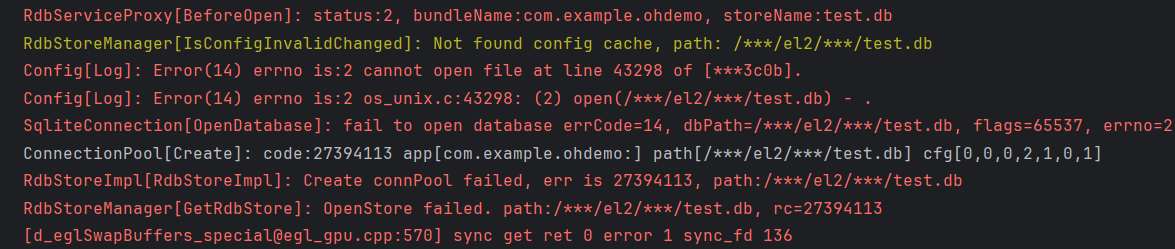 dependencies:
sqflite:
  git:
    url: "https://gitee.com/openharmony-sig/flutter_sqflite.git"
    path: "sqflite"
    ref: master
sqflite_common_ffi:
  git:
    url: "https://gitee.com/openharmony-sig/flutter_sqflite.git"
    path: "sqflite_common_ffi"
    ref: master
path_provider:
  git:
    url: "https://gitcode.com/openharmony-tpc/flutter_packages.git"
    path: "packages/path_provider/path_provider"
代码:
class MyDB {
  Future<Database> openDreamDB() async {
    var databasesPath = await getDatabasesPath();
    var path = join(databasesPath, "test.db");
    var exists = await databaseExists(path);
    if (!exists) {
      // Should happen only the first time you launch your application
      print("Creating new copy from asset");

      // Make sure the parent directory exists
      try {
        await Directory(dirname(path)).create(recursive: true);
      } catch (_) {}

      // Copy from asset
      ByteData data = await rootBundle.load(url.join("assets", "test.db"));
      List<int> bytes =
      data.buffer.asUint8List(data.offsetInBytes, data.lengthInBytes);

      // Write and flush the bytes written
      await File(path).writeAsBytes(bytes, flush: true);
    } else {
      print("Opening existing database");
    }
    return await openDatabase(path, readOnly: true);
  }

  Future<List<Map>> queryDreamLib(String classId) async {
    List<Map> mQuery = [];
    var sql =
        'SELECT * FROM name2';
    print('sql:$sql-------------------------');
    // mQuery = await openDreamDB().then((value) => value.rawQuery(
    //       sql,
    //     ));
    Database db = await openDreamDB();
    print('db.isOpen:${db.isOpen}');
    mQuery =  await db.rawQuery(sql);
    print('db.query');
    await db.close();
    if (mQuery.isEmpty) {
      return [
        {
          'title': '未查询到数据',
          'msg':
              '未查询到数据',
        },
      ];
    } else {
      print('mQuery.length:${mQuery.length}');
      print('mQuery.title:${mQuery[0]['title']}');
      print(mQuery);
      return mQuery;
    }
  }
}
更多关于HarmonyOS鸿蒙Next中flutter/sqflite操作失败,来大佬紧急求助的实战教程也可以访问 https://www.itying.com/category-92-b0.html

开发者您好,参考如下方案排查看是否解决问题,如果不可以请提供以下信息:
1.最小可复现问题demo及报错完整hilog日志(1.打开cmd 2.清除:hdc shell hilog -r 3.监听抓日志:hdc shell hilog >log.txt)。
【解决方案】
根据报错信息请排查数据库路径是否错误,访问路径是否有权限或文件是否损坏,或者参考官方提供的完整demo排查问题。
更多关于HarmonyOS鸿蒙Next中flutter/sqflite操作失败,来大佬紧急求助的实战系列教程也可以访问 https://www.itying.com/category-92-b0.html
鸿蒙Next中Flutter的sqflite操作失败及解决方案
鸿蒙Next中Flutter的sqflite操作失败,主要原因是鸿蒙Next不再支持Android原生库。sqflite依赖Android平台的SQLite实现,在鸿蒙Next上无法直接运行。
解决方案是使用鸿蒙原生的数据库API替代。鸿蒙提供了轻量级数据存储(Preferences)和关系型数据库(RDB)两种数据管理方式。RDB支持SQLite语法,与sqflite功能类似。
需要将Flutter插件中涉及sqflite的代码替换为调用鸿蒙原生数据库接口。可通过平台通道(Platform Channel)实现Flutter与鸿蒙原生代码的交互。

这个问题在HarmonyOS Next上通常是由于文件系统权限或路径访问问题导致的。Unable to open the database file 错误表明SQLite引擎无法访问指定的数据库文件。
从你的代码看,主要问题可能出在以下几个方面:
-
路径权限问题:HarmonyOS Next对应用的文件访问权限有更严格的限制。
getDatabasesPath()返回的路径可能没有正确的读写权限。 -
文件复制问题:从assets复制到应用目录时,文件权限可能没有正确设置。
-
数据库文件格式:确保你的test.db文件是有效的SQLite 3格式。
解决方案:
首先,确认文件是否成功复制。在复制后添加文件存在性检查:
await File(path).writeAsBytes(bytes, flush: true);
var file = File(path);
print('File exists: ${await file.exists()}');
print('File size: ${(await file.stat()).size}');
其次,尝试使用应用文档目录而不是数据库目录:
import 'package:path_provider/path_provider.dart';

var appDocDir = await getApplicationDocumentsDirectory();
var path = join(appDocDir.path, "test.db");
如果问题依旧,检查数据库文件是否损坏。可以在复制后尝试直接读取文件内容验证完整性。
另外,确保在pubspec.yaml中正确声明了assets:
flutter:
  assets:
    - assets/test.db
最后,考虑在HarmonyOS Next上使用官方的@ohos/data-relationalStore作为替代方案,这是为HarmonyOS优化的本地数据库解决方案,性能更好且兼容性更有保障。
