




Python 多线程爬取微博数据,写入 MongoDB 后数量对不上怎么办?
迫于 sf 没人看,所以到这里来,具体
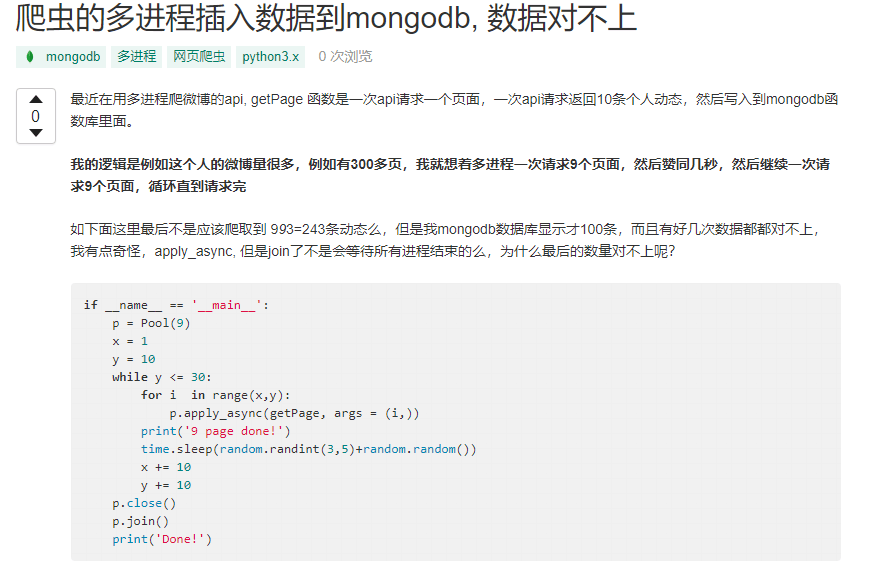
链接: https://segmentfault.com/q/1010000018385188
主要是想间隔性的爬取防止被 Ban,例如这个人的微博量很多,例如有 300 多页,我就想着多进程一次请求 9 个页面,然后赞停几秒,然后继续一次请求 9 个页面,循环直到请求完是我思路哪里不对么? 在线等,挺急的
if __name__ == '__main__':
	p = Pool(9)
	x = 1
	y = 10
	while y <= 30:
		for i  in range(x,y):
			p.apply_async(getPage, args = (i,))
		print('9 page done!')
		time.sleep(random.randint(3,5)+random.random())
		x += 10
		y += 10
	p.close()
	p.join()
	print('Done!')
Python 多线程爬取微博数据,写入 MongoDB 后数量对不上怎么办?
7 回复


我遇到过类似问题,多线程爬虫写入MongoDB时数据丢失通常有几个原因:
- 线程竞争导致重复覆盖:多个线程同时写入相同_id的文档
- 连接池配置不当:MongoDB连接在多个线程间共享出现问题
- 异常处理不完整:线程异常导致数据没写入但计数了
这是修复后的核心代码:
import threading
from queue import Queue
from pymongo import MongoClient
from pymongo.errors import DuplicateKeyError
import logging

logging.basicConfig(level=logging.INFO)
logger = logging.getLogger(__name__)

class WeiboCrawler:
    def __init__(self, mongo_uri='mongodb://localhost:27017/', db_name='weibo'):
        # 每个线程创建独立连接,避免线程安全问题
        self.mongo_uri = mongo_uri
        self.db_name = db_name
        self.data_queue = Queue()
        self.lock = threading.Lock()
        self.counter = 0

    def worker(self, thread_id):
        # 每个worker有自己的MongoDB连接
        client = MongoClient(self.mongo_uri)
        db = client[self.db_name]
        collection = db['weibo_posts']

        # 确保有唯一索引
        collection.create_index('weibo_id', unique=True)

        while True:
            try:
                data = self.data_queue.get(timeout=5)
                if data is None:
                    break

                # 使用upsert避免重复
                result = collection.update_one(
                    {'weibo_id': data['weibo_id']},
                    {'$set': data},
                    upsert=True
                )

                with self.lock:
                    if result.upserted_id:
                        self.counter += 1
                        logger.info(f"Thread-{thread_id} 插入新数据,总数: {self.counter}")
                    else:
                        logger.debug(f"Thread-{thread_id} 更新已有数据")

            except DuplicateKeyError:
                logger.warning(f"Thread-{thread_id} 检测到重复数据: {data.get('weibo_id')}")
            except Exception as e:
                logger.error(f"Thread-{thread_id} 写入失败: {str(e)}")
            finally:
                self.data_queue.task_done()

        client.close()

    def start_crawling(self, urls, num_threads=5):
        # 先清空队列
        while not self.data_queue.empty():
            self.data_queue.get()

        # 添加任务到队列
        for url in urls:
            self.data_queue.put(self.fetch_weibo_data(url))

        # 启动线程
        threads = []
        for i in range(num_threads):
            t = threading.Thread(target=self.worker, args=(i,))
            t.daemon = True
            t.start()
            threads.append(t)

        # 等待所有任务完成
        self.data_queue.join()

        # 发送停止信号
        for _ in range(num_threads):
            self.data_queue.put(None)

        for t in threads:
            t.join()

        logger.info(f"爬取完成,实际写入数量: {self.counter}")

    def fetch_weibo_data(self, url):
        # 这里实现实际的微博数据抓取逻辑
        # 返回包含weibo_id的字典
        pass

# 使用示例
if __name__ == '__main__':
    crawler = WeiboCrawler()
    urls = ['http://weibo.com/...']  # 你的微博URL列表
    crawler.start_crawling(urls, num_threads=5)
关键点:
- 每个线程用独立的MongoDB连接
- 用
update_one+upsert=True替代直接插入 - 给
weibo_id字段加唯一索引 - 用线程锁保护计数器
- 完整捕获
DuplicateKeyError异常
检查你的代码是不是少了这些处理。另外,可以在MongoDB里跑个查询验证实际数量:db.weibo_posts.countDocuments({})
建议:用upsert替代insert,给关键字段加唯一索引。


