




HarmonyOS鸿蒙Next中父组件进行缩放后,bindPopup怎么跟随父组件的变化而改变
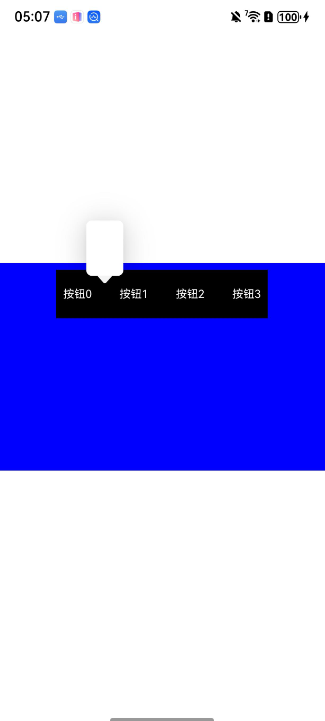
HarmonyOS鸿蒙Next中父组件进行缩放后,bindPopup怎么跟随父组件的变化而改变 【问题描述】:父组件使用了scale缩放,子组件按钮使用了bindPopup,按钮缩放后,绑定的bindPopup错位了,还在原来没有缩放的位置上
【问题现象】:按钮缩放后,绑定的bindPopup错位了,还在原来没有缩放的位置上
【版本信息】:不涉及
【复现代码】:
@Entry
@Component
export struct Index {
  @State containerWidth: number = 0; // 视口宽度
  @State containerHeight: number = 0; // 视口高度
  @State viewWidth: number = 0; // 组件宽度
  @State viewHeight: number = 0; // 组件高度
  @State viewScale: number = 1
  @State list: Array<string> = ["", "", "", ""]
  @State selBtnIndex: number = -1
  @State isShowPopup: boolean = false

  @Builder
  demoCard() {
    RelativeContainer() {

    }
    .height("120lpx")
    .width("100%")
    .backgroundColor(Color.White)
  }

  build() {
    RelativeContainer() {
      RelativeContainer() {
        Row({ space: 20 }) {
          ForEach(this.list, (item: string, index) => {
            Text(`按钮${index}`)
              .margin(10)
              .height("100lpx")
              .fontSize("20lxp")
              .fontColor(Color.White)
              .bindPopup(this.isShowPopup && this.selBtnIndex == index, {
                builder: this.demoCard(),
                width: "80lpx",
                placement: Placement.Top,
                radius: "12lpx",
                offset: { x: 0, y: `${20}lpx` },
                popupColor: Color.White,
                onStateChange: (e) => {
                  this.isShowPopup = e.isVisible
                },
              })
              .onClick(() => {
                this.selBtnIndex = index
                this.isShowPopup = true
              })
          })
        }
        .backgroundColor(Color.Black)
        .alignRules({
          middle: { anchor: "__container__", align: HorizontalAlign.Center }
        })
        .margin(10)
      }
      .backgroundColor(Color.Blue)
      .width("960lpx")
      .height("600lpx")
      .alignRules({
        center: { anchor: "__container__", align: VerticalAlign.Center },
        middle: { anchor: "__container__", align: HorizontalAlign.Center }
      })
      .onAreaChange((oldArea, newArea) => {
        this.viewWidth = Number(newArea.width);
        this.viewHeight = Number(newArea.height);
        this.checkViewSize()
      })
      .scale({
        centerY: "50%",
        centerX: "50%",
        x: this.viewScale,
        y: this.viewScale
      })
    }
    .width("100%")
    .height("100%")
    .onAreaChange((oldArea, newArea) => {
      this.containerWidth = Number(newArea.width);
      this.containerHeight = Number(newArea.height);
      this.checkViewSize()
    })
  }

  checkViewSize() {
    if (this.containerWidth != 0 && this.viewWidth != 0) {
      const viewAspectRatio = this.viewWidth / this.viewHeight;
      const containerAspectRatio = this.containerWidth / this.containerHeight;
      let scale: number;
      if (viewAspectRatio > containerAspectRatio) {
        // 以宽度为基准缩放
        scale = this.containerWidth / this.viewWidth;
      } else {
        // 以高度为基准缩放
        scale = this.containerHeight / this.viewHeight;
      }
      // 更新缩放比例
      this.viewScale = scale;
    }
  }
}
更多关于HarmonyOS鸿蒙Next中父组件进行缩放后,bindPopup怎么跟随父组件的变化而改变的实战教程也可以访问 https://www.itying.com/category-93-b0.html

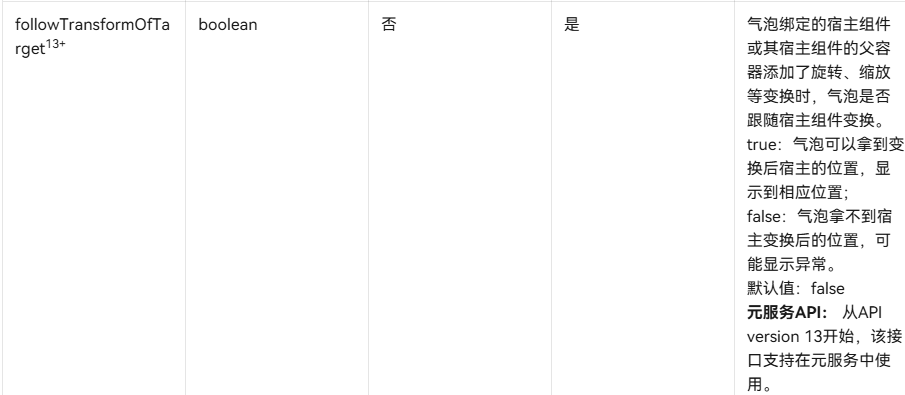
在气泡配置中添加followTransformOfTarge属性
更多关于HarmonyOS鸿蒙Next中父组件进行缩放后,bindPopup怎么跟随父组件的变化而改变的实战系列教程也可以访问 https://www.itying.com/category-93-b0.html


在HarmonyOS Next中,父组件缩放后,bindPopup默认不会自动跟随缩放。需要手动更新弹窗位置。可通过监听父组件的缩放变化,在回调中调用popupController的setPosition方法,动态计算并设置弹窗的新位置坐标,使其与父组件保持相对位置一致。

在HarmonyOS Next中,当父组件应用了scale缩放后,bindPopup的定位确实会出现错位问题。这是因为popup的定位计算是基于组件原始布局位置,不会自动跟随transform(如scale)的变化。
目前有两种可行的解决方案:
-
使用自定义弹窗替代bindPopup 可以改用CustomDialog或自定义浮层组件,手动计算并设置弹窗位置。通过获取缩放后按钮的实际位置信息,动态设置弹窗的偏移量。
-
调整布局结构避免嵌套缩放 将需要显示popup的组件移出缩放容器,或者重新设计布局,使popup的触发元素不处于缩放变换的组件树中。
从你的代码看,由于整个RelativeContainer都应用了scale变换,导致内部的bindPopup定位基准出错。建议考虑重构布局,将popup触发按钮放在未缩放的容器中,或者改用CustomDialog实现类似功能。
这个问题与popup组件的实现机制有关,在当前的架构下,popup的定位不会考虑父级容器的变换矩阵。
