




HarmonyOS鸿蒙Next中vue3项目如何通过webview加载?
HarmonyOS鸿蒙Next中vue3项目如何通过webview加载?
import { webview } from '@kit.ArkWeb';

@Entry
@Component
struct Index {
  private webviewController: webview.WebviewController = new webview.WebviewController();

  aboutToAppear() {
    // 启用 Web 调试(开发环境)
    webview.WebviewController.setWebDebuggingAccess(true);
  }

  aboutToDisappear() {
    // 清理资源
  }

  build() {
    RelativeContainer() {
      Web({
        src: $rawfile('dist/index.html'),
        controller: this.webviewController,
        renderMode: RenderMode.ASYNC_RENDER
      })
        .javaScriptAccess(true)
        .domStorageAccess(true)
        .fileAccess(true)
        .imageAccess(true)
        .databaseAccess(true)
        .mixedMode(MixedMode.All)
        .cacheMode(CacheMode.Default)
        .height('100%')
        .width('100%')
        .onPageBegin((event) => {
          console.info('Page started loading: ' + event?.url);
        })
        .onPageEnd((event) => {
          console.info('Page finished loading: ' + event?.url);
        })
        .onErrorReceive((event) => {
          console.error('Page load error: ' + JSON.stringify(event));
        })
        .onConsole((event) => {
          console.info('Web console: ' + event?.message.getMessage());
          return false;
        })
    }
    .height('100%')
    .width('100%')
  }
}
"requestPermissions": [
  {
    "name": "ohos.permission.INTERNET",
    "reason": "$string:app_name",
    "usedScene": {
      "abilities": [],
      "when": "always"
    }
  },
  {
    "name": "ohos.permission.GET_NETWORK_INFO",
    "reason": "$string:app_name",
    "usedScene": {
      "abilities": [],
      "when": "always"
    }
  }
]
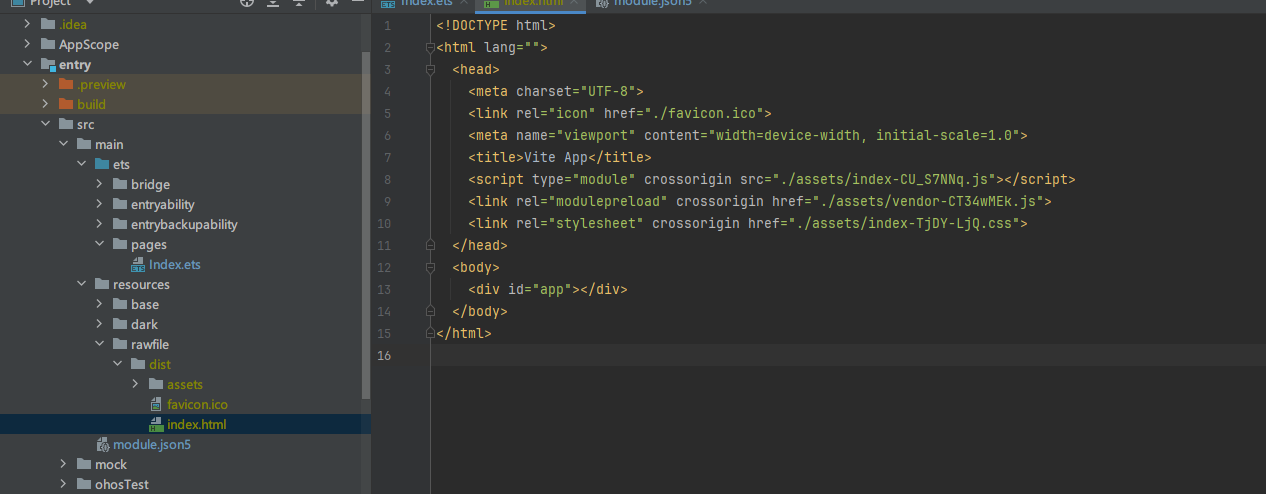
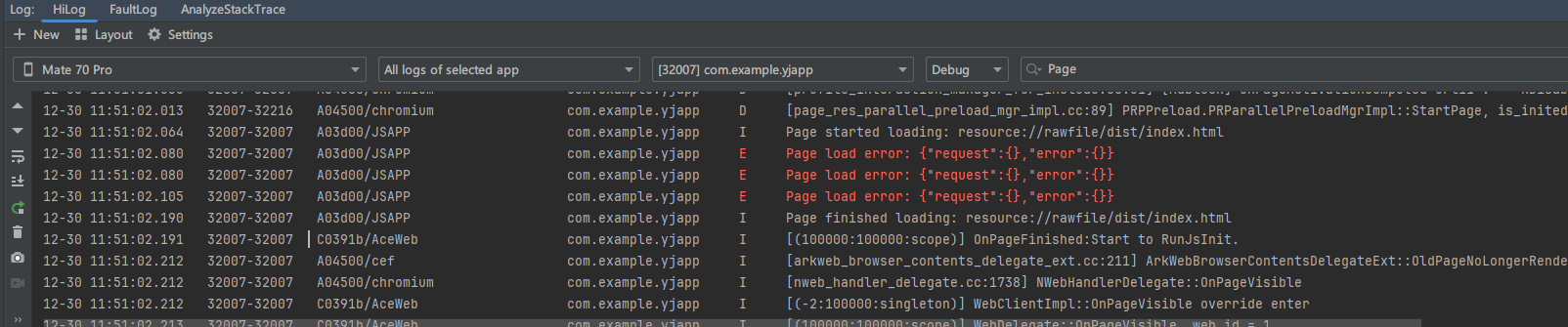
我这边运行后是白屏的,但是普通工 html 可以正常加载
更多关于HarmonyOS鸿蒙Next中vue3项目如何通过webview加载?的实战教程也可以访问 https://www.itying.com/category-93-b0.html

SetWebDebuggingAccessAndPort: SetWebDebuggingAccessAndPort, not initialized根据报错提示未指定端口
通过setWebDebuggingAccess()接口开启Web组件前端页面调试能力,可以使用无线调试和USB连接调试,不建议使用模拟器
web加载vue3可以参考下ArkWeb加载Vue3打包后的静态文件
【背景知识】
从API version 20开始,可使用无线调试
当指定了端口port时,ArkWeb会启动一个tcp socket监听。这时可以无线调试网页。详情请参考无线调试
更多关于HarmonyOS鸿蒙Next中vue3项目如何通过webview加载?的实战系列教程也可以访问 https://www.itying.com/category-93-b0.html

1、先确定在浏览器上能否正常访问你部署的Vue3项目;
2、如果第一步没问题,那么需要先卸载APP再重新安装看看行不行,因为ArkWeb的缓存策略默认会拿第一次的网络请求作为后续结果,如果缓存无效或没有缓存,才会从网络中继续获取。
CacheMode枚举定义
| 名称 | 值 | 说明 |
|---|---|---|
| Default9+ | 0 | 优先使用未过期的缓存加载资源,如果缓存无效或没有缓存,则从网络获取。 默认值:当 cacheMode属性没有显式调用时,默认为CacheMode.Default。传入undefined或null时也视为CacheMode.Default。 |
| None | 1 | 优先使用缓存(包括已过期的缓存)加载资源,如果没有缓存,则从网络获取。 |
| Online | 2 | 强制从网络获取最新资源,不使用任何缓存。 |
| Only | 3 | 仅使用本地缓存加载资源。 |
CacheMode通过Web组件的.cacheMode()属性进行设置,用于控制Web页面加载资源(如HTML、图片、脚本等)时的缓存策略。未显式设置时,缓存模式为CacheMode.Default。
基本使用示例:
import { webview } from '@kit.ArkWeb';

@Entry
@Component
struct WebComponent {
  controller: webview.WebviewController = new webview.WebviewController();
  @State mode: CacheMode = CacheMode.None; // 设置为None模式

  build() {
    Column() {
      Web({ src: ' www.example.com', controller: this.controller })
        .cacheMode(this.mode) // 应用缓存模式
    }
  }
}
为了获取最新资源,可以使用WebviewController.removeCache()接口清除已缓存的资源。
清除缓存示例:
import { webview } from '@kit.ArkWeb';
import { BusinessError } from '@kit.BasicServicesKit';

@Entry
@Component
struct WebComponent {
  controller: webview.WebviewController = new webview.WebviewController();

  build() {
    Column() {
      Button('removeCache')
        .onClick(() => {
          try {
            // 参数为true时同时清除ROM和RAM中的缓存,为false时只清除RAM中的缓存
            this.controller.removeCache(true);
          } catch (error) {
            console.error(`ErrorCode: ${(error as BusinessError).code}, Message: ${(error as BusinessError).message}`);
          }
        })
      Web({ src: ' www.example.com', controller: this.controller })
    }
  }
}
你的 Vue3 项目通过 ArkWeb 加载白屏(普通 HTML 正常),核心是Vue 打包配置 / 资源路径问题,按以下步骤解决:
-
修正 Vue 打包的
base配置打开 Vue 项目的vite.config.js(或vue.config.js),设置base: './'(确保资源以相对路径加载):// vite.config.js export default defineConfig({ base: './', // 关键:避免绝对路径导致资源找不到 // 其他配置... })重新打包
npm run build,将新的dist目录完整复制到鸿蒙项目的rawfile下。 -
确认资源路径匹配确保
rawfile/dist下的结构是:rawfile/ dist/ index.html assets/ index-xxx.js vendor-xxx.js index-xxx.css与
index.html中引用的./assets/xxx路径完全对应。 -
用 Web 调试看具体错误你的代码已开
setWebDebuggingAccess(true),在电脑 Chrome 浏览器输入chrome://inspect,找到鸿蒙设备的 WebView 实例,查看控制台错误(大概率是 “资源加载失败” 或 “JS 执行错误”)。 -
**补充 ArkWeb 配置(可选)**给 Web 组件加
allowUniversalAccessFromFileURLs(true)(允许本地文件加载资源):Web({...}) .allowUniversalAccessFromFileURLs(true) // 新增 .javaScriptAccess(true) // 其他配置...

VUE3默认不是file协议,需要拦截处理
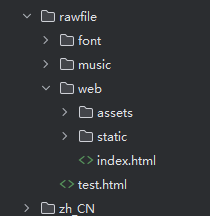
//这里域名可以随便写,只是用于拦截时做判断
Web({
  src: 'https://www.example.com/index.html', controller: this.controller
})
  .width('100%')
  .height('100%')
  .domStorageAccess(true)
  .databaseAccess(true)
  .fileAccess(true)
  .imageAccess(true)
  .geolocationAccess(true)
  .javaScriptAccess(true)
  .cacheMode(CacheMode.Default)
  .onlineImageAccess(true)
  .mediaPlayGestureAccess(true)
  .mixedMode(MixedMode.All)//HTTP和HTTPS混合
  .onInterceptRequest((event) => {
    if (!event) {
      return null;
    }

    let url = event.request.getRequestUrl();
    if (url.includes('www.example.com')) {
      // 此处匹配自己想要加载的本地离线资源,进行资源拦截替换,绕过跨域
      let rawfileName: string = url.replace('https://www.example.com/', 'web/')!;

      let type = rawfileName.substring(rawfileName.lastIndexOf('.') + 1);

      let mimeType = 'text/html'
      switch (type) {
        case 'html':
          mimeType = 'text/html';
          break;
        case 'css':
          mimeType = 'text/css';
          break;
        case 'js':
          mimeType = 'text/javascript';
          break;
        case 'png':
          mimeType = 'image/png';
          break;
        case 'jpg':
          mimeType = 'image/jpeg';
          break;
        case 'json':
          mimeType = 'application/json';
          break;
        case 'ico':
          mimeType = 'image/png';
          break;
      }

      let response = new WebResourceResponse();
      // 构造响应数据,如果本地文件在rawfile下,可以通过如下方式设置

      response.setResponseData($rawfile(rawfileName));
      response.setResponseEncoding('utf-8');
      response.setResponseMimeType(mimeType);
      response.setResponseCode(200);
      response.setReasonMessage('OK');
      response.setResponseIsReady(true);
      return response;
    }
    return null;
  })

换了好多端口,还是报错 SetWebDebuggingAccessAndPort: SetWebDebuggingAccessAndPort, not initialized,用的虚拟机
https://developer.huawei.com/consumer/cn/doc/harmonyos-guides/web-debugging-with-devtools 使用DevTools工具调试前端页面,可以准确获得前端页面运行错误,便于排查问题

换了好多端口,还是报错 SetWebDebuggingAccessAndPort: SetWebDebuggingAccessAndPort, not initialized,用的虚拟机,
SetWebDebuggingAccessAndPort: SetWebDebuggingAccessAndPort, not initialized根据报错提示未指定端口
通过setWebDebuggingAccess()接口开启Web组件前端页面调试能力,可以使用无线调试和USB连接调试,不要使用模拟器,


在HarmonyOS Next的Vue3项目中,通过<web>组件加载Web内容。首先在entry/src/main/ets/pages目录下的页面文件中引入<web>标签,设置src属性为本地或远程URL。例如:<web src="https://example.com" width="100%" height="100%"></web>。若加载本地资源,需将HTML文件放置在entry/src/main/resources/rawfile目录下,然后使用$rawfile('filename.html')引用。确保在module.json5文件中配置ohos.permission.INTERNET网络权限。

你的代码整体结构正确,但Vue 3项目在HarmonyOS Next的Webview中加载白屏,通常是由于几个关键配置问题导致的。核心在于确保Webview能正确访问到Vue构建产物的所有资源,并处理其路由模式。
1. 检查资源路径与放置
你的代码 src: $rawfile('dist/index.html') 意味着将Vue 3构建后的整个 dist 目录放入ArkTS项目的 rawfile 目录下。请确认:
dist目录已完整复制到entry/src/main/resources/rawfile/中。dist目录内的静态资源(如JS、CSS文件)引用使用的是相对路径。Vue CLI或Vite默认构建出的资源引用通常是绝对的(以/开头),这在rawfile协议下可能无法正确解析。你需要在Vue项目的构建配置中设置publicPath为./(例如,在vue.config.js中设置publicPath: './'或在Vite的vite.config.ts中设置base: './'),然后重新构建。
2. 启用必要的Webview能力
你已配置的 .javaScriptAccess(true) 和 .domStorageAccess(true) 是正确的,这对于运行Vue应用是必须的。.fileAccess(true) 也允许访问本地文件。
3. 处理Vue Router的History模式
这是导致白屏的一个常见原因。如果Vue 3项目使用了Vue Router且为history模式,在本地文件加载时,路由会寻找不存在的文件路径。你有两个选择:
- 推荐:在Vue项目中,将路由模式改为
hash模式(createWebHashHistory)。 - 如果必须使用
history模式,你需要确保所有路由都回退到index.html。这在本地文件加载中较难实现,通常需要服务器配置。
4. 调试与日志
你已添加了onPageEnd和onErrorReceive事件监听,这很好。白屏时,请重点查看:
onPageEnd事件是否触发?如果触发,说明HTML文件本身加载成功了。onErrorReceive事件是否有报错?常见的错误是404(找不到JS/CSS文件)或JavaScript执行错误。onConsole事件也能捕获到Vue应用内部的console日志,有助于排查。
5. 其他可能
- Content Security Policy (CSP): 如果Vue构建的HTML文件头包含严格的CSP策略,可能会阻止本地资源的加载。你可能需要调整或移除构建配置中的CSP设置。
- 基础路径: 如上所述,确保构建产物的资源引用路径是相对的。
建议的排查步骤:
- 检查Vue项目构建配置,将
publicPath或base设置为'./'。 - 将Vue Router模式改为
hash模式进行测试。 - 重新构建Vue项目,并将完整的
dist目录覆盖到rawfile目录。 - 清理HarmonyOS应用构建缓存并重新运行。
- 观察DevEco Studio的Log窗口,查看
onPageEnd、onErrorReceive和onConsole输出的具体错误信息。
你的代码框架是正确的,问题很可能出在Vue构建产物的路径适配或路由模式上。
