




HarmonyOS 鸿蒙Next应用蓝牙功能实现源码和步骤讲解
HarmonyOS 鸿蒙Next应用蓝牙功能实现源码和步骤讲解

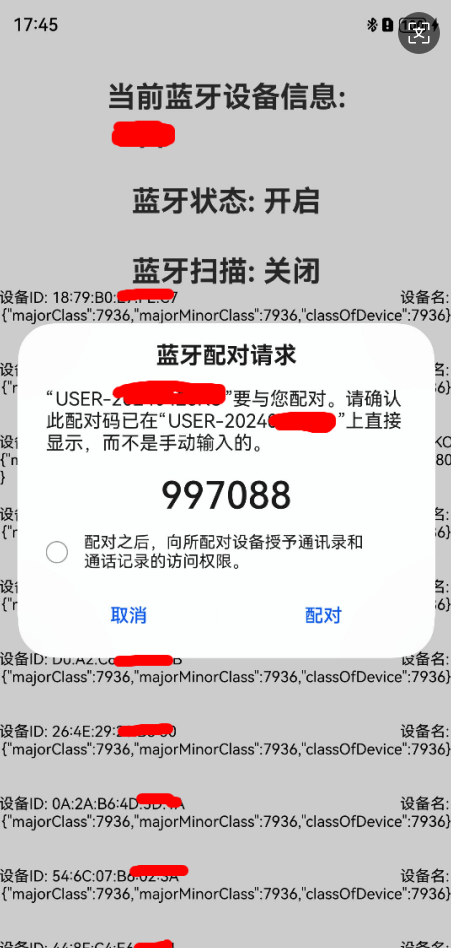
一、蓝牙配对业务流程
1.设备进入可被发现模式: 首先,设备需要进入可被发现模式,这样周围的蓝牙设备才能识别到它。一方设备(如手机)会主动搜索附近的蓝牙设备,并列出所有可用的配对选项。
2.选择并触发配对请求: 用户从列表中选择想要连接的设备,并触发配对请求。此时,双方设备会交换一系列的身份验证信息,以确保彼此的身份安全无误。在这个过程中,可能会要求用户输入配对码(如PIN码)或在设备上确认配对请求。
3.身份验证和加密: 一旦身份验证通过,设备间就会建立安全的连接通道,这一过程称为“配对成功”。配对完成后,设备之间的连接就建立了,它们可以开始传输数据。
4.数据传输: 设备间通过蓝牙进行数据传输,可以传输音频、文件等多种类型的数据。
5.断开连接: 当数据传输完成后,蓝牙设备可以断开连接。断开连接的操作可以通过设备上的按钮或者软件来实现。
- 蓝牙配对通常是一次性的,即一旦设备成功配对,它们会在后续的连接中自动识别并连接,无需再次进行配对过程(除非设备被重置或用户手动取消配对)
Demo包括以下内容: 1.蓝牙权限开启 2.蓝牙开启/关闭 3.蓝牙扫描开启/关闭 4.蓝牙配对 5.蓝牙code协议确认
三、常规蓝牙配对Demo源码:
蓝牙UI交互类
import { access } from '[@kit](/user/kit).ConnectivityKit';
import { BusinessError } from '[@kit](/user/kit).BasicServicesKit';
import { BlueToothMgr } from '../manager/BlueToothMgr';
import { abilityAccessCtrl, common } from '[@kit](/user/kit).AbilityKit';
import { connection } from '[@kit](/user/kit).ConnectivityKit';
import { map } from '[@kit](/user/kit).ConnectivityKit';
import { pbap } from '[@kit](/user/kit).ConnectivityKit';
import { HashMap } from '[@kit](/user/kit).ArkTS';
import { DeviceInfo } from '../info/DeviceInfo';
import { promptAction } from '[@kit](/user/kit).ArkUI';

@Entry
@Component
struct Index {

  private TAG: string = "BlueToothTest";

  // 扫描状态定时器
  private mNumInterval: number = -1;
  // 当前设备蓝牙名
  @State mCurrentDeviceName: string = "";
  // 蓝牙状态
  @State @Watch('onChangeBlueTooth') isStartBlueTooth: boolean = false;
  // 蓝牙扫描状态
  @State @Watch('onChangeBlueTooth') isStartScan: boolean = false;
  // 当前蓝牙权限
  @State userGrant: boolean = false;
  // 扫描到设备名
  @State mMapDevice: HashMap<string, DeviceInfo> = new HashMap();
  // ui展现的设备列表
  @State mListDeviceInfo: Array<DeviceInfo> = new Array();

  async aboutToAppear() {
    await this.requestBlueToothPermission();

    let state = access.getState();
    console.log(this.TAG, "getState state: " + state);
    if(state == 2){
      this.isStartBlueTooth = true;
      console.log(this.TAG, "getState isStartBlueTooth: " + this.isStartBlueTooth);
    }else{
      this.isStartBlueTooth = false;
      console.log(this.TAG, "getState isStartBlueTooth: " + this.isStartBlueTooth);
    }
  }

  private onChangeBlueTooth(){
    if(!this.isStartBlueTooth){
      this.mMapDevice = new HashMap();
      return;
    }

    this.mCurrentDeviceName = BlueToothMgr.Ins().getCurrentDeviceName();
  }

  // 用户申请权限
  async reqPermissionsFromUser(): Promise<number[]> {
    let context = getContext() as common.UIAbilityContext;
    let atManager = abilityAccessCtrl.createAtManager();
    let grantStatus = await atManager.requestPermissionsFromUser(context, ['ohos.permission.ACCESS_BLUETOOTH']);
    return grantStatus.authResults;
  }

  // 用户申请蓝牙权限
  async requestBlueToothPermission() {
    let grantStatus = await this.reqPermissionsFromUser();
    for (let i = 0; i < grantStatus.length; i++) {
      if (grantStatus[i] === 0) {
        // 用户授权,可以继续访问目标操作
        this.userGrant = true;
        promptAction.showToast({ message: "蓝牙授权成功!"});
      }else{
        promptAction.showToast({ message: "蓝牙授权失败!"});
      }
    }
  }

  setBlueToothScan = ()=>{
    if(!this.isStartScan){
      promptAction.showToast({ message: "开启扫描!"});
      BlueToothMgr.Ins().startScanDevice((data: Array<string>)=>{
        let deviceId: string = data[0];
        if(this.mMapDevice.hasKey(deviceId)){
          // 重复设备,丢弃不处理
        }else{
          // 添加到表中
          let deviceInfo: DeviceInfo = new DeviceInfo();
          deviceInfo.deviceId = deviceId;
          deviceInfo.deviceName = BlueToothMgr.Ins().getDeviceName(deviceId);
          deviceInfo.deviceClass = BlueToothMgr.Ins().getDeviceClass(deviceId);
          this.mMapDevice.set(deviceId, deviceInfo);
          this.mListDeviceInfo = this.mListDeviceInfo.concat(deviceInfo);
        }
      });
      this.mMapDevice.clear();
      this.mListDeviceInfo = [];
      // 开启定时器
      this.mNumInterval = setInterval(()=>{
        let discovering = BlueToothMgr.Ins().isCurrentDiscovering();
        if(!discovering){
          this.closeScanDevice();
        }
      }, 1000);
      this.isStartScan = true;
    }else{
      promptAction.showToast({ message: "关闭扫描!"});
      BlueToothMgr.Ins().stopScanDevice();
      this.closeScanDevice();
    }
  }

  private closeScanDevice(){
    clearInterval(this.mNumInterval);
    this.isStartScan = false;
  }

  setBlueToothState = ()=>{
    try {
      if(!this.isStartBlueTooth){
        // 开启蓝牙
        BlueToothMgr.Ins().setBlueToothAccess(true, (state: access.BluetoothState) => {
          console.log(this.TAG, "getState setBlueToothAccessTrue: " + state);
          if(state == access.BluetoothState.STATE_ON){
            this.isStartBlueTooth = true;
            promptAction.showToast({ message: "开启蓝牙!"});
            console.log(this.TAG, "getState isStartBlueTooth: " + this.isStartBlueTooth);
          }
        });
      }else{
        BlueToothMgr.Ins().setBlueToothAccess(false, (state: access.BluetoothState) => {
          console.log(this.TAG, "getState setBlueToothAccessFalse: " + state);
          if(state == access.BluetoothState.STATE_OFF){
            this.isStartBlueTooth = false;
            promptAction.showToast({ message: "关闭蓝牙!"});
            console.log(this.TAG, "getState isStartBlueTooth: " + this.isStartBlueTooth);
          }
        });
      }
    } catch (err) {
      console.error(this.TAG,'errCode: ' + (err as BusinessError).code + ', errMessage: ' + (err as BusinessError).message);
    }
  }

  private isLog(){
    console.log(this.TAG, "isLog isStartBlueTooth: " + this.isStartBlueTooth);
    return true;
  }

  build() {
    Column() {
      if(this.userGrant){
        if(this.isLog()){
          Text("当前蓝牙设备信息:\n " + this.mCurrentDeviceName)
            .fontSize(px2fp(80))
            .margin({ top: px2vp(100) })
            .fontWeight(FontWeight.Bold)

          Text(this.isStartBlueTooth ? "蓝牙状态: 开启" : "蓝牙状态: 关闭")
            .fontSize(px2fp(80))
            .margin({ top: px2vp(100) })
            .fontWeight(FontWeight.Bold)
            .onClick(this.setBlueToothState)

          Text(this.isStartScan ? "蓝牙扫描: 开启ing" : "蓝牙扫描: 关闭")
            .margin({ top: px2vp(100) })
            .fontSize(px2fp(80))
            .fontWeight(FontWeight.Bold)
            .onClick(this.setBlueToothScan)

          this.ListView()
        }
      }
    }
    .justifyContent(FlexAlign.Center)
    .height('100%')
    .width('100%')
  }

  @Builder ListView(){
    List() {
      ForEach(this.mListDeviceInfo, (item: DeviceInfo, index: number) => {
        ListItem() {
          Column(){
            Row() {
              Text("设备ID: " + item.deviceId).fontSize(px2fp(42)).fontColor(Color.Black)
              Blank()
              Text("设备名: " + item.deviceName).fontSize(px2fp(42)).fontColor(Color.Black)
            }
            .width('100%')
            Text(item.deviceClass).fontSize(px2fp(42)).fontColor(Color.Black)
          }
          .width('100%')
          .height(px2vp(200))
          .justifyContent(FlexAlign.Start)
          .onClick(()=>{
            // 点击选择处理配对
            AlertDialog.show({
              title:"选择配对",
              message:"是否选择该设备进行蓝牙配对?",
              autoCancel: true,
              primaryButton: {
                value:"确定",
                action:()=>{
                  promptAction.showToast({ message: item.deviceName + "配对ing!"});
                  BlueToothMgr.Ins().pairDevice(item.deviceId);
                }
              },
              secondaryButton: {
                value:"取消",
                action:()=>{
                  promptAction.showToast({ message: "取消!"});
                }
              },
              cancel:()=>{
                promptAction.showToast({ message: "取消!"});
              }
            })
          })
        }
      }, (item: string, index: number) => JSON.stringify(item) + index)
    }
    .width('100%')
  }
}
蓝牙管理类
import { access, ble } from '[@kit](/user/kit).ConnectivityKit';
import { BusinessError } from '[@kit](/user/kit).BasicServicesKit';
import { connection } from '[@kit](/user/kit).ConnectivityKit';

export class BlueToothMgr {

  private TAG: string = "BlueToothTest";

  private static mBlueToothMgr: BlueToothMgr | undefined = undefined;

  private advHandle: number = 0xFF; // default invalid value

  private mDeviceDiscoverArr: Array<string> = new Array<string>();

  public static Ins(){
    if(!BlueToothMgr.mBlueToothMgr){
      BlueToothMgr.mBlueToothMgr = new BlueToothMgr();
      BlueToothMgr.init();
    }
    return BlueToothMgr.mBlueToothMgr;
  }

  private static init(){
    try {
      connection.on('pinRequired', (data: connection.PinRequiredParam) =>{
        // data为配对请求参数
        console.info("BlueToothTest",'pinRequired pin required = '+ JSON.stringify(data));
      });
    } catch (err) {
      console.error("BlueToothTest", 'pinRequired errCode: ' + (err as BusinessError).code + ', errMessage: ' + (err as BusinessError).message);
    }
  }

  /**
   * 当前设备蓝牙设备名称
   */
  public getCurrentDeviceName(){
    let localName: string = "";
    try {
      localName = connection.getLocalName();
      console.info(this.TAG, 'getCurrentDeviceName localName: ' + localName);
    } catch (err) {
      console.error(this.TAG, 'getCurrentDeviceName errCode: ' + (err as BusinessError).code + ', errMessage: ' + (err as BusinessError).message);
    }
    return localName;
  }

  /**
   * 当前设备蓝牙可发现状态
   */
  public isCurrentDiscovering(){
    let res: boolean = false;
    try {
      res = connection.isBluetoothDiscovering();
      console.info(this.TAG, 'isCurrentDiscovering isBluetoothDiscovering: ' + res);
    } catch (err) {
      console.error(this.TAG, 'isCurrentDiscovering errCode: ' + (err as BusinessError).code + ', errMessage: ' + (err as BusinessError).message);
    }
    return res;
  }

  // STATE_OFF	0	表示蓝牙已关闭。
  // STATE_TURNING_ON	1	表示蓝牙正在打开。
  // STATE_ON	2	表示蓝牙已打开。
  // STATE_TURNING_OFF	3	表示蓝牙正在关闭。
  // STATE_BLE_TURNING_ON	4	表示蓝牙正在打开LE-only模式。
  // STATE_BLE_ON	5	表示蓝牙正处于LE-only模式。
  // STATE_BLE_TURNING_OFF	6	表示蓝牙正在关闭LE-only模式。

  public getBlueToothState(): access.BluetoothState {
    let state = access.getState();
    return state;
  }

  /**
   * 设置蓝牙访问(开关状态)
   * [@param](/user/param) isAccess true: 打开蓝牙
   */
  setBlueToothAccess(isAccess: boolean, callbackBluetoothState: Callback<access.BluetoothState>){
    try {
      if(isAccess){
        console.info(this.TAG, 'bluetooth enableBluetooth 1');
        access.enableBluetooth();
        console.info(this.TAG, 'bluetooth enableBluetooth 2');
        access.on('stateChange', (data: access.BluetoothState) => {
          let btStateMessage = this.switchState(data);
          if (btStateMessage == 'STATE_ON') {
            access.off('stateChange');
          }
          console.info(this.TAG, 'bluetooth statues: ' + btStateMessage);
          callbackBluetoothState(data);
        })
      }else{
        console.info(this.TAG, 'bluetooth disableBluetooth 1');
        access.disableBluetooth();
        console.info(this.TAG, 'bluetooth disableBluetooth 2');
        access.on('stateChange', (data: access.BluetoothState) => {
          let btStateMessage = this.switchState(data);
          if (btStateMessage == 'STATE_OFF') {
            access.off('stateChange');
          }
          console.info(this.TAG, "bluetooth statues: " + btStateMessage);
          callbackBluetoothState(data);
        })
      }
    } catch (err) {
      console.error(this.TAG, 'errCode: ' + (err as BusinessError).code + ', errMessage: ' + (err as BusinessError).message);
    }
  }

  private switchState(data: access.BluetoothState){
    let btStateMessage = '';
    switch (data) {
      case 0:
        btStateMessage += 'STATE_OFF';
        break;
      case 1:
        btStateMessage += 'STATE_TURNING_ON';
        break;
      case 2:
        btStateMessage += 'STATE_ON';
        break;
      case 3:
        btStateMessage += 'STATE_TURNING_OFF';
        break;
      case 4:
        btStateMessage += 'STATE_BLE_TURNING_ON';
        break;
      case 5:
        btStateMessage += 'STATE_BLE_ON';
        break;
      case 6:
        btStateMessage += 'STATE_BLE_TURNING_OFF';
        break;
      default:
        btStateMessage += 'unknown status';
        break;
    }
    return btStateMessage;
  }

  /**
   * 主播蓝牙广播
   */
  public registerBroadcast(){
    try {
      ble.on('advertisingStateChange', (data: ble.AdvertisingStateChangeInfo) => {
        console.info(this.TAG, 'bluetooth advertising state = ' + JSON.stringify(data));
        AppStorage.setOrCreate('advertiserState', data.state);
      });
    } catch (err) {
      console.error(this.TAG, 'errCode: ' + (err as BusinessError).code + ', errMessage: ' + (err as BusinessError).message);
    }
  }

  /**
   * 开启蓝牙广播
   */
  public async startBroadcast(valueBuffer: Uint8Array){

    // 表示发送广播的相关参数。
    let setting: ble.AdvertiseSetting = {
      // 表示广播间隔,最小值设置160个slot表示100ms,最大值设置16384个slot,默认值设置为1600个slot表示1s。
      interval: 160,
      // 表示发送功率,最小值设置-127,最大值设置1,默认值设置-7,单位dbm。推荐值:高档(1),中档(-7),低档(-15)。
      txPower: 0,
      // 表示是否是可连接广播,默认值设置为true,表示可连接,false表示不可连接。
      connectable: true
    };

    //
更多关于HarmonyOS 鸿蒙Next应用蓝牙功能实现源码和步骤讲解的实战系列教程也可以访问 https://www.itying.com/category-93-b0.html


鸿蒙Next应用蓝牙功能实现基于ArkTS/TypeScript。主要步骤包括:
- 在module.json5中声明蓝牙权限(ohos.permission.USE_BLUETOOTH等)。
- 导入@ohos.bluetooth相关API模块。
- 使用bluetoothManager.enableBluetooth()开启蓝牙。
- 通过bluetoothManager.startBluetoothDiscovery()扫描设备。
- 使用bluetoothManager.pairDevice()配对设备。
- 通过bluetoothManager.createGattServer()或createGattClientDevice()建立GATT连接进行数据通信。源码需调用上述接口实现蓝牙开关、发现、配对及数据传输流程。
在HarmonyOS Next中实现蓝牙功能,主要涉及权限声明、设备发现、连接、数据通信等步骤。以下是核心实现流程与关键代码示例:
1. 权限与Profile配置
在module.json5中声明蓝牙权限与定义GATT服务:
{
  "module": {
    "requestPermissions": [
      {
        "name": "ohos.permission.DISCOVER_BLUE_TOOTH"
      },
      {
        "name": "ohos.permission.MANAGE_BLUE_TOOTH"
      },
      {
        "name": "ohos.permission.USE_BLUE_TOOTH"
      }
    ],
    "definePermissions": [
      {
        "name": "ohos.bluetooth.GATT",
        "grantMode": "system_grant"
      }
    ]
  }
}
2. 初始化蓝牙适配器
import { bluetoothManager } from '@kit.ConnectivityKit';

// 获取蓝牙适配器
let adapter = bluetoothManager.getDefaultAdapter();
if (!adapter) {
  console.error('Bluetooth adapter not available');
  return;
}

// 开启蓝牙
if (!adapter.isEnabled()) {
  adapter.enableBluetooth();
}
3. 设备发现与连接
import { deviceManager } from '@kit.DeviceManagerKit';

// 开始扫描
let filter = {
  deviceId: '', // 空字符串表示扫描所有设备
  isBond: false
};
adapter.startBluetoothDiscovery(filter);

// 监听设备发现
adapter.on('bluetoothDeviceFind', (devices: Array<bluetoothManager.BluetoothDevice>) => {
  devices.forEach(device => {
    if (device.deviceName === '目标设备名称') {
      // 停止扫描
      adapter.stopBluetoothDiscovery();

      // 创建GATT客户端
      let gattClient = adapter.createGattClientDevice(device.deviceId);

      // 连接设备
      gattClient.connect();
    }
  });
});
4. GATT服务发现与数据通信
// 监听连接状态
gattClient.on('connectionStateChange', (state: number) => {
  if (state === 2) { // 已连接
    // 发现服务
    gattClient.discoverServices();
  }
});

// 监听服务发现完成
gattClient.on('servicesDiscovered', (services: Array<GattService>) => {
  // 查找特定特征值
  let targetService = services.find(s => s.serviceUuid === '目标服务UUID');
  let targetChar = targetService?.characteristics.find(c => c.characteristicUuid === '目标特征UUID');

  if (targetChar) {
    // 启用特征值通知
    gattClient.setNotifyCharacteristicChanged(targetChar, true);

    // 监听特征值变化
    gattClient.on('characteristicChange', (characteristic: GattCharacteristic) => {
      let receivedData = characteristic.value; // 接收到的数据
    });

    // 写入数据
    let writeData = new Uint8Array([0x01, 0x02, 0x03]);
    gattClient.writeCharacteristicValue(targetChar, writeData);
  }
});
5. 断开连接与资源释放
// 断开连接
gattClient.disconnect();

// 移除监听器
gattClient.off('characteristicChange');
adapter.off('bluetoothDeviceFind');

// 关闭蓝牙(可选)
adapter.disableBluetooth();
关键注意事项:
- 权限管理:确保在应用首次运行时动态申请必要权限
- 设备过滤:扫描时建议使用
serviceUuids参数过滤目标设备 - 连接超时:实现连接超时机制,建议设置10-15秒超时
- 错误处理:对所有蓝牙操作添加try-catch异常处理
- 后台运行:如需后台保持连接,需申请
ohos.permission.KEEP_BACKGROUND_RUNNING权限
以上代码基于HarmonyOS Next的API 11版本实现,实际开发时请根据具体API版本调整。蓝牙通信涉及硬件差异,建议在不同设备上进行充分测试。
