




HarmonyOS鸿蒙Next中SpeechRecognizer语音识别的onResult不回调
HarmonyOS鸿蒙Next中SpeechRecognizer语音识别的onResult不回调 我正在实现类似微信聊天的输入框,需要用到语音转文字功能,用了SpeechRecognizer,但是很奇怪,我按照示例写的始终不走onResult回调,也不报错误日志,初始化SpeechRecognizer也成功,start,stop也成功,就是不走回调。
用的SpeechRecognizer工具类:
/*
 * Copyright (c) 2025 Huawei Device Co., Ltd.
 * Licensed under the Apache License, Version 2.0 (the "License");
 * you may not use this file except in compliance with the License.
 * You may obtain a copy of the License at
 *
 *     http://www.apache.org/licenses/LICENSE-2.0
 *
 * Unless required by applicable law or agreed to in writing, software
 * distributed under the License is distributed on an "AS IS" BASIS,
 * WITHOUT WARRANTIES OR CONDITIONS OF ANY KIND, either express or implied.
 * See the License for the specific language governing permissions and
 * limitations under the License.
 */

import { speechRecognizer } from '@kit.CoreSpeechKit';

export class SpeechRecognizer {
  private engineParams: speechRecognizer.CreateEngineParams = {
    language: 'zh-CN',
    online: 1,
    extraParams: { 'locate': 'CN', 'recognizerMode': 'short' }
  };
  private asrEngine?: speechRecognizer.SpeechRecognitionEngine;
  private sessionId: string = 'SpeechRecognizer_' + Date.now();

  public async initEngine() {
    this.asrEngine = await speechRecognizer.createEngine(this.engineParams);
  }

  public start(callback: (srr: speechRecognizer.SpeechRecognitionResult) => void = () => {
  }) {
    this.setListener(callback);
    this.startListening();
  }

  public stop() {
    this.asrEngine?.finish(this.sessionId);
  }

  public shutdown() {
    this.asrEngine?.shutdown();
  }

  private startListening() {
    let recognizerParams: speechRecognizer.StartParams = {
      sessionId: this.sessionId,
      audioInfo: {
        audioType: 'pcm',
        sampleRate: 16000,
        soundChannel: 1,
        sampleBit: 16
      },
      extraParams: { recognitionMode: 0, maxAudioDuration: 60000 }
    };
    this.asrEngine?.startListening(recognizerParams);
  }

  private setListener(callback: (srr: speechRecognizer.SpeechRecognitionResult) => void = () => {
  }) {
    let listener: speechRecognizer.RecognitionListener = {
      onStart(sessionId: string, eventMessage: string) {
      },
      onEvent(sessionId: string, eventCode: number, eventMessage: string) {
      },
      onResult(sessionId: string, result: speechRecognizer.SpeechRecognitionResult) {
        callback && callback(result);
      },
      onComplete(sessionId: string, eventMessage: string) {
      },
      onError(sessionId: string, errorCode: number, errorMessage: string) {
      },
    };
    this.asrEngine?.setListener(listener);
  }
}
我的代码:
import { PAGView } from "@tencent/libpag";
import { common } from "@kit.AbilityKit";
import * as pag from '@tencent/libpag'
import { SpeechRecognizer } from "../utils/SpeechRecognizer";
import { Logger } from "../utils/Logger";
import { WorkerManager } from "../services/WorkerManager";
import { PermissionUtil } from "@pura/harmony-utils";

const  TAG='AIXiaoShuChatPageTextInput';
@Component
export struct AIXiaoShuChatPageTextInput {
  private context: common.UIAbilityContext = this.getUIContext().getHostContext() as common.UIAbilityContext;
  @State voiceAnimaWavePagViewController: pag.PAGViewController = new pag.PAGViewController();
  @State inputText: string = '';
  // 是否正在录音
  @State isRecording: boolean = false
  // 是否显示取消提示(上滑状态)
  @State isCancel: boolean = false
  // 是否为文本输入模式,true为文本输入,false为语音输入
  @State isTextInputMode: boolean = true

  @State positionY: number = 0;
  @State positionX: number = 0;
  @State dragPosition: number = 0;
  // 触摸起始位置
  private touchStartY: number = 0
  // 触摸移动阈值,超过该值显示取消提示
  private readonly cancelThreshold: number = 50

  // 语音识别相关
  private speechRecognizer: SpeechRecognizer = new SpeechRecognizer();

  private workerManager: WorkerManager = WorkerManager.getInstance();


  async aboutToAppear(): Promise<void> {
    let voice_animation_wave = this.context.resourceDir + "/voice_animation_wave.pag";
    let file = await pag.PAGFile.LoadFromPathAsync(voice_animation_wave)
    this.voiceAnimaWavePagViewController.setComposition(file);
    this.voiceAnimaWavePagViewController.setRepeatCount(0);
    this.voiceAnimaWavePagViewController.play();
    //初始化语音识别
    this.speechRecognizer.initEngine()

    this.workerManager.stopRecording();
  }


  aboutToDisappear(): void {
    // 如果正在录音,停止录音
    this.speechRecognizer.shutdown();

    this.workerManager.startRecording();
  }


  private async startSpeechRecognizer() {
    let permissionResult=await PermissionUtil.checkRequestPermissions('ohos.permission.MICROPHONE')
    if (permissionResult){
      this.speechRecognizer.start((result) => {
        console.log('jxl result: ' + result.result+'  isFinal: '+result.isFinal);

        if (result.isFinal) {

        }
      });
    }

  }
  private stopSpeechRecognizer() {

    this.speechRecognizer.stop();

  }
  build() {
    // Stack({ alignContent: Alignment.Bottom }) {
    Column() {
      // 顶部按钮栏
      Row() {
        // 联系管家按钮
        Button() {
          Row() {
            Image($r('app.media.ic_contact_manager'))
              .width(16)
              .height(16)
              .fillColor(Color.White)
              .margin({ right: 4 })

            Text('联系管家')
              .fontSize(14)
              .fontColor(Color.White)
              .fontWeight(400)
          }
          .alignItems(VerticalAlign.Center)
        }
        .backgroundColor(Color.Transparent)
        .borderRadius(12)
        .border({ width: 1, color: '#333333' })
        .padding({ left: 14, right: 14, top: 6, bottom: 6 })
        .onClick(() => {
          // TODO: 联系管家逻辑
        })


        // 联系客服按钮
        Button() {
          Row() {
            Image($r('app.media.ic_contact_service'))
              .width(16)
              .height(16)
              .fillColor(Color.White)
              .margin({ right: 4 })

            Text('联系客服')
              .fontSize(14)
              .fontColor(Color.White)
              .fontWeight(400)
          }
          .alignItems(VerticalAlign.Center)
        }
        .backgroundColor(Color.Transparent)
        .borderRadius(12)
        .border({ width: 1, color: '#333333' })
        .padding({ left: 14, right: 14, top: 6, bottom: 6 })
        .onClick(() => {
          // TODO: 联系客服逻辑
        })


        // 月报解读按钮
        Button() {
          Row() {
            Image($r('app.media.ic_monthly_report'))
              .width(16)
              .height(16)
              .fillColor(Color.White)
              .margin({ right: 4 })

            Text('月报解读')
              .fontSize(14)
              .fontColor(Color.White)
              .fontWeight(400)
          }
          .alignItems(VerticalAlign.Center)
        }
        .backgroundColor(Color.Transparent)
        .borderRadius(12)
        .border({ width: 1, color: '#333333' })
        .padding({ left: 14, right: 14, top: 6, bottom: 6 })
        .onClick(() => {
          // TODO: 月报解读逻辑
        })
      }
      .width('100%')
      .height(28)
      .justifyContent(FlexAlign.SpaceBetween)
      .margin({ bottom: 16 })

      // 输入框栏
      Row() {
        // 输入图标
        Button() {
          Image(this.isTextInputMode ? $r('app.media.ic_voice_input') : $r('app.media.ic_text_input'))
            .width(28)
            .height(28)
            .fillColor('#FFFFFF')
        }
        .backgroundColor(Color.Transparent)
        .width(28)
        .height(28)
        .onClick(() => {
          // 切换输入模式
          this.isTextInputMode = !this.isTextInputMode;
        })

        if (this.isTextInputMode) {
          // 文本输入框
          TextInput({
            placeholder: '有问题尽管问我...',
            text: this.inputText
          })
            .backgroundColor('#1E1E1F')
            .borderRadius(6)
            .placeholderColor('#7B7B7B')
            .fontColor('#7B7B7B')
            .fontSize(14)
            .padding({
              left: 16,
              right: 16,
              top: 9,
              bottom: 9
            })
            .layoutWeight(1)
            .margin({ left: 8, right: 8 })
            .onChange((value: string) => {
              this.inputText = value;
            })

        // 发送按钮
        Button() {
          Text('发送')
            .fontSize(14)
            .fontColor(Color.White)
            .fontWeight(600)
        }
        .backgroundColor('#00ABD4')
        .borderRadius(6)
        .padding({ left: 12, right: 12, top: 8, bottom: 8 })
        .onClick(() => {
          // TODO: 发送消息逻辑
          if (this.inputText.trim()) {
            console.log('发送消息:', this.inputText);
            this.inputText = '';
          }
        })
      }else {
          // 语音输入栏
          Row() {
            // 录音按钮
            Text('按住说话')
              .fontSize(16)
              .fontWeight(600)
              .fontColor('#FFFFFF')
          }
          .height(40)
          .width(307)
          .justifyContent(FlexAlign.Center)
          .alignItems(VerticalAlign.Center)
          .margin({ left: 8, right: 16 })
          .backgroundColor('#1E1E1F')
          .borderRadius(8)
          .gesture(
            GestureGroup(GestureMode.Sequence,
              LongPressGesture({ repeat: false })
                .onAction(() => {
                  this.startSpeechRecognizer();
                })
                .onActionEnd(() => {
                }),
              PanGesture()
                .onActionStart(() => {
                })
                .onActionUpdate((event: GestureEvent) => {
                  // 获取拖动位置的y坐标
                  for (let i = 0; i < event.fingerList.length; i++) {
                    this.positionY = event.fingerList[i].localY;
                    this.positionX = event.fingerList[i].localX;
                  }
                })
                .onActionEnd(() => {
                  if (this.positionY >= -200 && this.positionY <= -50 && this.positionX >= 140 && this.positionX <= 200) {
                    this.dragPosition = 1;
                  } else {
                    this.dragPosition = -1;
                  }
                  if (this.dragPosition === 1) {

                  } else {
                    this.stopSpeechRecognizer();
                  }
                  this.positionY = 0;
                  this.positionX = 0;
                })
            )
              .onCancel(() => {
                if (this.dragPosition !== 1 ) {
                  this.stopSpeechRecognizer();
                }
                this.stopSpeechRecognizer();
              })
          );
        }
      }
      .width('100%')
      .alignItems(VerticalAlign.Center)
    }
    .width('100%')
    .backgroundColor(Color.Black)
    .padding({ top: 16, bottom: 8, left: 16, right: 16 })
  }
}
更多关于HarmonyOS鸿蒙Next中SpeechRecognizer语音识别的onResult不回调的实战教程也可以访问 https://www.itying.com/category-93-b0.html

更多关于HarmonyOS鸿蒙Next中SpeechRecognizer语音识别的onResult不回调的实战系列教程也可以访问 https://www.itying.com/category-93-b0.html

你试过这个吗 这个场景示例我下载运行过 跟你这个场景差不多

正确的初始化顺序应为:
// 1. 创建引擎
this.asrEngine = await speechRecognizer.createEngine(...);
// 2. 设置监听器
this.asrEngine.setListener(...);
// 3. 开始识别
this.asrEngine.startListening(...);
若在startListening之后设置监听器会导致回调丢失

public start(callback: (srr: speechRecognizer.SpeechRecognitionResult) => void = () => {
}) {
  this.setListener(callback);
  this.startListening();
}

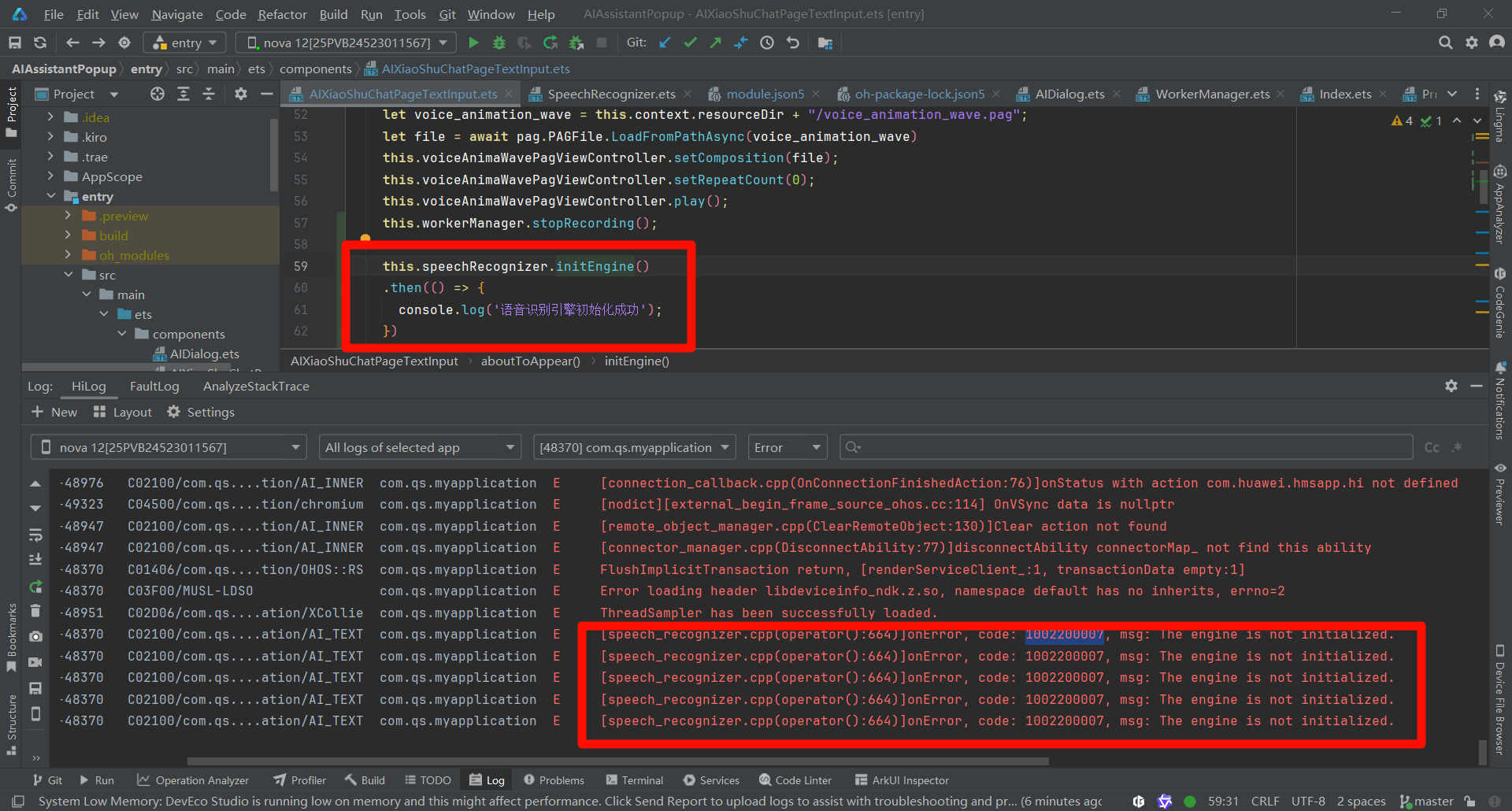

在HarmonyOS Next中,SpeechRecognizer的onResult不回调通常与权限配置或生命周期管理有关。请检查是否在module.json5中正确声明了ohos.permission.MICROPHONE权限,并确保在应用运行时动态请求了麦克风权限。同时,确认SpeechRecognizer实例的创建、订阅及启动流程符合规范,且未在回调触发前被意外释放。

根据你的代码,问题很可能出在异步时序和监听器设置时机上。
在你的 SpeechRecognizer 工具类中,start 方法先调用 setListener,再调用 startListening。然而,setListener 是同步的,但 startListening 启动识别引擎需要时间。如果监听器设置完成时,引擎的音频采集或处理流水线尚未就绪,就可能漏掉初期的回调,包括 onResult。
核心问题分析:
- 监听器绑定时机:
setListener应该在引擎完全准备就绪后调用。虽然你的代码顺序正确,但引擎内部从startListening到真正开始采集、处理音频之间存在微小延迟。在这期间,如果语音输入非常短暂或立即停止,可能触发不了有效的结果回调。 online模式与网络:你设置了online: 1(在线识别)。在线识别需要网络连接,并且将音频数据发送到云端处理。如果网络不稳定、权限不足(如网络权限)或服务器未返回结果,onResult也可能不会触发。虽然onError可能捕获一些错误,但某些网络或服务端问题可能不会触发标准错误事件。recognitionMode设置:在extraParams中,你设置了recognizerMode: 'short'(短语音模式),但在startListening的extraParams中又设置了recognitionMode: 0。根据 HarmonyOS Next 的@kit.CoreSpeechKitAPI 文档,recognitionMode应设置为0(流式识别)或1(单句识别)。短语音模式通常对应单句识别。建议确保这两个地方的模式配置一致,避免引擎内部行为不一致。
解决方案:
- 调整监听器设置时机:尝试在
startListening之后,添加一个极短的延迟(例如 10-50ms)再设置监听器。虽然不理想,但可以绕过引擎内部就绪时序问题。更可靠的方法是监听onStart回调,确保引擎已启动后再进行语音输入。 - 检查网络和权限:确保设备已连接网络,并且应用已获得
ohos.permission.INTERNET权限(如果需要)。在线识别必须能够访问云端服务。 - 统一识别模式:将
startListening中的extraParams改为:
以匹配extraParams: { recognitionMode: 1, maxAudioDuration: 60000 } // 单句识别模式engineParams中的recognizerMode: 'short'。 - 添加超时和错误日志:在
listener中实现onError和onEvent回调,并打印日志,以捕获任何潜在的错误或状态事件。 - 验证音频配置:确保
audioInfo中的参数(如sampleRate: 16000)与设备麦克风支持的标准配置一致。不匹配的音频格式可能导致引擎无法处理。
修改建议:
在你的 SpeechRecognizer 工具类中,可以尝试以下调整:
private setListener(callback: (srr: speechRecognizer.SpeechRecognitionResult) => void = () => {}) {
  let listener: speechRecognizer.RecognitionListener = {
    onStart(sessionId: string, eventMessage: string) {
      console.log('SpeechRecognizer onStart:', sessionId, eventMessage);
    },
    onEvent(sessionId: string, eventCode: number, eventMessage: string) {
      console.log('SpeechRecognizer onEvent:', sessionId, eventCode, eventMessage);
    },
    onResult(sessionId: string, result: speechRecognizer.SpeechRecognitionResult) {
      console.log('SpeechRecognizer onResult:', sessionId, result);
      callback && callback(result);
    },
    onComplete(sessionId: string, eventMessage: string) {
      console.log('SpeechRecognizer onComplete:', sessionId, eventMessage);
    },
    onError(sessionId: string, errorCode: number, errorMessage: string) {
      console.error('SpeechRecognizer onError:', sessionId, errorCode, errorMessage);
    },
  };
  this.asrEngine?.setListener(listener);
}
并在 startListening 中调整 extraParams:
extraParams: { recognitionMode: 1, maxAudioDuration: 60000 } // 单句识别模式
如果问题依旧,请检查系统日志中是否有 CoreSpeechKit 相关的错误或警告信息。
