




HarmonyOS 鸿蒙Next中如何去除焦点框发光效果?
HarmonyOS 鸿蒙Next中如何去除焦点框发光效果? 参考 https://developer.huawei.com/consumer/cn/doc/harmonyos-guides/arkts-common-events-focus-event#设置容器绘制焦点框 设置组件获焦态,为什么会出现发光效果?和文档中动态不一样
import { hilog } from '@kit.PerformanceAnalysisKit';

const TAG = '[Sample_FocusAndBlurExample]';
const DOMAIN = 0xF811;
const BUNDLE = 'MyApp_FocusAndBlurExample';

@Entry
@Component
export struct ScopeFocusExample {

  build() {
    NavDestination() {
      Column() {
        Column({ space: 5 }) {
          Text('容器获焦').textAlign(TextAlign.Center)
        }
        .justifyContent(FlexAlign.Center)
        .width(140)
        .height(50)
        .margin({ top: 5, bottom: 5 })
        .onClick(() => {
        })
        .focusable(true)
        .focusBox({
          margin: LengthMetrics.vp(10),
          strokeColor: ColorMetrics.rgba(255, 255, 255),
          strokeWidth: LengthMetrics.vp(4),
        })

        Button('Button1')
          .width(140)
          .height(45)
          .margin(20)
          .focusBox({
            margin: LengthMetrics.vp(10),
            strokeColor: ColorMetrics.rgba(255, 0, 0),
            strokeWidth: LengthMetrics.vp(4),
          })
        Button('Button2')
          .width(140)
          .height(45)
          .margin(20)
          .focusBox({
            margin: LengthMetrics.vp(10),
            strokeColor: ColorMetrics.rgba(0, 255, 0),
            strokeWidth: LengthMetrics.lpx(4),
          })
      }.width('100%')
    }
    // ···
  }
}
如下图,容器获焦后为啥会有闪光动画?另外获焦边框设置为纯白色,但实际是灰色。
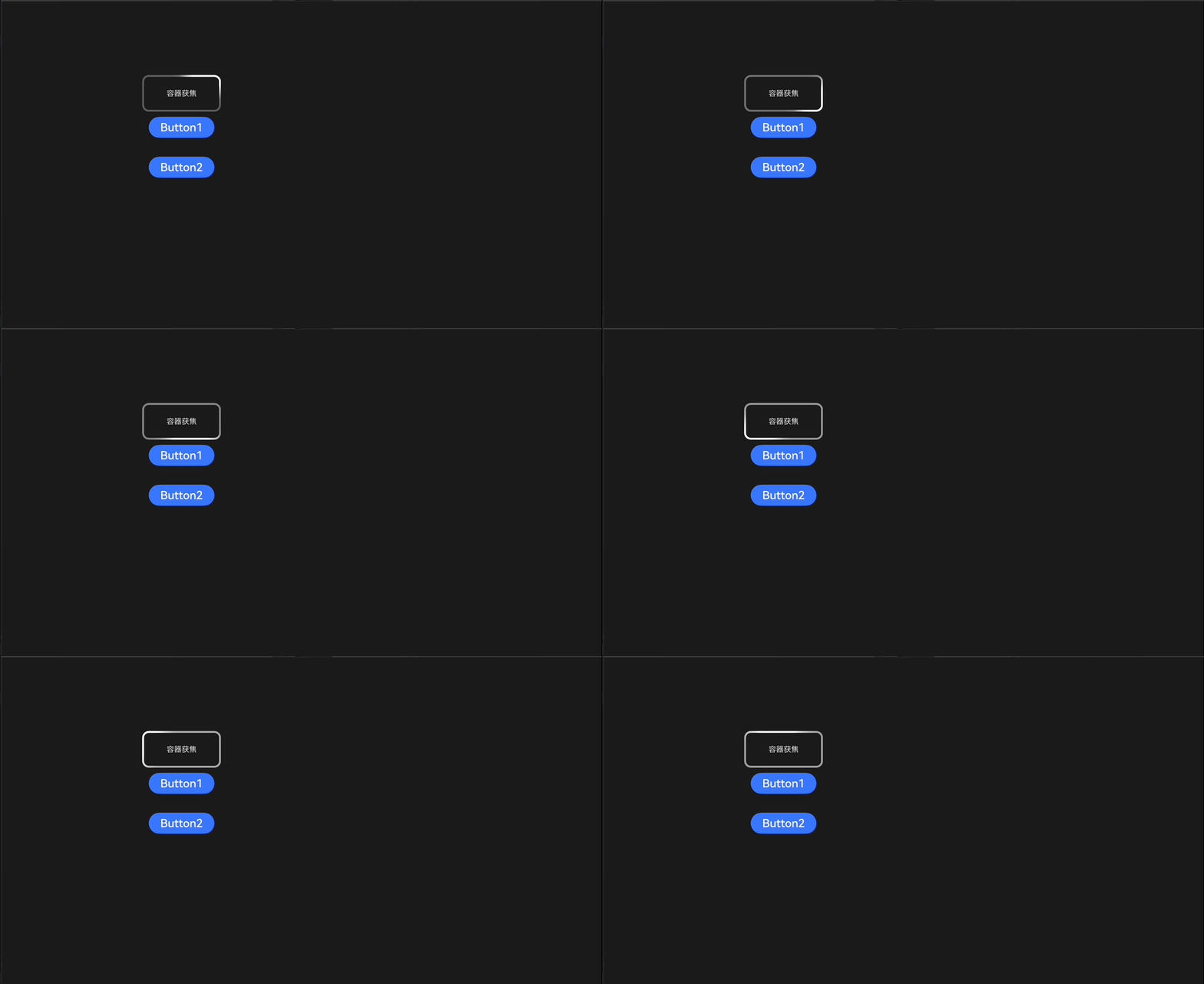
如何正确显示focusBox设置的获焦样式?
更多关于HarmonyOS 鸿蒙Next中如何去除焦点框发光效果?的实战教程也可以访问 https://www.itying.com/category-93-b0.html

开发者您好,可通过
.focusBox({ strokeWidth: LengthMetrics.px(0) })
设置焦点框的宽度去除流光特效
更多关于HarmonyOS 鸿蒙Next中如何去除焦点框发光效果?的实战系列教程也可以访问 https://www.itying.com/category-93-b0.html

那我如何保留获焦的白色边框呢?
.focusBox({ margin: LengthMetrics.vp(10), strokeColor: ColorMetrics.rgba(255, 0, 0), strokeWidth: LengthMetrics.vp(4) })
是我想要的样式,对于开发者而言,这段代码也看不出会有流光特效。
我只想要去掉流光特效,正常展示上面代码的白色边框样式

开发者您好,流光效果是TV上获焦特效,无法通过focusBox去除流光特效,如果您还是想要实现此需求,麻烦您提供如下信息吧:
请问您是在什么样的业务场景中使用该能力,交互流程是怎样的,在哪一个环节遇到了问题?方便说明能力不满足可能带来的影响:什么时间用到?是否高频?有无三方库可以做到?若提供该能力,是否会造成大工作量返工?请您注意提供的内容不要包含您或第三方的非公开信息,如给您带来不便,敬请谅解。

我们是TV APP应用,设计不需要获焦时出现流光特效
我想知道鸿蒙设计focusBox最初就不允许应用自定义吗?如果是,那我觉得focusBox存在的意义不大。
focusBox不满足,我们只能用其他方式实现,比如评论区的border,只是实现上相比focusBox稍显复杂
电视才有的获焦特效。
使用外描边属性outline代替:
.stateStyles({
        normal: {
                .outline({
                        width: 0,
                        color: Color.Red,
                        radius: 50,
                        style: OutlineStyle.DASHED
                })
        },
        focused: {
                .outline({
                        width: 5,
                        color: Color.Red,
                        radius: 50,
                        style: OutlineStyle.DASHED
                })
        }
})
①外描边设置-视效与模糊-通用属性-ArkTS组件-ArkUI(方舟UI框架)
②多态样式-通用属性-ArkTS组件-ArkUI(方舟UI框架)
有了outline,focusBox就不生效了。


找HarmonyOS工作还需要会Flutter技术的,有需要Flutter教程的可以学学大地老师的教程,很不错,B站免费学:https://www.bilibili.com/video/BV1S4411E7LY/?p=17




在HarmonyOS Next中,去除焦点框发光效果可通过修改组件的focusable属性实现。将focusable设置为false可禁用焦点效果。若需保留焦点但去除发光,可在组件的focusStyle中自定义样式,例如将focusEffect设置为none或调整border属性。具体代码示例:
Button('按钮')
  .focusable(false)
  // 或自定义焦点样式
  .focusStyle({ focusEffect: 'none' })
在HarmonyOS Next中,焦点框的发光效果是系统默认的焦点动画。要完全去除发光效果并正确显示自定义的focusBox样式,需要同时配置focusBox和focusStyle。
关键点在于:focusBox仅定义了焦点框的静态绘制参数(如边框颜色、宽度),而发光动画是由focusStyle控制的。要完全去除发光,需将focusStyle的动画类型设置为none。
修改你的代码示例如下:
// 对于Column容器
Column({ space: 5 }) {
  Text('容器获焦').textAlign(TextAlign.Center)
}
.justifyContent(FlexAlign.Center)
.width(140)
.height(50)
.margin({ top: 5, bottom: 5 })
.onClick(() => {})
.focusable(true)
.focusBox({
  margin: LengthMetrics.vp(10),
  strokeColor: ColorMetrics.rgba(255, 255, 255),
  strokeWidth: LengthMetrics.vp(4),
})
.focusStyle({ // 添加focusStyle配置
  focusAnimationType: FocusAnimationType.None // 关闭焦点动画
})

// 对于Button组件同样配置
Button('Button1')
  .width(140)
  .height(45)
  .margin(20)
  .focusBox({
    margin: LengthMetrics.vp(10),
    strokeColor: ColorMetrics.rgba(255, 0, 0),
    strokeWidth: LengthMetrics.vp(4),
  })
  .focusStyle({
    focusAnimationType: FocusAnimationType.None
  })
关于边框颜色显示为灰色而非纯白色的问题:这可能是由于系统默认的半透明叠加效果。确保使用不透明的颜色值,如Color.Red或ColorMetrics.rgba(255, 255, 255, 1.0)(alpha值为1.0)。
通过同时配置focusBox定义静态边框样式,并通过focusStyle关闭焦点动画,即可完全控制焦点框的显示效果,去除默认的发光动画。
