




HarmonyOS鸿蒙Next中首选项获取实例失败
HarmonyOS鸿蒙Next中首选项获取实例失败 在使用首选项进行持久化存储的时候,总是报获取实例失败,而且错误都是关于context,这个怎么解决啊?
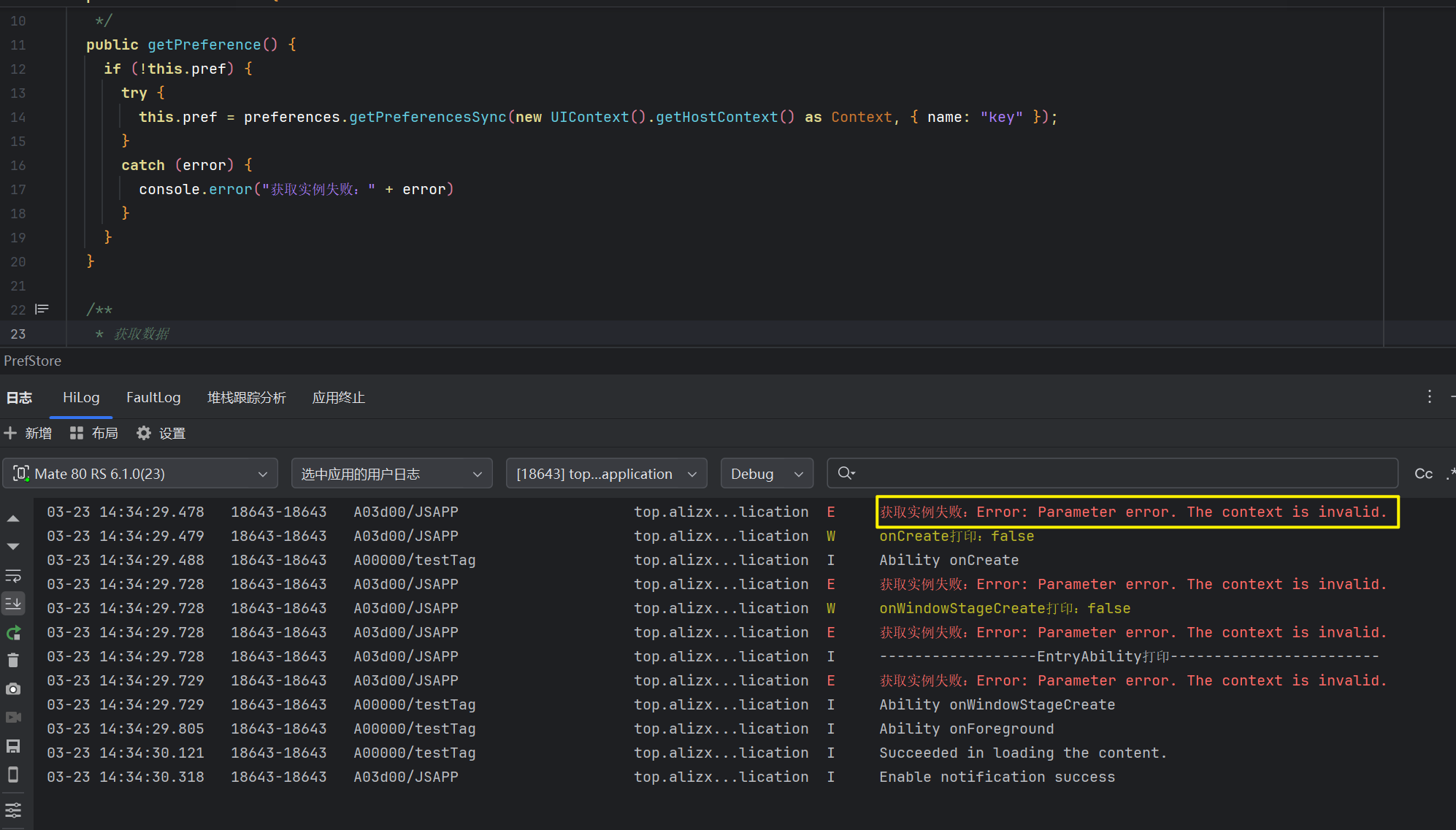
首选项文件代码如下:
import { preferences, ValueType } from '@kit.ArkData';
import { UIContext } from '@kit.ArkUI';
import { Context } from '@kit.AbilityKit';

export class PrefStore {
  private pref: preferences.Preferences | null = null

  /**
   * 获取实例
   */
  public getPreference() {
    if (!this.pref) {
      try {
        this.pref = preferences.getPreferencesSync(new UIContext().getHostContext() as Context, { name: "key" });
      }
      catch (error) {
        console.error("获取实例失败:" + error)
      }
    }
  }

  /**
   * 获取数据
   * @param key 键
   * @param value 默认值
   */
  public getData(key: string, value: ValueType) {
    if (!this.pref) {
      this.getPreference()
    }

    if (!this.pref) {
      return value
    }

    try {
      return this.pref.getSync(key, value)
    }
    catch (error) {
      console.error("获取数据失败:" + error)
      return value
    }
  }

  /**
   * 存储数据
   * @param key 键
   * @param value 值
   */
  public putData(key: string, value: ValueType) {
    if (!this.pref) {
      this.getPreference()
    }

    if (!this.pref) {
      return
    }

    try {
      this.pref.putSync(key, value)
      this.pref.flushSync()
    }
    catch (error) {
      console.error("存储数据失败:" + error)
    }
  }

  /**
   * 删除数据
   * @param key 键
   */
  public removeData(key: string) {
    if (!this.pref) {
      this.getPreference()
    }

    if (!this.pref) {
      return
    }
    try {
      this.pref.deleteSync(key)
      this.pref.flushSync()
    }
    catch (error) {
      console.error("删除数据失败:" + error)
    }
  }
}

export const prefStore = new PrefStore()
更多关于HarmonyOS鸿蒙Next中首选项获取实例失败的实战教程也可以访问 https://www.itying.com/category-93-b0.html

你获取context的方式是错误的。
更多关于HarmonyOS鸿蒙Next中首选项获取实例失败的实战系列教程也可以访问 https://www.itying.com/category-93-b0.html

获取context的方法:
1、在 Ability/Extension 组件内部直接获取:this.context
2、在页面/组件(ArkUI)中获取 UIAbilityContext:this.getUIContext().getHostContext()
3、过 ApplicationContext 获取应用级上下文:this.context.getApplicationContext()
4、在 UI 组件内获取 UIContext(UI 操作专用):this.getUIContext();

【解决方案】
UIContext是ArkUI实例的上下文,它是由窗口创建的用于管理所有UI的对象,并且该对象由创建的窗口所持有和管理。
这边定义的class是工具类,不是UI界面所以无法获取。
- 方案一:通过组件主动传递UIContext。
-
在页面组件中获取UIContext。 在组件的生命周期方法或事件回调中,通过this.getUIContext()获取当前页面的UIContext:
// 页面组件内 let uiContext = this.getUIContext(); -
将UIContext传递到工具类。 工具类设计为接收UIContext参数的形式:
class Utils {
  static doSomething(context: UIContext) {
    // ...
  }
}
// 页面调用
Utils.doSomething(this.getUIContext());
-
方案二:通过全局状态管理。
可在页面初始化时将UIContext存入AppStorage:
// 页面组件内
import { AppStorage } from '@kit.ArkUI';

onPageShow() {
  AppStorage.setOrCreate('currentUIContext', this.getUIContext());
}

// 工具类中读取
class Utils {
  static getUIContext(): UIContext {
    return AppStorage.get('currentUIContext');
  }
}


在HarmonyOS Next中,首选项获取实例失败通常由以下原因导致:
- 上下文(Context)错误:使用的
Context对象不正确,例如使用了错误的Ability或UIAbility的Context。应使用UIAbilityContext或ExtensionContext。 - 存储文件路径问题:指定的首选项存储文件名或路径无效,或应用无对应目录的访问权限。
- 首选项实例已被释放:尝试访问一个已经关闭或释放的
Preferences实例。
核心检查点:确保调用dataPreferences.getPreferences(context, name)时传入正确的context参数和合法的name。
问题出在获取 Context 的方式上。在 getPreference() 方法中,你使用了 new UIContext().getHostContext() as Context 来获取 Context,这种方式在 HarmonyOS Next 中无法正确获取到有效的应用上下文。
正确的解决方案是:
-
通过依赖注入获取 UIAbility 的 Context: 在 UIAbility 的
onCreate()或onWindowStageCreate()生命周期中,将 UIAbility 的context传递给PrefStore类。 -
修改
PrefStore类:- 添加一个
context属性 - 修改构造函数接收
context参数 - 使用传入的
context来获取首选项实例
- 添加一个
修改后的代码示例:
import { preferences, ValueType } from '@kit.ArkData';
import { Context } from '@kit.AbilityKit';

export class PrefStore {
  private pref: preferences.Preferences | null = null
  private context: Context | null = null

  /**
   * 构造函数,接收 Context
   */
  constructor(context: Context) {
    this.context = context;
  }

  /**
   * 获取实例
   */
  public getPreference() {
    if (!this.pref && this.context) {
      try {
        this.pref = preferences.getPreferencesSync(this.context, { name: "key" });
      }
      catch (error) {
        console.error("获取实例失败:" + error)
      }
    }
  }

  // ... 其他方法保持不变,但需要确保 this.context 存在
}

// 在 UIAbility 中使用
// 在 UIAbility 的 onCreate 或 onWindowStageCreate 中:
// const prefStore = new PrefStore(this.context);
或者在 EntryAbility 中这样使用:
import { UIAbility } from '@kit.AbilityKit';
import { window } from '@kit.ArkUI';
import { PrefStore } from './PrefStore';

export default class EntryAbility extends UIAbility {
  private prefStore: PrefStore | null = null;

  onCreate(want, launchParam) {
    // 创建 PrefStore 实例并传入 context
    this.prefStore = new PrefStore(this.context);
  }

  // ... 其他生命周期方法
}
关键点:
- 不要使用
new UIContext().getHostContext()来获取 Context - 应该从 UIAbility 的生命周期中获取有效的
context - 通过构造函数或方法参数将
context传递给需要它的类
这样修改后,首选项实例就能正确获取,不会出现获取实例失败的错误了。
