




HarmonyOS 鸿蒙Next文件中数学符号丢失不显示
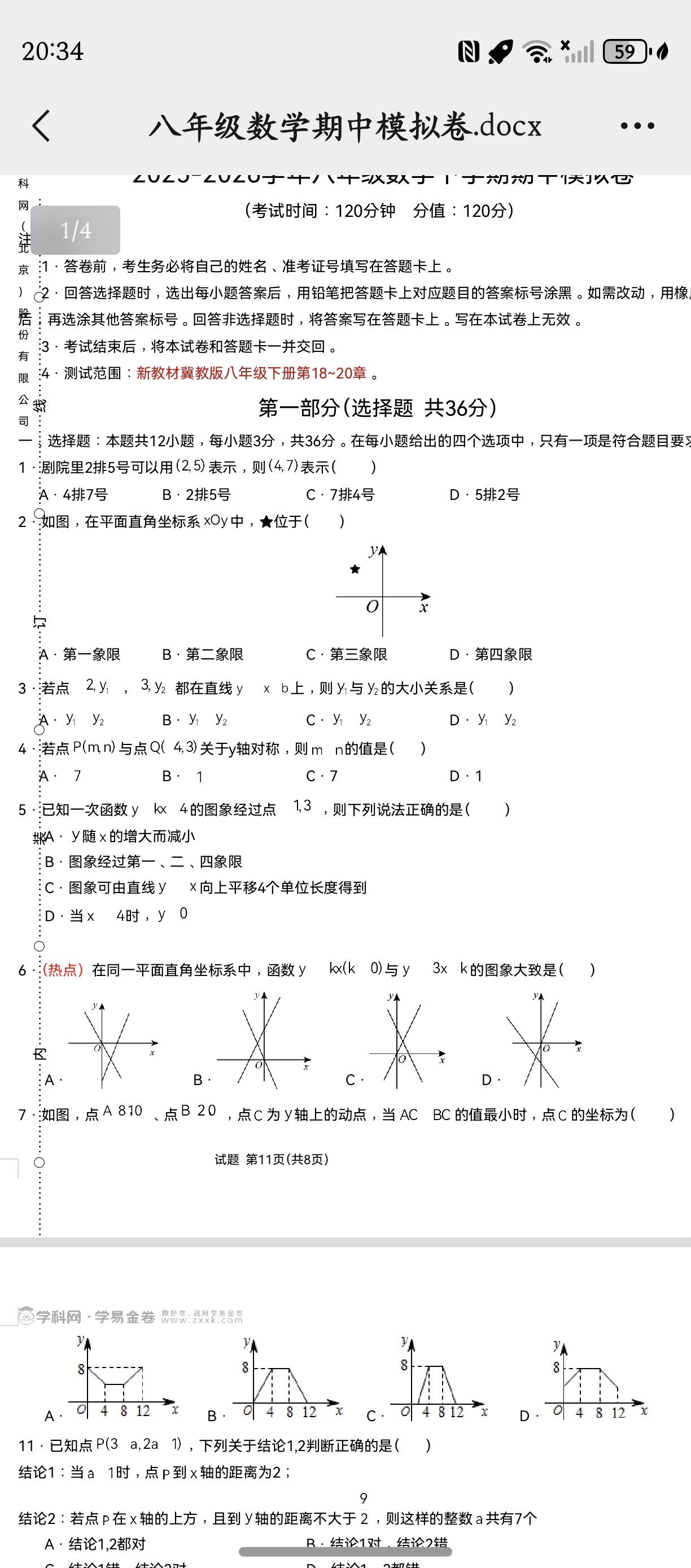
HarmonyOS 鸿蒙Next文件中数学符号丢失不显示 下载的数学考试卷,有的符号显示不出来
更多关于HarmonyOS 鸿蒙Next文件中数学符号丢失不显示的实战教程也可以访问 https://www.itying.com/category-93-b0.html
3 回复

开发者您好, 使用文件管理自带预览和文件预览服务打开类似数学试卷,都未复现问题。请说明您的具体使用场景,DevEco Studio版本和手机版本,并提供docx文件,方便问题分析复现。用于复现问题的文件预览服务demo如下:
// Index.ets
import { filePreview } from '@kit.PreviewKit';
import { BusinessError } from '@kit.BasicServicesKit';
import { fileIo as fs } from '@kit.CoreFileKit';
import { common } from '@kit.AbilityKit';
import fileUri from '@ohos.file.fileuri';

function myRawfileCopy(filetype: string, context: common.UIAbilityContext) {
  context.resourceManager.getRawFileContent(filetype, (err: BusinessError, data: Uint8Array) => {
    if (err != null) {
      console.info('open file failed: ' + err.message);
    } else {
      let buffer = data.buffer;
      console.info('size = ' + buffer.byteLength);
      let sandboxPath = context.cacheDir;
      console.info('myRawfileCopy path' + sandboxPath);
      let file: fs.File = null!;
      try {
        file = fs.openSync(context.cacheDir + '/' + filetype, fs.OpenMode.CREATE | fs.OpenMode.READ_WRITE);
        // 拷贝文件到沙箱
        fs.writeSync(file.fd, buffer);
        console.info('myRawfileCopy success');
      } catch (err) {
        console.info('myRawfileCopy error');
      } finally {
        fs.close(file.fd);
      }
    }
  });
}

export function viewFile(fileName: string, filePath: string, uiContext: UIContext) {
  let context = uiContext.getHostContext() as common.UIAbilityContext;
  let promptAction = uiContext.getPromptAction();
  // 将沙箱路径转换为uri
  let uri = fileUri.getUriFromPath(filePath);
  // 根据文件的uri判断文件是否可预览 传入支持的文件类型且项目存在时会返回true
  filePreview.canPreview(context, uri).then((result) => {
    // true:可以预览
    if (result === true) {
      let fileNames: string[] = fileName.split('.');
      let type = fileNames[fileNames.length-1];
      let mType: string = '';
      switch (type) {
        case 'pdf': {
          mType = 'application/pdf';
          break;
        }
        case 'txt': {
          mType = 'text/plain';
          break;
        }
        case 'png': {
          mType = 'image/png';
          break;
        }
        case 'jpg': {
          mType = 'image/jpeg';
          break;
        }
        case 'docx': {
          mType = 'application/vnd.openxmlformats-officedocument.wordprocessingml.document';
          break;
        }
        case 'xlsx': {
          mType = 'application/vnd.ms-excel';
          break;
        }
        default: {
          console.error('Type Is Not Support');
          promptAction.showToast({
            message: '不支持类型'
          });
          return;
        }
      }
      let fileInfo: filePreview.PreviewInfo = {
        // 文件预览信息,包含了文件标题名、uri以及文件类型(mimeType)
        title: fileName,
        uri: uri,
        mimeType: mType // 文件(夹)的媒体资源类型,如text/plain
      };
      filePreview.openPreview(context, fileInfo).then(() => {
        console.info('openPreview success');
      }).catch((err: BusinessError) => {
        console.error('openPreview failed, err = %s', err.message);
      });
    } else {
      promptAction.showToast({
        // 不可预览
        message: '不可预览'
      });
      console.info('openPreview failed, err = canPreview false');
    }
  }).catch((err: BusinessError) => {
    console.error('canPreview failed, err = %s', err.message);
  });
}

function viewTXT(uiContext: UIContext) {
  let context = uiContext.getHostContext() as common.UIAbilityContext;
  try {
    // 文件名称、文件所在的沙箱路径
    let fileName = 'sample.docx'; // sample.docx在rawfile路径下
    let filePath = context.cacheDir + '/' + fileName;
    myRawfileCopy(fileName, context as common.UIAbilityContext);
    viewFile(fileName, filePath, uiContext);
  } catch (error) {
    let err: BusinessError = error as BusinessError;
    console.error(`Invoke downloadTask failed-----, code is ${err.code}, message is ${err.message}`);
  }
}

@Entry
@Component
struct Index {
  build() {
    Column() {
      Button('预览DOCX文件') // docx文件存放在rawfile路径下,首先将docx拷贝进沙箱目录,再预览沙箱文件
        .onClick(() => {
          viewTXT(this.getUIContext());
        });
    };
  }
}
更多关于HarmonyOS 鸿蒙Next文件中数学符号丢失不显示的实战系列教程也可以访问 https://www.itying.com/category-93-b0.html


根据您提供的图片和描述,问题很可能出在文档所使用的数学符号字体上。HarmonyOS Next系统可能没有预装试卷文档所依赖的特定字体(例如,某些数学字体包如“Symbol”、“MT Extra”或“Cambria Math”)。
主要原因与解决方案:
-
字体缺失:这是最常见的原因。文档中的特殊数学符号使用了Windows或特定办公软件中的字体,这些字体未包含在HarmonyOS Next的默认字体库中。
- 解决方案:尝试在HarmonyOS Next的应用市场搜索并安装一个通用的“字体”管理类应用,通过它来查找并安装常见的数学符号字体包。或者,将文档发送到一台安装了完整字体的Windows或macOS电脑上,确认符号可以正常显示后,将文档另存为PDF格式。PDF文件会内嵌字体,在HarmonyOS Next上使用阅读器打开即可确保符号正常显示。
-
文档格式兼容性:如果试卷是较旧格式(如.doc)或由特定软件生成,可能存在格式解析问题。
- 解决方案:尝试使用HarmonyOS Next上不同的办公应用(如WPS Office等)打开该文档,看是否有一款应用能正确渲染。同样,转换为PDF是最高效的跨平台兼容方案。
-
应用渲染问题:您当前使用的文档查看器可能对复杂符号的支持有限。
- 解决方案:更换一个文档阅读或办公应用打开文件,查看问题是否依然存在。
总结建议: 最直接有效的方法是将原文档在电脑上转换为PDF格式,再传输到鸿蒙设备上查看。这能从根本上解决因字体缺失或格式解析导致的符号显示问题。如果必须编辑原文件,则需要考虑在鸿蒙设备上补充安装相应的字体。
