




HarmonyOS鸿蒙Next中有沉浸光感的tabs栏怎么实现
HarmonyOS鸿蒙Next中有沉浸光感的tabs栏怎么实现
想问一下怎么实现如图所示的tabs栏效果:液态玻璃+点光源+Q 弹效果。
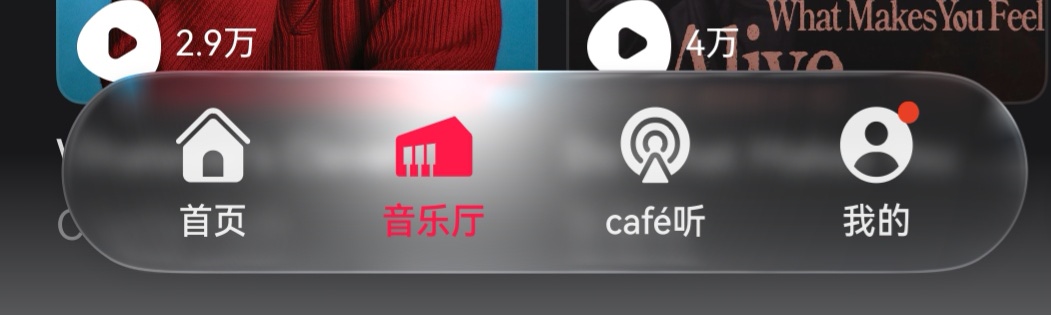
更多关于HarmonyOS鸿蒙Next中有沉浸光感的tabs栏怎么实现的实战教程也可以访问 https://www.itying.com/category-93-b0.html

关于沉浸光感效果可参考:沉浸光感-UI Design Kit(UI设计套件)。
该文档为API 23版本的开发文档,我们已为您向业务部门提交了查看API 23版本开发文档的权限申请,预计该权限将于今日20:00后开通,请您刷新下载中心和文档页面进行查看。感谢您的支持!
更多关于HarmonyOS鸿蒙Next中有沉浸光感的tabs栏怎么实现的实战系列教程也可以访问 https://www.itying.com/category-93-b0.html


使用ArkUI框架,通过window模块设置getLastWindow()并调用setWindowLayoutFullScreen(true)和setWindowSystemBarEnable(['status']),再调用setWindowSystemBarProperties({statusBarContentColor: '#00000000', isStatusBarLightIcon: true})使状态栏透明。Tabs组件设置.backgroundColor(Color.Transparent),并在onPageSelected事件中动态调整图标与文字颜色,配合systemCapability监听深浅色模式切换即可。,

可使用 ArkUI 的 Stack 配合 brightness、blur、spring 动画 实现。核心步骤:
- 液态玻璃背景:Tabs 栏容器使用
.backgroundBlurStyle(BlurStyle.Thin)或自定义模糊 + 半透明背景,叠加linearGradient模拟玻璃质感,必要时用BlendMode制造光感。 - 点光源:在选中 tab 下方或上方放置一个带径向渐变的
Circle,通过offset或translate跟随选中项移动,并用interpolatingSpring驱动位置,实现光斑吸附效果。 - Q 弹效果:对每个 tab 图标/文本做一个缩放动画,选中时从 1.0 弹性过渡到 1.15 再回弹,使用
interpolatingSpring(velocity: ..., mass: ..., stiffness: ..., damping: ...)控制回弹幅度与速度。
示例关键代码(摘要):
@State currentIndex: number = 0
@State lightOffsetX: number = 0

// 点光源移动动画
@AnimatableLight({ watch: true }) lightAnim: number = 0

build() {
  Stack() {
    // 玻璃背景
    Row()
      .width('100%')
      .height(56)
      .backgroundBlurStyle(BlurStyle.Thin)
      .backgroundColor('#30FFFFFF')

    // 点光源
    Circle({ width: 40, height: 40 })
      .fill(new RadialGradient({ colors: [['#FFD9A0', 0.2], ['#00FFFFFF', 1.0]] }))
      .offset({ x: this.lightOffsetX - 20, y: -28 })
      .animation({ curve: curves.interpolatingSpring(100, 12, 300, 30) })

    // Tabs 项
    Row() {
      ForEach(['首页','发现','我的'], (item, index) => {
        Column() {
          Image($rawfile('icon.png'))
            .width(24).height(24)
          Text(item)
            .fontSize(12)
        }
        .scale({ x: index === this.currentIndex ? 1.15 : 1.0, y: index === this.currentIndex ? 1.15 : 1.0 })
        .animation({ curve: curves.interpolatingSpring(100, 12, 400, 20) })
        .onClick(() => {
          this.currentIndex = index
          this.lightOffsetX = index * (screenWidth / 3) + screenWidth / 6 // 计算光源位置
        })
      })
    }
    .width('100%').height('100%')
    .justifyContent(FlexAlign.SpaceEvenly)
  }
}
以上组合即可实现带光感的玻璃态 Tab 栏与 Q 弹触感。实际项目可根据设计参数调整模糊度、渐变颜色和弹簧参数。
