



HarmonyOS 鸿蒙Next中hdsTabs如何设置左右手跟随质感握姿
HarmonyOS 鸿蒙Next中hdsTabs如何设置左右手跟随质感握姿 低需求1: 想让hdsTabs 在左边, 如何设置呢, 希望大佬指点一二, 谢谢
Column() {
HdsTabs({ controller: this.controller }) {
TabContent() {
this.tabContentBuilder(Color.Green)
}
.tabBar(new BottomTabBarStyle($r('sys.media.ohos_ic_public_clock'), 'Green'))
TabContent() {
this.tabContentBuilder(Color.Blue)
}
.tabBar(new BottomTabBarStyle($r('sys.media.wifi_router_fill'), 'Blue'))
TabContent() {
this.tabContentBuilder(Color.Yellow)
}
.tabBar(new BottomTabBarStyle($r('sys.media.ohos_ic_public_clock'), 'Yellow'))
}
// 设置barOverlap为true,vertical为false,barPosition为BarPosition.End
.barOverlap(true)
.barPosition(BarPosition.End)
.vertical(false)
// 设置页签栏悬浮样式。
.barFloatingStyle({
barWidth: { smallWidth: 200, mediumWidth: 300, largeWidth: 400 },
barBottomMargin: 28,
gradientMask: { maskColor: '#66F1F3F5', maskHeight: 92 },
systemMaterialEffect: {
materialType: hdsMaterial.MaterialType.IMMERSIVE,
materialLevel: hdsMaterial.MaterialLevel.ADAPTIVE
},
// 设置迷你栏,若不设置,则仅有页签栏。
miniBar: {
miniBarBuilder: () => this.miniBarBuilder()
}
})
}
}
更多关于HarmonyOS 鸿蒙Next中hdsTabs如何设置左右手跟随质感握姿的实战教程也可以访问 https://www.itying.com/category-93-b0.html

首先你要知道,HdsTabs 固定在左边:
vertical: true(竖排)
barPosition: BarPosition.Start(左侧)
去掉 barFloatingStyle 里会把它钉在底部的配置
智感握姿(左右手自动切换):
订阅系统 holdingHandChanged 事件
左手 → 贴左边(Start)
右手 → 贴右边(End)
简单改了下你的代码
import { HdsTabs, BarPosition } from '@kit.UIDesignKit';
import { multimodalAwareness } from '@kit.MultimodalAwareness';

@Entry
@Component
struct PageTabs {
  @State barPos: BarPosition = BarPosition.End; // 默认右侧
  controller: HdsTabs.Controller = new HdsTabs.Controller();

  aboutToAppear() {
    // 订阅智感握姿变化
    multimodalAwareness.on('holdingHandChanged', (e) => {
      if (e.hand === multimodalAwareness.HoldingHand.LEFT) {
        this.barPos = BarPosition.Start; // 左手→左侧
      } else {
        this.barPos = BarPosition.End; // 右手→右侧
      }
    });
  }

  tabContentBuilder(color: Color) {
    return Column() {
      Text(color === Color.Green ? 'Green' : color === Color.Blue ? 'Blue' : 'Yellow')
        .fontSize(30)
    }
    .width('100%')
    .height('100%')
    .backgroundColor(color)
  }

  miniBarBuilder() {
    return Text('MiniBar').fontSize(12);
  }

  build() {
    Column() {
      HdsTabs({ controller: this.controller }) {
        TabContent() {
          this.tabContentBuilder(Color.Green)
        }
        .tabBar(new BottomTabBarStyle($r('sys.media.ohos_ic_public_clock'), 'Green'))

        TabContent() {
          this.tabContentBuilder(Color.Blue)
        }
        .tabBar(new BottomTabBarStyle($r('sys.media.wifi_router_fill'), 'Blue'))

        TabContent() {
          this.tabContentBuilder(Color.Yellow)
        }
        .tabBar(new BottomTabBarStyle($r('sys.media.ohos_ic_public_clock'), 'Yellow'))
      }
      // 关键:竖排 + 左右位置绑定状态
      .vertical(true) // 竖排(侧边栏)
      .barPosition(this.barPos) // 动态:左手左、右手右
      .barOverlap(true)
      // 悬浮样式(保留你原来的,但不要让它钉在底部)
      .barFloatingStyle({
        barWidth: { smallWidth: 200, mediumWidth: 300, largeWidth: 400 },
        barBottomMargin: 28,
        gradientMask: { maskColor: '#66F1F3F5', maskHeight: 92 },
        systemMaterialEffect: {
          materialType: hdsMaterial.MaterialType.IMMERSIVE,
          materialLevel: hdsMaterial.MaterialLevel.ADAPTIVE
        },
        miniBar: { miniBarBuilder: () => this.miniBarBuilder() }
      })
    }
    .width('100%')
    .height('100%')
  }
}
更多关于HarmonyOS 鸿蒙Next中hdsTabs如何设置左右手跟随质感握姿的实战系列教程也可以访问 https://www.itying.com/category-93-b0.html


你需要先订阅用户握感姿势,判断用户当前是左手还是右手,然后在对应的修改UI
官方文档:
https://developer.huawei.com/consumer/cn/doc/harmonyos-guides/motion-guidelines

以,HdsTabs 放左边和“左右手跟随握姿”分别这么做。
1. 只想固定在左边
你现在这段代码之所以在底部,是因为你写了:
.vertical(false).barPosition(BarPosition.End)barFloatingStyle也是底部悬浮场景
如果想放到左边,要改成:
.vertical(true).barPosition(BarPosition.Start)
也就是:
HdsTabs({ controller: this.controller }) {
  TabContent() {
    this.tabContentBuilder(Color.Green)
  }
  .tabBar(new BottomTabBarStyle($r('sys.media.ohos_ic_public_clock'), 'Green'))

  TabContent() {
    this.tabContentBuilder(Color.Blue)
  }
  .tabBar(new BottomTabBarStyle($r('sys.media.wifi_router_fill'), 'Blue'))

  TabContent() {
    this.tabContentBuilder(Color.Yellow)
  }
  .tabBar(new BottomTabBarStyle($r('sys.media.ohos_ic_public_clock'), 'Yellow'))
}
.vertical(true)
.barPosition(BarPosition.Start)
官方对 Tabs/HdsTabs 的位置规则也是这个逻辑:
vertical = true+BarPosition.Start:左侧vertical = true+BarPosition.End:右侧vertical = false+BarPosition.Start:顶部vertical = false+BarPosition.End:底部
可参考官方Tabs/HdsTabs文档说明:Tabs、HdsTabs
2. 想做左右手“智感握姿”跟随
这个不是手动改 barPosition 就完了,HdsTabs 本身有开关:
adaptToHandedness(true)
官方文档里这个属性的说明就是“左右跟手开关”,开启后可根据左右手进行适配:HdsTabs
所以常见写法是:
HdsTabs({ controller: this.controller }) {
  // ...
}
.vertical(true)
.adaptToHandedness(true)
根据官方论坛的说明,在横屏场景下,开启后可以实现:
- 左手点击时 TabBar 出现在左侧
- 右手点击时 TabBar 出现在右侧
参考:论坛说明
3. 你这段代码里还要注意的一点
你现在用了 barFloatingStyle,这套样式本身是偏底部悬浮 TabBar 的用法,官方示例也是要求:
barPosition = BarPosition.Endvertical = falsebarOverlap = true
参考:设置页签栏的悬浮样式
所以如果你要改成左侧栏:
- 建议先去掉这套底部悬浮配置
- 改成竖向侧边栏样式再调宽度和边距
4. 最直接的结论
如果你的需求是:
-
固定左边:用
vertical(true) + barPosition(BarPosition.Start) -
左右手自动切换:再加
adaptToHandedness(true)

刚刚实现了一下,记得加权限:
"requestPermissions": [
      {
        "name" : "ohos.permission.ACTIVITY_MOTION",
        "reason": "$string:activity_motion_reason",
        "usedScene": {
          "abilities": ["EntryAbility"],
          "when": "always"
        }
      },
      {
        "name" : "ohos.permission.DETECT_GESTURE",
        "reason": "$string:detect_gesture_reason",
        "usedScene": {
          "abilities": ["EntryAbility"],
          "when": "always"
        }
      }
    ]
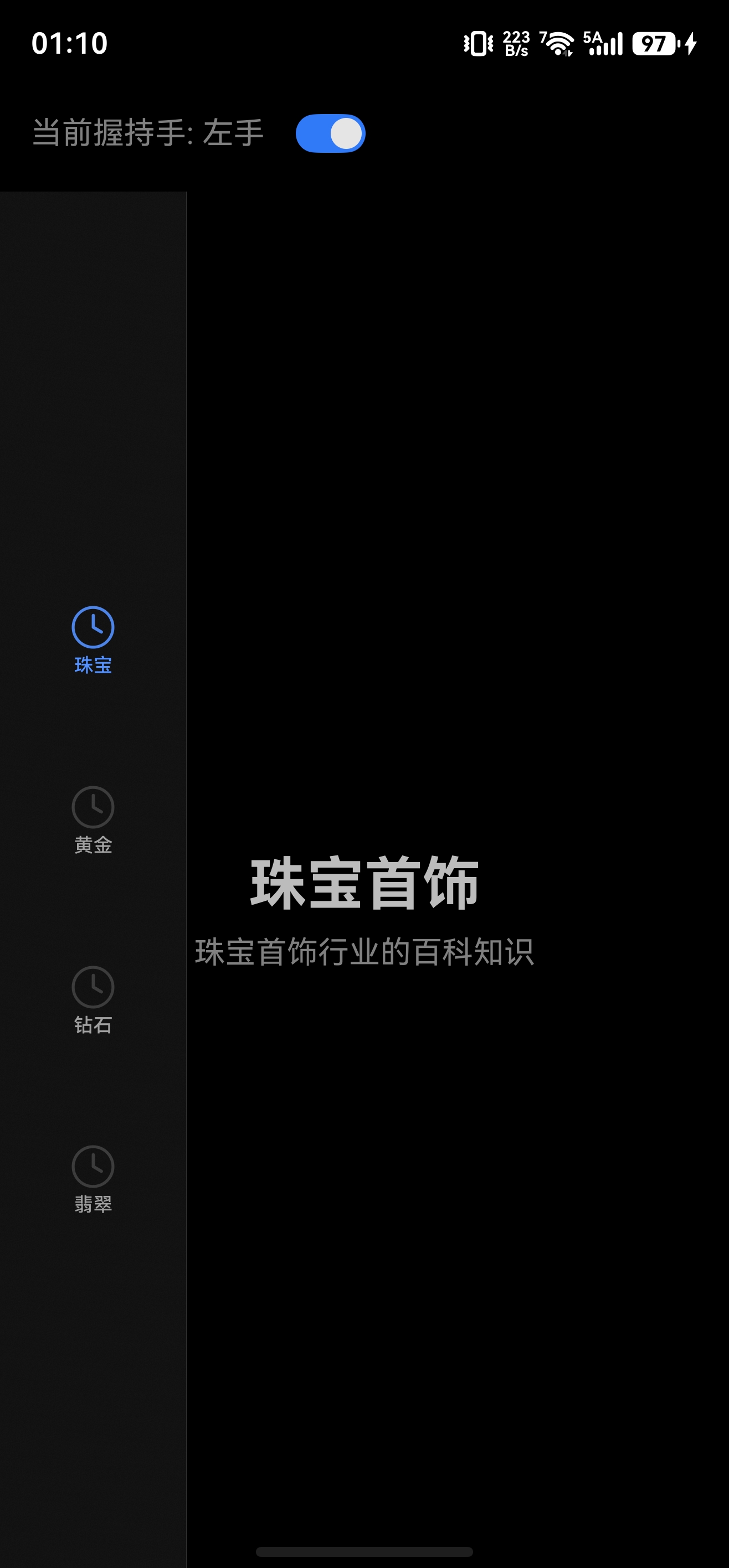
import { HdsTabs, HdsTabsController } from '@kit.UIDesignKit';
import { hdsMaterial } from '@kit.UIDesignKit';
import motion from '@ohos.multimodalAwareness.motion';

@Entry
@Component
struct SmartTabsPage {
  @State barPositionValue: number = 0;
  controller: HdsTabsController = new HdsTabsController();
  @State isLeftHand: boolean = true;
  @State handStatus: string = '左手';

  aboutToAppear(): void {
    motion.on('holdingHandChanged', (data) => {
      const handValue: number = data as number;
      if (handValue === 1) {
        this.isLeftHand = true;
        this.barPositionValue = 0;
        this.handStatus = '左手';
      } else if (handValue === 2) {
        this.isLeftHand = false;
        this.barPositionValue = 1;
        this.handStatus = '右手';
      }
    });
  }

  aboutToDisappear(): void {
    motion.off('holdingHandChanged');
  }

  build() {
    Column() {
      Row() {
        Text('当前握持手: ' + this.handStatus)
          .fontSize(16)
          .fontColor(Color.Gray)
        Toggle({ type: ToggleType.Switch, isOn: this.isLeftHand })
          .onChange((isOn: boolean) => {
            this.isLeftHand = isOn;
            this.barPositionValue = isOn ? 0 : 1;
            this.handStatus = isOn ? '左手' : '右手';
          })
          .margin({ left: 16 })
      }
      .padding(16)
      .width('100%')

      HdsTabs({
        controller: this.controller
      }) {
        TabContent() {
          Column() {
            Text('珠宝首饰')
              .fontSize(30)
              .fontWeight(FontWeight.Bold)
            Text('珠宝首饰行业的百科知识')
              .fontSize(16)
              .fontColor(Color.Gray)
              .margin({ top: 8 })
          }
          .width('100%')
          .height('100%')
          .justifyContent(FlexAlign.Center)
        }
        .tabBar(new BottomTabBarStyle($r('sys.media.ohos_ic_public_clock'), '珠宝'))

        TabContent() {
          Column() {
            Text('黄金')
              .fontSize(30)
              .fontWeight(FontWeight.Bold)
            Text('黄金价格、选购知识')
              .fontSize(16)
              .fontColor(Color.Gray)
              .margin({ top: 8 })
          }
          .width('100%')
          .height('100%')
          .justifyContent(FlexAlign.Center)
        }
        .tabBar(new BottomTabBarStyle($r('sys.media.ohos_ic_public_clock'), '黄金'))

        TabContent() {
          Column() {
            Text('钻石')
              .fontSize(30)
              .fontWeight(FontWeight.Bold)
            Text('钻石4C标准、选购指南')
              .fontSize(16)
              .fontColor(Color.Gray)
              .margin({ top: 8 })
          }
          .width('100%')
          .height('100%')
          .justifyContent(FlexAlign.Center)
        }
        .tabBar(new BottomTabBarStyle($r('sys.media.ohos_ic_public_clock'), '钻石'))

        TabContent() {
          Column() {
            Text('翡翠')
              .fontSize(30)
              .fontWeight(FontWeight.Bold)
            Text('翡翠鉴定、保养知识')
              .fontSize(16)
              .fontColor(Color.Gray)
              .margin({ top: 8 })
          }
          .width('100%')
          .height('100%')
          .justifyContent(FlexAlign.Center)
        }
        .tabBar(new BottomTabBarStyle($r('sys.media.ohos_ic_public_clock'), '翡翠'))
      }
      .vertical(true)
      .barPosition(this.barPositionValue)
      .barOverlap(true)
      .barFloatingStyle({
        gradientMask: { maskColor: '#66F1F3F5', maskHeight: 92 },
        systemMaterialEffect: {
          materialType: hdsMaterial.MaterialType.IMMERSIVE,
          materialLevel: hdsMaterial.MaterialLevel.ADAPTIVE
        }
      })
    }
    .width('100%')
    .height('100%')
  }
}

HdsTabs.vertical(true) 配合 barPosition(Start/End) 是侧边页签,但页签布局会按纵向 Tabs 规则走;如果你要“贴左/右边但页签仍保持横排”,单靠 HdsTabs 的 barPosition 不太适合。建议把内容区和页签区拆成自定义 Row 布局:左手时 TabBar + Content,右手时 Content + TabBar,页签本身用自定义 Builder 或普通 Tabs 样式保持横排。HDS 的沉浸/模糊材质可以复用在自定义容器上,但左右手切换逻辑需要你监听握持状态后更新布局状态。
export default class HoldingHandPlugin implements FlutterPlugin {
  private mEventChannel?: EventChannel;
  private sink: EventSink | undefined = undefined;
  private isListening: boolean = false;

  getUniqueClassName(): string {
    return "HoldingHandPlugin";
  }

  onAttachedToEngine(binding: FlutterPluginBinding): void {
    Log.d(TAG, "onAttachedToEngine");
    this.mEventChannel = new EventChannel(binding.getBinaryMessenger(), CHANNEL_NAME);
    const handler: StreamHandler = {
      onListen: (args: ESObject, events: EventSink) => {
        Log.d(TAG, 'EventChannel onListen');
        this.start(events);
      },
      onCancel: (args: ESObject) => {
        Log.d(TAG, 'EventChannel onCancel');
        this.stop();
      },
    };
    this.mEventChannel.setStreamHandler(handler);
  }

  onDetachedFromEngine(binding: FlutterPluginBinding): void {
    Log.d(TAG, "onDetachedFromEngine");
    this.stop();
    this.mEventChannel?.setStreamHandler(null);
    this.mEventChannel = undefined;
  }

  /**
   * 注册到 FlutterEngine(在 EntryAbility.configureFlutterEngine 中调用)
   */
  static registerWith(flutterEngine: FlutterEngine): void {
    const channel = new EventChannel(flutterEngine.dartExecutor, CHANNEL_NAME);
    const plugin = new HoldingHandPlugin();

    const handler: StreamHandler = {
      onListen: (args: ESObject, events: EventSink) => {
        Log.d(TAG, 'registerWith onListen');
        plugin.start(events);
      },
      onCancel: (args: ESObject) => {
        Log.d(TAG, 'registerWith onCancel');
        plugin.stop();
      },
    };
    channel.setStreamHandler(handler);
    Log.d(TAG, 'registerWith done');
  }

  /**
   * 开始订阅握持手状态
   * 优先尝试 holdingHandChanged (API 20),失败后降级到 operatingHandChanged (API 15)
   */
  private start(events: EventSink): void {
    this.sink = events;

    if (this.isListening) {
      return;
    }
    this.isListening = true;

    // 优先尝试握持手回调 (API 20+)
    try {
      motion.on('holdingHandChanged', (data: motion.HoldingHandStatus) => {
        Log.d(TAG, 'holdingHandChanged: ' + data);
        this.emitStatus('holding', data as number);
      });
      Log.d(TAG, 'motion.on(holdingHandChanged) succeeded');
      this.emitStatus('holding', -1); // 初始状态未知
      return;
    } catch (err) {
      const error = err as BusinessError;
      Log.w(TAG, 'motion.on(holdingHandChanged) failed, code=' + error.code);
      // 非 801(能力未支持)错误,直接返回
      if (error.code !== 801) {
        this.emitError('holdingHandChanged', error);
        return;
      }
    }

    // 降级:尝试操作手回调 (API 15+)
    this.tryFallbackToOperating();
  }

  /**
   * 降级订阅操作手状态
   */
  private tryFallbackToOperating(): void {
    try {
      motion.on('operatingHandChanged', (data: motion.OperatingHandStatus) => {
        Log.d(TAG, 'operatingHandChanged: ' + data);
        this.emitStatus('operating', data as number);
      });
      Log.d(TAG, 'fallback: motion.on(operatingHandChanged) succeeded');

      // 尝试获取最近一次操作手状态
      try {
        const recent = motion.getRecentOperatingHandStatus();
        this.emitStatus('operating', recent as number);
      } catch (_) {
        // ignore
      }
    } catch (err) {
      const error = err as BusinessError;
      this.emitError('operatingHandChanged', error);
      Log.w(TAG, 'fallback: motion.on(operatingHandChanged) failed, code=' + error.code);
    }
  }

  /**
   * 停止订阅
   */
  private stop(): void {
    this.isListening = false;

    try { motion.off('holdingHandChanged'); } catch (_) {}
    try { motion.off('operatingHandChanged'); } catch (_) {}

    this.sink = undefined;
  }

  /**
   * 推送状态到 Flutter
   */
  private emitStatus(source: string, status: number): void {
    if (!this.sink) {
      return;
    }
    const payload: Record<string, Object> = {
      'source': source,
      'status': status,
      'ts': Date.now(),
    };
    this.sink.success(payload);
  }

  /**
   * 推送错误到 Flutter
   */
  private emitError(action: string, error: BusinessError): void {
    if (!this.sink) {
      return;
    }
    this.sink.error(
      error.code?.toString() ?? '-1',
      `${action} failed: ${error.message}`,
      error
    );
  }
}
这是我在一个flutter项目上定义的智感握姿的plugin,希望对你有帮助。
我想你是想实现QQ音乐那种miniBar和tabBar按照左右手握持互调位置的样式,但其实按照设置页签栏的悬浮样式是无法实现左右互换的,固定样式为左tabBar右miniBar,QQ音乐是自己实现的样式,不知道你有没有发现一个细节,就是QQ音乐的tabBar缩略样式是有跟手样式的,正常的tabBar非展开样式是没有跟手动效的。所以QQ音乐的智感握姿实现方式是用了两个tabBar放在一个Row里,判断握持方式然后调整左右布局。如何单独使用HdsTabs作为一个普通组件可以参考以下代码,我之前回复很多同样的问题了:
import { HdsTabs } from "@hms.hds.hdsBaseComponent"
import { hdsMaterial } from "@kit.UIDesignKit"

@ComponentV2
export struct AreaWithHdsTabBar {

  @BuilderParam @Require content: () => void
  @Param @Require barHeight: number
  @Param @Require barWidth: number


  build() {
    Row() {
      HdsTabs() {
        TabContent() {
        }
        .tabBar(this.content)
      }
      .backgroundColor('transparent')
      .width(this.barWidth)
      .height(this.barHeight)
      .barOverlap(true)
      .barPosition(BarPosition.End)
      .vertical(false)
      .barHeight(this.barHeight)
      .barWidth(this.barWidth)
      .barFloatingStyle({
        systemMaterialEffect: {
          materialType: hdsMaterial.MaterialType.IMMERSIVE,
          materialLevel: hdsMaterial.MaterialLevel.EXQUISITE
        },
        gradientMask: { maskColor: '#00ffffff', maskHeight: 1 },
      })
    }
    .width(this.barWidth)
    .height(this.barHeight)
    .borderRadius(this.barHeight/2)
    .justifyContent(FlexAlign.Center)
    .alignItems(VerticalAlign.Center)
    .clip(true)
  }
}
将@Builder作为一个入参传入,我们TabContent为空就好,同时传入组件宽高,这样就可以实现普通组件使用到HdsTabs的tabBar的沉浸跟手特效,然后在外层控制迷你播控和tabBar的左右,同时加上动画即可。

可以参考开发文档Multimodal Aweareness Kit(多模态融合感知服务) https://device.harmonyos.com/cn/docs/apiref/harmonyos-guides/multimodal-awareness-kit

在HarmonyOS Next中,hdsTabs组件可通过设置layoutDirection属性(如LayoutDirection.RTL或LTR)实现左右手跟随。质感握姿调整需修改组件的pressEffectConfig(触摸反馈参数)和backgroundEffect样式。使用.setLayoutDirection(Direction.RIGHT)等API适配。

