




HarmonyOS鸿蒙Next中求助,超级简单问题,变量改变界面就是不刷新
HarmonyOS鸿蒙Next中求助,超级简单问题,变量改变界面就是不刷新 1.界面a定义了变量
@State private m_count:number = 0;
2.界面a定义了
refreshLocalData函数,在此函数种m_count被重新赋值
3.界面b点击后触发了界面a的
refreshLocalData函数
4.可以确定m_count改变了
5.界面a的不刷新代码如下,this.SectionTitle(aaa (${this.m_count}))不刷新
build() {
  RelativeContainer() {
    Column() {
      this.TopImageSection()
      Scroll() {
        Column({ space: 10 }) {
          Row({ space: 10 }) {
            this.SectionTitle(`aaa (${this.m_count})`)
          }
更多关于HarmonyOS鸿蒙Next中求助,超级简单问题,变量改变界面就是不刷新的实战教程也可以访问 https://www.itying.com/category-93-b0.html

重点看 refreshLocalData 是不是在页面 A 组件实例上下文中执行。ArkUI 的 @State 刷新依赖组件自己的状态管理,如果把页面 A 的方法引用传给页面 B、全局保存,或跨页面直接调用另一个页面组件实例,容易出现值确实变了但没有触发对应组件重建的情况。建议把跨页面通信改成可观察状态:例如用 AppStorage/LocalStorage 保存计数,页面 A 用 @StorageLink 或本地状态订阅;或者把 m_count 提升到父组件,通过 @Link 传给子组件。不要直接持有另一个页面组件实例。另外如果实际代码里更新的是数组/对象内部字段,也要注意重新赋值新引用;但你这个 number 场景,更像是跨页面调用导致状态更新没有走到页面 A 的渲染链路。
更多关于HarmonyOS鸿蒙Next中求助,超级简单问题,变量改变界面就是不刷新的实战系列教程也可以访问 https://www.itying.com/category-93-b0.html
从你补充的代码看,vegetableItems 能刷新而 m_count 对应的 SectionTitle 不进,问题大概率不在 @State number 本身,而在 SectionTitle 这层 Builder/函数封装上。
建议先做两个调整:
- 不要单独维护
m_count,它本质是vegetableItems.length的派生值。这样数组更新时标题和列表依赖同一个状态源。
@State private vegetableItems: ShouYeItem[] = [];

refreshLocalData() {
  this.vegetableItems = [
    ...globalDataManager.getGroupItemByBigTypeNameShouye('蔬菜')
  ];
}

Row({ space: 10 }) {
  Text('鲜蔬盈筐(' + this.vegetableItems.length + ')')
}
- 如果一定要封装
SectionTitle,尽量让 Builder 直接读取状态,或者把它改成独立组件用@Prop接收 count,不要只传一个已经拼好的字符串。字符串在 Builder 参数里容易让依赖关系变得不明显。
@Builder
SectionTitle(count: number) {
  Text('鲜蔬盈筐(' + count + ')')
}

this.SectionTitle(this.vegetableItems.length)
另外,跨页面/跨组件触发 refreshLocalData 时,也要确认调用的是当前页面 A 的活跃组件实例。如果是把页面 A 的方法保存到全局再由页面 B 调用,可能会调到旧实例。更稳的是用 AppStorage/LocalStorage、事件通知或父组件状态下发来驱动刷新。
排查时可以先把标题改成直接 Text('鲜蔬盈筐(' + this.m_count + ')'),如果这样能刷新,就说明问题在 SectionTitle 封装;如果直接 Text 也不刷新,再回头查是不是调用到了旧组件实例。

refreshLocalData部分内容如下:
this.vegetableItems = [...globalDataManager.getGroupItemByBigTypeNameShouye('蔬菜')];
this.m_count = [...globalDataManager.getGroupItemByBigTypeNameShouye('蔬菜')].length;
在build中,this.vegetableItems相关的界面更新了,this.m_count相关的界面没有跟新,部分代码如下
build() {
  RelativeContainer() {
    Column() {
      this.TopImageSection()

      Scroll() {
        Column({ space: 10 }) {
          // 鲜蔬栏目
          Row({ space: 10 }) {
            this.SectionTitle(`鲜蔬盈筐 (${this.m_count})`)//没有进入此处
          }
          Scroll() {
            Row({ space: 10 }) {
              ForEach(this.vegetableItems, (item: ShouYeItem) => {//进入了此处,界面更新
                this.GridImageItem(item);
              }, (item: ShouYeItem, index: number) => `veg_${index}_${item.name}`)
            }


尊敬的开发者,您好,确认 refreshLocalData 函数被调用时,其内部的 this 确实指向界面A的组件实例。可参考官方的文档:@Prop装饰器:父子单向同步。按引用传递参数。如有疑问,请提供完整的Demo,以便更精准的分析。
refreshLocalData部分内容如下:
this.vegetableItems = [...globalDataManager.getGroupItemByBigTypeNameShouye('蔬菜')];
this.m_count = [...globalDataManager.getGroupItemByBigTypeNameShouye('蔬菜')].length;
在build中,this.vegetableItems相关的界面更新了,this.m_count相关的界面没有跟新,部分代码如下
build() {
  RelativeContainer() {
    Column() {
      this.TopImageSection()

      Scroll() {
        Column({ space: 10 }) {
          // 鲜蔬栏目
          Row({ space: 10 }) {
            this.SectionTitle(`鲜蔬盈筐 (${this.m_count})`)//没有进入此处
          }
          Scroll() {
            Row({ space: 10 }) {
              ForEach(this.vegetableItems, (item: ShouYeItem) => {//进入了此处,界面更新
                this.GridImageItem(item);
              }, (item: ShouYeItem, index: number) => `veg_${index}_${item.name}`)
            }

根据提供的代码片段资料,整理一个简易的Demo,此Demo是否满足需求,如有问题,请提供一下您的完整Demo示例。
import { emitter } from '@kit.BasicServicesKit';
class Tmp {
  public count: number = 0;
}
@Component
struct PageA {
  @State m_count: number = 0;

  aboutToAppear(): void {
    this.refreshLocalData()
    emitter.on('refresh', (eventData: emitter.EventData) => {
      this.refreshLocalData()
    })
  }

  // 刷新数据函数
  refreshLocalData(): void {
    console.log('开始刷新数据...');
    this.m_count = this.m_count + 1
  }

  @Builder
  SectionTitle(params: Tmp) {
    Text(`${params.count}`)
      .fontSize(24)
      .fontWeight(FontWeight.Bold)
      .fontColor('#333333')
      .margin({ top: 20, bottom: 10 })
      .width('100%')
      .textAlign(TextAlign.Start)
  }

  build() {
    Column() {
      this.SectionTitle({ count: this.m_count })

      Button('手动刷新')
        .fontSize(12)
        .backgroundColor('#4CAF50')
        .fontColor(Color.White)
        .onClick(() => {
          console.log('pageA刷新')
          this.refreshLocalData();
        })
    }
    .width('100%')
    .height('100%')
    .backgroundColor('#F5F5F5')
  }
}

// 页面B组件,用于触发刷新
@Component
struct PageB {
  build() {
    Column() {
      Text('页面 B')
        .fontSize(24)
        .fontWeight(FontWeight.Bold)
        .margin({ bottom: 30 })

      Button('触发界面A的refreshLocalData')
        .width('80%')
        .height(50)
        .backgroundColor('#FF9800')
        .fontColor(Color.White)
        .fontSize(16)
        .onClick(() => {
          console.log('PageB: 触发刷新');
          emitter.emit("refresh")
        })
        .margin({ bottom: 20 })
    }
    .width('100%')
    .height('100%')
    .justifyContent(FlexAlign.Center)
    .alignItems(HorizontalAlign.Center)
    .backgroundColor(Color.White)
  }
}

// 主入口,包含两个页面
@Entry
@Component
struct MainApp {
  @State currentPage: string = 'index';
  private controller: TabsController = new TabsController();
  @State currentIndex: number = 0;
  @State selectedIndex: number = 0;
  @State fontColor: string = '#182431';
  @State selectedFontColor: string = '#007DFF';
  @Builder tabBuilder(index: number) {
    Column() {
      Text(`Tab${index + 1}`)
        .fontColor(this.selectedIndex === index ? this.selectedFontColor : this.fontColor)
        .fontSize(10)
        .fontWeight(500)
        .lineHeight(14)
    }.width('100%')
  }

  build() {
    Column() {
      Tabs({ barPosition: BarPosition.End, controller: this.controller }) {
        TabContent(){
          PageA()
        }.tabBar(this.tabBuilder(0))
        TabContent(){
          PageB()
        }.tabBar(this.tabBuilder(1))
      }
    }
    .width('100%')
    .height('100%')
    .backgroundColor('#F5F5F5')
  }
}

背景知识:
我按照你描述的写了一下,好像没有看出什么问题。代码如下:
问题解决:
示例代码:
@Entry
@Component
struct VideoAISubtitlesPage {
    @State private m_count: number = 0;


    private callFun = ()=>{
        this.refreshLocalData()
    }

    build() {
        Column() {
            Text("页面A")
                .width("100%")
                .height("200")
                .fontSize(20)
                .fontColor(Color.Black)
                .fontWeight(FontWeight.Bold)
                .textAlign(TextAlign.Center)

            Text(`m_count = ${this.m_count}`)
                .fontSize(20)
                .fontColor(Color.Black)
                .fontWeight(FontWeight.Bold)
                .textAlign(TextAlign.Center)

            BPage({
                call:this.callFun
            })

        }
        .height('100%')
        .width('100%')
    }

    refreshLocalData() {
        this.m_count++
    }
}

@ComponentV2
struct BPage {
    //定义一个外部接收的方法
    @Param @Require call: () => void

    build() {
        Text("页面B")
            .width("100%")
            .height("200")
            .fontSize(20)
            .fontColor(Color.Black)
            .fontWeight(FontWeight.Bold)
            .textAlign(TextAlign.Center)
            .onClick(()=>{
                this.call()
            })

    }
}
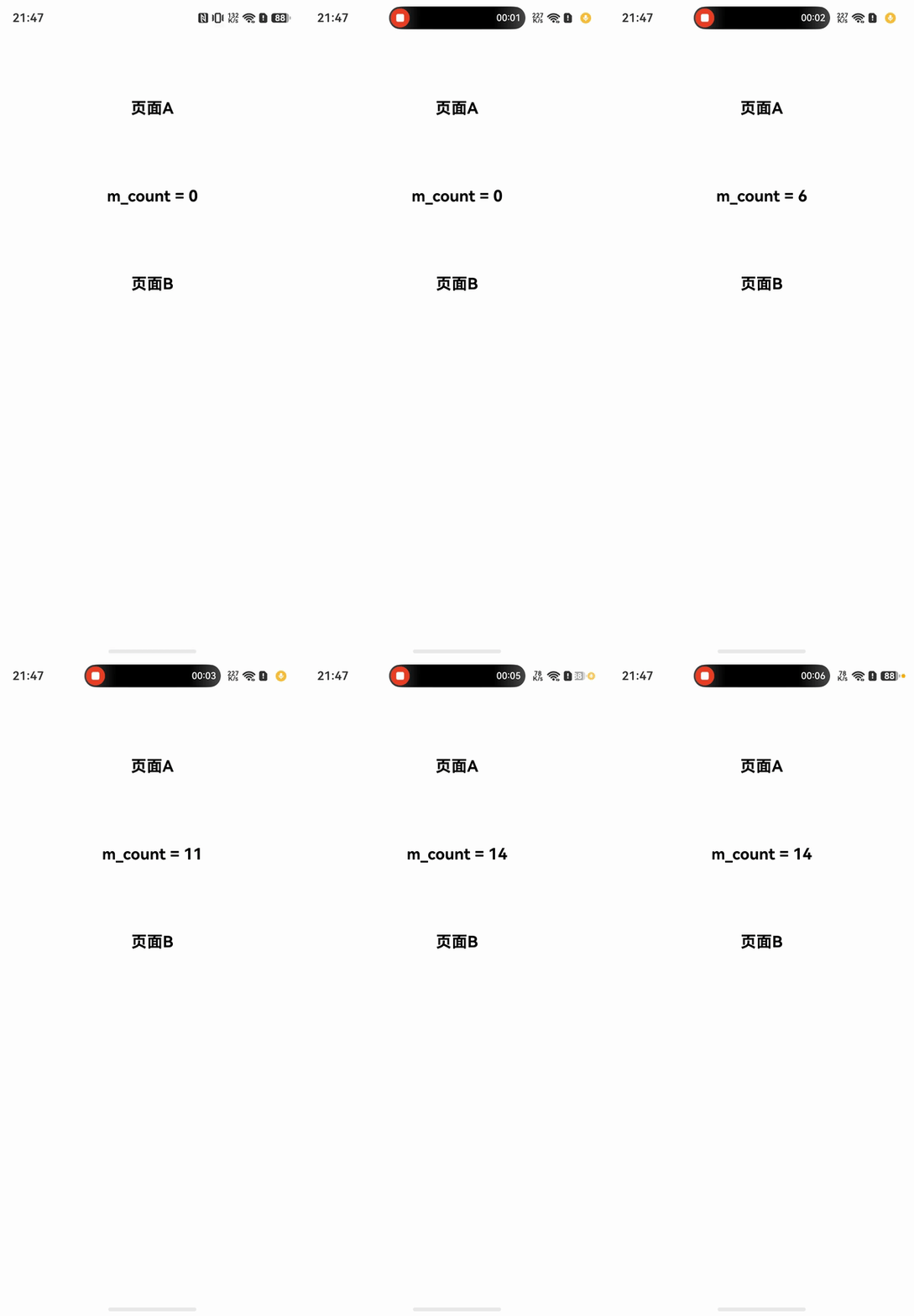
真机演示:

找HarmonyOS工作还需要会Flutter的哦,有需要Flutter教程的可以学学大地老师的教程,很不错,B站免费学的哦:https://www.bilibili.com/video/BV1S4411E7LY/?p=17

核心问题是你修改的变量,并没有绑定在当前显示的 UI 组件实例上。要么就是修改了“旧”的组件实例,要么就是this指向丢失,this 可能不再指向当前组件。
对于这种比较基础的代码错误,建议使用AI工具,阿里的AI工具Lingma用起来基本无门槛,可直接集成在IDE:


@State 装饰的变量是用于管理组件内部私有状态的,其核心设计是让状态变化仅影响当前组件,实现“自己修改、自己刷新。外部页面(如父组件)可以在初始化时传入值,但无法直接修改已初始化的 @State 变量并触发跨页面同步刷新。
@State 的基本定位
@State 是 ArkTS 状态管理中最基础的装饰器,用于声明组件内部的可变状态。被装饰的变量生命周期与所属自定义组件相同,且默认是私有的,只能从组件内部访问。这意味着在组件内部对该变量的修改会自动触发当前组件的 UI 刷新。
如果你需要跨页面共享状态,可以这样做:
@Observed + @State:对类使用 @Observed 装饰器,使其属性变化可被跨组件观察。
AppStorage:提供应用全局状态存储,通过 @StorageLink 或 @StorageProp 在任意组件中访问和同步。
refreshLocalData部分内容如下:
this.vegetableItems = [...globalDataManager.getGroupItemByBigTypeNameShouye('蔬菜')];
this.m_count = [...globalDataManager.getGroupItemByBigTypeNameShouye('蔬菜')].length;
在build中,this.vegetableItems相关的界面更新了,this.m_count相关的界面没有跟新,部分代码如下
build() {
  RelativeContainer() {
    Column() {
      this.TopImageSection()

      Scroll() {
        Column({ space: 10 }) {
          // 鲜蔬栏目
          Row({ space: 10 }) {
            this.SectionTitle(`鲜蔬盈筐 (${this.m_count})`)//没有进入此处
          }
          Scroll() {
            Row({ space: 10 }) {
              ForEach(this.vegetableItems, (item: ShouYeItem) => {//进入了此处,界面更新
                this.GridImageItem(item);
              }, (item: ShouYeItem, index: number) => `veg_${index}_${item.name}`)
            }


refreshLocalData部分内容如下:
this.vegetableItems = [...globalDataManager.getGroupItemByBigTypeNameShouye('蔬菜')];
this.m_count = [...globalDataManager.getGroupItemByBigTypeNameShouye('蔬菜')].length;
在build中,this.vegetableItems相关的界面更新了,this.m_count相关的界面没有跟新,部分代码如下
build() {
  RelativeContainer() {
    Column() {
      this.TopImageSection()
      Scroll() {
        Column({ space: 10 }) {
          // 鲜蔬栏目
          Row({ space: 10 }) {
            this.SectionTitle(`鲜蔬盈筐 (${this.m_count})`)//没有进入此处
          }
          Scroll() {
            Row({ space: 10 }) {
              ForEach(this.vegetableItems, (item: ShouYeItem) => {//进入了此处,界面更新
                this.GridImageItem(item);
              }, (item: ShouYeItem, index: number) => `veg_${index}_${item.name}`)
            }
开发者您好,参考下[@Prop装饰器:父子单向同步](https://developer.huawei.com/consumer/cn/doc/harmonyos-guides/arkts-prop)
在HarmonyOS Next (ArkUI) 中,变量改变后界面不刷新通常是因为未使用 @State 装饰器标记变量,或在非主线程中直接修改变量。请检查变量是否添加了 @State,并使用 this.变量名 方式赋值。若在异步回调中修改,需确保在UI主线程操作。

问题很可能出在函数定义方式上。如果 refreshLocalData 是用普通函数声明的,当界面 B 调用它时,函数内部的 this 可能已丢失,导致修改的不是界面 A 组件实例的 @State 变量,界面自然不刷新。解决方法是使用箭头函数定义,自动捕获所在作用域的 this:
refreshLocalData = () => {
  this.m_count = ... // this 正确指向当前组件
}
如果无法修改原函数,调用时显式绑定:
refreshLocalData.bind(this)()
另外,确认没有在子线程中直接修改 @State 变量,若使用异步任务需在 UI 线程中赋值(如 TaskPool 后用 this.getUIContext().runOnUIThread(() => {...}))。通常第一种情况最常见。
