




HarmonyOS 鸿蒙Next中Navigation嵌套子组件Tabs滑动异常
HarmonyOS 鸿蒙Next中Navigation嵌套子组件Tabs滑动异常 【问题描述】:Navigation组件里包含了一个Tabs组件,tab页面布局是一个scroll或者LIst可滑动的页面,滑动tab页面中的scroll或者LIst组件,会导致tabBar上移
具体代码如下:
/**
 * Navigation + Tabs + Scroll 下拉回弹Bug复现Demo
 *
 * 问题描述:
 *   当 Navigation 包裹 Tabs,且 TabContent 内部使用 Scroll 组件时,
 *   下拉 Scroll 触发的回弹效果会穿透 Navigation 和 Tabs,
 *   导致底部 Tab 栏整体上移,产生视觉异常。
 *
 * 关键结构:Navigation > Column > Tabs > TabContent > Scroll
 *
 * 本Demo包含3个Tab用于对比:
 *   Tab1(Scroll): 外层Scroll → 有Bug,下拉时Tab栏上移
 *   Tab2(List):   外层List   → 有Bug,下拉时Tab栏上移
 *   Tab3(Column): 无滚动容器  → 无Bug,作为基准对照
 *
 * 复现步骤:
 *   1. 切换到"Scroll(有Bug)"Tab
 *   2. 在内容区域向下拉动
 *   3. 观察底部Tab栏是否被上移拉动
 *   4. 切换到"List(正常)"Tab重复操作,对比差异
 */

@Entry
@Component
struct Index {
  @State currentTab: number = 0;
  private navStack: NavPathStack = new NavPathStack();
  private tabsController: TabsController = new TabsController();

  // ========== Tab1: Scroll组件(有Bug) ==========
  @Builder
  ScrollPage() {
    Scroll() {
      Column() {
        Text('这是 Scroll 容器').fontSize(20).fontWeight(FontWeight.Bold).margin({ bottom: 8 })
        Text('下拉此页面,观察底部Tab栏是否上移').fontSize(14).fontColor('#666666').margin({ bottom: 24 })

        ForEach([1, 2, 3, 4, 5, 6, 7, 8, 9, 10, 11, 12], (item: number): void => {
          Row() {
            Text(`列表项 ${item}`).fontSize(16).fontColor('#333333')
          }
          .width('90%').height(60).backgroundColor(Color.White).borderRadius(12)
          .margin({ bottom: 12 }).padding({ left: 20 })
          .shadow({ radius: 4, color: '#1A000000', offsetY: 2 })
        }, (item: number): string => `${item}`)
      }
      .width('100%').padding({ left: 20, right: 20, top: 20, bottom: 20 })
    }
    .width('100%').height('100%')
    .scrollBar(BarState.Off)
    .edgeEffect(EdgeEffect.Spring)
  }

  // ========== Tab2: List组件(无Bug) ==========
  @Builder
  ListPage() {
    List() {
      ListItem() {
        Column() {
          Text('这是 List 容器').fontSize(20).fontWeight(FontWeight.Bold).margin({ bottom: 8 })
          Text('下拉此页面,观察底部Tab栏是否上移').fontSize(14).fontColor('#666666')
        }.width('100%').padding({ bottom: 24 })
      }

      ForEach([1, 2, 3, 4, 5, 6, 7, 8, 9, 10, 11, 12], (item: number): void => {
        ListItem() {
          Row() {
            Text(`列表项 ${item}`).fontSize(16).fontColor('#333333')
          }
          .width('100%').height(60).backgroundColor(Color.White).borderRadius(12)
          .margin({ bottom: 12 }).padding({ left: 20 })
          .shadow({ radius: 4, color: '#1A000000', offsetY: 2 })
        }
      }, (item: number): string => `${item}`)
    }
    .width('100%').height('100%')
    .scrollBar(BarState.Off)
    .edgeEffect(EdgeEffect.Spring)
    .cachedCount(5)
  }

  // ========== Tab3: Column无滚动(基准) ==========
  @Builder
  ColumnPage() {
    Column() {
      Text('无滚动容器').fontSize(20).fontWeight(FontWeight.Bold).margin({ bottom: 8 })
      Text('此页面不可滚动,Tab栏应始终不动').fontSize(14).fontColor('#666666').margin({ bottom: 24 })

      Column() {
        Text('这是静态内容区域').fontSize(16).fontColor('#333333')
      }
      .width('90%').height(200).backgroundColor(Color.White).borderRadius(12)
      .justifyContent(FlexAlign.Center)
      .shadow({ radius: 4, color: '#1A000000', offsetY: 2 })
    }
    .width('100%').height('100%').padding(20)
    .justifyContent(FlexAlign.Start)
  }

  // ========== Tab栏图标 ==========
  @Builder
  Tab1Icon() {
    Column() {
      Text('S').fontSize(20).fontColor(this.currentTab === 0 ? '#FF5722' : '#AAAAAA').fontWeight(FontWeight.Bold)
      Text('Scroll').fontSize(10)
        .fontColor(this.currentTab === 0 ? '#FF5722' : '#AAAAAA')
        .fontWeight(this.currentTab === 0 ? FontWeight.Bold : FontWeight.Normal)
    }.justifyContent(FlexAlign.Center).alignItems(HorizontalAlign.Center)
  }

  @Builder
  Tab2Icon() {
    Column() {
      Text('L').fontSize(20).fontColor(this.currentTab === 1 ? '#FF5722' : '#AAAAAA').fontWeight(FontWeight.Bold)
      Text('List').fontSize(10)
        .fontColor(this.currentTab === 1 ? '#FF5722' : '#AAAAAA')
        .fontWeight(this.currentTab === 1 ? FontWeight.Bold : FontWeight.Normal)
    }.justifyContent(FlexAlign.Center).alignItems(HorizontalAlign.Center)
  }

  @Builder
  Tab3Icon() {
    Column() {
      Text('C').fontSize(20).fontColor(this.currentTab === 2 ? '#FF5722' : '#AAAAAA').fontWeight(FontWeight.Bold)
      Text('Column').fontSize(10)
        .fontColor(this.currentTab === 2 ? '#FF5722' : '#AAAAAA')
        .fontWeight(this.currentTab === 2 ? FontWeight.Bold : FontWeight.Normal)
    }.justifyContent(FlexAlign.Center).alignItems(HorizontalAlign.Center)
  }

  build() {
    // 关键:Navigation包裹,与PoPoMusic一致
    Navigation(this.navStack) {
      Column() {
        Tabs({ barPosition: BarPosition.End, controller: this.tabsController }) {
          TabContent() {
            this.ScrollPage()
          }.tabBar(this.Tab1Icon())

          TabContent() {
            this.ListPage()
          }.tabBar(this.Tab2Icon())

          TabContent() {
            this.ColumnPage()
          }.tabBar(this.Tab3Icon())
        }
        .width('100%').layoutWeight(1)
        .barHeight(56)
        .barBackgroundColor('#26FFFFFF')
        .barMode(BarMode.Fixed)
        .scrollable(false)
        .onChange((index: number): void => {
          this.currentTab = index;
        })
      }
      .width('100%').height('100%')
      .linearGradient({ direction: GradientDirection.Bottom, colors: [['#FFF8F0', 0], ['#FFEDE3', 1]] })
    }
    .height('100%')
    .mode(NavigationMode.Auto)
  }
}
【问题现象】:
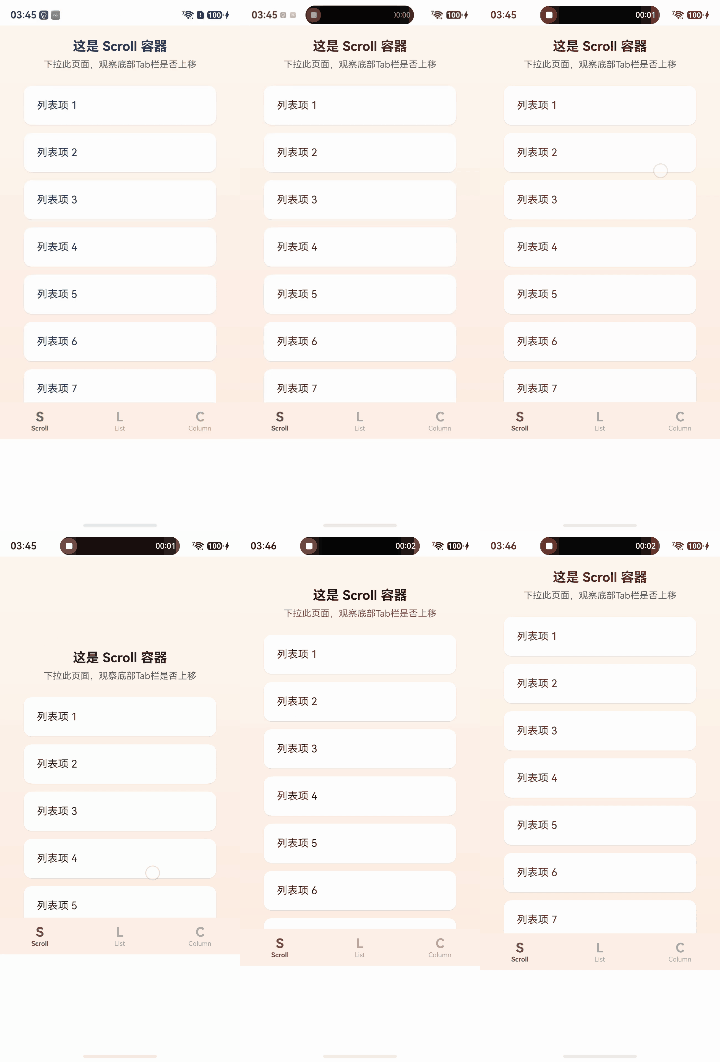
【版本信息】:API23
更多关于HarmonyOS 鸿蒙Next中Navigation嵌套子组件Tabs滑动异常的实战教程也可以访问 https://www.itying.com/category-93-b0.html

问题出在 Navigation.title 这里。
// 关键:Navigation包裹,与PoPoMusic一致
Navigation(this.navStack) {
        //...
}
.height('100%')
.mode(NavigationMode.Auto)
//方案一
// .titleMode(NavigationTitleMode.Mini)
//方案二
// .title("")
//方案三
.hideTitleBar(true)
方案一二三根据需求选一个。
更多关于HarmonyOS 鸿蒙Next中Navigation嵌套子组件Tabs滑动异常的实战系列教程也可以访问 https://www.itying.com/category-93-b0.html


开发者您好,Navigation的标题栏显示模式默认值是NavigationTitleMode.Free,参考NavigationTitleMode枚举说明(文档链接:https://developer.huawei.com/consumer/cn/doc/harmonyos-references/ts-basic-components-navigation#navigationtitlemode枚举说明)中Free的说明,滚动组件会影响titleBar和NavBarContent的高度,Navigation组件是路由导航的根视图容器,一般作为页面的根容器使用,其内部默认包含了标题栏、内容区和工具栏。参考组件外层加了Navigation后,该组件的高度不能达到整个屏幕高度(文档链接:https://developer.huawei.com/consumer/cn/doc/architecture-guides/educate-v1_1-ts_65-0000002406921681)。

刚好我的程序也用这种,参考一下:
build(): void {
    Stack() {
      HdsNavigation(this.pageInfo) {
        HdsTabs({ controller: this.controller }) {
          ForEach(this.tabs, (tab: TabConfig) => {
            TabContent() {
              this.buildTabContent(tab)
            }
            .tabBar(new BottomTabBarStyle({
              normal: new SymbolGlyphModifier(tab.normalIcon)
                .renderingStrategy(SymbolRenderingStrategy.MULTIPLE_COLOR)
                .fontColor([
                  $r('sys.color.ohos_id_color_bottom_tab_icon_off'),
                  $r('sys.color.ohos_id_color_bottom_tab_icon_auxcolor_off02')
                ]),
              selected: new SymbolGlyphModifier(tab.selectedIcon)
                .renderingStrategy(SymbolRenderingStrategy.MULTIPLE_COLOR)
                .fontColor([
                  $r('sys.color.ohos_id_color_activated'),
                  $r('sys.color.ohos_id_color_primary_contrary')
                ])
            }, tab.label))
          })
        }
        .scrollable(false)
        .barOverlap(!this.shouldSideNav)
        .vertical(this.shouldSideNav)
        .barPosition(this.shouldSideNav ? BarPosition.Start : BarPosition.End)
        .barFloatingStyle(!this.shouldSideNav ? {
          barBottomMargin: 24,
          systemMaterialEffect: {
            materialType: hdsMaterial.MaterialType.ADAPTIVE,
            materialLevel: hdsMaterial.MaterialLevel.EXQUISITE
          }
        } : undefined)
      }
      .mode(NavigationMode.Stack)
      .titleBar({
        content: {
          title: {
            mainTitle: 'AI珠宝通',
          },
          menu: this.menus,
        },
        style: {
          scrollEffectOpts: {
            enableScrollEffect: true,
            scrollEffectType: ScrollEffectType.GRADIENT_BLUR,
          },
          systemMaterialEffect: {
            materialType: hdsMaterial.MaterialType.ADAPTIVE,
            materialLevel: hdsMaterial.MaterialLevel.EXQUISITE
          },
        },
        avoidLayoutSafeArea: false,
        enableComponentSafeArea: false
      })
      .bindToScrollable([this.scrollerHome, this.scrollerAR, this.scrollerMe])
      .hideBackButton(true)
      .titleMode(HdsNavigationTitleMode.MINI)
      .ignoreLayoutSafeArea([LayoutSafeAreaType.SYSTEM], [LayoutSafeAreaEdge.TOP, LayoutSafeAreaEdge.BOTTOM])
    }
    .width('100%')
    .height('100%')
    .clip(false)
  }
@Builder
buildTabContent(tab: TabConfig): void {
    Stack() {
      Column()
        .width('100%')
        .height('100%')
        .linearGradient({
          direction: GradientDirection.Top,
          colors: this.currentColorMode !== ConfigurationConstant.ColorMode.COLOR_MODE_DARK ? [
            ['#FDF6F0', 0.0],
            ['#FFFEFC', 1.0]
          ] : [
            ['#16121E', 0.0],
            ['#0A070F', 1.0]
          ]
        })

      Scroll(this.getScrollerForTab(tab)) {
        Column({ space: 20 }) {
          Column()
            .width('100%')
            .height(16)

          if (tab.pageName === 'Home') {
            HomeTab()
          }

          if (tab.pageName === 'AR') {
            ARTab()
          }

          if (tab.pageName === 'Me') {
            MeTab()
          }

          Column()
            .width('100%')
            .height(100)
        }
        .width('100%')
        .alignItems(HorizontalAlign.Center)
      }
      .clipContent(ContentClipMode.SAFE_AREA)
      .height('100%')
      .scrollBar(BarState.Off)
      .edgeEffect(EdgeEffect.Spring)
      .expandSafeArea([SafeAreaType.SYSTEM], [SafeAreaEdge.TOP, SafeAreaEdge.BOTTOM])

      if (!this.isEmulator) {
        this.agentFabBuilder();
      } else {
        this.buildEncyclopediaButton(
          this.fabAlignLeft ? { left: 20, bottom: 120 } : { right: 20, bottom: 120 }
        );
      }
    }
    .width('100%')
    .height('100%')
  }
这个问题本质上是:
Navigation + Tabs + Scroll(Spring回弹)
在 API23 上的嵌套滑动冲突。
不是你的代码逻辑问题。
而是:
Scroll/List 的边缘回弹(EdgeEffect.Spring)
把位移传递到了外层 Navigation,
导致整个 Tabs 区域一起发生了偏移,
于是看起来像:
TabBar 被上移了
⸻
你这个 Demo 其实已经复现得非常标准了:
Navigation
 └── Tabs
      └── TabContent
           └── Scroll/List
这是目前 HarmonyOS NEXT 里比较典型的嵌套滑动问题。
⸻
重点:
不是 TabBar 真被布局修改了。
而是:
Spring 回弹动画把父级一起拉动了。
所以:
- Scroll 下拉
- 内容 overscroll
- Navigation 产生位移
- Tabs bar 跟随移动
就出现了你截图里的效果。
⸻
尤其:
.edgeEffect(EdgeEffect.Spring)
是核心触发点。
⸻
目前 API23 下:
Navigation + Tabs + Scroll(Spring)
确实存在这个问题。
很多项目都踩过。
⸻
解决方案一般有几个:
1、最简单(推荐)
关闭 Spring 回弹。
改成:
.edgeEffect(EdgeEffect.None)
或者:
.edgeEffect(EdgeEffect.Fade)
例如:
Scroll() {

}
.edgeEffect(EdgeEffect.None)
通常立刻恢复正常。
⸻
2、尽量使用 List 替代 Scroll(官方更推荐)
HarmonyOS 的:
List
Grid
WaterFlow
适配明显比:
Scroll + Column
更成熟。
尤其:
Tabs 场景。
你 Demo 里其实已经能看出来:
List 比 Scroll 稳定
这是因为:
List 内部用了更完整的 NestedScroll 处理。
⸻
3、不要让 Navigation 直接包 Tabs
这是目前很多项目的规避方案。
改成:
Navigation
 └── 页面
      └── Tabs
而不是:
Navigation 直接包裹整个 Tabs 主体
否则 Navigation 会参与整体滑动动画。
⸻
4、给 Tabs 外层固定布局
例如:
Column() {
  Tabs() {

  }
  .layoutWeight(1)
  .clip(true)
}
或者:
.clip(true)
有时能缓解 Spring 位移穿透。
但不能完全解决。
⸻
5、避免 Scroll 嵌套 Column 超长布局
HarmonyOS NEXT 当前:
Scroll + 巨型Column
在:
- 回弹
- 手势分发
- 嵌套动画
上问题比 List 多。
官方现在其实更偏向:
LazyForEach + List
方案。
⸻
你这个场景我实际建议:
直接改:
.edgeEffect(EdgeEffect.None)
基本是目前最稳定的解决方式。
因为:
API23 下 Spring 的嵌套回弹确实还有问题。
⸻
一句话总结:
这不是你的布局写错了,
而是 API23 下:
Navigation + Tabs + Scroll(Spring)
存在嵌套回弹位移 Bug。
最有效方案:
.edgeEffect(EdgeEffect.None)
或者尽量使用:
List 替代 Scroll
来规避。

在HarmonyOS Next的ArkUI中,Navigation与Tabs嵌套时滑动异常,通常因手势冲突或布局层级导致。需确保Tabs组件的scrollable属性与Navigation的滑动手势互斥。可设置Tabs的swipe属性为false,或调整Navigation的slideBehavior为None以禁用侧滑。同时检查Tabs的barWidth与content区域是否被正确约束。

该问题由嵌套滚动冲突引起:Navigation包裹Tabs,Tabs内部的Scroll/List启用了EdgeEffect.Spring(弹性回弹),回弹时的滚动动量会穿透Tabs传递到外层布局,导致底部tabBar随之上移。
解决方法:在Scroll组件上添加.nestedScroll属性,限制自身滚动,禁止事件向上冒泡。修正后Scroll的Builder片段如下:
Scroll() {
  // 原有内容
}
.width('100%').height('100%')
.scrollBar(BarState.Off)
.edgeEffect(EdgeEffect.Spring)
.nestedScroll({
  scrollForward: NestedScrollMode.SELF_ONLY,
  scrollBackward: NestedScrollMode.SELF_ONLY
})
同理,List组件也可添加相同设置,彻底避免tabBar随滚动位移。
