




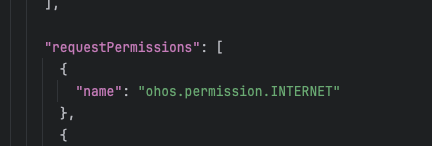
HarmonyOS鸿蒙Next中mac环境flutter转鸿蒙运行成功后提示没有网络权限,但是在module.json5中是申请过的。
HarmonyOS鸿蒙Next中mac环境flutter转鸿蒙运行成功后提示没有网络权限,但是在module.json5中是申请过的。 【问题描述】:mac环境,flutter转鸿蒙,在模拟器上运行成功后提示没有网络权限,但是在module.json5中是申请过的。模拟器是有网的,app没网。
【问题现象】:mac环境,flutter转鸿蒙,在模拟器上运行成功后提示没有网络权限,但是在module.json5中是申请过的。模拟器是有网的,app没网。

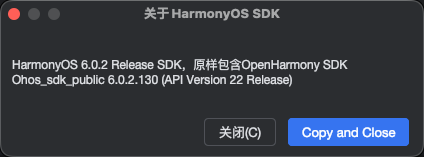
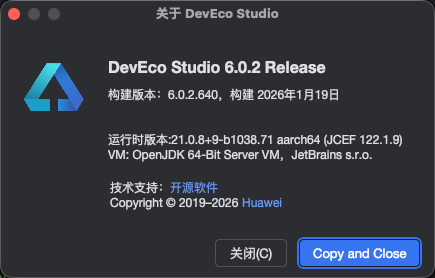
【版本信息】:
【复现代码】:不涉及
【尝试解决方案】:暂无
更多关于HarmonyOS鸿蒙Next中mac环境flutter转鸿蒙运行成功后提示没有网络权限,但是在module.json5中是申请过的。的实战教程也可以访问 https://www.itying.com/category-92-b0.html

开发者您好,
本地加载页面使用的是否是webview_flutter,是否是HarmonyOS化的webview_flutter,本地测试可以正常在模拟器上加载网页。
检查下是否是网络限制,配置下模拟器代理,使用deveco代理或者手动配置代理。尝试切换其他网络是否可以正常加载。可以在模拟器代理配置页面使用检查连接功能测试相关页面是否可以连接。
flutter版本3.7.12,测试代码:
environment:
  sdk: '>=2.19.6 <3.0.0'

# Dependencies specify other packages that your package needs in order to work.
# To automatically upgrade your package dependencies to the latest versions
# consider running `flutter pub upgrade --major-versions`. Alternatively,
# dependencies can be manually updated by changing the version numbers below to
# the latest version available on pub.dev. To see which dependencies have newer
# versions available, run `flutter pub outdated`.
dependencies:
  flutter:
    sdk: flutter


  # The following adds the Cupertino Icons font to your application.
  # Use with the CupertinoIcons class for iOS style icons.
  cupertino_icons: ^1.0.2

  webview_flutter:
    git:
      url: "https://gitcode.com/openharmony-sig/flutter_packages.git"
      path: 'packages/webview_flutter/webview_flutter'
      depth: 1
// main.dart

import 'package:flutter/material.dart';
import 'package:webview_flutter/webview_flutter.dart';

void main() => runApp(const MaterialApp(home: WebViewExample()));

class WebViewExample extends StatefulWidget {
  const WebViewExample({super.key});

  @override
  State<WebViewExample> createState() => _WebViewExampleState();
}

class _WebViewExampleState extends State<WebViewExample> {
  late final WebViewController controller;

  @override
  void initState() {
    super.initState();

    // #docregion webview_controller
    controller = WebViewController()
      ..setJavaScriptMode(JavaScriptMode.unrestricted)
      ..setBackgroundColor(const Color(0x00000000))
      ..setNavigationDelegate(
        NavigationDelegate(
          onProgress: (int progress) {
            // Update loading bar.
          },
          onPageStarted: (String url) {},
          onPageFinished: (String url) {},
          onWebResourceError: (WebResourceError error) {},
        ),
      )
      ..loadRequest(Uri.parse('https://xxx.xxx'));
    // #enddocregion webview_controller
  }

  // #docregion webview_widget
  @override
  Widget build(BuildContext context) {
    return Scaffold(
      appBar: AppBar(title: const Text('Flutter Simple Example')),
      body: WebViewWidget(controller: controller),
    );
  }
  // #enddocregion webview_widget
}
更多关于HarmonyOS鸿蒙Next中mac环境flutter转鸿蒙运行成功后提示没有网络权限,但是在module.json5中是申请过的。的实战系列教程也可以访问 https://www.itying.com/category-92-b0.html


鸿蒙Next中网络权限需在entry模块的module.json5的requestPermissions中配置ohos.permission.INTERNET,且注意权限名称大小写及模块路径是否正确。若仍无效,检查是否在调试包或签名后未重新安装权限配置;另外,确认网络请求是否使用了@ohos.net.http等不受沙箱限制的API。

在 HarmonyOS 中,ohos.permission.INTERNET 属于普通权限,只需在 module.json5 中声明即可,无需动态申请。你已正确添加该权限,但应用仍提示无网络权限,通常是因为应用安装后未重启或缓存未刷新,导致旧权限状态残留。可尝试卸载应用后重新部署运行;若使用模拟器,请确认模拟器网络设置未限制应用联网,同时检查 module.json5 中权限声明格式是否为:
"requestPermissions": [
  { "name": "ohos.permission.INTERNET" }
]
另外,部分 Flutter 引擎集成时可能需要显式开启网络支持,例如在 main_pages.json 或引擎初始化参数中设置 "network" 字段。可先检查工程中是否存在其他模块的权限配置文件覆盖了主模块。多数情况下,清理重装即可解决问题。
