




HarmonyOS 鸿蒙Next中英文切换的输入法demo
HarmonyOS 鸿蒙Next中英文切换的输入法demo 【问题描述】:想要个中英文切换的输入法demo
5 回复


HarmonyOS 中英文切换输入法 Demo
1. 输入法主页面
typescript
import inputMethod from '@ohos.inputMethod'
import { InputMethodProperty } from '@ohos.inputMethod'

@Entry
@Component
struct InputMethodDemo {
@State isEnglishMode: boolean = true
@State inputText: string = ''
@State candidates: string[] = []
@State selectedIndex: number = 0
private inputMethodController: inputMethod.InputMethodController = inputMethod.getController()

// 英文键盘布局
private englishKeys = [
['Q', 'W', 'E', 'R', 'T', 'Y', 'U', 'I', 'O', 'P'],
['A', 'S', 'D', 'F', 'G', 'H', 'J', 'K', 'L'],
['Z', 'X', 'C', 'V', 'B', 'N', 'M']
]

// 中文拼音输入映射
private pinyinMap: Map<string, string[]> = new Map([
['ni', ['你', '尼', '泥']],
['hao', ['好', '号', '耗']],
['zhong', ['中', '钟', '终']],
['wen', ['文', '问', '闻']],
['shi', ['是', '时', '事']],
['shu', ['书', '输', '树']],
['ru', ['入', '如', '儒']],
['fa', ['法', '发', '法']]
])

@Builder
KeyItem(key: string, isSpecial: boolean = false) {
Button(key)
.width(isSpecial ? 60 : 40)
.height(45)
.fontSize(18)
.fontWeight(FontWeight.Medium)
.backgroundColor(this.isEnglishMode ? '#FFFFFF' : '#F5F5F5')
.fontColor('#000000')
.borderRadius(6)
.margin({ left: 2, right: 2, top: 2, bottom: 2 })
.onClick(() => {
this.handleKeyPress(key)
})
}

handleKeyPress(key: string) {
if (this.isEnglishMode) {
// 英文模式直接输入
this.inputText += key
this.sendTextToEditor(this.inputText)
} else {
// 中文模式拼音输入
this.handlePinyinInput(key)
}
}

handlePinyinInput(key: string) {
// 简化的拼音处理逻辑
const currentPinyin = this.inputText.toLowerCase()
if (this.pinyinMap.has(currentPinyin + key.toLowerCase())) {
this.inputText += key
this.candidates = this.pinyinMap.get(this.inputText.toLowerCase()) || []
this.selectedIndex = 0
} else {
this.inputText += key
this.candidates = []
}
}

selectCandidate(index: number) {
if (this.candidates[index]) {
this.sendTextToEditor(this.candidates[index])
this.inputText = ''
this.candidates = []
}
}

sendTextToEditor(text: string) {
// 将文本发送到输入框
this.inputMethodController.insertText(text)
}

switchLanguage() {
this.isEnglishMode = !this.isEnglishMode
this.inputText = ''
this.candidates = []
}

deleteChar() {
if (this.inputText.length > 0) {
this.inputText = this.inputText.slice(0, -1)
if (!this.isEnglishMode) {
// 中文模式下删除时更新候选词
const currentPinyin = this.inputText.toLowerCase()
this.candidates = this.pinyinMap.get(currentPinyin) || []
}
}
}

build() {
Column() {
// 顶部状态栏
Row() {
Text(this.isEnglishMode ? 'EN' : '中')
.fontSize(16)
.fontWeight(FontWeight.Bold)
.fontColor('#FFFFFF')
.padding({ left: 12, right: 12, top: 6, bottom: 6 })
.backgroundColor('#007DFF')
.borderRadius(16)
.onClick(() => {
this.switchLanguage()
})

Blank()

Text(this.inputText)
.fontSize(14)
.fontColor('#666666')
.maxLines(1)
.padding({ right: 12 })

Button('⌫')
.fontSize(20)
.backgroundColor('#F0F0F0')
.width(50)
.height(40)
.onClick(() => {
this.deleteChar()
})
}
.width('100%')
.padding({ left: 16, right: 16, top: 8, bottom: 8 })
.backgroundColor('#FAFAFA')

// 候选词区域(仅中文模式显示)
if (!this.isEnglishMode && this.candidates.length > 0) {
Row({ space: 8 }) {
ForEach(this.candidates, (candidate: string, index: number) => {
Text(candidate)
.fontSize(16)
.fontColor(index === this.selectedIndex ? '#007DFF' : '#333333')
.fontWeight(index === this.selectedIndex ? FontWeight.Bold : FontWeight.Normal)
.padding({ left: 12, right: 12, top: 6, bottom: 6 })
.backgroundColor(index === this.selectedIndex ? '#E6F2FF' : '#FFFFFF')
.borderRadius(8)
.onClick(() => {
this.selectCandidate(index)
})
}, (candidate: string, index: number) => `${index}_${candidate}`)
}
.width('100%')
.padding({ left: 16, right: 16, top: 8, bottom: 8 })
.backgroundColor('#FFFFFF')
}

// 键盘区域
Column({ space: 4 }) {
ForEach(this.englishKeys, (row: string[]) => {
Row({ space: 2 }) {
ForEach(row, (key: string) => {
this.KeyItem(key)
}, (key: string) => key)
}
.justifyContent(FlexAlign.Center)
}, (row: string[], index: number) => `row_${index}`)

// 底部功能键
Row({ space: 4 }) {
Button('123')
.width(50)
.height(45)
.fontSize(14)
.backgroundColor('#D0D0D0')
.onClick(() => {
// 切换数字键盘
})

Button(',')
.width(50)
.height(45)
.fontSize(18)
.backgroundColor('#FFFFFF')
.onClick(() => {
this.handleKeyPress(',')
})

Button(' ')
.layoutWeight(1)
.height(45)
.fontSize(14)
.backgroundColor('#FFFFFF')
.onClick(() => {
this.handleKeyPress(' ')
})

Button('.')
.width(50)
.height(45)
.fontSize(18)
.backgroundColor('#FFFFFF')
.onClick(() => {
this.handleKeyPress('.')
})

Button('↵')
.width(50)
.height(45)
.fontSize(18)
.backgroundColor('#007DFF')
.fontColor('#FFFFFF')
.onClick(() => {
this.sendTextToEditor('\n')
})
}
.width('100%')
.padding({ left: 8, right: 8, bottom: 8 })
}
.layoutWeight(1)
.backgroundColor('#E8E8E8')
.padding({ top: 8 })
}
.width('100%')
.height('100%')
.backgroundColor('#F5F5F5')
}
}
2. 输入法服务配置
typescript
// InputMethodService.ets
import inputMethod from '@ohos.inputMethod'
import { InputMethodProperty, InputMethodController } from '@ohos.inputMethod'

export class InputMethodService {
private static instance: InputMethodService
private controller: InputMethodController

private constructor() {
this.controller = inputMethod.getController()
}

static getInstance(): InputMethodService {
if (!InputMethodService.instance) {
InputMethodService.instance = new InputMethodService()
}
return InputMethodService.instance
}

// 初始化输入法
async initInputMethod(): Promise<void> {
const property: InputMethodProperty = {
name: 'ChineseEnglishIME',
label: '中英文输入法',
icon: '',
extra: {}
}

try {
await inputMethod.switchInputMethod(property)
console.log('输入法初始化成功')
} catch (error) {
console.error('输入法初始化失败:', error)
}
}

// 发送文本到编辑器
insertText(text: string): void {
this.controller.insertText(text)
}

// 删除文本
deleteText(length: number): void {
this.controller.deleteForward(length)
}

// 获取选中文本
getSelectedText(): string {
return this.controller.getSelectedText(0, 0)
}
}
3. module.json5 配置
json5
{
"module": {
"name": "entry",
"type": "entry",
"description": "中英文输入法",
"mainElement": "EntryAbility",
"deviceTypes": [
"default",
"tablet"
],
"deliveryWithInstall": true,
"installationFree": false,
"pages": "$profile:main_pages",
"abilities": [
{
"name": "EntryAbility",
"srcEntry": "./ets/entryability/EntryAbility.ets",
"description": "输入法入口",
"icon": "$media:app_icon",
"label": "$string:app_name",
"startWindowIcon": "$media:icon",
"startWindowBackground": "$color:start_window_background",
"exported": true,
"skills": [
{
"entities": [
"entity.system.inputmethod"
]
}
]
}
],
"requestPermissions": [
{
"name": "ohos.permission.INPUT_METHOD",
"reason": "用于提供输入法服务",
"usedScene": {
"abilities": ["EntryAbility"],
"when": "inuse"
}
}
]
}
}
4. 使用示例
typescript
// 在应用中使用输入法
import { InputMethodService } from '../services/InputMethodService'

@Entry
@Component
struct DemoPage {
private inputMethodService: InputMethodService = InputMethodService.getInstance()

aboutToAppear() {
this.inputMethodService.initInputMethod()
}

build() {
Column() {
TextInput({ placeholder: '请输入文本' })
.width('90%')
.height(50)
.margin({ top: 20 })
}
.width('100%')
.height('100%')
}
}
5. 功能说明
- 中英文切换:点击左上角 EN/中 按钮切换
- 英文输入:直接输入英文字符
- 中文拼音:输入拼音显示候选词,点击候选词上屏
- 删除功能:支持逐字符删除
- 候选词选择:中文模式下显示拼音候选词
- 功能键:数字切换、空格、回车等
6. 扩展建议
- 集成第三方拼音引擎(如搜狗、讯飞)
- 添加词频统计和智能联想
- 支持手写输入
- 添加语音输入功能
- 支持自定义词库

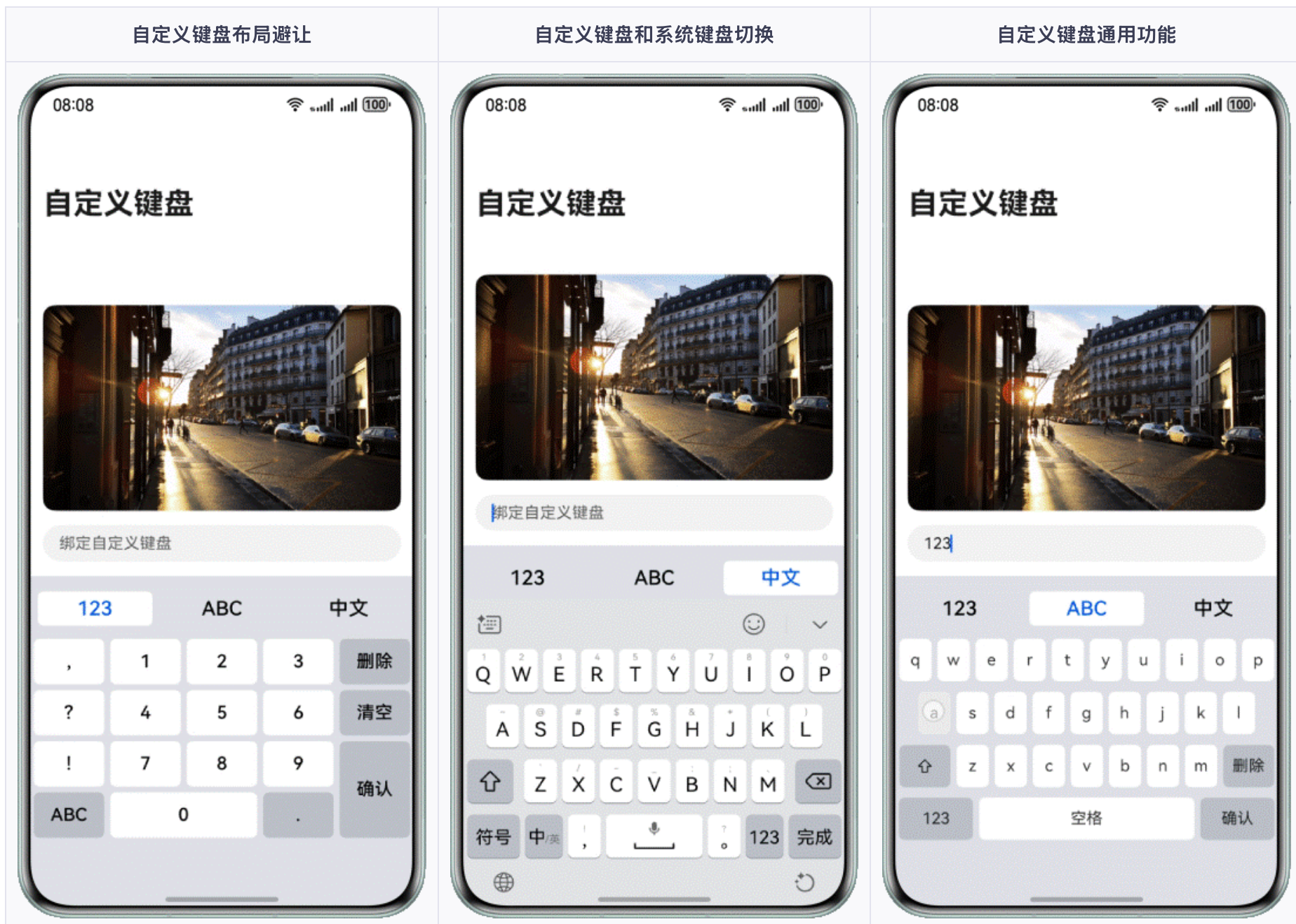

在HarmonyOS Next中,可使用ArkTS开发输入法demo,继承InputMethodExtensionAbility,在onCreate中配置语言切换逻辑。通过onKeyEvent监听按键事件,调用InputMethodController的setInputMethodOptions实现中英文模式动态切换。

以下为基于ArkTS实现的HarmonyOS Next中英文切换输入法核心代码。该Demo通过InputMethodExtensionAbility实现自定义键盘,用户点击切换按钮即可在中英文模式间切换并更新键盘布局。
// InputMethodService.ts
import InputMethodExtensionAbility from '@ohos.InputMethodExtensionAbility';
import InputMethodExtensionContext from '@ohos.InputMethodExtensionContext';
import keyboardController from '@ohos.multimodalInput.keyboardController';

const ENGLISH_KEYS = ['q','w','e','r','t','y','u','i','o','p','a','s','d','f','g','h','j','k','l','z','x','c','v','b','n','m'];
const CHINESE_PINYIN = ['a','b','c','d','e','f','g','h','i','j','k','l','m','n','o','p','q','r','s','t','u','v','w','x','y','z'];

export default class EnChInputService extends InputMethodExtensionAbility {
  private isEnglish: boolean = true;
  private currentKeys: string[] = ENGLISH_KEYS;

  onCreate(want) {
    // 初始化状态
  }

  onStart(context: InputMethodExtensionContext) {
    // 创建键盘UI
    this.createKeyboardUI(context);
  }

  createKeyboardUI(context: InputMethodExtensionContext) {
    Column() {
      // 切换按钮
      Button(this.isEnglish ? '中' : 'En')
        .onClick(() => {
          this.isEnglish = !this.isEnglish;
          this.currentKeys = this.isEnglish ? ENGLISH_KEYS : CHINESE_PINYIN;
          // 刷新键盘布局
          this.updateLayout(context);
        })
      // 键盘区域(简化示例,展示部分按键)
      Grid() {
        ForEach(this.currentKeys, (key: string) => {
          GridItem() {
            Button(key)
              .onClick(() => {
                keyboardController.sendText(key);
              })
          }
        })
      }
      .columnsTemplate('1fr 1fr 1fr 1fr 1fr 1fr')
      // 其他功能键(删除、空格等)可类似添加
    }
    .width('100%')
    .height('40%')
  }

  updateLayout(context: InputMethodExtensionContext) {
    // 重新构建或更新组件,实际开发中可通过状态变量驱动UI刷新
    // 此处简单示意为重新调用创建方法,生产环境需优化
    this.createKeyboardUI(context);
  }

  onStop() {}
}
在module.json5中需声明extensionAbilities:
{
  "extensionAbilities": [
    {
      "name": "EnChInputService",
      "srcEntry": "./ets/InputMethodExtensionAbility/EnChInputService.ts",
      "type": "inputMethod"
    }
  ]
}
该Demo展示了核心切换逻辑:通过Button触发中英文状态切换,动态更新按键数组,再利用Grid重新渲染。实际开发中需完善汉字候选、输入法生命周期、按键响应等。
