




HarmonyOS 鸿蒙Next中这算一个框架bug吗
HarmonyOS 鸿蒙Next中这算一个框架bug吗 type为ButtonType.Normal的按钮,如果要设置一个BorderRadius圆角,只能在Button后直接写,写在@Extend(Button)里不生效,调试了好久。。。

有两个方案,其实就是radius顺序的问题:
@Extend(Button)
function btnStyle(isConfirm: boolean = false) {
        .type(ButtonType.Normal)
        .layoutWeight(1)
        .height(44)
        .fontSize(16)
        .fontColor(isConfirm ? Color.White : "#1678ff")
        .fontWeight(600)
        .border({
                width: 1,
                color: "#1678ff",
                radius: 4//方案一
        })
        //方案二
        // .borderRadius(4)
        .backgroundColor(isConfirm ? "#1678ff" : Color.White)
}
在border中指定radius,或者borderRadius在border后面。
更多关于HarmonyOS 鸿蒙Next中这算一个框架bug吗的实战系列教程也可以访问 https://www.itying.com/category-93-b0.html

Row({ space: 12 }) {
  Button('重置').btnStyle().onClick(() => {
    this.handlerReset()
  })
  Button('确定').btnStyle(true).onClick(() => {
    this.handlerConfirm()
  })
}
@Extend(Button)
function btnStyle(isConfirm: boolean = false) {
  .type(ButtonType.Normal)
  .layoutWeight(1)
  .height(44)
  .fontSize(16)
  .fontColor(isConfirm ? Color.White : "#1678ff")
  .fontWeight(600)
  .borderRadius(4)
  .border({
    width: 1,
    color: "#1678ff"
  })
  .backgroundColor(isConfirm ? "#1678ff" : Color.White)
}
效果:

4vp的圆角出不来


找HarmonyOS工作还需要会Flutter的哦,有需要Flutter教程的可以学学大地老师的教程,很不错,B站免费学的哦:https://www.bilibili.com/video/BV1S4411E7LY/?p=17,

注释掉.type(ButtonType.Normal) 这一行就行了,这个type强制使用了Normal的样式。
@Extend(Button)
function btnStyle(isConfirm: boolean = false) {
  // .type(ButtonType.Normal)
  .layoutWeight(1)
  .height(44)
  .fontSize(16)
  .fontColor(isConfirm ? Color.White : "#1678ff")
  .fontWeight(600)
  .borderRadius(4)
  .border({
    width: 1,
    color: "#1678ff"
  })
  .backgroundColor(isConfirm ? "#1678ff" : Color.White)
}


@Extend(Button)
function ExtendButton() {
        .borderRadius(50)
}

@Entry
@Component
struct Index {

    build() {
        Column() {
            Column({ space: 50 }) {

                Button("Normal1").type(ButtonType.Normal).ExtendButton()
                Button("Normal2").ExtendButton().type(ButtonType.Normal)
                Button("Normal3", { type: ButtonType.Normal }).ExtendButton()

            }
            .justifyContent(FlexAlign.Center)
            .width('100%')
            .height('100%')
            .backgroundImage($r("app.media.bg2"))
            .backgroundImageSize(ImageSize.FILL)
        }
    }

}
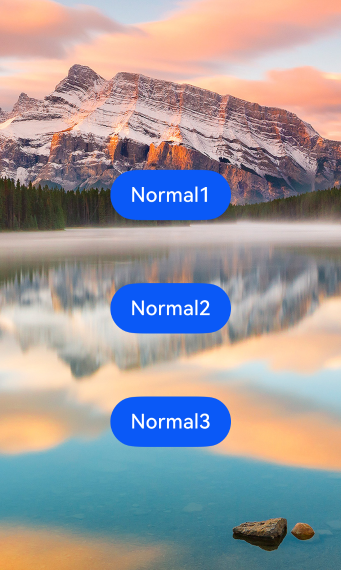
都可以啊
仅凭标题无法判断是否为框架bug。鸿蒙Next框架bug通常表现为API行为与文档不符、组件异常崩溃、布局渲染错误或状态管理失效等。建议核对版本更新日志和已知问题列表,确认是否为已修复或已知的兼容性问题。
这不是 bug,这是 ArkUI 中 @Extend 装饰器的已知限制。
@Extend(Button) 本质上是对组件属性的静态扩展,它只能处理 基础类型、简单对象、属性方法 的样式设置。但 borderRadius 这个属性在 Button 组件上接收的是一个 BorderRadiuses 或 Length 类型的参数,其传递机制在 @Extend 中因类型系统的处理方式而无法正确合并到组件属性中,所以写在 @Extend 里不生效是符合当前框架设计的行为,属于功能限制而非缺陷。
你可以通过 borderRadius 直接在组件标签上设置,或用 stateStyles、attributeModifier 等动态方式实现复用。
