




HarmonyOS 鸿蒙Next中页签随滚动收缩隐藏的效果
HarmonyOS 鸿蒙Next中页签随滚动收缩隐藏的效果 本应用社区页面,在滚动话题后页签会自动收缩隐藏。这个效果有提供选项来开启吗?还是说这是自定义动画来实现的?

当使用bindTabsToScrollable或bindTabsToNestedScrollable等接口绑定了Tabs组件和可滚动容器组件后,在滑动可滚动容器组件时,会触发所有与其绑定的Tabs组件的TabBar的显示和隐藏动效。
参考示例:
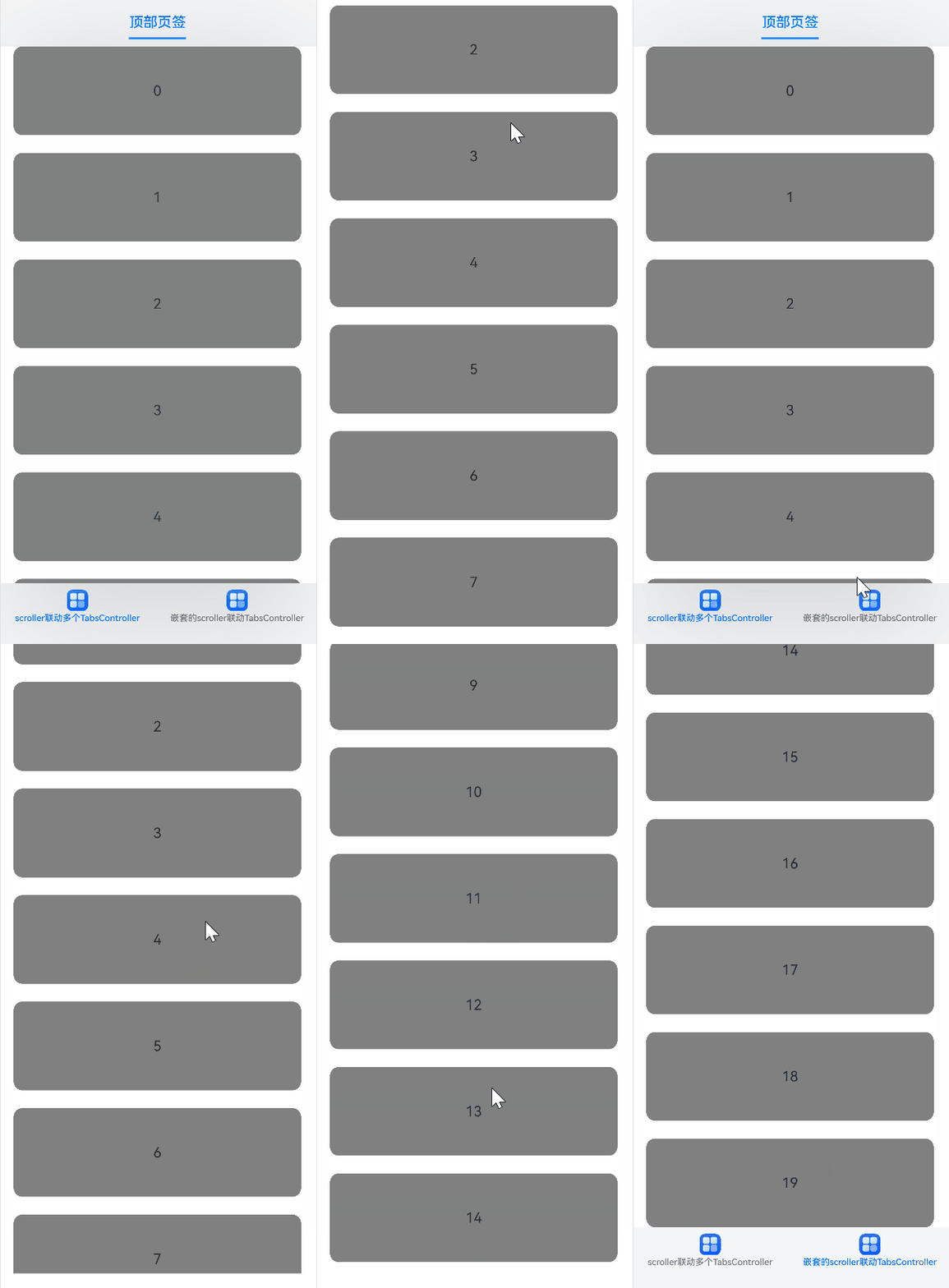
@Entry
@Component
struct TabsExample {
  private arr: string[] = [];
  private parentTabsController: TabsController = new TabsController();
  private childTabsController: TabsController = new TabsController();
  private listScroller: Scroller = new Scroller();
  private parentScroller: Scroller = new Scroller();
  private childScroller: Scroller = new Scroller();

  aboutToAppear(): void {
    for (let i = 0; i < 20; i++) {
      this.arr.push(i.toString());
    }
    let context = this.getUIContext();
    context.bindTabsToScrollable(this.parentTabsController, this.listScroller);
    context.bindTabsToScrollable(this.childTabsController, this.listScroller);
    context.bindTabsToNestedScrollable(this.parentTabsController, this.parentScroller, this.childScroller);
  }

  aboutToDisappear(): void {
    let context = this.getUIContext();
    context.unbindTabsFromScrollable(this.parentTabsController, this.listScroller);
    context.unbindTabsFromScrollable(this.childTabsController, this.listScroller);
    context.unbindTabsFromNestedScrollable(this.parentTabsController, this.parentScroller, this.childScroller);
  }

  build() {
    Tabs({ barPosition: BarPosition.End, controller: this.parentTabsController }) {
      TabContent() {
        Tabs({ controller: this.childTabsController }) {
          TabContent() {
            List({ space: 20, initialIndex: 0, scroller: this.listScroller }) {
              ForEach(this.arr, (item: string) => {
                ListItem() {
                  Text(item)
                    .width('100%')
                    .height(100)
                    .fontSize(16)
                    .textAlign(TextAlign.Center)
                    .borderRadius(10)
                    .backgroundColor(Color.Gray)
                }
              }, (item: string) => item)
            }
            .scrollBar(BarState.Off)
            .width('90%')
            .height('100%')
            .contentStartOffset(56)
            .contentEndOffset(52)
          }.tabBar(SubTabBarStyle.of('顶部页签'))
        }
        .width('100%')
        .height('100%')
        .barOverlap(true) // 使TabBar叠加在TabContent上,当TabBar向上或向下隐藏后,原位置处不为空白
        .clip(true) // 对超出Tabs组件范围的子组件进行裁剪,防止TabBar向上或向下隐藏后误触TabBar
      }.tabBar(BottomTabBarStyle.of($r('app.media.startIcon'), 'scroller联动多个TabsController'))

      TabContent() {
        Scroll(this.parentScroller) {
            List({ space: 20, initialIndex: 0, scroller: this.childScroller }) {
              ForEach(this.arr, (item: string) => {
                ListItem() {
                  Text(item)
                    .width('100%')
                    .height(100)
                    .fontSize(16)
                    .textAlign(TextAlign.Center)
                    .borderRadius(10)
                    .backgroundColor(Color.Gray)
                }
              }, (item: string) => item)
            }
            .scrollBar(BarState.Off)
            .width('90%')
            .height('100%')
            .contentEndOffset(52)
            .nestedScroll({ scrollForward: NestedScrollMode.SELF_FIRST, scrollBackward: NestedScrollMode.SELF_FIRST })
        }
        .width('100%')
        .height('100%')
        .scrollBar(BarState.Off)
        .scrollable(ScrollDirection.Vertical)
        .edgeEffect(EdgeEffect.Spring)
      }.tabBar(BottomTabBarStyle.of($r('app.media.startIcon'), '嵌套的scroller联动TabsController'))
    }
    .width('100%')
    .height('100%')
    .barOverlap(true) // 使TabBar叠加在TabContent上,当TabBar向上或向下隐藏后,原位置处不为空白
    .clip(true) // 对超出Tabs组件范围的子组件进行裁剪,防止TabBar向上或向下隐藏后误触TabBar
  }
}
更多关于HarmonyOS 鸿蒙Next中页签随滚动收缩隐藏的效果的实战系列教程也可以访问 https://www.itying.com/category-93-b0.html

测试发现,在 API 23 使用 barFloatingStyle 开启 TabBar 的沉浸光感效果后,实际的效果是有问题的。关闭后没问题,但开启后只有图标会下沉,而且有旧效果的顶部边缘残留。


与官方对话后得知,HdsTabs 中要启用该效果,需要对其绑定的 HdsTabsController,在组件滑动时调用 applyHideAnimation 或 applyShowAnimation。具体还要配合滚动组件滑动回调事件给出的 offset 的大小,决定应用哪一个接口。
可参考以下内容:https://developer.huawei.com/consumer/cn/doc/harmonyos-references/ui-design-hdstabs#applyhideanimation、https://developer.huawei.com/consumer/cn/doc/harmonyos-references/ui-design-hdstabs#applyshowanimation;
核心代码:this.controller.applyHideAnimation(HdsAnimationMode.SCROLL_ANIMATION);
其中 SCROLL_ANIMATION 是我想要的效果,另一个可选的 CLICK_ANIMATION 也不错。

这个“页签随滚动收缩/隐藏”的效果,目前 没有一个 HdsTabs/HDS 组件级的开关可以直接开启(不像有些系统 App 内置行为那样一键配置)。一般是:
- 自定义实现:监听滚动 → 判断方向/速度 → 用动画改变 TabBar(或标题栏/筛选栏)的高度、位移、透明度;
- 如果你看到的是“系统应用/官方应用”的体验,那更多是它们在业务层做了这套交互,不是 HdsTabs 自带选项。
典型实现方式(你可以照这个思路做)
- 用
List/Scroll的滚动回调拿到 offset - 计算本次 offset 与上次 offset 的差值:
- 上滑(内容向上滚,offset 增大)→ 隐藏/收缩
- 下滑(offset 减小)→ 显示/展开
- 对页签容器做动画(
translateY / height / opacity+animation/animateTo)
如果你用的是沉浸悬浮页签,建议用 叠层(Stack 底部 overlay)+ translateY,这样不会触发布局重排,抖动更少。

在HarmonyOS Next中,可通过监听Scroll或List的onScroll事件,获取偏移量,调用animateTo动态改变页签组件的visibility或translate属性,实现收缩/隐藏效果。使用@State管理状态,配合.transition()添加平滑动画即可。

