




HarmonyOS 鸿蒙Next中HdsNavigation组件动态模糊效果在真机与虚拟机的差异
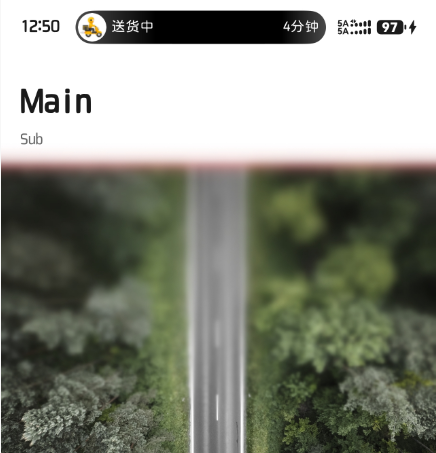
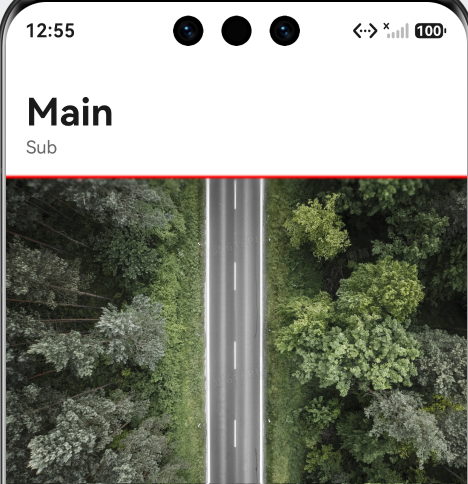
HarmonyOS 鸿蒙Next中HdsNavigation组件动态模糊效果在真机与虚拟机的差异 真机版本是Mate80Pro(6.0.0.328 SP52),虚拟机版本是Mate80Pro(6.0.33 API23),在使用HdsNavigation组件的ScrollEffectType.IMMERSIVE_GRADIENT_BLUR或GRADUAL_BLUR时,真机和虚拟机的效果不一样,真机的模糊面积较大(图一,模糊区域超过了红线位置),虚拟机的上方模糊面积较小(图二,红线位置上方为模糊区域),我想知道是我代码写得有问题还是API问题,目前COMMON_BLUR和GRADUAL_BLUR在真机和虚拟机中的效果是一样的
import { HdsNavigation, HdsNavigationTitleMode, ScrollEffectType } from '@kit.UIDesignKit';
import { LengthMetrics } from '@kit.ArkUI';

const TITLE_BAR_HEIGHT: number = 138;
const DEBUG_LINE_HEIGHT: number = 2;

@Entry
@Component
struct Index {
  private scroller: Scroller = new Scroller();

  build() {
    HdsNavigation() { // 创建HdsNavigation组件
      Stack({ alignContent: Alignment.TopStart }) {
        Scroll(this.scroller) { // HdsNavigation组件内容区
          Column() {
            Blank()
              .height(TITLE_BAR_HEIGHT);

            Image($r('app.media.test'))
              .width('100%')
              .objectFit(ImageFit.Cover);

            Image($r('app.media.test'))
              .width('100%')
              .objectFit(ImageFit.Cover);

            Image($r('app.media.test'))
              .width('100%')
              .objectFit(ImageFit.Cover);
          }
          .width('100%');
        }
        .width('100%')
        .height('100%')
        .edgeEffect(EdgeEffect.Spring)
        .scrollBar(BarState.Off);

        Row() {
        }
        .width('100%')
        .height(DEBUG_LINE_HEIGHT)
        .backgroundColor(Color.Red)
        .margin({ top: TITLE_BAR_HEIGHT });
      }
      .width('100%')
      .height('100%');
    }.titleBar({
      style: { // 设置导航组件标题栏样式
        // 标题栏动态模糊样式,包括是否使能滚动动态模糊,动态模糊类型,动态模糊生效的滚动距离等
        scrollEffectOpts: {
          enableScrollEffect: true,
          scrollEffectType: ScrollEffectType.GRADIENT_BLUR,
          blurEffectiveStartOffset: LengthMetrics.vp(0),
          blurEffectiveEndOffset: LengthMetrics.vp(60)
        },
        originalStyle: { // 内容区滚动前初始样式设置
          backgroundStyle: { // 标题栏背板样式设置
            backgroundColor: $r('sys.color.ohos_id_color_background'),
            maskExtraHeight: 120,
            blurRadius: 36
          },
          contentStyle: { // 标题栏内容区样式设置,包括标题区域,菜单区域,返回按钮区域
            titleStyle: {
              mainTitleColor: $r('sys.color.font_primary'),
              subTitleColor: $r('sys.color.font_secondary')
            },
            menuStyle: {
              backgroundColor: $r('sys.color.comp_background_tertiary'),
              iconColor: $r('sys.color.icon_primary')
            },
            backIconStyle: {
              backgroundColor: $r('sys.color.comp_background_tertiary'),
              iconColor: $r('sys.color.icon_primary')
            }
          }
        },
        scrollEffectStyle: { // 内容区滚动超过blurEffectiveEndOffset后样式设置
          backgroundStyle: {
            backgroundColor: $r('sys.color.ohos_id_color_background_transparent'),
            maskExtraHeight: 220,
            blurRadius: 72
          },
          contentStyle: {
            titleStyle: {
              mainTitleColor: $r('sys.color.font_primary'),
              subTitleColor: $r('sys.color.font_secondary')
            },
            menuStyle: {
              backgroundColor: $r('sys.color.comp_background_tertiary'),
              iconColor: $r('sys.color.icon_primary')
            },
            backIconStyle: {
              backgroundColor: $r('sys.color.comp_background_tertiary'),
              iconColor: $r('sys.color.icon_primary')
            }
          }
        }
      },
      content: { // 标题栏内容设置
        title: { mainTitle: 'Main', subTitle: 'Sub' },
      }
    })
    .titleMode(HdsNavigationTitleMode.FULL)
    .bindToScrollable([this.scroller])
  }
}
更多关于HarmonyOS 鸿蒙Next中HdsNavigation组件动态模糊效果在真机与虚拟机的差异的实战教程也可以访问 https://www.itying.com/category-93-b0.html

这种能力建议你还是在手机上去调试,我试了下GRADIENT_BLUR类型用模拟器没什么效果,和手机不一样,有差异。
COMMON_BLUR和GRADUAL_BLUR类型在手机和模拟器上效果都是一样的。
应该是模拟器的硬件渲染能力不够,模糊效果是按照机器硬件能力来的,看官网说明:
模糊效果生效策略将根据系统策略进行调整。共设置三档系统策略:精美、轻柔、流畅,只有精美档位配置能够生效模糊效果。
系统策略由设备厂商根据设备性能配置,未配置时默认执行精美策略。
模拟器与真机存在部分能力差异:
- 模拟器不支持HDS沉浸视效,包括点光源效果、按压阴影、双边边缘流光、背景流光和自带背景的双边流光。
- 模拟器不适合用于测试应用/元服务的性能(如数据处理、图形渲染、网络速度)、资源占用(如内存、CPU、功耗),模拟器的性能测试结果仅能用于评估应用功能的相对差异。如需获取真实场景下的用户体验数据,建议在真机上进行测试。
下面是我的代码:
import { HdsNavigation, HdsNavigationAttribute, HdsNavigationTitleMode, ScrollEffectType } from '@kit.UIDesignKit';
import { ComponentContent, LengthMetrics, Prompt } from '@kit.ArkUI';
import { BusinessError } from '@kit.BasicServicesKit';

/**
 * 通过组件导航将标题栏设置动态模糊样式
 */

@Builder
function menuComponent() {
  Menu() {
    MenuItem({ content: "copy" }).onClick(() => {
      Prompt.showToast({ message: 'on click' })
    })
    MenuItem({ content: "paste" }).enabled(false)
  }
  .width(224).menuItemDivider({ strokeWidth: LengthMetrics.px(1), color: $r('sys.color.comp_divider') })
}

@Entry
@Component
struct TestDesign {
  @State arr: number[] = [];
  @State targetId: string = 'bindMenu'

  aboutToAppear(): void {
    for (let index = 0; index < 40; index++) {
      this.arr.push(index);
    }
  }
  @Builder
  StackBuilder() {
    Column() {
      Button("HdsNavigation")
    }
    .height(56)
    .justifyContent(FlexAlign.Center)
  }

  @Builder
  BottomBuilder() {
    Column() {
      Search()
    }
    .width('100%')
    .height(56)
  }

  @Styles
  listCard() {
    .backgroundColor(Color.White)
    .height(72)
    .width('calc(100% - 20vp)')
    .borderRadius(12)
    .margin({ left: 10, right: 10 })
  }

  build() {
    HdsNavigation() { // 创建HdsNavigation组件
      // HdsNavigation组件内容区
      Scroll() {
        Column({ space: 10 }) {
          Image($r('app.media.startIcon'))
            .width('100%')
            .height(300)
          List({ space: 10 }) {
            ForEach(this.arr, (item: number) => {
              ListItem() {
                Image($r('app.media.a'))
              }.listCard()

            }, (item: number) => item.toString())
          }
          .padding({ bottom: 30 })
          .edgeEffect(EdgeEffect.Spring)
        }
        .width('100%')
      }
    }
    // .titleMode(HdsNavigationTitleMode.FULL)
    .titleBar({
      style: {
        // 设置导航组件标题栏样式
        // 标题栏动态模糊样式,包括是否使能滚动动态模糊,动态模糊类型,动态模糊生效的滚动距离等
        scrollEffectOpts: {
          enableScrollEffect: true,
          scrollEffectType: ScrollEffectType.GRADIENT_BLUR,
          blurEffectiveStartOffset: LengthMetrics.vp(0),
          blurEffectiveEndOffset: LengthMetrics.vp(20)
        },
        originalStyle: {
          // 内容区滚动前初始样式设置
          backgroundStyle: {
            // 标题栏背板样式设置
            backgroundColor: $r('sys.color.ohos_id_color_background'),
          },
          contentStyle: {
            // 标题栏内容区样式设置,包括标题区域,菜单区域,返回按钮区域
            titleStyle: {
              mainTitleColor: $r('sys.color.font_primary'),
              subTitleColor: $r('sys.color.font_secondary')
            },
            menuStyle: {
              backgroundColor: $r('sys.color.comp_background_tertiary'),
              iconColor: $r('sys.color.icon_primary')
            },
            backIconStyle: {
              backgroundColor: $r('sys.color.comp_background_tertiary'),
              iconColor: $r('sys.color.icon_primary')
            }
          }
        },
        scrollEffectStyle: {
          // 内容区滚动超过blurEffectiveEndOffset后样式设置
          backgroundStyle: {
            backgroundColor: $r('sys.color.ohos_id_color_background_transparent'),
          },
          contentStyle: {
            titleStyle: {
              mainTitleColor: $r('sys.color.font_primary'),
              subTitleColor: $r('sys.color.font_secondary')
            },
            menuStyle: {
              backgroundColor: $r('sys.color.comp_background_tertiary'),
              iconColor: $r('sys.color.icon_primary')
            },
            backIconStyle: {
              backgroundColor: $r('sys.color.comp_background_tertiary'),
              iconColor: $r('sys.color.icon_primary')
            }
          }
        }
      },
      content: {
        // 标题栏内容设置
        title: { mainTitle: 'Main', subTitle: 'Sub' },
        menu: {
          value: [
            {
              content: {
                label: 'menu1',
                icon: $r('sys.symbol.ohos_wifi'),
                isEnabled: true,
                action: () => {
                  let uiContext = this.getUIContext();
                  let promptAction = uiContext.getPromptAction();
                  let contentNode = new ComponentContent(uiContext, wrapBuilder(menuComponent))
                  try {
                    promptAction.openMenu(
                      contentNode,
                      { id: this.targetId },
                      { backgroundColor: Color.Yellow })
                  } catch (error) {
                    let message = (error as BusinessError).message;
                    let code = (error as BusinessError).code;
                    console.error(`openMenu args error code is ${code}, message is ${message}`);
                  }
                  console.info("model cancel");
                }
              },
              badge: {
                count: 9
              }
            }, {
            content: {
              label: 'menu2',
              icon: $r('sys.symbol.ohos_photo'),
            }
          }
          ]
        }
      }
    })
  }
}
更多关于HarmonyOS 鸿蒙Next中HdsNavigation组件动态模糊效果在真机与虚拟机的差异的实战系列教程也可以访问 https://www.itying.com/category-93-b0.html

从描述来看,这很可能是一个系统版本差异或模拟器渲染机制不同导致的已知现象,而非你的代码错误。
核心原因分析
- 系统版本差异
- 真机版本:6.0.0.328 SP52。这是一个较新的、经过多次补丁更新的版本。
- 模拟器版本:6.0.33 API23。模拟器的系统镜像通常更新频率不如真机,或者其底层渲染逻辑为了性能进行了简化。
- 结论:华为在后续的SP补丁中可能调整了 IMMERSIVE_GRADIENT_BLUR 的算法,增大了模糊半径或范围,而旧版本的模拟器没有同步这个变化。
- 硬件渲染能力差异
- 模糊效果非常依赖GPU性能。真机拥有独立的NPU/GPU进行高效的高斯模糊计算,可以承担更大范围的实时模糊。
- 模拟器运行在电脑上,受限于虚拟化层的图形转译,为了保证流畅度,系统可能会自动降级渲染效果,导致模糊范围变小。
- 安全区域
- 真机(Mate 80 Pro)有复杂的“灵动岛”或刘海屏区域,系统可能会强制扩大模糊区域以确保状态栏文字的可读性。
- 模拟器的屏幕拓扑结构可能与真机不同,导致系统计算的模糊锚点位置有偏差。
解决方案与建议
-
以真机表现为准
在UI开发中,模糊、透明度、动画流畅度等涉及底层渲染的特性,永远以真机调试结果为标准。模拟器仅用于逻辑调试。
-
检查 windowBgBlurRadius
尝试在代码中显式指定模糊半径,看是否能强制统一效果。
// 尝试显式设置模糊半径,看是否能覆盖系统默认行为 .scrollEffectType(ScrollEffectType.IMMERSIVE_GRADIENT_BLUR) // 如果有相关属性,尝试调整 // .blurRadius(20) // 伪代码,需查阅最新API文档是否有此配置 -
版本适配
如果真机和模拟器的差异大到影响开发效率,可以在代码中通过系统版本判断来做微调。
import device from '[@ohos](/user/ohos).device';

// 获取系统版本
let version = device.getDeviceInfo().systemVersion;

// 根据版本动态调整样式(如果有必要)


HdsNavigation组件的动态模糊效果在真机上依赖GPU硬件加速与渲染管线优化,效果实时且流畅;虚拟机采用软件模拟或简化渲染,模糊精度较低,可能出现延迟或失真。主要原因在于真机系统级图形栈(如ArkGraphics)与虚拟机的模拟环境不同。
