




HarmonyOS鸿蒙Next中CMake打包so问题
HarmonyOS鸿蒙Next中CMake打包so问题
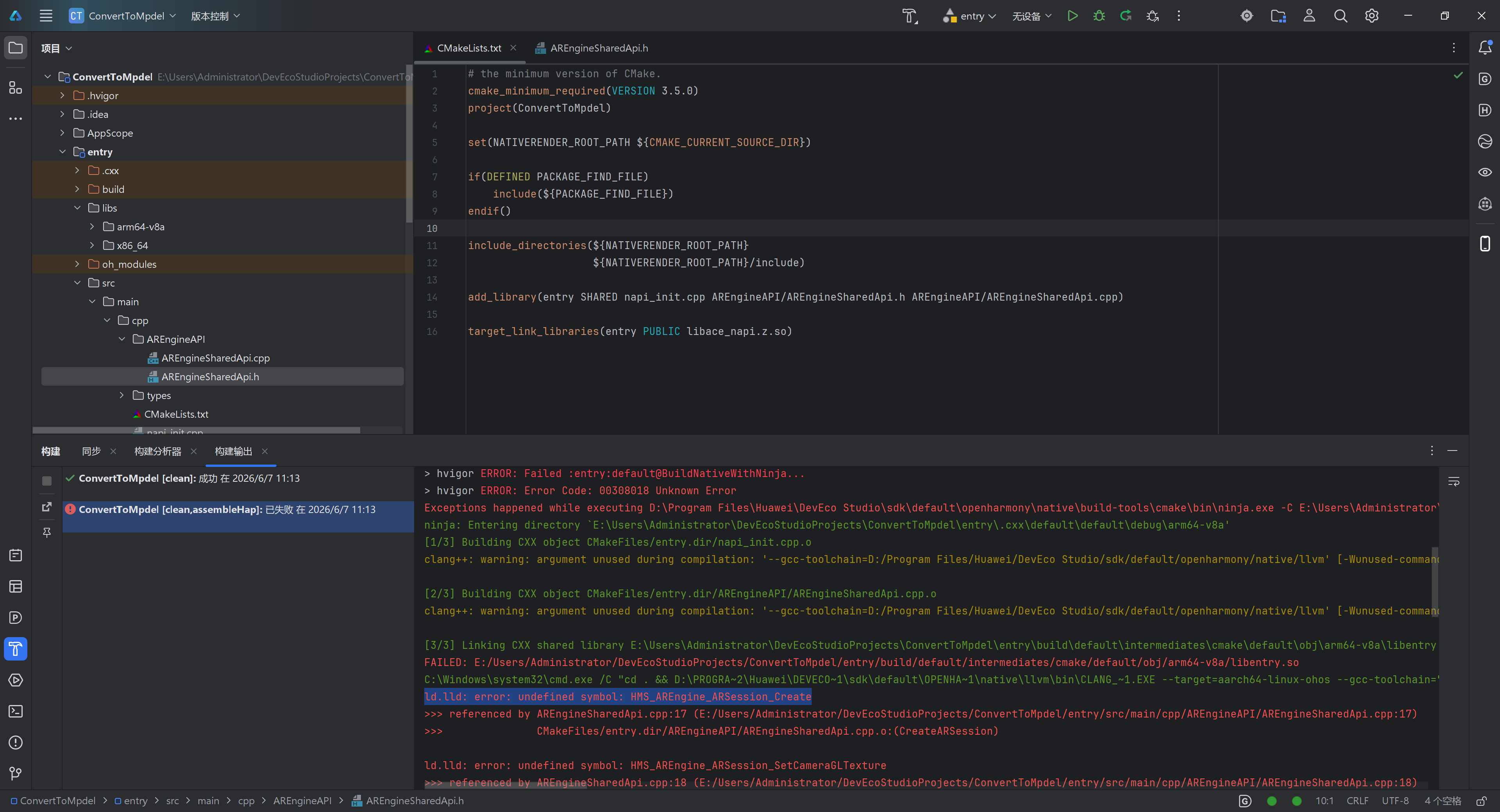
啊啊啊啊!我要疯了!我正在用CMake打包so,这是个啥问题啊?被AI拐带了一上午也没解决(而且AI一会儿我一个样,我都不敢听了)。
更多关于HarmonyOS鸿蒙Next中CMake打包so问题的实战教程也可以访问 https://www.itying.com/category-93-b0.html

不用急,看看官方的demo,
https://developer.huawei.com/consumer/cn/codelabsPortal/carddetails/tutorials_AREngine-C
我也跑过,最近研究AR,按照里面的方法就行了
#
#  Copyright (c) 2024-2025 Huawei Device Co., Ltd.
#  Licensed under the Apache License, Version 2.0 (the "License");
#  you may not use this file except in compliance with the License.
#  You may obtain a copy of the License at
#
#      http://www.apache.org/licenses/LICENSE-2.0
#
#  Unless required by applicable law or agreed to in writing, software
#  distributed under the License is distributed on an "AS IS" BASIS,
#  WITHOUT WARRANTIES OR CONDITIONS OF ANY KIND, either express or implied.
#  See the License for the specific language governing permissions and
#  limitations under the License.
#

# the minimum version of CMake.
cmake_minimum_required(VERSION 3.5.0)

# project
project(ARSample)

set(CMAKE_CXX_STANDARD 17)
set(NATIVE_ROOT_PATH ${CMAKE_CURRENT_SOURCE_DIR})

find_library(arengine-lib libarengine_ndk.z.so)

# include directory
include_directories(
    ${NATIVE_ROOT_PATH}/src
    ${NATIVE_ROOT_PATH}/src/utils
    ${NATIVE_ROOT_PATH}/src/graphic
    ${NATIVE_ROOT_PATH}/thirdparty/glm
    ${NATIVE_ROOT_PATH}/thirdparty/stb
)

# Build shared library.
add_library(entry SHARED
    # common
    ${NATIVE_ROOT_PATH}/src/module.cpp
    ${NATIVE_ROOT_PATH}/src/napi_manager.cpp
    ${NATIVE_ROOT_PATH}/src/global.cpp
    ${NATIVE_ROOT_PATH}/src/utils/app_util.cpp
    ${NATIVE_ROOT_PATH}/src/utils/app_file.cpp
    ${NATIVE_ROOT_PATH}/src/utils/renderer_ref.cpp
    ${NATIVE_ROOT_PATH}/src/graphic/GLUtils.cpp
    ${NATIVE_ROOT_PATH}/src/graphic/RenderAttribute.cpp
    ${NATIVE_ROOT_PATH}/src/graphic/RenderContext.cpp
    ${NATIVE_ROOT_PATH}/src/graphic/RenderSurface.cpp

    # world
    ${NATIVE_ROOT_PATH}/src/world/world_ar_application.cpp
    ${NATIVE_ROOT_PATH}/src/world/world_background_renderer.cpp
    ${NATIVE_ROOT_PATH}/src/world/world_object_renderer.cpp
    ${NATIVE_ROOT_PATH}/src/world/world_plane_renderer.cpp
    ${NATIVE_ROOT_PATH}/src/world/world_render_manager.cpp
    ${NATIVE_ROOT_PATH}/src/world/world_file_manager.cpp

    # depth
    ${NATIVE_ROOT_PATH}/src/depth/depth_ar_application.cpp
    ${NATIVE_ROOT_PATH}/src/depth/depth_background_renderer.cpp
    ${NATIVE_ROOT_PATH}/src/depth/depth_render_manager.cpp
    ${NATIVE_ROOT_PATH}/src/depth/depth_background_no_renderer.cpp

     # mesh
    ${NATIVE_ROOT_PATH}/src/mesh/mesh_ar_application.cpp
    ${NATIVE_ROOT_PATH}/src/mesh/mesh_background_renderer.cpp
    ${NATIVE_ROOT_PATH}/src/mesh/mesh_render_manager.cpp
    ${NATIVE_ROOT_PATH}/src/mesh/scenemesh_display_renderer.cpp
    ${NATIVE_ROOT_PATH}/src/mesh/mesh_object_renderer.cpp

    # image
    ${NATIVE_ROOT_PATH}/src/image/image_ar_application.cpp
    ${NATIVE_ROOT_PATH}/src/image/image_background_renderer.cpp
    ${NATIVE_ROOT_PATH}/src/image/image_render_manager.cpp
    ${NATIVE_ROOT_PATH}/src/image/image_render_base.cpp
    ${NATIVE_ROOT_PATH}/src/image/image_line_render.cpp

    # semanticdense
    ${NATIVE_ROOT_PATH}/src/semanticdense/semanticdense_ar_application.cpp
    ${NATIVE_ROOT_PATH}/src/semanticdense/semanticdense_background_renderer.cpp
    ${NATIVE_ROOT_PATH}/src/semanticdense/semanticdense_point_cloud_renderer.cpp
    ${NATIVE_ROOT_PATH}/src/semanticdense/semanticdense_render_manager.cpp
    ${NATIVE_ROOT_PATH}/src/semanticdense/semanticdense_cube_renderer.cpp
)

# Link the OpenHarmony native library (using OpenGL).
target_link_libraries(entry PUBLIC
    EGL
    GLESv3
    hilog_ndk.z
    ace_ndk.z
    ace_napi.z
    z
    uv
    ace_napi.z
    rawfile.z
    libohfileio.so
    image_source
    pixelmap
    pixelmap_ndk.z
    ${arengine-lib}
    libnative_display_manager.so
)
https://gitcode.com/HarmonyOS_Codelabs/arengine-codelab-ar-sample
更多关于HarmonyOS鸿蒙Next中CMake打包so问题的实战系列教程也可以访问 https://www.itying.com/category-93-b0.html
我给您举一个常见场景,看是否和您截图里一致:CMake 打包 so 时如果是 find_library 找不到库,或 target_link_libraries 链接失败,通常先看三处:1)CMakeLists.txt 里的库名是否写对,例如 AR Engine 官方示例里是 find_library(arengine-lib libarengine_ndk.z.so);2)build-profile.json5 的 abiFilters 是否和设备一致,优先确认 arm64-v8a;3)自编/三方 so 是否放在模块可搜索目录下。
麻烦补充截图里的完整错误文本、CMakeLists.txt、DevEco Studio/SDK 版本和目标 ABI,我这边才能判断是库路径、ABI 还是链接参数问题。参考:AR Engine Codelab(官方示例)https://developer.huawei.com/consumer/cn/codelabsPortal/carddetails/tutorials_AREngine-C


在HarmonyOS Next中,使用CMake打包so文件需配置ohos-sdk提供的工具链。在CMakeLists.txt中设置CMAKE_TOOLCHAIN_FILE指向$OHOS_SDK/native/build/cmake/ohos.toolchain.cmake,并通过OHOS_ARCH指定目标架构(如arm64-v8a)。执行cmake -B build和cmake --build build生成so文件。注意用OHOS_STL=c++_shared控制C++运行时。

