




HarmonyOS鸿蒙Next中如何限制Grid拖动的时候最后一个不能移动
HarmonyOS鸿蒙Next中如何限制Grid拖动的时候最后一个不能移动 向微信发送朋友圈的时候,别的格子拖动到最后一个的时候没反应
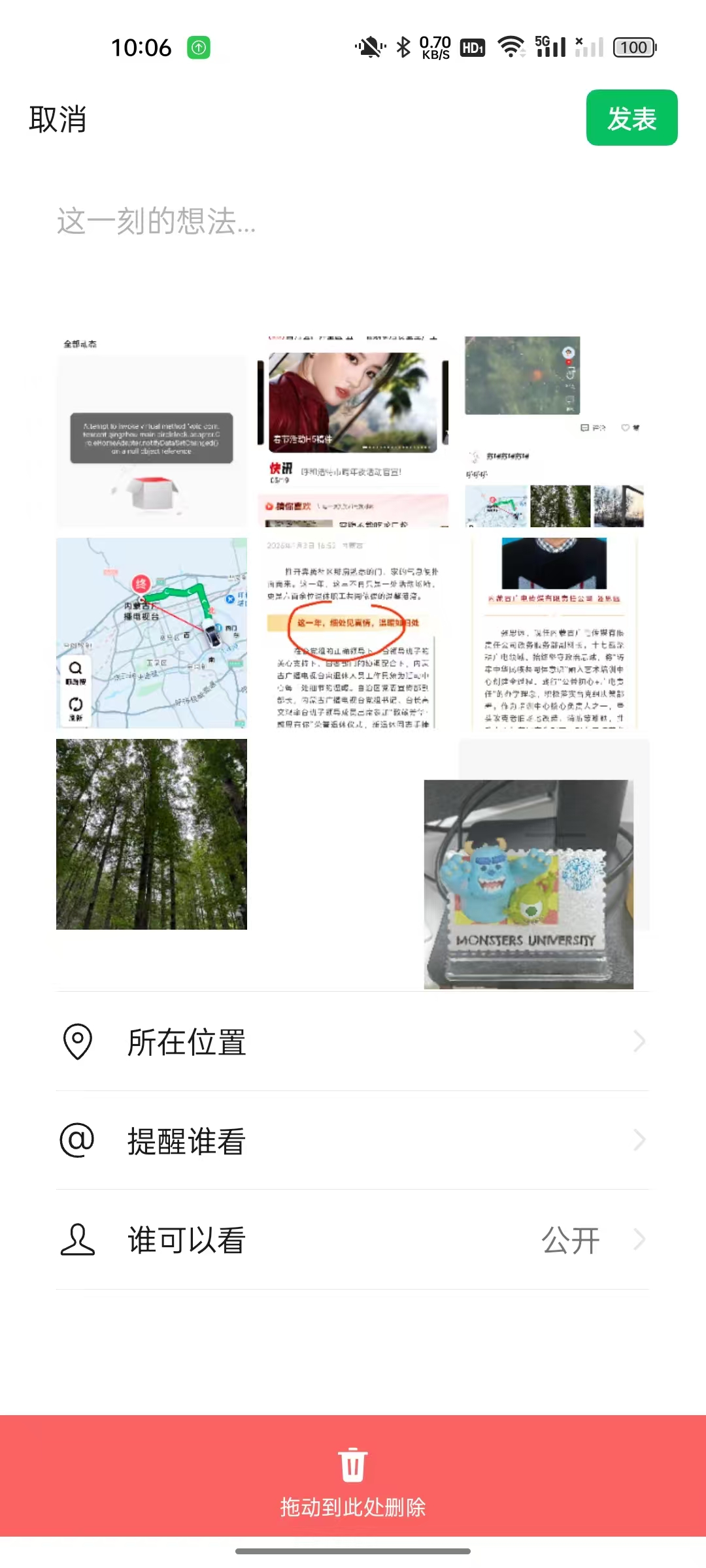
//图片
Grid() {
  ForEach(this.picture, (item: FileBean, index) => {
    GridItem() {
      if (item.image) {
        RelativeContainer() {
          Image(item.url)
            .width(Config.IMAGE_WIDTH-7)
            .height(Config.IMAGE_WIDTH-7)
            .draggable(false)
            .borderRadius(8)
            .objectFit(ImageFit.Fill)
            .align(Alignment.BottomStart)

            .id('temp_img')
            .alignRules({
              bottom: { anchor: '__container__', align: VerticalAlign.Bottom },
              left: { anchor: '__container__', align: HorizontalAlign.Start }
            })
            .onClick(() => {
              router.pushUrl({
                url: 'pages/main/PreviewMediaPage',
                params: new jumpPreviewMedia(this.picture, index)
              })
            })
          Image($r('app.media.reveal_picture_close'))
            .width(14)
            .height(14)
            .borderRadius(8)
            .align(Alignment.TopEnd)
            .borderRadius(7)
            .backgroundColor($r('app.color.app_54000000'))
            .id('temp_close')
            .alignRules({
              top: { anchor: '__container__', align: VerticalAlign.Top },
              right: { anchor: '__container__', align: HorizontalAlign.End }
            })
            .onClick(() => {
              this.picture.splice(index, 1)
              this.pixelMap.splice(index, 1)

              let fileBean = this.picture[this.picture.length - 1]
              if(fileBean.type == 'video' || fileBean.type == 'image'){
                let fileBean = new FileBean()
                this.picture.push(fileBean)
              }
            })
          }
        .width(Config.IMAGE_WIDTH)
        .height(Config.IMAGE_WIDTH)
        .borderRadius(8)
        .rotate({
          z: this.rotateZ,
          angle: 0.4,
          centerX: 0.5,
          centerY: 0.5
        })
      } else {
        RelativeContainer() {
          Image('')
            .width(Config.IMAGE_WIDTH-7)
            .height(Config.IMAGE_WIDTH-7)
            .borderRadius(8)
            .align(Alignment.BottomStart)
            .draggable(false)
            .borderRadius(8)
            .backgroundColor($r('app.color.app_F7F7F7'))
            .id('temp_img')
            .alignRules({
              bottom: { anchor: '__container__', align: VerticalAlign.Bottom },
              left: { anchor: '__container__', align: HorizontalAlign.Start }
            })
          Image($r('app.media.reveal_picture_add'))
            .width(24)
            .height(24)
            .draggable(false)
            .alignRules({
              center: { anchor: 'temp_img', align: VerticalAlign.Center },
              middle: { anchor: 'temp_img', align: HorizontalAlign.Center },
            })
        }
        .width(Config.IMAGE_WIDTH)
        .height(Config.IMAGE_WIDTH)
        .borderRadius(8)
        .onClick(() => {
          if (index == this.picture.length - 1) {
            this.dialog.open()
          }
        })
      }
    }
    .backgroundColor($r('app.color.white'))
    .borderRadius(8)
  })
}
.columnsTemplate('1fr 1fr 1fr')
.columnsGap(5)
.rowsGap(2)
.width('100%')
.margin({ top: 8 })
.padding({ left: 16, right: 16 })
.supportAnimation(true) //是否支持动画
.editMode(true)//设置Grid是否进入编辑模式,进入编辑模式可以拖拽Grid组件内部GridItem
.onItemDragStart((event: ItemDragInfo, itemIndex: number) => {//开始拖拽列表元素时触发。
  if (itemIndex == this.picture.length - 1 && !this.picture[itemIndex].url) {
    return undefined;// 禁止拖拽
  }
  this.currentIndex = itemIndex
  return this.pixelMapBuilder()//设置拖拽过程中显示的图片
})
.onItemDragEnter((event: ItemDragInfo) => {//拖拽进入列表元素范围内时触发。
})
.onItemDragMove((event: ItemDragInfo, itemIndex: number, insertIndex: number) => {//拖拽在列表元素范围内移动时触发。
})
.onItemDragLeave((event: ItemDragInfo, itemIndex: number) => {//拖拽离开列表元素时触发。
})
.onItemDrop((event: ItemDragInfo, itemIndex: number, insertIndex: number, isSuccess: boolean) => {
  //绑定该事件的列表元素可作为拖拽释放目标,当在列表元素内停止拖拽时触发。
  //不支持拖拽到已有内容以外的位置
  if (insertIndex == this.picture.length - 1 && !this.picture[insertIndex].url) {
    return
  }
  if (insertIndex < this.picture.length) {
    this.changeIndex(itemIndex, insertIndex)
    this.stopJump()
  }
})
这是现在的逻辑,只能让加号无法拖动,但是拖动别的会让加号换位置
更多关于HarmonyOS鸿蒙Next中如何限制Grid拖动的时候最后一个不能移动的实战教程也可以访问 https://www.itying.com/category-93-b0.html

你好,可以自定义实现拖动,参考 grid拖动的时候,怎么让第一个item不响应? 通过下面的方法控制item是否可拖动。
// 通过元素的索引,控制对应元素是否能移动排序
isDraggable(index: number): boolean {
  return index < this.numbers.length - 1 // 除了最后一个,都可拖动排序
}
完整demo:
import curves from '@ohos.curves';

@Entry
@Component
struct Index {
  // 元素数组
  @State numbers: number[] = [];
  row: number = 4;
  // 元素数组中最后一个元素的索引
  @State lastIndex: number = 0;
  @State dragItem: number = -1;
  @State scaleItem: number = -1;
  item: number = -1;
  @State offsetX: number = 0;
  @State offsetY: number = 0;
  // 多列
  private str: string = '';
  private dragRefOffsetX: number = 0;
  private dragRefOffsetY: number = 0;
  private FIX_VP_X: number = 108;
  private FIX_VP_Y: number = 120;

  aboutToAppear() {
    for (let i = 1; i <= 20; i++) {
      this.numbers.push(i);
    }
    this.lastIndex = this.numbers.length - 1;
    // 多列
    for (let i = 0; i < this.row; i++) {
      this.str = this.str + '1fr ';
    }
  }

  itemMove(index: number, newIndex: number): void {
    console.info('index:' + index + ' newIndex:' + newIndex);
    if (!this.isDraggable(newIndex)) {
      return;
    }
    let tmp = this.numbers.splice(index, 1);
    this.numbers.splice(newIndex, 0, tmp[0]);
  }

  // 向下滑
  down(index: number): void {
    if (!this.isDraggable(index + this.row)) {
      return;
    }
    this.offsetY -= this.FIX_VP_Y;
    this.dragRefOffsetY += this.FIX_VP_Y;
    // 多列
    this.itemMove(index, index + this.row);
  }

  // 向下滑(右下角为空)
  down2(index: number): void {
    if (!this.isDraggable(index + 3)) {
      return;
    }
    this.offsetY -= this.FIX_VP_Y;
    this.dragRefOffsetY += this.FIX_VP_Y;
    this.itemMove(index, index + 3);
  }

  // 向上滑
  up(index: number): void {
    if (!this.isDraggable(index - this.row)) {
      return;
    }
    this.offsetY += this.FIX_VP_Y;
    this.dragRefOffsetY -= this.FIX_VP_Y;
    this.itemMove(index, index - this.row);
  }

  // 向左滑
  left(index: number): void {
    if (!this.isDraggable(index - 1)) {
      return;
    }
    this.offsetX += this.FIX_VP_X;
    this.dragRefOffsetX -= this.FIX_VP_X;
    this.itemMove(index, index - 1);
  }

  // 向右滑
  right(index: number): void {
    if (!this.isDraggable(index + 1)) {
      return;
    }
    this.offsetX -= this.FIX_VP_X;
    this.dragRefOffsetX += this.FIX_VP_X;
    this.itemMove(index, index + 1);
  }

  // 向右下滑
  lowerRight(index: number): void {
    if (!this.isDraggable(index + this.row + 1)) {
      return;
    }
    this.offsetX -= this.FIX_VP_X;
    this.dragRefOffsetX += this.FIX_VP_X;
    this.offsetY -= this.FIX_VP_Y;
    this.dragRefOffsetY += this.FIX_VP_Y;
    this.itemMove(index, index + this.row + 1);
  }

  // 向右上滑
  upperRight(index: number): void {
    if (!this.isDraggable(index - (this.row - 1))) {
      return;
    }
    this.offsetX -= this.FIX_VP_X;
    this.dragRefOffsetX += this.FIX_VP_X;
    this.offsetY += this.FIX_VP_Y;
    this.dragRefOffsetY -= this.FIX_VP_Y;
    this.itemMove(index, index - (this.row - 1));
  }

  // 向左下滑
  lowerLeft(index: number): void {
    if (!this.isDraggable(index + (this.row - 1))) {
      return;
    }
    this.offsetX += this.FIX_VP_X;
    this.dragRefOffsetX -= this.FIX_VP_X;
    this.offsetY -= this.FIX_VP_Y;
    this.dragRefOffsetY += this.FIX_VP_Y;
    this.itemMove(index, index + (this.row - 1));
  }

  // 向左上滑
  upperLeft(index: number): void {
    if (!this.isDraggable(index - (this.row + 1))) {
      return;
    }
    this.offsetX += this.FIX_VP_X;
    this.dragRefOffsetX -= this.FIX_VP_X;
    this.offsetY += this.FIX_VP_Y;
    this.dragRefOffsetY -= this.FIX_VP_Y;
    this.itemMove(index, index - (this.row + 1));
  }

  // 通过元素的索引,控制对应元素是否能移动排序
  isDraggable(index: number): boolean {
    return index < this.numbers.length - 1 // 除了最后一个,都可拖动排序
  }

  build() {
    Column() {
      Grid() {
        ForEach(this.numbers, (item: number) => {
          GridItem() {
            Text(item + '')
              .fontSize(16)
              .width('100%')
              .textAlign(TextAlign.Center)
              .height(100)
              .borderRadius(10)
              .backgroundColor(0xFFFFFF)
              .shadow(this.scaleItem == item ? {
                radius: 70,
                color: '#15000000',
                offsetX: 0,
                offsetY: 0
              } :
                {
                  radius: 0,
                  color: '#15000000',
                  offsetX: 0,
                  offsetY: 0
                })
              .animation({ curve: Curve.Sharp, duration: 300 });
          }
          // 添加震动
          .onTouch(() => {
          })
          .onAreaChange((oldVal, newVal) => {
            // 多列
            this.FIX_VP_X = Math.round(newVal.width as number);
            this.FIX_VP_Y = Math.round(newVal.height as number);
            console.info(`oldVal:${JSON.stringify(oldVal)}`);
          })
          // 指定固定GridItem不响应事件
          .hitTestBehavior(this.isDraggable(this.numbers.indexOf(item)) ? HitTestMode.Default : HitTestMode.None)
          .scale({ x: this.scaleItem == item ? 1.05 : 1, y: this.scaleItem == item ? 1.05 : 1 })
          .zIndex(this.dragItem == item ? 1 : 0)
          .translate(this.dragItem == item ? { x: this.offsetX, y: this.offsetY } : { x: 0, y: 0 })
          .padding(10)
          .gesture(
            GestureGroup(GestureMode.Sequence,
              LongPressGesture({ repeat: true, duration: 50 })
                .onAction((event?: GestureEvent) => {
                  console.info(`event: ${event}`);
                  this.getUIContext().animateTo({ curve: Curve.Friction, duration: 300 }, () => {
                    this.scaleItem = item;
                  });
                })
                .onActionEnd(() => {
                  this.getUIContext().animateTo({ curve: Curve.Friction, duration: 300 }, () => {
                    this.scaleItem = -1;
                  });
                }),
              PanGesture({ fingers: 1, direction: null, distance: 0 })
                .onActionStart(() => {
                  this.dragItem = item;
                  this.dragRefOffsetX = 0;
                  this.dragRefOffsetY = 0;
                })
                .onActionUpdate((event: GestureEvent) => {
                  this.offsetY = event.offsetY - this.dragRefOffsetY;
                  this.offsetX = event.offsetX - this.dragRefOffsetX;
                  console.info(`移动过程中event.offsetY:${event.offsetY}`,
                    ` this.dragRefOffsetY: ${this.dragRefOffsetY}`, `this.offsetY: ${this.offsetY}`);
                  console.info(`移动过程中event.offsetX:${event.offsetX}`,
                    ` this.dragRefOffsetX: ${this.dragRefOffsetX}`, `this.offsetX: ${this.offsetX}`);
                  this.getUIContext().animateTo({ curve: curves.interpolatingSpring(0, 1, 400, 38) }, () => {
                    let index = this.numbers.indexOf(this.dragItem);
                    console.info('index= ', index);
                    if (this.offsetY >= this.FIX_VP_Y / 2 &&
                      (this.offsetX <= this.FIX_VP_X / 2 && this.offsetX >= -this.FIX_VP_X / 2)
                      && (index + this.row <= this.lastIndex)) {
                      // 向下滑
                      this.down(index);
                    } else if (this.offsetY <= -this.FIX_VP_Y / 2 &&
                      (this.offsetX <= this.FIX_VP_X / 2 && this.offsetX >= -this.FIX_VP_X / 2)
                      && index - this.row >= 0) {
                      // 向上滑
                      this.up(index);
                    } else if (this.offsetX >= this.FIX_VP_X / 2 &&
                      (this.offsetY <= this.FIX_VP_Y / 2 && this.offsetY >= -this.FIX_VP_Y / 2)
                      && !(((index - (this.row - 1)) % this.row == 0) || index == this.lastIndex)) {
                      // 向右滑
                      this.right(index);
                    } else if (this.offsetX <= -this.FIX_VP_X / 2 &&
                      (this.offsetY <= this.FIX_VP_Y / 2 && this.offsetY >= -this.FIX_VP_Y / 2)
                      && !(index % this.row == 0)) {
                      // 向左滑
                      this.left(index);
                    } else if (this.offsetX >= this.FIX_VP_X / 2 && this.offsetY >= this.FIX_VP_Y / 2
                      && ((index + this.row + 1 <= this.lastIndex && !((index - (this.row - 1)) % this.row == 0)) ||
                        !((index - (this.row - 1)) % this.row == 0))) {
                      // 向右下滑
                      this.lowerRight(index);
                    } else if (this.offsetX >= this.FIX_VP_X / 2 && this.offsetY <= -this.FIX_VP_Y / 2
                      && !((index - this.row < 0) || ((index - (this.row - 1)) % this.row == 0))) {
                      // 向右上滑
                      this.upperRight(index);
                    } else if (this.offsetX <= -this.FIX_VP_X / 2 && this.offsetY >= this.FIX_VP_Y / 2
                      && (!(index % this.row == 0) && (index + (this.row - 1) <= this.lastIndex))) {
                      // 向左下滑
                      this.lowerLeft(index);
                    } else if (this.offsetX <= -this.FIX_VP_X / 2 && this.offsetY <= -this.FIX_VP_Y / 2
                      && !((index <= this.row - 1) || (index % this.row == 0))) {
                      // 向左上滑
                      this.upperLeft(index);
                    } else if (this.offsetX >= this.FIX_VP_X / 2 && this.offsetY >= this.FIX_VP_Y / 2
                      && (index == this.lastIndex)) {
                      // 向右下滑(右下角为空)
                      this.down2(index);
                    }
                  });
                })
                .onActionEnd(() => {
                  this.getUIContext().animateTo({ curve: curves.interpolatingSpring(0, 1, 400, 38) }, () => {
                    this.dragItem = -1;
                  });
                  this.getUIContext().animateTo({
                    curve: curves.interpolatingSpring(14, 1, 170, 17), delay: 150
                  }, () => {
                    this.scaleItem = -1;
                  });
                })
            )
              .onCancel(() => {
                this.getUIContext().animateTo({ curve: curves.interpolatingSpring(0, 1, 400, 38) }, () => {
                  this.dragItem = -1;
                });
                this.getUIContext().animateTo({
                  curve: curves.interpolatingSpring(14, 1, 170, 17)
                }, () => {
                  this.scaleItem = -1;
                });
              })
          );
        }, (item: number) => item.toString());
      }
      .width('90%')
      .editMode(true)
      .scrollBar(BarState.Off)
      // 多列
      .columnsTemplate(this.str);
    }
    .expandSafeArea([SafeAreaType.SYSTEM], [SafeAreaEdge.TOP, SafeAreaEdge.BOTTOM])
    .width('100%')
    .height('100%')
    .backgroundColor('#f1f3f5')
    .padding({ top: 5 });
  }
}
更多关于HarmonyOS鸿蒙Next中如何限制Grid拖动的时候最后一个不能移动的实战系列教程也可以访问 https://www.itying.com/category-93-b0.html

最后一个“加号”不要放进可排序数据里一起拖。它是固定入口,不是图片项;只在 onItemDragStart 禁止拖它还不够,因为其他图片 drop 到最后位置时仍会把数组顺序改乱。
建议把数据拆成两段:
- pictures 只保存真实图片。
- UI 渲染时 ForEach(pictures) 后面额外渲染一个固定的 AddItem。
- onItemDrop 只允许目标 index 落在 0 到 pictures.length - 1 之间。
- 如果当前 Grid 必须把加号放进同一个数组,也要在 drop 时判断 toIndex >= picture.length - 1 就直接 return,不做 changeIndex。
这样拖拽排序只影响图片列表,最后一个加号天然固定,不需要在每次拖拽状态里额外修补。

补充一个更稳的做法:不要把最后一个“加号”当普通图片参与排序。它更像停车场门口的“入口牌”,位置固定;真正能拖动、能换位的,应该只有前面的真实图片。你现在只是禁止了加号自身被拖起,但 onItemDrop 里仍然对 this.picture 整体 changeIndex,所以其他图片拖到尾部时,加号仍可能被挤走。
可以先算出真实图片区间,再把拖起和放下都限制在这个区间内:
private isAddItem(item?: FileBean): boolean {
  return !item?.image
}

private realCount(): number {
  return this.picture.length - (this.isAddItem(this.picture[this.picture.length - 1]) ? 1 : 0)
}

.onItemDragStart((_event, itemIndex) => {
  if (itemIndex >= this.realCount()) return undefined
  this.currentIndex = itemIndex
  return this.pixelMapBuilder()
})

.onItemDrop((_event, itemIndex, insertIndex, isSuccess) => {
  const end = this.realCount()
  if (!isSuccess || itemIndex >= end || insertIndex >= end) return
  this.moveRealItem(itemIndex, insertIndex)
  this.stopJump()
})

private moveRealItem(from: number, to: number) {
  const hasAdd = this.isAddItem(this.picture[this.picture.length - 1])
  const addItem = hasAdd ? this.picture.pop() : undefined
  const item = this.picture.splice(from, 1)[0]
  this.picture.splice(to, 0, item)
  if (hasAdd) this.picture.push(addItem!)
}
如果 pixelMap 和 picture 一一对应,也按同样规则只移动真实图片部分,最后再把加号占位补回末尾。这样逻辑上就是:[图片区可排序] + [加号固定占位],不会被拖拽算法误伤。
参考官方文档:Grid 的 editMode + onItemDragStart/onItemDrop 由开发者在回调中完成数组换位;draggable 只是通用拖拽属性,不能替代 Grid 编辑模式下的排序控制。

onItemDrop里 && 改成 ||
if (insertIndex >= this.picture.length - 1 || !this.picture[insertIndex].url) {
    return
  }
或者直接限制最后一个不能被拖入
if (!isSuccess || insertIndex >= this.picture.length-1) {
          return;
        }
onItemDragStart里也可以只限制最后一个当条件。
你的需求其实和微信朋友圈一样:
[图片1] [图片2] [图片3]
[图片4] [图片5] [图片6]
[图片7] [图片8] [+]
这里的 + 不是普通图片项,而是:
固定占位Item
永远在最后
不能被拖动
也不能成为拖动目标
你现在的问题是:
你只做了:
.onItemDragStart(...)
禁止了最后一个 + 被拖动。
但是:
图片A
↓
拖到 +
↓
Grid内部已经计算出 insertIndex = 最后一个位置
↓
动画发生
↓
+ 被挤走
Grid 自己的动画已经执行了。
所以:
if (insertIndex == this.picture.length - 1) {
    return
}
只能阻止数据交换。
阻止不了拖拽动画。
微信的实现方式
实际上微信不是:
9宫格图片 + Grid编辑模式
而是:
8张真实图片
+
1个固定AddItem
拖拽时:
只允许在真实图片范围内排序
即:
真实可拖拽区域:

0 ~ length-2
最后一个位置根本不参与排序。
推荐方案
不要让 Grid 看到最后一个 +
把数据拆开:
let imageList = this.picture.filter(item => item.url)
Grid只渲染:
imageList
然后:
Grid() {
  ForEach(imageList, ...)
}
Grid后面再补:
GridItem() {
  AddButton()
}
或者:
if (imageList.length < 9) {
  AddButton()
}
这样:
Grid拖拽范围
=
真实图片
而:
+
永远固定最后
如果必须保持当前数据结构
例如:
[
 img1,
 img2,
 img3,
 addItem
]
那么在 Drop 时限制:
const lastIndex = this.picture.length - 1

if (insertIndex >= lastIndex) {
  insertIndex = lastIndex - 1
}
然后:
this.changeIndex(itemIndex, insertIndex)
即:
允许拖到最后一个图片
不允许拖到+
例如:
0
1
2
+

拖2到+

实际插入:

1的位置
不过这样仍然有个问题:
Grid动画会显示拖到了+
松手后再弹回。
体验不如微信。
最接近微信的做法
单独维护:
@State imageList: FileBean[] = []
不要把:
new FileBean()
这个加号占位项放进排序数组。
页面渲染时:
ForEach(imageList)
最后动态补一个:
AddButton()
这样:
- 图片之间可任意拖拽
-
- 永远最后
- 不需要各种 insertIndex 判断
- 动画完全正常
这也是目前朋友圈、QQ空间、小红书等九宫格上传组件最常见的实现方式。

在 HarmonyOS Next 中,通过 Grid 的 onItemDragStart 事件判断拖拽项索引,若为最后一项则返回 false 阻止拖拽。示例:onItemDragStart((event, extraParams) => extraParams.itemIndex === dataList.length - 1 ? false : true)。
