




HarmonyOS鸿蒙Next ArkUI中Scroll内容底部被HdsTabs悬浮标签栏遮挡,无法完整滚动到最底部
HarmonyOS鸿蒙Next ArkUI中Scroll内容底部被HdsTabs悬浮标签栏遮挡,无法完整滚动到最底部 环境
- API 版本:24(HarmonyOS NEXT 6.1.1)
- 组件:Scroll + HdsTabs(barFloatingStyle 悬浮模式)
- 框架:ArkTS 严格模式
问题描述
页面结构如下:
Column() {
  // 标题栏、表单等(固定高度)
  Scroll() {
    // 内容区域(高度由 layoutWeight(1) 撑满)
    Row() {
      // 左侧时间刻度
      // 右侧 7 天竖列(高度为动态计算的 columnHeight)
    }
  }
  .layoutWeight(1)
  .edgeEffect(EdgeEffect.Spring)
}
最外层 Index.ets 中使用了 HdsTabs 的悬浮标签栏:
HdsTabs({ controller: this.controller }) {
  TabContent() { SchedulePage() }
}
.barFloatingStyle({
  barBottomMargin: 28,
  systemMaterialEffect: { ... }
})
.barPosition(BarPosition.End)
问题表现
- Scroll 使用 .layoutWeight(1) 填满 TabContent 剩余空间
- 当 Scroll 内容高度 > 视口高度时,可以正常滚动
- 但滚动到底部时,最下方的几个课程块会被悬浮标签栏遮挡,无法通过滚动将其完全显示到标签栏上方
- 即 Scroll 的内容区域与悬浮标签栏存在重叠,Scroll 没有感知到标签栏占用的空间
期望行为
Scroll 最底部的内容应该能完整滚动到悬浮标签栏之上,不被遮挡。类似 iOS/Android 中为 TabBar 添加 contentInsetBottom 的效果。
当前临时解决方案
在 Scroll 内部 Row 添加 .padding({ bottom: 100 }) 手动留出底部空间,但这不是一个通用的优雅方案。
问题
- 是否有 API 可以让 Scroll 自动感知悬浮标签栏的高度并调整 contentInset?
- 或者 HdsTabs 是否提供了类似 safeArea 的配置来处理内容区域与悬浮标签栏的边界?
- 官方推荐的处理悬浮 TabBar + Scroll 内容底部不被遮挡的方案是什么?
更多关于HarmonyOS鸿蒙Next ArkUI中Scroll内容底部被HdsTabs悬浮标签栏遮挡,无法完整滚动到最底部的实战教程也可以访问 https://www.itying.com/category-93-b0.html

在 HarmonyOS NEXT(API 24) 当前的 ArkUI 布局体系里,你遇到的现象实际上是符合当前设计的。
先说结论:
目前 Scroll 不会自动感知 HdsTabs 的悬浮标签栏(barFloatingStyle)占用的视觉空间,也不存在类似 iOS UIScrollView.contentInsetBottom 的自动机制。
原因分析
你的结构本质上是:
Window
 └─ HdsTabs
     ├─ TabContent
     │   └─ SchedulePage
     │       └─ Scroll
     └─ Floating TabBar
当启用:
.barFloatingStyle(...)
后,
TabBar
已经变成:
视觉悬浮层
而不是:
参与布局计算的组件
因此:
Scroll可滚动区域
=
TabContent高度
而不是:
TabContent高度
-
悬浮TabBar高度
所以滚动到底部时:
最后一部分内容
↓
被悬浮TabBar覆盖
这是当前行为。
问题1:是否有类似 contentInsetBottom 的 API?
截至 API 24:
没有
目前 Scroll 提供:
.scrollBar(...)
.edgeEffect(...)
.enableScrollInteraction(...)
.flingSpeedLimit(...)
等能力。
但没有:
.contentInset(...)
.contentPadding(...)
.scrollIndicatorInsets(...)
这类 API。
因此无法:
Scroll()
  .contentInset({
      bottom: tabBarHeight
  })
这样处理。
问题2:HdsTabs 是否提供 safeArea 配置?
目前 HdsTabs 的:
.barFloatingStyle()
主要控制:
毛玻璃
圆角
边距
悬浮效果
例如:
.barFloatingStyle({
    barBottomMargin: 28
})
但不会反向通知:
TabContent
Scroll
List
Grid
去避让自己。
也就是说:
barBottomMargin
只是:
视觉位置
而不是:
布局占位
问题3:官方推荐方案是什么?
目前实际项目里主要有三种方案。
方案一:底部 Spacer(推荐)
最常见。
例如:
Column() {

  Row() {
      ...
  }

  Blank()
    .height(120)
}
或者:
.padding({
    bottom: tabBarHeight
})
本质与你现在做法一样。
虽然看起来笨:
但这是当前最稳定方案
方案二:动态计算安全区域
不要写死:
.padding({ bottom: 100 })
而是:
const bottomInset =
    tabBarHeight +
    barBottomMargin +
    safeAreaBottom;
例如:
.padding({
    bottom: 88
})
这样:
手机
折叠屏
平板
适配更稳定。
方案三:使用 List 替代 Scroll
如果页面本质是:
课程列表
时间轴
日程
推荐:
List()
而不是:
Scroll + Column
然后:
List()
{
    ...
    ListItem() {
       Blank().height(120)
    }
}
把最后一个 Item 作为 Footer。
这是很多鸿蒙系统应用采用的方案。
为什么 Android/iOS 看起来没这个问题?
因为:
Android
CoordinatorLayout
WindowInsets
NavigationBarInsets
很多组件已经处理好了。
iOS
UIScrollView
safeAreaInsets
contentInsetAdjustmentBehavior
系统自动帮你避让。
而 ArkUI 当前:
SafeArea
负责系统区域

Floating TabBar
属于业务组件
两者没有联动。
实际项目建议
对于:
HdsTabs + barFloatingStyle + Scroll
目前最稳妥的做法就是:
Scroll() {
    Column() {
        ...
        Blank()
            .height(120)
    }
}
或者:
.padding({
    bottom: 120
})
并把这个高度抽成统一常量:
const FLOATING_TABBAR_AVOID_HEIGHT = 120;
因为截至 HarmonyOS NEXT 6.1.1 / API 24,官方暂未提供:
Scroll 自动感知 Floating TabBar
contentInsetBottom
TabBar 避让联动
这类能力。
更多关于HarmonyOS鸿蒙Next ArkUI中Scroll内容底部被HdsTabs悬浮标签栏遮挡,无法完整滚动到最底部的实战系列教程也可以访问 https://www.itying.com/category-93-b0.html


背景知识:
按照楼主的做法,只要在可以在scroll() 最下面加一个空白高度,把内容顶上去。
页面结构如下:

Column() {

  // 标题栏、表单等(固定高度)

  Scroll() {

    // 内容区域(高度由 layoutWeight(1) 撑满)

    Row() {

      // 左侧时间刻度

      // 右侧 7 天竖列(高度为动态计算的 columnHeight)

    }

    //添加一个高度,把内容顶上去
     Blank()height("100")

  }

  .layoutWeight(1)

  .edgeEffect(EdgeEffect.Spring)

}

补充一个可复用写法:悬浮 HdsTabs 本质是覆盖在 TabContent 之上,Scroll 的 layoutWeight 只按内容区高度参与布局,不会自动感知 barFloatingStyle 的高度,所以没有类似 contentInsetBottom 的一键 API。建议把底部避让抽成变量,给滚动内容加尾部占位,把 tabBar 高度、barBottomMargin 和余量一起算进去。
const tabBarH = 56
const bottomGap = tabBarH + 28 + 16
Scroll() {
  Column() {
    Row() { /* 内容 */ }
    Blank().height(bottomGap)
  }
}
.layoutWeight(1)
如果不必须悬浮,可改成 Column:Scroll.layoutWeight(1) + 底部 HdsTabs 固定占位,布局会自然避让。参考:官方 HdsTabs、Scroll、通用属性“安全区域/expandSafeArea”。


官方参考代码:
@Entry
@Component
export struct Index {
  private scrollerForScroll: Scroller = new Scroller();
  private controller: HdsTabsController = new HdsTabsController();
  private menus: HdsNavigationMenuContentOptions = {
    value: [{
      content: {
        label: 'menu1',
        icon: $r('sys.symbol.square_and_pencil')
      }
    }, {
      content: {
        label: 'menu2',
        icon: $r('sys.symbol.star')
      }
    },{
      content: {
        label: 'menu3',
        icon: $r('sys.symbol.more')
      }
    }
    ]
  };
  build() {
    HdsNavigation() {
      HdsTabs({ controller: this.controller }) {
        ForEach(MENU_CONFIG, (item: MenuItem) => {
          TabContent() {
            Stack() {
              Scroll(this.scrollerForScroll) {
                Column() {
                  Image($r('app.media.scenery01')).width('100%') // scenery为自定义资源,开发者需替换本地资源
                }
              }
              .clipContent(ContentClipMode.SAFE_AREA)
              .height('100%')
            }
          }
          .tabBar(new BottomTabBarStyle({
            normal: item.symbolGlyph, selected: item.symbolGlyph1
          }, item.label))
        })
      }
      .barOverlap(true)
      .vertical(false)
      .barPosition(BarPosition.End)
      .barFloatingStyle({
        barBottomMargin: 28,
        // 设置沉浸光感效果:ADAPTIVE类型表示自适应系统材质,ADAPTIVE等级表示材质生效策略由系统根据设备性能自适应决定
        systemMaterialEffect: {
          materialType: hdsMaterial.MaterialType.ADAPTIVE,
          materialLevel: hdsMaterial.MaterialLevel.ADAPTIVE // 底部悬浮页签沉浸光感效果跟随系统策略自适应
        }
      })
    }
    .mode(NavigationMode.Stack)
    .titleBar({
      content: {
        title: {
          mainTitle: 'MainTitle',
        },
        menu: this.menus,
      },
      style: {
        scrollEffectOpts: {
          enableScrollEffect: false,
          scrollEffectType: ScrollEffectType.GRADIENT_BLUR,
        },
        // 设置沉浸光感效果:ADAPTIVE类型表示自适应系统材质,ADAPTIVE等级表示材质生效策略由系统根据设备性能自适应决定
        systemMaterialEffect: {
          materialType: hdsMaterial.MaterialType.ADAPTIVE,
          materialLevel: hdsMaterial.MaterialLevel.ADAPTIVE // 标题栏按钮沉浸光感效果跟随系统策略自适应
        },
      },
      avoidLayoutSafeArea: false,
      enableComponentSafeArea: false
    })
    .bindToScrollable([this.scrollerForScroll])
    .hideBackButton(false)
    .titleMode(HdsNavigationTitleMode.MINI)
    .ignoreLayoutSafeArea([LayoutSafeAreaType.SYSTEM], [LayoutSafeAreaEdge.TOP, LayoutSafeAreaEdge.BOTTOM])
  }
}
interface MenuItem {
  symbolGlyph: SymbolGlyphModifier,
  symbolGlyph1: SymbolGlyphModifier,
  label: string,
  defaultBgColor: ResourceColor,
  hoverBgColor: ResourceColor,
  pressBgColor: ResourceColor,
};
const MENU_CONFIG: MenuItem[] = [
  {
    symbolGlyph: new SymbolGlyphModifier($r('sys.symbol.alarm_fill_1')).renderingStrategy(SymbolRenderingStrategy.MULTIPLE_COLOR)
      .fontColor([$r('sys.color.ohos_id_color_bottom_tab_icon_off'),
        $r('sys.color.ohos_id_color_bottom_tab_icon_auxcolor_off02')]),
    symbolGlyph1: new SymbolGlyphModifier($r('sys.symbol.alarm_fill_1')).renderingStrategy(SymbolRenderingStrategy.MULTIPLE_COLOR)
      .fontColor([$r('sys.color.ohos_id_color_activated'), $r('sys.color.ohos_id_color_primary_contrary')]),
    label: '闹钟',
    defaultBgColor: Color.Transparent,
    hoverBgColor: $r('sys.color.ohos_id_color_hover'),
    pressBgColor: $r('sys.color.ohos_id_color_click_effect')
  },
  {
    symbolGlyph: new SymbolGlyphModifier($r('sys.symbol.worldclock_fill_2')).renderingStrategy(SymbolRenderingStrategy.MULTIPLE_COLOR)
      .fontColor([$r('sys.color.ohos_id_color_bottom_tab_icon_off'),
        $r('sys.color.ohos_id_color_bottom_tab_icon_auxcolor_off02')]),
    symbolGlyph1: new SymbolGlyphModifier($r('sys.symbol.worldclock_fill_2')).renderingStrategy(SymbolRenderingStrategy.MULTIPLE_COLOR)
      .fontColor([$r('sys.color.ohos_id_color_activated'), $r('sys.color.ohos_id_color_primary_contrary')]),
    label: '时钟',
    defaultBgColor: Color.Transparent,
    hoverBgColor: $r('sys.color.ohos_id_color_hover'),
    pressBgColor: $r('sys.color.ohos_id_color_click_effect')
  },
  {
    symbolGlyph: new SymbolGlyphModifier($r('sys.symbol.stopwatch_2')).renderingStrategy(SymbolRenderingStrategy.MULTIPLE_COLOR)
      .fontColor([$r('sys.color.ohos_id_color_bottom_tab_icon_off'),
        $r('sys.color.ohos_id_color_bottom_tab_icon_auxcolor_off02')]),
    symbolGlyph1: new SymbolGlyphModifier($r('sys.symbol.stopwatch_2')).renderingStrategy(SymbolRenderingStrategy.MULTIPLE_COLOR)
      .fontColor([$r('sys.color.ohos_id_color_activated'), $r('sys.color.ohos_id_color_primary_contrary')]),
    label: '秒表',
    defaultBgColor: Color.Transparent,
    hoverBgColor: $r('sys.color.ohos_id_color_hover'),
    pressBgColor: $r('sys.color.ohos_id_color_click_effect')
  }
];
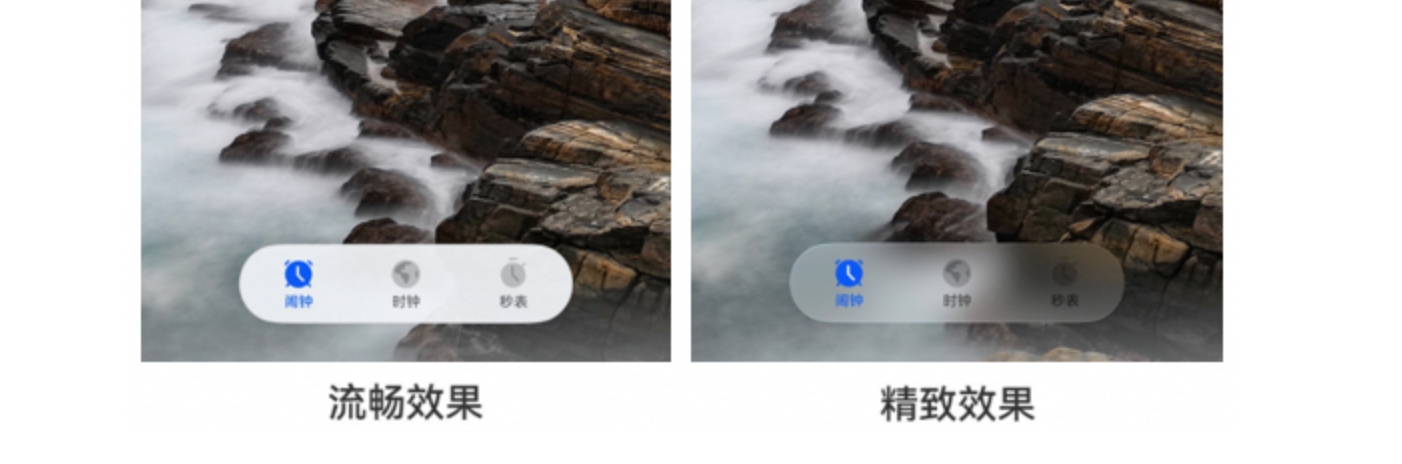
官方教程:https://developer.huawei.com/consumer/cn/doc/harmonyos-guides/ui-design-hds-component-material
在ArkUI中,Scroll默认不会自动避开悬浮标签栏。可在Scroll外层用Stack布局,设置HdsTabs为底部固定;同时在Scroll内容末尾添加固定高度的Blank或Spacer,确保内容底部有额外空间可滚动。
HdsTabs 的悬浮模式(barFloatingStyle)是覆盖在内容上方的,不会为 Scroll 自动预留底部空间,因此内容区域和悬浮标签栏产生重叠。目前 ArkUI 没有 API 让 Scroll 自动感知 HdsTabs 悬浮栏高度并调整内间距(类似 contentInset),HdsTabs 也未提供 safeArea 级别的配置来避开该重叠区域。
官方推荐的解决方案是:手动计算底部间距并通过 padding 为内容预留空间。可根据设计稿获取 HdsTabs 悬浮栏高度(含 barBottomMargin、系统导航栏及安全区域),直接设为 Scroll 或内容容器的 padding({ bottom: ... })。例如:
Scroll() {
  // 内容区域
  Row() { /* 时间刻度 + 日程 */ }
}
.layoutWeight(1)
.padding({ bottom: 68 }) // 68 = 悬浮栏高度 40 + barBottomMargin 28(如有系统导航栏再加其高度)
若需动态获取 HdsTabs 悬浮区域高度,可通过 HdsTabs 的布局回调或借助 ComponentUtils 测量标签栏,但对于大多数场景,使用固定值已足够。这是 ArkUI 官方示例中处理悬浮 TabBar + Scroll 遮挡的惯用方式。
