



uni-app schema2code 生成的代码在微信小程序端报错
uni-app schema2code 生成的代码在微信小程序端报错
产品分类:uniCloud/App
bug描述:
按照你们的B站教程,我使用了你们提供的opendb-contacts.schema.json,并且配置上了nation_china这个字段,具体如下:
"nation_china":{
    "bsonType":"string",
    "title":"名族",
    "description":"选择名族",
    "enum":{
        "collection":"opendb-nation-china",
        "field":"_id as value, name as text"
    },
    "foreignKey":"opendb-nation-china._id",
    "componentForEdit":{
        "name":"uni-data-picker"
    }
}
然后执行schema2code,生成的代码中,在list.vue这个页面中tenplate代码如下:
<template>
  <view class="container">
    <unicloud-db ref="udb" v-slot:default="{data, pagination, loading, hasMore, error}" :collection="collectionList" field="username,gender,mobile,email,comment,nation_china{name}">
        {{error}}
      <view v-if="error">{{error.message}}</view>
      <view v-else-if="data">
        <uni-list>
          <uni-list-item v-for="(item, index) in data" :key="index" showArrow :clickable="true" @click="handleItemClick(item._id)">
            <template v-slot:body>
              <text>
                <!-- 此处默认显示为_id,请根据需要自行修改为其他字段 -->
                <!-- 如果使用了联表查询,请参考生成的 admin 项目中 list.vue 页面的绑定字段的写法 -->
                {{item._id}}
              </text>
            </template>
          </uni-list-item>
        </uni-list>
      </view>
      <uni-load-more :status="loading?'loading':(hasMore ? 'more' : 'noMore')"></uni-load-more>
    </unicloud-db>
    <uni-fab ref="fab" horizontal="right" vertical="bottom" :pop-menu="false" @fabClick="fabClick" />
  </view>
</template>
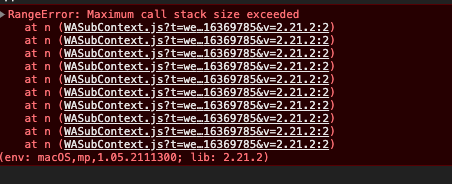
script中的代码没有动过,H5端正常,但微信小程序端直接:Maximum call stack size exceeded
操作步骤:
使用官方提供的opendb-contacts,添加
"nation_china":{
    "bsonType":"string",
    "title":"名族",
    "description":"选择名族",
    "enum":{
        "collection":"opendb-nation-china",
        "field":"_id as value, name as text"
    },
    "foreignKey":"opendb-nation-china._id",
    "componentForEdit":{
        "name":"uni-data-picker"
    }
}
更多关于uni-app schema2code 生成的代码在微信小程序端报错的实战教程也可以访问 https://www.itying.com/category-93-b0.html
2 回复

bug已确认,临时解决方案:将附件内的文件替换到HBuilderX的安装目录下,路径如下
HBuilderX/plugins/uniapp-cli/node_modules/@dcloudio/vue-cli-plugin-uni/packages/uni-cloud/dist
更多关于uni-app schema2code 生成的代码在微信小程序端报错的实战教程也可以访问 https://www.itying.com/category-93-b0.html

